



 Solution
 Support Center
 About Us
 Contact
Use Spoofer Go to Change Your iPhone Location Quickly
 Penny Warren Published on December 26, 2025GPS Location3-min reading
iPhone gives the real-time location where you are currently. This feature benefits you when you want to share your location with your family and friends. The iPhone location is also used for mobile games, like Pokémon GO and other apps that rely on your location.
However, these mobile games require you to go outside to complete the missions. What if you do not want to go outside, yet you want to play Pokémon GO? Spoofer Go is the solution for this issue. This article will help you determine the must-know information about the tool. Scroll below for more details about it.

In this article:
Part 1. What is Spoofer Go iOS?
If you are a Pokémon GO player, you are required to go outside due to the requirements of the mobile game. You can get Pokémon by visiting different places. However, some users want to play the mobile game, but do not have enough time to walk outside. Spoofer Go is the best app for that problem. It is commonly mistaken for Spoof Go.
This app is used to fake your location on an iPhone to use as a joystick for your Pokémon Go account. In this case, you no longer need to go outside to catch Pokémon. If so, you can also use it to fake an Instagram location on your iPhone.
1. Fake Location/Teleportation
The app allows you to teleport from one location to another. You can set your location around the globe, including gyms, rare Pokémon hotspots, and more. It is convenient because even though you are lying in bed, you can catch Pokémon for your account.
2. Movement Simulation
Instead of walking physically outside, you can use its main features to switch locations. It includes Joystick, Auto-walk, and Tap-to-walk features. The app also supports auto-generated routes, which allow you to catch the Pokémon automatically.
3. Skips Animations and Makes Gameplay Speed Up
When you catch Pokémon on the mobile app, you can skip the animations. The reason is that some users find it boring. This way, users can make the gameplay faster due to the fewer animations Pokémon GO offers in this state.
4. IV Preview
Each Pokémon has information about its attacks, defences, and stamina. Spoofer Go allows you to see the IV preview to know this information. It can happen before you catch the Pokémon. In this case, you will not waste your time getting it when you do not need it.
5. Management Shortcuts and Hacks
Spoofer Go allows you to experience a lot of Pokémon to be seen from different places. It is with the help of automatic inventory cleanup. This way, you can boost your Pokémon Go account.
Part 2. Is Spoofer Go Safe?
There is information that Pokémon GO supports Spoofer Go. Sadly, this information is incorrect. The developer of Pokémon GO offers fair gameplay for the application. Each user is required to go outside and visit places to catch Pokémon.
However, Spoofer Go download is crucial. There are APKs and crack versions where you can get the application to your device. Downloading it from unofficial websites can lead to security risks on your iPhone, including its data. Since you change the iPhone location for Pokémon GO, it will affect other features or apps that rely on your iPhone location. This app will freeze the location on Find My Friends or other features or apps that use the location on your iOS devices.
Part 3. Pros and Cons of Spoofer Go App
Before learning how to install Spoofer Go iOS, we recommend that you know the pros and cons of the Spoofer Go app first. This way, you can completely decide when and where to use it. The list is posted below.
Pros
- The app can spoof GPS location without rooting, which allows Android phone users to use it.
- It has an intuitive interface that is best for beginners.
- It can work with different applications on your mobile phone, like social media and games.
Cons
- Spoofer Go on Android has limited features compared to iOS devices.
- It may lead to accounts being banned from Pokémon GO.
- It drains the Android phone and iPhone battery.
- It struggles with location accuracy on your mobile phone.
- The apps sometimes freeze and crash.
Part 4. How to Download & Use Spoofer Go for Pokémon GO?
Suppose you are ready to use Spoofer Go. How to download Spoofer Go? It is recommended to download the app from its official website. It is to avoid future problems with the security features and data of your iPhone. Additionally, you are required to use additional third-party tools to make the app function well, like AltStore. The steps below will be your quick guide.
Download Pokémon Go Spoofer Go on your computer. You need to install iTunes or iCloud to proceed. Sign in to your account from your iCloud using a PC. Later, go to AltStore and download it on your PC. Plug the iPhone into the computer and use iTunes to download the tool on your iPhone.
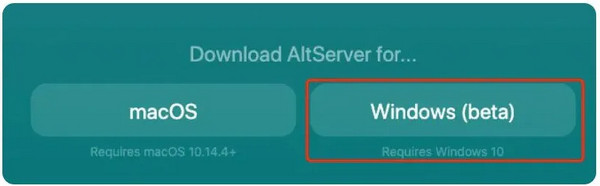
Download the IPA file of Spoofer Go. After that, select the Share button and choose AlStore from the options list. Then, tap the Sign In button. Tap the Keep App Extensions button from the small window. The Spoofer Go interface will appear.
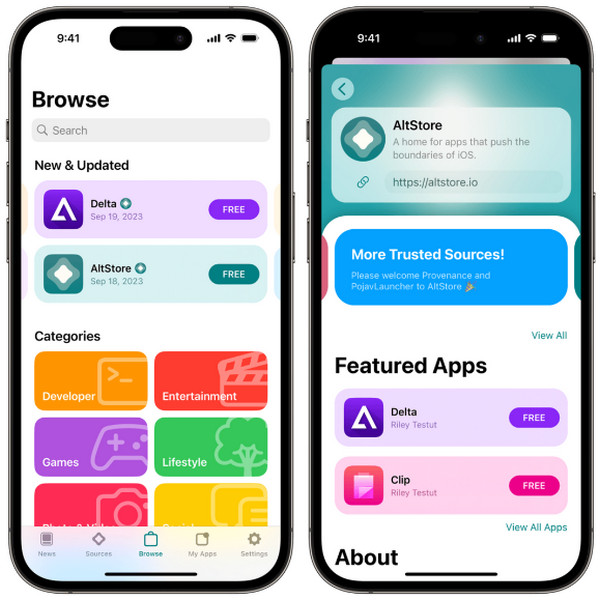
Go to the Home Screen section. Then, you can now use Spoofer Go with Pokémon GO to catch your desired Pokémon without leaving your area or home.
Part 5. Best Spoofer Go Alternative
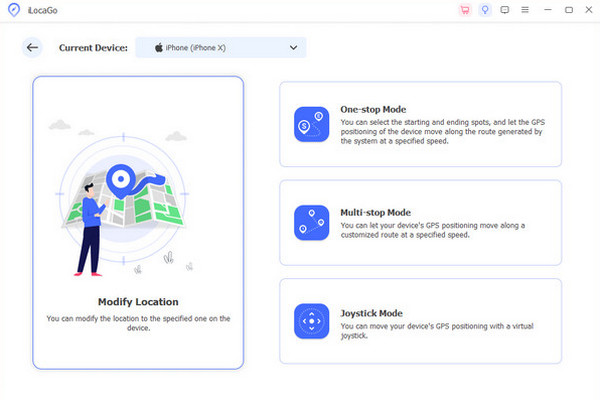
Spoofer Go APK for your iOS devices has a high risk of detection and account bans. Why not use its alternative, imyPass iLocaGo, to secure your Pokémon GO account? This third-party tool also allows you to use its Joystick Mode feature to switch places from the mentioned mobile game. This software secures your iPhone location and does not have a high risk of account breach.
The best thing about this tool is that you can use it for your Android phone. The intuitive interface and simple features of the tool are the reasons why beginners will love using it. Android 17 and iOS 27 are supported by the tool. Besides Pokémon GO, you can also use it for different famous apps on your Android phone and iPhone. It includes Tinder, Hinge, Facebook, WhatsApp, Snapchat, and more.
The tool does not affect the iPhone network speed, which is good for network operations from your applications. Besides Joystick Mode, One-stop Mode, Multi-stop Mode, and Custom Speed can also be used.
Conclusion
Spoofer Go is a third-party app that can change your iPhone location to use Pokémon GO without leaving your home. Due to the drawbacks that can affect your Pokémon GO account, you can use its best alternative, imyPass iLocaGo. It is a third-party tool that can change your location on an iPhone in multiple modes. Download the tool to explore its excellent features.
Penny focuses on GPS troubleshooting and Windows optimization. She formerly worked as a technical support engineer, helping clients solve location-based and system issues efficiently. Backed by IT support experience, she provides practical solutions that really work. In her free time, she likes hiking and geocaching, testing GPS tech in the real world.
Hot Solutions
-
GPS Location
-
Unlock iOS
-
iOS Tips
-
Unlock Android


