Solution
 Support Center
 About Us
 Contact
How to Reset TikTok Password When You Have Forgotten It
 Gideon Byron Published on March 06, 2026Password Tips3-min reading
Lost access to your TikTok account? Forgetting your TikTok password is a common roadblock, especially with the platform's frequent security updates in 2026. Whether you've lost your linked phone number or simply need to reset your credentials for better security, getting back in is straightforward if you know the right steps.
In this guide, we bypass the fluff and show you how to reset your TikTok password using email, SMS, or the latest biometric Passkeys. We'll also cover advanced recovery for accounts with no linked data and provide essential tips to harden your account security against unauthorized access.

In this article:
Part 1. What If I Forgot TikTok Password?
When you forget your TikTok password, the most useful and practical solution is to reset it. You can reset it with your linked email or phone number.
However, if you've forgotten your TikTok password, email, and phone number, it will be very challenging to restore your account. Your only resort will be TikTok Feedback, and the success rate is also not that promising.
Part 2. How to Reset TikTok Password
Way 1. Reset TikTok Password with Phone Number or Email
To change or reset the TikTok Password, you need to have a valid email or phone number that is linked to your TikTok account. Otherwise, you can't receive the TikTok password reset link. Now, let's go through the step-by-step guide to changing your TikTok password.
Open the TikTok app. Tap the Profile button in the bottom right corner. Select Login at the bottom.
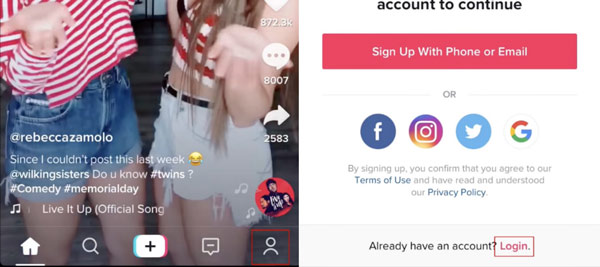
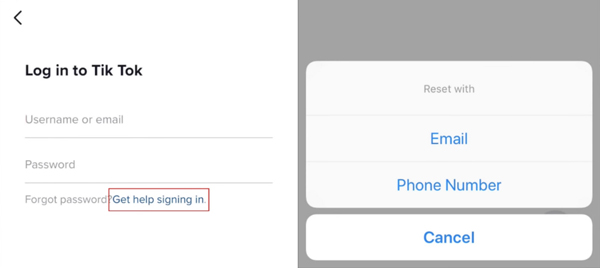
Tap Get help signing in. Choose the way to reset your TikTok password. If you have added your phone number to your TikTok account, you will have two options: email or cell phone number.
Enter the email or phone number that is linked to TikTok, and tap the red Arrow button at the bottom right.
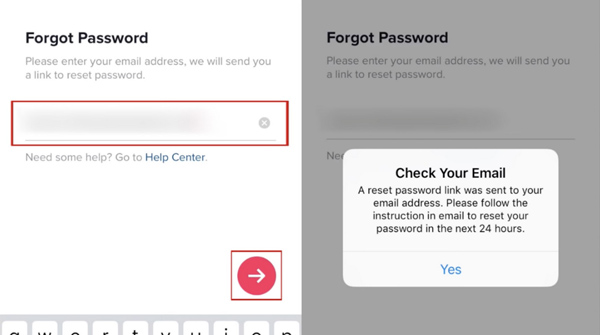
Check your email and tap the green button change password. You will be taken to the TikTok password reset page. Enter your new TikTok password and retype it. Finally, tap CHANGE.
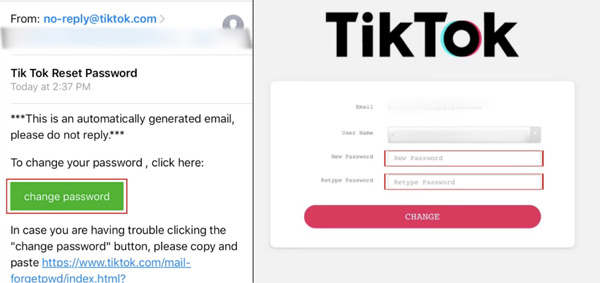
So far, you have learned how to reset TikTok password. After that, you can also do something to further strengthen your TikTok account security. Simply read the tips below.
Way 2. Log in with a Social Media Account
If you originally signed up using Google, Apple ID, Facebook, or Instagram, you don't need to reset the password. Instead, simply tap the corresponding social icon on the login screen. However, although this method can help you regain your TikTok account, you still don't know the account password.
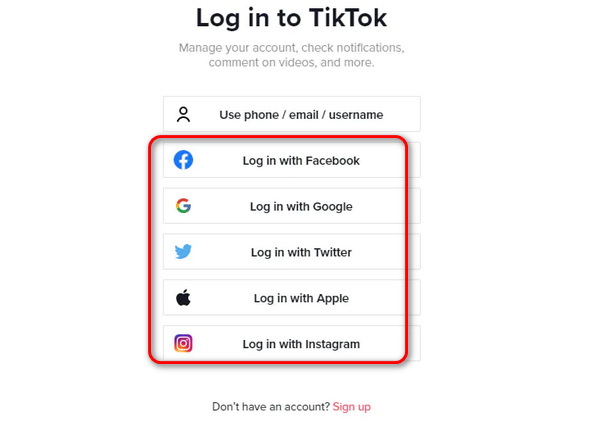
Way 3: Reset TikTok Password with Trusted Contacts
If you have at least 2 friends you follow (and who follow you back), you can ask them for help to reset your TikTok password via a verification process.
- 1.On the login screen, tap the ? or Help button at the top right.
- 2.Select Recover your account > Ask friends to verify.
- 3.TikTok will send a code to your chosen friends. Once they verify it's you, TikTok will grant you a temporary login.
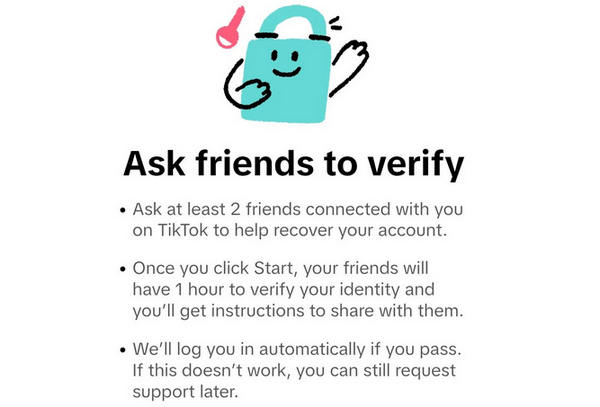
Way 4: Reset TikTok Password with Feedback Form
This method may help you to reset your TikTok password without your linked phone number or email address. However, the success rate may not be that satisfactory.
Visit the TikTok Feedback webpage: www.tiktok.com/legal/report/feedback.
Click the Topic dropdown button and select Account access / security.
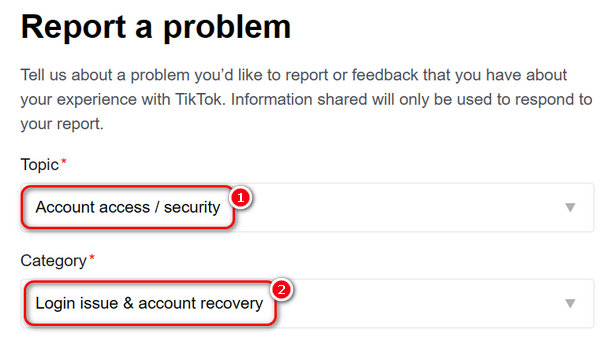
Click the Category dropdown button and select Login issue & account recovery.
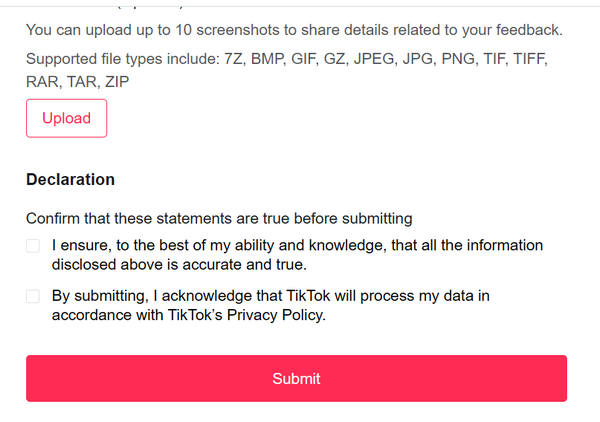
Then, you should scroll down to provide different types of necessary information, like username, sign-up date, sign-up region, and more.
Finally, click the Submit button at the bottom to submit your request. TikTok will check your request and decide whether to bring back your TikTok. This method may help you reset your forgotten TikTok password.
Part 3. Tips on Changing TikTok Password
Set a unique and memorable password
Most of us forget TikTok passwords because they are hard to memorize. So, set a special and more memorable TikTok password. Besides, it would be safer to add several capitalized letters and special strings to your TikTok passwords.
Add your phone number & email to your TikTok account
As you may have noticed, if you have added both your phone number and email to your TikTok account, you will have two options to reset your password. If you add only one of them, you can change your TikTok password with only one option. Therefore, it's better to link both your phone number and email to your TikTok. It will be easier to get back your forgotten TikTok password.
By following the tips, you can better manage your TikTok account. However, you may find it troublesome to go through all the steps on TikTok. Do you want an efficient tool to manage your TikTok password? If you do, the TikTok password manager is just right for you. Learn more in our next part.
Part 4. How to Keep Your TikTok Password
When you have reset your TikTok account password, you can keep it in case you forget it again. imyPass iPhone Password Manager can help you if you use an iPhone. After you have changed your TikTok password, you can use this password manager to view, manage, and save your TikTok password. Moreover, it can work as a keychain backup to help you keep all accounts and passwords on your iPhone. Your privacy will be safe and security.
Click the Download button below to download, install, and launch imyPass iPhone Password Manager.
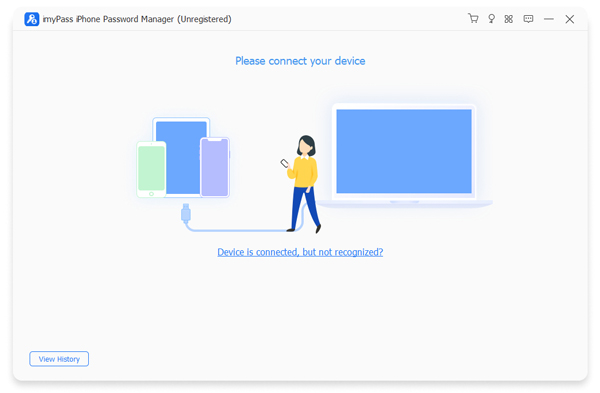
Connect your iPhone to your computer with a USB cable. Then, this program will recognize your iPhone.
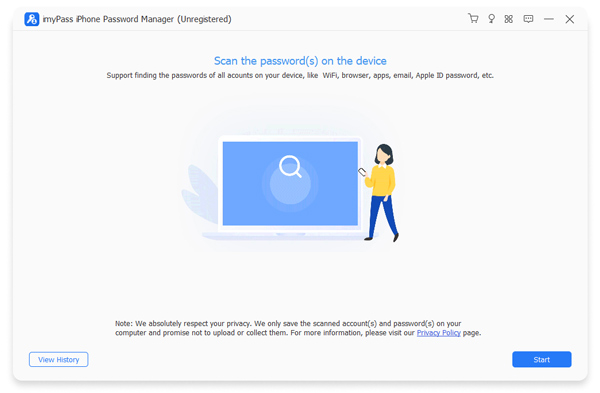
If you want to view or save your TikTok password, you need to let the password manager scan your iPhone. Click on the Start button. The password manager will scan your iPhone.
It will take a while to scan all your passwords. When it finishes, you can see the passwords are all listed on the interface. To find your TikTok password, click on the Web & App Password on the left. You will see your TikTok password on the list.
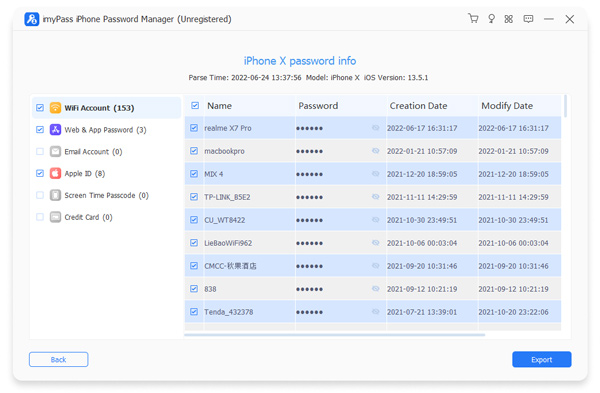
If you want to save your TikTok password as a file, simply check TikTok in the Name column and click on Export.
The password manager will give you a CSV file. You can download your TikTok password and save it for future use.
We all have more than one app and many accounts to manage. You can also use imyPass Password Manager to save any other passwords, including your Apple ID, Wi-Fi, Instagram, Gmail, and more. Besides, it enables you to view your scanning history. With it, you can find any lost passwords even if you don't save them locally. For example, if you forget your Facebook password, you can use it to find your Facebook password.
FAQs.
-
How do I recover my TikTok account with only username?
You should go to www.tiktok.com/legal/report/feedback and then select Account access / security in the Topic list, and then Login issue & account recovery in the Category list. Then, follow the on-screen prompts to submit a request to recovery your TikTok account.
-
How do I log into an already existing TikTok account?
1. Open TikTok and tap the Profile button at the bottom right.
2. Tap the Menu (three horizontal lines) at the top right and select Settings and privacy.
3. Scroll to the bottom and tap Switch account, then select Add account. -
Can you have two TikTok accounts in one phone?
Yes, you can. You can switch between different TikTok accounts on an TikTok app. If you use Android, your phone may support Dual Apps, which means you can install two or more TikTok apps and log in to different accounts.
Conclusion
This article offers 4 ways to deal with TikTok Forgot Password. You can recovery your TikTok account with or without linked phone number or email. You can also send a TikTok Feedback to request the official to help you recover your account.
When you reset your TikTok password, you also need to keep it safe. imyPass iPhone Password Manager can help you easily protect all accounts and passwords. It's a more flexible way to protect and view your iPhone passwords.
Gideon writes about unlocking iOS, Android, and Windows devices. He previously worked as a mobile device specialist in a repair center, assisting customers with locked devices and password recovery. In his spare time, he tests new unlock tools, customizes smart devices and makes complex unlock processes simple and safe.
Hot Solutions
-
Password Tips
- 4 Best Instagram Password Finders
- How to See Your Instagram Password
- How to Unlock Your Snapchat Account
- How to Reset Forgetten Twitter Password
- How to View Saved Passwords in Chrome
- What to Do When I Forgot My Apple ID Password
- How to Reset Your Snapchat Password
- How to Reset Forgotten Discord Password
-
Unlock iOS
-
Unlock Android
-
Windows Password