Solution
 Support Center
 About Us
 Contact
Detailed Review of AppGeeker iOS Data Recovery in 2026
 Clara Prescott Published on March 06, 2026Recover Data3-min reading
Losing important data on iPhone or iPad can be frustrating, and many users have no idea how to recover different types of files quickly. This is where iOS data recovery tools come into play. AppGeeker iOS Data Recovery is one such solution designed to help you retrieve lost or deleted files, like photos, videos, messages, notes, contacts, and more, from your Apple devices. But how effective is it? In this review, we will analyze AppGeeker iOS Data Recovery's features, usability, performance, pros and cons, and overall reliability.

In this article:
Part 1: Main Features of AppGeeker iOS Data Recovery
AppGeeker iOS Data Recovery offers 3 features to recover lost files efficiently on your iPhone, iPad, and iPod (only mobile iOS devices are supported). Below are its key highlights:
3 Flexible Recovery Modes of AppGeeker iOS Data Recovery
Mode 1: Recover from iOS Device
This mode will deeply scan your iOS device (iPhone, iPad, and iPod) to retrieve lost files.
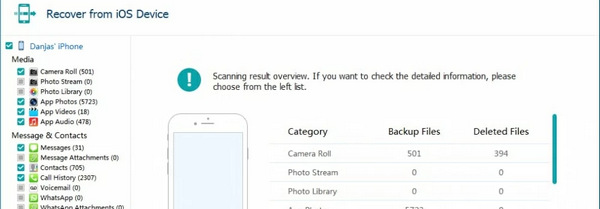
- Best for: Users with no backup or those who just deleted files.
- How it works: Deep scans your iPhone/iPad's internal database to find hidden data that hasn't been overwritten yet.
- Key Advantage: No need for iCloud or iTunes. It can even recover permanently deleted photos, messages, and WhatsApp chats directly from the hardware.
- Pro Tip: Stop using your device immediately after data loss to prevent data overwriting.
Mode 2: Recover from iCloud
This mode can restore backup files from iCloud to your iPhone, iPad, or iPod so that you may regain lost files.
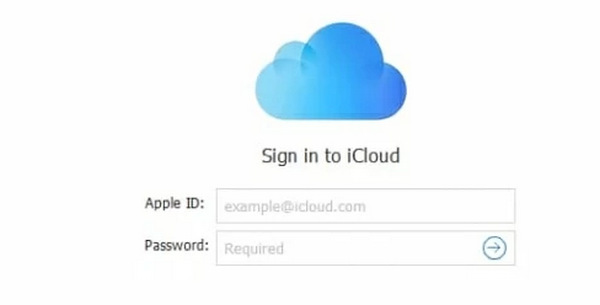
- Best for: Users who have backed up files to iCloud and even regularly back up.
- How it works: Securely logs into your iCloud (with 2FA support) to preview and extract specific files.
- Key Advantage: Unlike Apple's official restore, AppGeeker iOS Data Recovery allows you to selectively download only what you need (e.g., just one specific photo album) without wiping your current phone data.
- Security: AppGeeker won't store your Apple ID and credentials.
Mode 3: Recover from iTunes/Finder Backup
If you've ever backed up your iOS device to your computer, whether on Windows or macOS, and the backup history isn't deleted, AppGeeker iOS Data Recovery can extract the files from it and send them to your iPhone, iPad, or iPod.
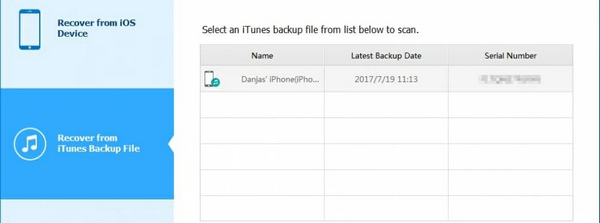
- Best for: Users with local backups on a PC or Mac.
- How it works: Locates and deconstructs your local iTunes backup files for instant viewing.
- Key Advantage: Even if your backup is encrypted, just enter your password to unlock and preview all contents before hitting Recover.
Note:
Ensure the backup file is stored on the computer where AppGeeker iOS Data Recovery is running for the fastest extraction speed.
What File and Data Types AppGeeker Supports
AppGeeker iOS Data Recovery can recover messages, photos, videos, contacts, call logs, notes, Safari bookmarks, and more. Check the detailed classification below:
- Calls and Messages: Contacts, call log, messages, iMessages, message attachments.
- Multimedia Files: Photos, live photos, videos, audio files, and many types of files stored in the File app.
- System App Data: Notes, calendar, voice memo, Safari history, reminders.
- App Data: WhatsApp, Kik, Line, Viber, Facebook Messenger.
User-Friendly Features
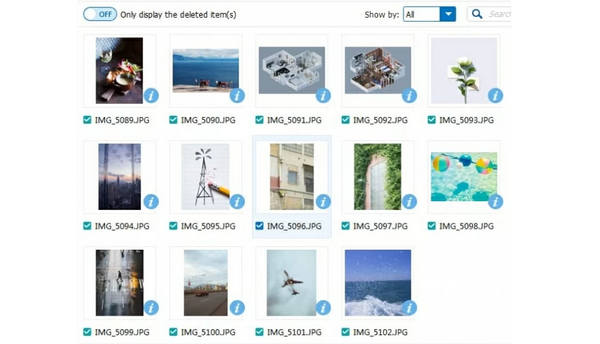
- Preview Feature: You can preview files before restoring them so that you only have to recover your desired files instead of restoring a whole backup.
- Selective Recovery: You can select specific files to recover, saving time and storage space.
- User Interface: The interface of AppGeeker iOS Data Recovery is intuitive and easy to navigate, making it suitable for both beginners and experienced users.
You May Also Like:
Part 2: Detailed Review of AppGeeker iOS Data Recovery
Pricing of AppGeeker iOS Data Recovery
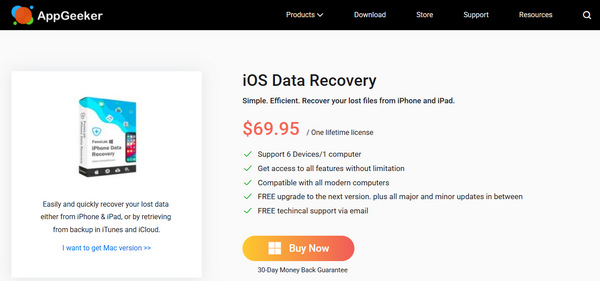
AppGeeker iOS Data Recovery lets you scan and preview lost files on iPhone, iPad, and iPod. However, if you want to recover data, a paid license is required:
Lifetime License: $69.95 (Supports 6 devices/1 computer)
AppGeeker iOS Data Recovery Supported Platforms
OS Platform: Windows XP and later; macOS 10.7 and above.
Supported iOS Devices: All models of iPhone and iPad series, and the iPod Touch 6/5/4.
Performance of AppGeeker iOS Data Recovery
We've factory reset an iPhone (228.2GB/256GB) to test the real performance of AppGeeker iOS Data Recovery. Below are the aspects we pay great attention to and the results of our test:
Scanning Speed: AppGeeker iOS Data Recovery takes 14 minutes and 32 seconds to perform a basic scan. A deep scan takes 63 minutes and 11 seconds.
Recovery Success Rate: In our tests, AppGeeker iOS Data Recovery successfully retrieved about 70% of deleted files, which is comparable to leading competitors. Recovery of text messages, photos, and contacts had a high success rate.
Note:
If you want to recover large video files with AppGeeker iOS Data Recovery, you may fail to recover them. Also, it's not easy to recover data from iPhone if your device usually deletes data and receives data.
Pros and Cons of AppGeeker iOS Data Recovery
Pros
- User-Friendly Interface.
- Provide multiple workable data recovery methods.
- Offer a preview feature.
- Work with most iOS devices and versions.
Cons
- Data recovery requires a payment.
- Usually fail to log into iCloud account.
- Usually fail to detect iTunes or Finder backup.
Part 3: The Best AppGeeker iOS Data Recovery Alternative
AppGeeker iOS Data Recovery‘'s scanning speed is a bit slow. If you cannot wait to recovery lost data, imyPass iPhone Data Recovery is your better resort. From our test, it can in-depth scan an iPhone in just about 13 minutes.
It also supports a large number of iOS file types, including many apps and app data, such as WhatsApp chats and media files. It can also recover lost files from your iCloud and iTunes. Even if your iPhone is erased and has no backup, you can still use this AppGeeker iOS Data Recovery alternative to restore lost data from your iPhone.
4,000,000+ Downloads
Connect your iPhone to your computer to scan for lost data.
Mark your lost files in red for your quick selection.
Preview lost files before your recover them.
Select and recover files during the scanning process.
FAQs.
-
Is AppGeeker trusted?
Yes, it is. AppGeeker is a legitimate brand and website that offers legal products and services.
-
Is it possible to recover permanently deleted data from an iPhone?
The short answer is yes, but timing is everything. When you delete a file on an iPhone, the system doesn't immediately scrub the data; it simply marks the storage space as available. Until that space is overwritten by new data (like a new photo or app update), professional recovery tools like imyPass iPhone Data Recovery can still scan the SQLite database and reconstruct the lost files.
-
Is it worth paying for data recovery?
Yes, it is. Data recovery is necessary if your lost data is irreplaceable. However, before you pay, you need to ensure the data recovery software or service lets you preview your lost data.
Conclusion
This AppGeeker iOS Data Recovery review has introduced this program in depth. You can see if it's your best choice to recover iOS data. You can also directly resort to imyPass iPhone Data Recovery to recover lost data. This AppGeeker iOS Data Recovery alternative supports more file types and offers a faster recovery speed.
Clara has over 8 years of experience helping users recover lost files and transfer data. She previously worked as a data recovery technician for a major IT service company. Certified in Data Recovery and Digital Forensics, her articles focus on simple solutions that make complicated recovery tasks easier for everyday users.
Hot Solutions
-
Recover Data
- AppGeeker iOS Data Recovery Review
- Disk Drill iPhone Data Recovery Review
- How to Get iPhone Out of Recovery Mode
- How to Fix support.apple.com/iphone/restore
- How to Recover Data from DFU Mode
- Gbyte iPhone Data Recovery Review
- How to Recover iPhone Deleted Photos After 30 Days
- How to Recover Deleted Photos on iPad
-
Unlock iOS
-
Transfer Data
-
iOS Tips