Solution
 Support Center
 About Us
 Contact
A Guide to Samsung FRP Bypass No PC or With PC (2026 Guide)
 Gideon Byron Published on November 13, 2026Unlock Android3-min reading
If you are having trouble bypassing the Google FRP lock on Samsung J7, you know how frustrating Samsung FRP bypass can be. The J7 is part of the Galaxy J series and comes with strict security that makes the process hard. Because of this, many people are confused when they forget the credentials. To help you out, this guide will show you five working methods to bypass Google account verification on your Samsung J7 without wasting too much time.

In this article:
Part 1. Official Methods to Remove FRP on Samsung J7/J7 Prime
If you forgot the Google account password previously synced with your Samsung J7, try Google's official account recovery service first.
Method 1. Recover Your Google Account
Open the Google Account Recovery page on another phone or computer.
Enter the Gmail address previously linked to your Samsung J7.
Follow the on-screen instructions to verify your identity using your recovery email, phone number, or other verification options.
If Google allows you to reset your password, create a new one and complete the recovery process.
Return to your Samsung J7 and sign in with the recovered Google account when prompted.
Note:
If you recently changed your Google account password, you may need to wait before using the new password on your reset Samsung device
Method 2. Contact Samsung Support
If you cannot recover the Google account previously synced with your Samsung J7, contact Samsung Support or visit an authorized Samsung Service Center. Before contacting Samsung, prepare the exact model number, such as SM-G610F or SM-J700F and proof of purchase or other documents showing device ownership. Samsung Support will check your device and review your eligibility.
Part 2: How to Bypass FRP on Samsung J7 and Other Models (Easiest)
An all-in-one unlock tool is the fastest way to deal with a locked phone, and for the Samsung J7, nothing works better than imyPass AnyPassGo. It supports FRP removal on various Android brands and versions, with its wide compatibility covering Android 5-17. It is designed for users who prefer a guided solution over complicated manual procedures. What's more, this tool also removes various screen locks from Android phone without password.
Download and Launch AnyPassGo. Install imyPass AnyPassGo on your Windows computer and open the program.
Select Bypass Google FRP Lock from the main interface.
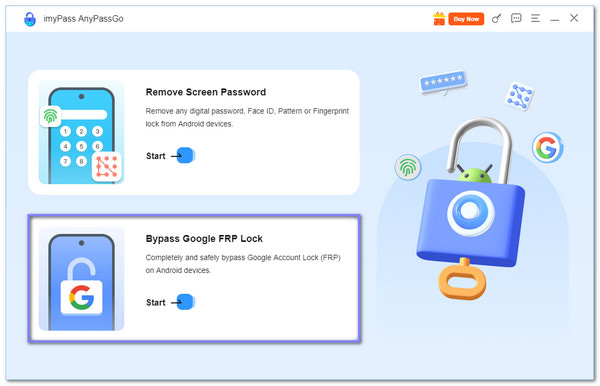
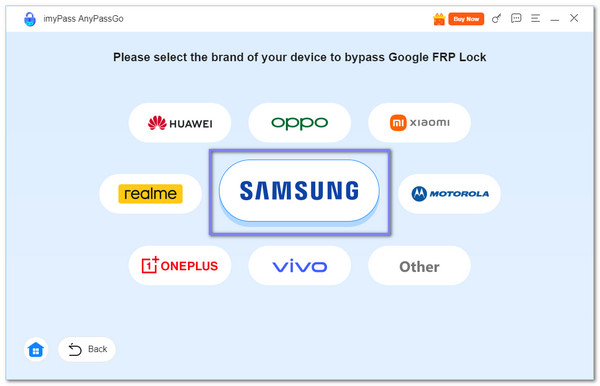
Select Samsung as your device brand and connect your Galaxy J7 to the computer using a USB cable.
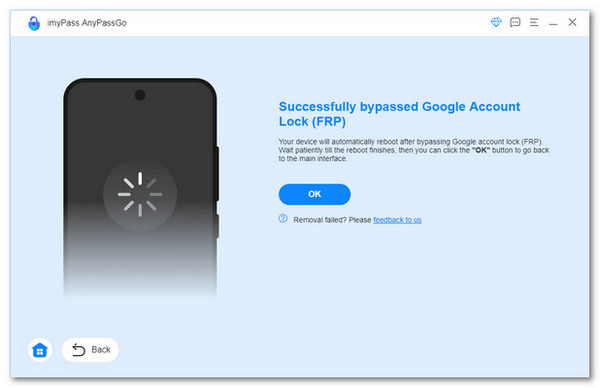
Check the displayed instructions for your device model and firmware. Follow the software prompts and wait for the program to finish. The Google FRP lock has been removed successfully.
Part 3: How to Bypass FRP on Samsung J7 Using Odin Tool
Odin is a firmware flashing utility commonly used with Samsung Galaxy devices. It allows users to install compatible firmware packages, but it is not an FRP bypass tool. If the firmware doesn't match your exact Model Number, the flash can fail and may leave your phone unbootable. Before you start, check your exact model in Settings > About Phone or on the original box, and only download firmware built for that Model Number.
If you accept these risks and have the matching firmware, follow these steps:
Download Odin Samsung Flash Tool from a reliable source. You also need to get the FRP Bypass firmware for Samsung G610F (J7 Prime) from a trusted firmware site. Then, please install the latest Samsung USB drivers on your computer so it can detect your phone.
Turn off your Samsung J7. Now, press and hold Volume Down + Home + Power at the same time. A warning screen will appear. Press Volume Up to continue. Your phone is now in Download Mode.
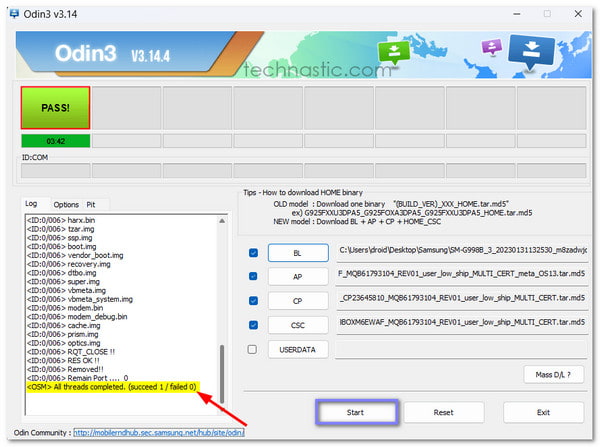
Use a good USB cable to connect your Samsung J7 to your computer. Open the Odin tool on your computer. Once the phone is detected, a blue box will show up inside Odin. It means the tool sees your device and is ready to work.
In Odin, click the AP button. Find and select the FRP Bypass firmware file you downloaded earlier. Make sure that only Auto Reboot and F.Reset Time are checked in Odin. Do not change other options because it may cause issues.
Now, click Start in Odin. Please wait for the tool to finish flashing. You will see a PASS message when it is complete. Your phone will reboot on its own. If it does not restart, hold the Power button to reboot it manually. After this step, the FRP lock should be removed from your Samsung J7.
Part 4: How to Bypass FRP on Samsung J7 Without Computer
QuickShortcutMaker is an APK that lists all activities hidden inside your system apps and lets you launch them directly through a shortcut. It was used as a workaround method to bypass FRP on Samsung phones. Newer Samsung firmware has fixed many of these entry points, so the method does not work. It also requires installing APK files from unknown sources, which can put your phone at risk. Only download files from trusted websites.
Turn on your Samsung J7 and set it up until you reach the Google verification screen. When asked for a phone number or email, type any random text. Long-press on it and tap the Hamburger button. From the list, choose Assist. Deny the help message and tap on the Google search bar that shows up.
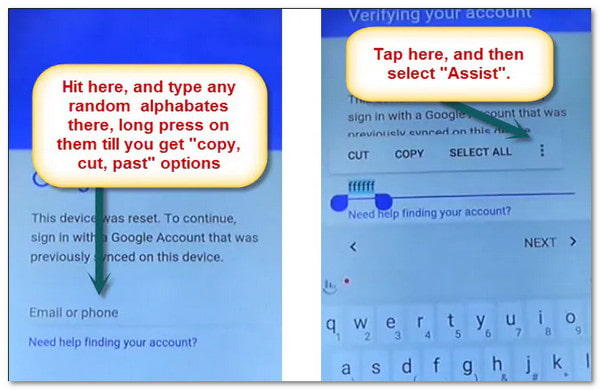
In the search bar, look for the Google Account Manager APK and download it. Do the same for the QuickShortcutMaker. Both files will be saved in the Downloads section of your phone.
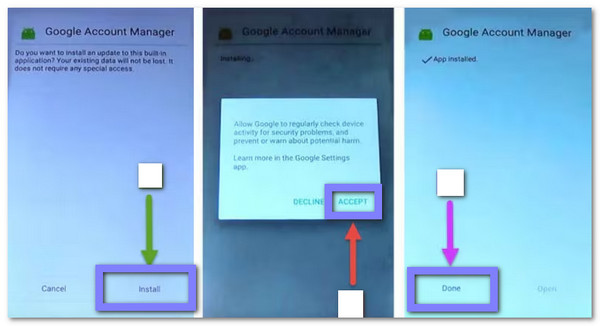
Go to your Downloads folder and open the Google Account Manager APK. If you see a message about blocked installs, head to Settings and allow apps from unknown sources. Then, continue and follow the instructions until the app is installed.
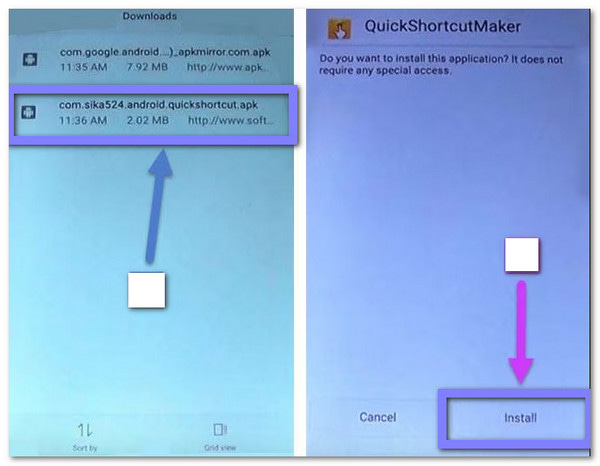
Once the first app is done, go back to your Downloads and open the QuickShortcutMaker. Allow unknown sources again if needed. Then, install it by following the same steps. When the installation is complete, press to open the app.
Inside QuickShortcutMaker, look for Google Account Manager. Choose the option that says Type email and password. It will bring up a login screen. Enter your own Google account email and password. After signing in, the FRP lock will be removed, and your Samsung J7 will be ready to use.
As you notice, it is simple, direct, and does not need extra apps like SideSync, but it requires patience and careful steps to work well if you want to bypass Google verification.
Conclusion
To sum up, there is more than one way to bypass Samsung FRP on a Samsung J7 or J7 Prime. Start with Google Account Recovery if you still have the linked account. Odin and QuickShortcutMaker can help on Samsung phones running old firmware. If these methods are not suitable, imyPass AnyPassGo offers the simplest solution for beginners. You can regain full access to your phone without unnecessary risk with it.
Gideon writes about unlocking iOS, Android, and Windows devices. He previously worked as a mobile device specialist in a repair center, assisting customers with locked devices and password recovery. In his spare time, he tests new unlock tools, customizes smart devices and makes complex unlock processes simple and safe.
Hot Solutions
-
Unlock Android
-
Unlock iOS
-
Password Tips
-
iOS Tips