



 Solution
 Support Center
 About Us
 Contact
How to Reset a Motorola Phone That is Locked to Use It Again
 Gideon Byron Published on January 30, 2026Unlock Android3-min reading
The security features of a Motorola phone are practical and solid. You can use a pattern, PIN, password, face recognition, or fingerprint. However, the biometric locks can only be used on the latest models of Motorola. The screen lock types of Motorola phones are strong, but rely on the core protections of Android. It does not have heavy customs features. Unlike Apple or Pixel security features, some say that Motorola phone needs improvement.
When the Motorola lock screen password is forgotten, there are only a few techniques that can be used. How to reset a Motorola phone when locked? You can refer to this article, as it suggests the ways to factory reset your Motorola phone without the correct password. Continue browsing to see the information you need to know.

In this article:
Part 1. Things to Know Before Resetting a Locked Motorola Phone
Before we reset or unlock a Motorola phone without the password, there are things to consider. These key points will assist you in understanding the process better and the results of the unlocking process. See the list as you scroll below.
1. Data Loss Possibility
When you reset your Motorola phone when locked, you will be wiping the content and settings it contains. Motorola does not offer a procedure that can unlock the Motorola phone without data loss when the password is forgotten. On the other hand, you can restore your backups from Google if you have one. Otherwise, the data deleted from the process will be permanently inaccessible.
2. Charge Your Motorola Phone
Locked or not, the Motorola phone can be charged using a power supply and a charger. It is recommended to charge your Motorola phone for at least 50% or higher. This way, there will be no interruption of shutting down during the reset process of the mentioned device.
3. Google Account Must Be Known
The later models of Motorola phones support the Google Factory Reset Protection feature or also known as FRP lock. The Google account associated with the Motorola phone is required after the factory reset. If the mentioned account is unknown, you will need an FRP bypass.
Part 2. How to Do an External Reset of a Motorola Phone When Locked
The Motorola phone does not allow you to use settings or remote controls when you are locked out. The good thing is that there is one method that can be used, which is the recovery mode. This command requires the physical buttons that your Motorola phone supports. There are no additional features needed to access from the mentioned device, including Bluetooth or an internet connection.
This procedure requires intermediate to professional skills. If you are a novice, it is suggested to perform it with extra careful. How to reset a Motorola phone that is locked? You can follow the steps below for your reference.
Ensure that the Motorola phone is turned off. To do that, please press the Power and Volume Up buttons. Hold the buttons for 5 to 10 seconds until it shuts down. Alternatively, you may press and hold the Power button for a few seconds. Finally, tap the Power Off button.
Enter the Fastboot mode on your Motorola phone. To do so, please press the Power and Volume Down buttons. You need to keep holding the buttons for 10 to 20 seconds until the Fastboot menu appears.
Press the Volume Down button of your Motorola phone to scroll the screen. Press the Power physical button to choose the Recovery Mode button. This way, the features of the recovery mode will be prompted.
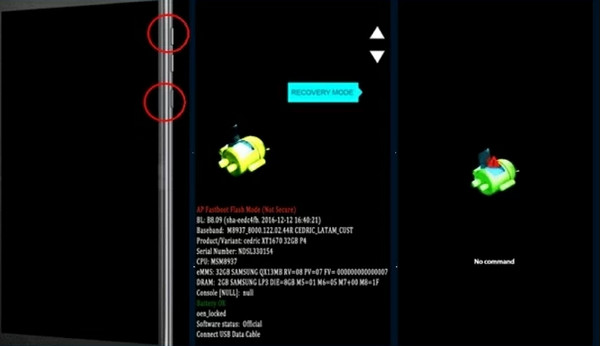
The No Command screen will be accessed. Please press and hold the Power button. Then press the Volume Up button quickly. Please release the Power button to see the Recovery menu on your Motorola phone.
Use the Volume Down button to go to the option that you prefer. Press the Power physical button to choose the Wipe Data/Factory Reset button. After that, wait for the reset procedure to be completed. It takes 1 to 5 minutes. Then, select the Reboot System Now option. Press the Power button to reboot your Motorola phone afterward.
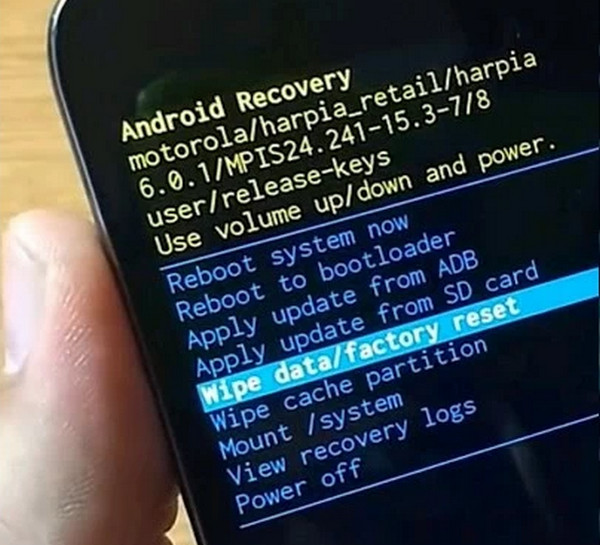
Part 3. How to Reset a Locked Motorola Phone via imyPass AnyPassGo
On the other hand, some Motorola phone users cannot perform the previous method correctly. It is due to the skill it requires. Also, some are stuck in the No Command screen of recovery mode. How to reset a Motorola phone when locked on No Command? You can use imyPass AnyPassGo.
What is imyPass AnyPassGo
imyPass AnyPassGo is a tool designed to unlock your different Android phone brands, including Motorola, Samsung, Oppo, Xiaomi, Alcatel, Infinix, and more. This tool can remove the lock screen password, PIN, pattern, face recognition, and fingerprint. It can be used for different scenarios, including when you get a Motorola phone second-hand, a forgotten lock screen password, a broken screen, etc. The Google FRP lock can also be removed using the tool. It is the most recommended feature to use if the Google account is unknown. How to bypass Google lock on Motorola after a factory reset? Please continue browsing.
Steps to Reset a Locked Motorola Phone Using AnyPassGo
Now, it is time to know how to use the mentioned tool. Ensure that you have a USB cable because it is the primary requirement for the procedure.
Please download imyPass AnyPassGo on your computer. Locate the downloaded file and set it up based on the needed requirements. After that, install and open it on your computer to start the unlocking procedure.
Please select the Bypass Google FRP Lock button from the screen. You may also click the Start button at the bottom left. Then, the tool will show you the supported Android phone brands on the screen. Please click the Motorola button from the list to proceed.
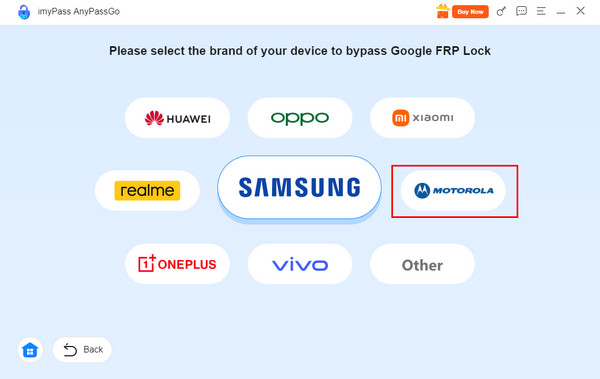
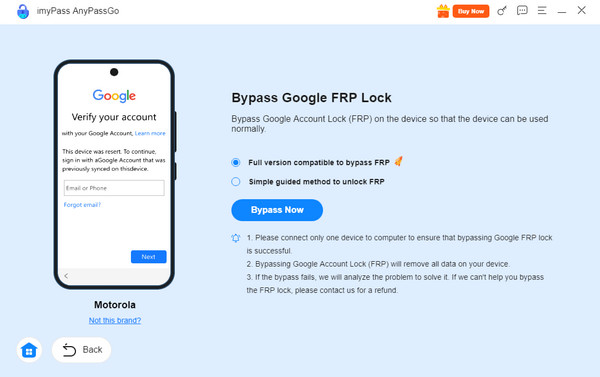
Plug your Motorola phone into the computer with a compatible USB cable. After that, choose between the Full Version Compatible to Bypass FRP and the Simple Guided Method to Unlock FRP buttons. Finally, click the Bypass Now button at the bottom. The bypass procedure will start immediately. Wait for it to be completed.
Conclusion
To summarize, you can factory reset a locked Motorola phone to use it again. This article proves it with the easy methods it contains. imyPass AnyPassGo is here to help you factory reset your Motorola phone and bypass the FRP lock afterward. It does not require you to have an internet connection for the unlocking process. Download it to explore more of its features.
Gideon is a senior editor from imyPass. He is an expert in unlocking phones and computers, and he has written password tutorials in imyPass for 3 years.
Hot Solutions
-
Unlock Android
-
Unlock iOS
-
Password Tips
-
iOS Tips

