Solution
 Support Center
 About Us
 Contact
3uTools iCloud Bypass Review: Can It Really Remove Activation Lock
 Samuel Spenser Published on June 22, 2026Unlock iOS3-min reading
3uTools iCloud bypass is often mentioned online when people talk about removing the iCloud Activation Lock. However, its actual capability is frequently misunderstood. But is it really a reliable option for removing iCloud Activation Lock, and why do many users search for it? All these questions are answered by reading our review of this app in this article.

In this article:
Part 1. Can I Use 3uTools to Bypass iCloud Activation Lock?
No, 3uTools cannot bypass iCloud Activation Lock.
3uTools is an adaptable tool that offers various features, including jailbreaking and managing iOS devices. However, when bypassing the iCloud Activation Lock, there are better solutions than 3uTools. Maybe you've seen rumors on the internet, but it really cannot deal with iCloud Activation Lock. Despite that, 3uTools can help you jailbreak an iPhone or iPad using checkra1n iCloud bypass and other available options, and then you can remove iCloud Activation Lock.
Key Features of 3uTools
- Flash your iPhone firmware to different versions, including downgrades.
- Manage files like videos, photos, contacts, ringtones, and more, on iOS devices.
- Troubleshoot and fix common iOS system errors, like stuck on the boot logo.
- Display detailed information about the iPhone, like battery health and overall condition.
- Create a full backup of iOS data for safekeeping and quickly restore it when needed.
- Convert various video formats for better compatibility with your device.
- Remove screen lock on iPhone (4-digit / 6-digit / Touch ID / Face ID) in certain conditions.
- Quickly install apps on your iPhone or iPad.
- Make ringtones and wallpapers for your iPhone or iPad.
Part 2. Rumors & Test Results of 3uTools iCloud Bypass
Rumors about 3uTools iCloud Bypass
Some tutorials claim that combining Smart Flash and Jailbreak in 3uTools can bypass iCloud Activation Lock. Actually, this is a misunderstanding of what these tools actually do. It cannot remove the Activation Lock. but can downgrade iOS, fix bugs and errors, and unlock restricted features.
Testing Results of 3uTools iCloud Bypass Claims
We tested several iPhone models running different iOS versions under the same conditions. We used iPhone 8, iPhone 12, and iPhone 15 running iOS 16 to iOS 26. Each device was tested on the same Windows computer with the latest version of 3uTools.
Test Results: The iPhone 8 on iOS 16 remained stuck on the Activation Lock screen, the iPhone 12 on iOS 17 showed no successful bypass, and the iPhone 15 running iOS 26 also failed to remove Activation Lock after the same flashing and jailbreak-related attempts. Overall, none of these devices were able to bypass iCloud Activation Lock using 3uTools.
Verdict
3uTools cannot help you bypass iCloud Activation Lock. It can only help you jailbreak an iPhone or iPad, which is a necessary step in iCloud Activation Lock bypass. Even the combo of Smart Flash and Jailbreak in 3uTools cannot do that.
However, 3uTools can help you do a lot of other practical and useful tasks, like removing the screen lock on an iPhone when Find My is off, and the device is not iCloud Activation Locked. It can help you unlock an iPhone with a broken screen.
You can also enjoy other practical apps and data management features in 3uTools. But also keep in mind that these methods are often unreliable and may even permanently turn off your device. Additionally, tampering with your device's software could void your warranty, leaving you without manufacturer support.
Part 3. How to Jailbreak Your iPhone Using 3uTools
Download the 3uTools on your PC and launch it. Connect your iOS device via a lighting cable to your PC and go to the Toolbox.
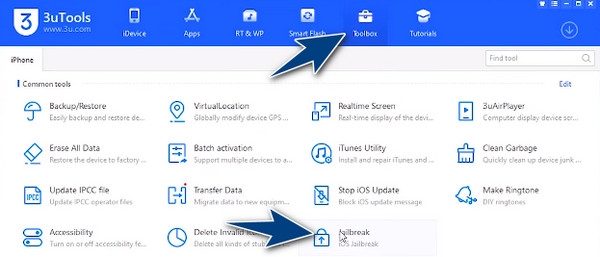
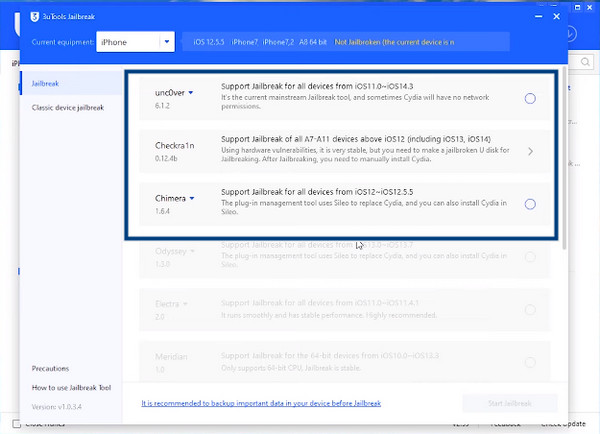
After that, click the Jailbreak and plug a blank USB drive into the PC. Find the jailbreak option you want to use and click Start Making. Restart your PC and press the F12 to open the Boot Options. Go to USB Storage Device and click Enter.
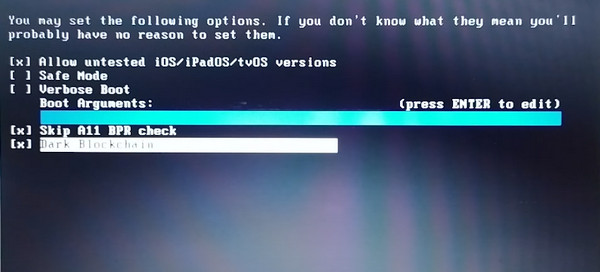
Press Alt + F2, go to Options, and check Allow untested, Skip All BPR Check, and Blockchain. Then click the Start and Next buttons to put iOS in recovery mode. Click the Start button and follow the on-screen instructions to put iOS in jailbreak mode.
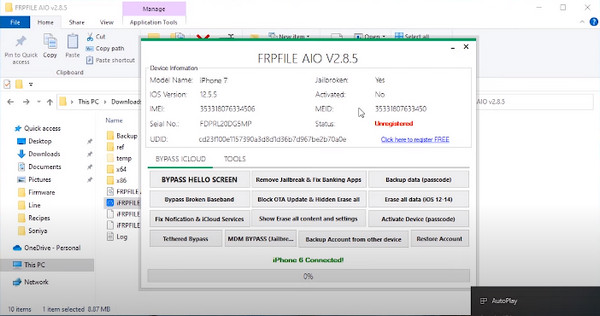
Upon completion, reboot the PC, download the FRPFILE, register it, and click the BYPASS HELLO SCREEN.
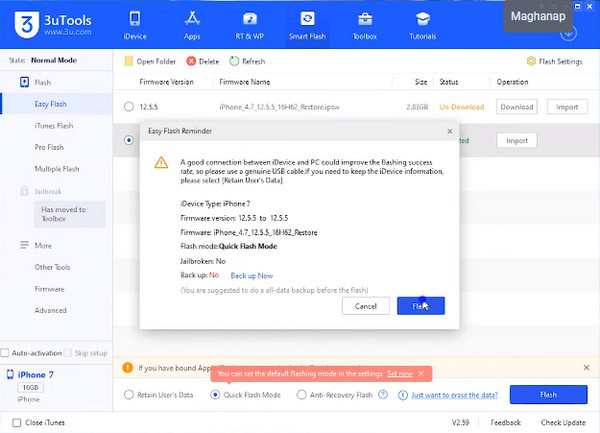
Open 3uTools again, but now go to Smart Flash, download the firmware and click Flash. After that, your device will be ready to use!
Part 4. More Efficient Alternative to 3uTools iCloud Removal
You cannot use 3uTools to unlock iCloud, so you need another method. From our tests on 10 iCloud Activation Removal applications and online services, imyPass iPassBye is a very fast and reliable resort. Though jailbreaking is needed, it is still more efficient and processes the bypassing quicker than other competitors. Interested? If so, you can follow the steps to remove Activation Lock on iPhone!
Click the Download button to download imyPass iPassBye on your computer. Then, install it, follow the setup process, and click the app to start using it!
Plug your lightning cable into your computer and establish a connection to the iOS device you need to process. When a prompt appears, click the Trust This Computer button.
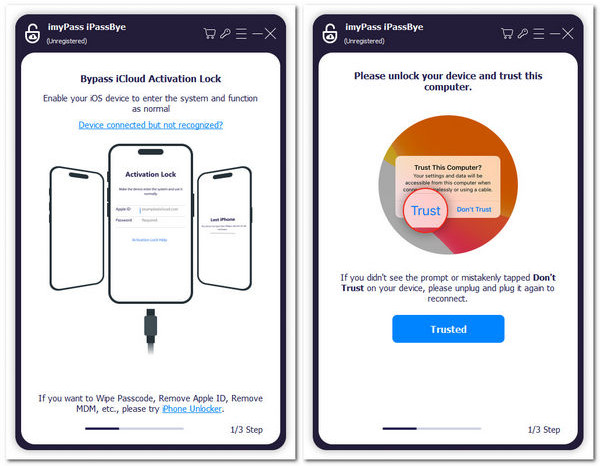
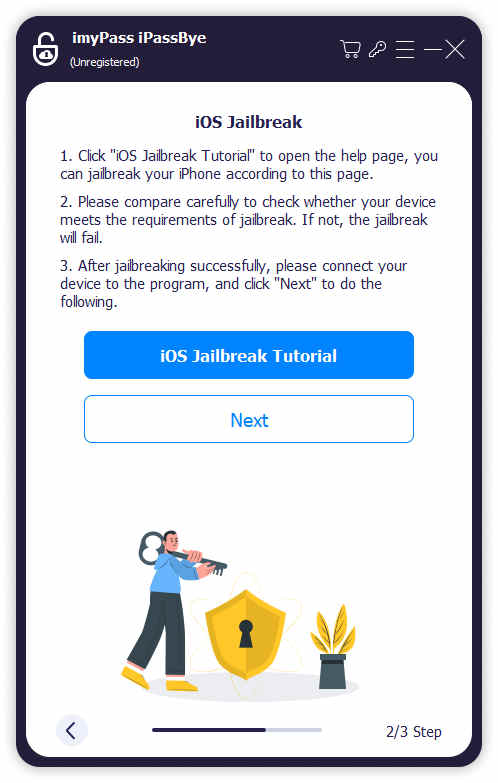
Read the cautions before you proceed to the next step and put your iOS into jailbreak mode. The app provides a tutorial if you need to learn how to do it!
When setting up is done, click the Start Bypassing Activation button, and then the process will start. You will get a screen notification when the process is complete, and you can check if the activation has been removed.
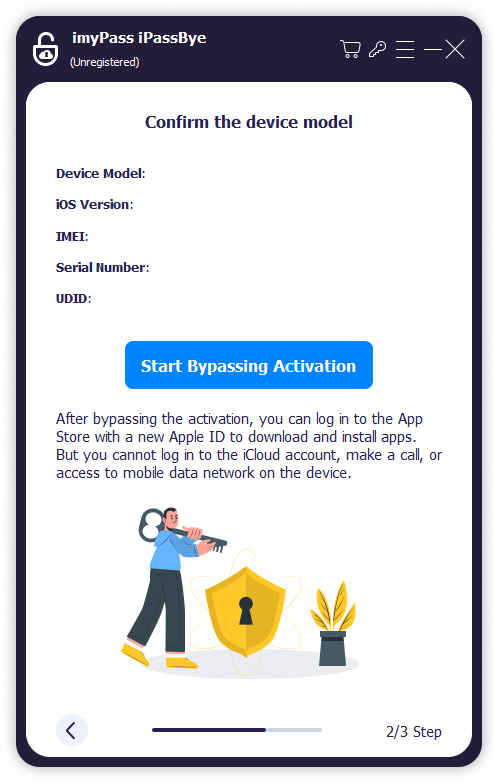
Why We Selected It: This application is the fastest one to remove iCloud Activation Lock on iPhone and iPad. It can unlock iCloud on iPhone 13 in just 5 seconds and 10 seconds on iPhone 17. The interface is also very easy to understand, and the workflow is very simple.
Part 5. FAQs about 3uTools iCloud Bypass
FAQs.
-
Is 3uTools safe?
Generally, 3uTools is considered safe for tasks like managing apps, backups, and device information. However, using it for unauthorized purposes, such as bypassing iCloud, can be risky. Always exercise caution and follow official guidelines.
-
Will 3utools erase your iPhone data?
When using 3uTools, specific actions like flashing firmware can result in data loss. Always back up your data before performing any significant operations with the tool.
-
Can I use 3uTools to downgrade my iOS version?
3uTools allows you to flash your iOS device to a different firmware version. However, be cautious when downgrading, as it may only sometimes be reversible, and you could lose data.
-
How do I back up my iPhone using 3uTools?
Connect your iPhone to your PC, open 3uTools, and click on the Backup/Restore tab. Choose Backup Now to create a backup of your device.
Conclusion
3uTools cannot help you unlock iCloud Activation Lock. The Jailbreak and Smart Flash combo doesn't work on iCloud. It can only help you remove screen lock, flash iPhone, and manage many types of files and apps. If you want to remove iCloud Activation Lock easily, imyPass iPassBye is a good choice. You can connect your iCloud-locked iPhone to a computer, and then use this program to unlock iCloud with just a few clicks!
Samuel specializes in password security and digital privacy. He used to work as a cybersecurity consultant for small businesses to protect digital assets. With certifications in Cybersecurity and Ethical Hacking, he turns complex security topics into easy-to-follow advice. He also enjoys sharing password tips to help users protect their accounts more confidently.
Hot Solutions
-
Unlock iOS
-
iOS Tips
-
Unlock Android
-
Password Tips