



 Solution
 Support Center
 About Us
 Contact
What Is EaseUS MobiUnlock and How to Properly Use It
 Samuel Spenser Published on October 23, 2026Unlock iOS3-min reading
It is well known that the screen lock is an essential security measure on iOS devices. Without the passcode, anyone will be locked out of your device. That can effectively protect your data and activities on your iPhone. However, it may be a disaster too if you forget your iPhone passcode. You will be blocked from accessing your device and data. EaseUS MobiUnlock is a third-party program to unlock your iPhone without the passcode. This article reviews the software for iOS users.

In this article:
Part 1: What is EaseUS MobiUnlock
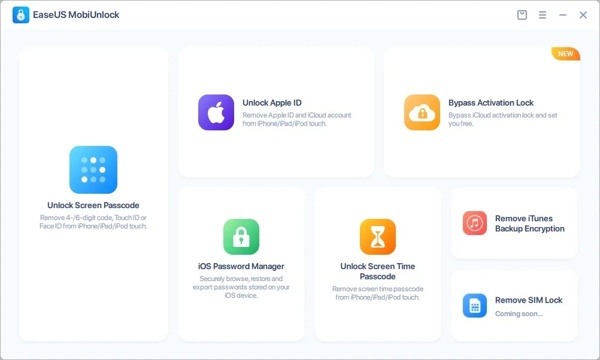
EaseUS MobiUnlock is a versatile iPhone and iPad passcode unlocking program. It enables you to regain access to your iOS device without the passcode.
Main Features of EaseUS MobiUnlock
- 1.Remove Apple ID and iCloud account from iPhone/iPad without the password.
- 2.Bypass iCloud Activation Lock on iOS devices.
- 3.Wipe the Screen Time password without erasing your device.
- 4.Decrypt iTunes backup by removing the password.
- 5.Integrate an iOS Password Manager to browse, restore, and back up passwords on your iPhone.
Compatibility of EaseUS MobiUnlock
| Operating System Supported | Devices Supported | iOS 26 – iOS 9
| Windows 11/10/8/7 macOS 26 and later | iPhone 4s, 5, 5s and later series iPad mini2, 3, 4, Air, Air 2, Pro and later iPod touch 7/6/5/4/3/2 |
The Price of EaseUS MobiUnlock
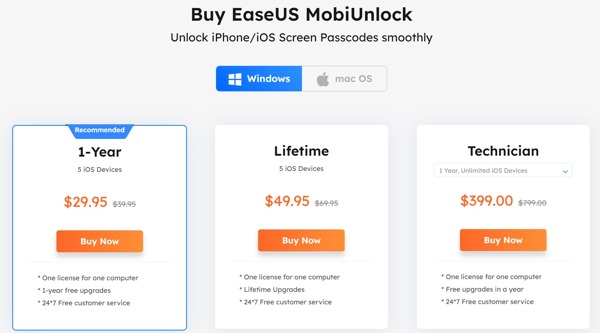
EaseUS MobiUnlock is free to download, but the free trial can remove nothing. In other words, you need to purchase an EaseUS MobiUnlock license key to unlock all features. It offers three plans:
- Yearly plan: $29.95 for up to 5 iOS devices on one computer.
- Lifetime plan: $49.95 for up to 5 iOS devices on one computer.
- Technician plan: $399.00 per year for unlimited iOS devices on one computer.
Part 2: Pros & Cons of EaseUS MobiUnlock
EaseUS MobiUnlock has its strengths, but it also comes with a few limitations worth knowing before you pay for it.
Pros
- EaseUS MobiUnlock is simple to use.
- It works on Windows 11/10/8/7 and macOS 10.13 or later.
- It supports all iPhones and iPad models running iOS 17 to iOS 9.
- It can remove a variety of screen locks including Face ID and Touch ID.
- Even if your iPhone screen is cracked or disabled, it can remove the screen lock.
- The success rate is high if your device is compatible.
Cons
- It jailbreaks your iPhone when bypassing the Activation Lock.
- EaseUS MobiUnlock eliminates everything on your device when unlocking an iPhone.
- It is not free and is a bit expensive compared to competitors.
- It is not compatible with old iPhones and iPad models.
- It is not stable and may crash when unlocking the iPhone screen.
Part 3: How to Use EaseUS MobiUnlock
The major feature of EaseUS MobiUnlock is unlocking iOS devices and removing screen locks. Therefore, we demonstrate how it works below. You can explore other features after purchasing a license.
Download and install the unlocking software on your computer. When you are locked out of your iPhone, open the software, and choose Unlock Screen Passcode.
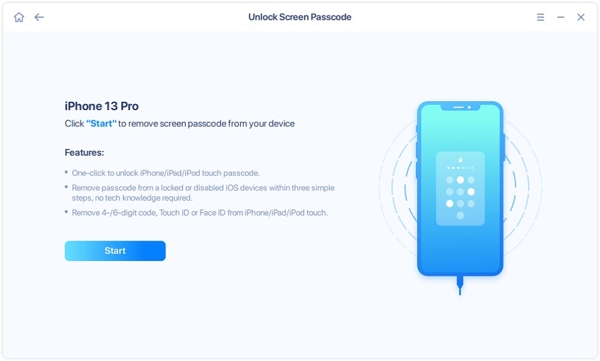
Connect your iPhone to your computer with a USB cable, and click the Start button to move on. If your iPhone is disabled, follow the on-screen instructions to put it in the Recovery Mode.
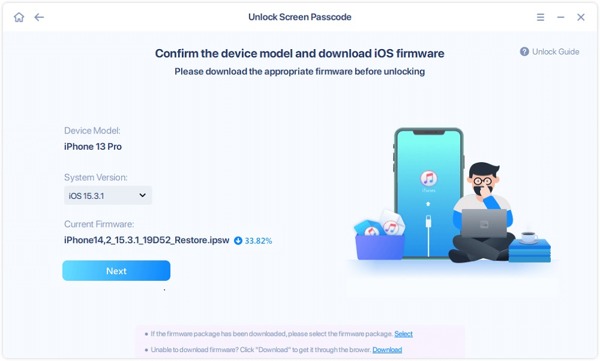
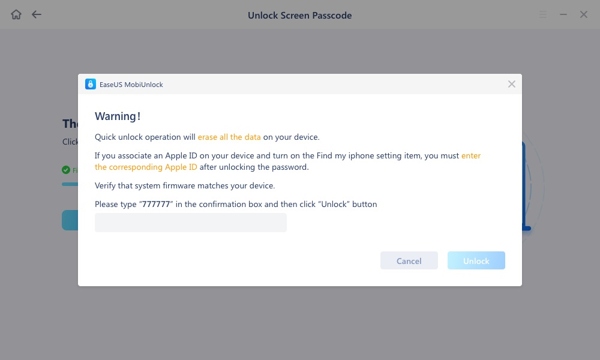
Check your device model and software version. Click the Next button to download the firmware. If prompted, read the alert, type the code into the field, and click Unlock to confirm it. You can unlock a disabled iPhone without iTunes.
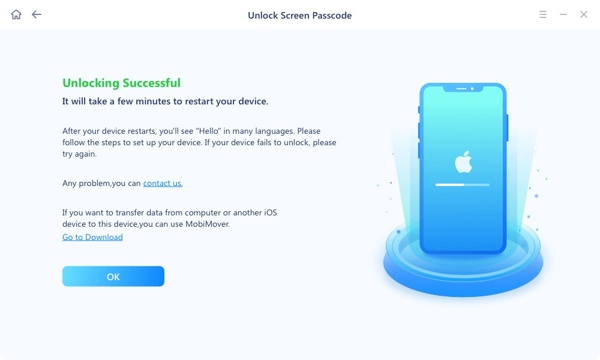
As long as EaseUS MobiUnlock unlocks your iPhone successfully, it will take you to the Unlocking Successful screen. Then restart your iPhone and the Hello screen will pop up. You can access it as a new device.
Part 4: EaseUS MobiUnlock Real User Test
To see how EaseUS MobiUnlock performs, we tested its screen passcode removal and Screen Time passcode removal features on iPhone.
Test Environment
- Computer: Windows 11 laptop, 16 GB RAM
- Software: EaseUS MobiUnlock installed latest version
- Devices: iPhone 8, iPhone 11, iPhone 13, and iPhone 16
- Connection: USB cable with a stable internet connection
Test Process and Results
We installed the software, connected each iPhone, followed the on-screen instructions, and checked whether the device was recognized and the selected operation completed.
| Feature | iPhone Model | iOS Version | Result | Observation |
| Screen passcode removal | iPhone 8 | iOS 16.7.12 | Successful | The process finished, and the phone returned to the setup screen. |
| Screen passcode removal | iPhone 11 | iOS 17.7.2 | Failed | The removal process did not complete. |
| Screen Time passcode removal | iPhone 13 | iOS 18.5 | Successful | The passcode was removed. |
| Device recognition | iPhone 16 | iOS 26 | Failed at first | The software did not detect the phone first time. |
Test Conclusion
EaseUS MobiUnlock provides step-by-step instructions, but device recognition can still require troubleshooting. Screen passcode removal also erases the iPhone's data.
Part 5: Best Alternative to EaseUS MobiUnlock
To be honest, a single unlocking application cannot work on all iOS devices. EaseUS MobiUnlock, for example, is not available to old iPhones and iPad models. Moreover, it takes time to upgrade the supported models when Apple releases new iPhones and iPad. Therefore, you’d better learn more options, such as imyPass iPassGo. It provides similar features to EaseUS MobiUnlock but supports a wider range of iOS devices.

4,000,000+ Downloads
Unlock the screen lock on any iOS device with one click.
Remove 4-/6-digit passcode, Touch ID, and Face ID easily.
Compatible with devices running the latest iOS version to iOS 5.
Offer bonus features, like Apple ID removal, MDM removal.
How to Use EaseUS MobiUnlock Alternative
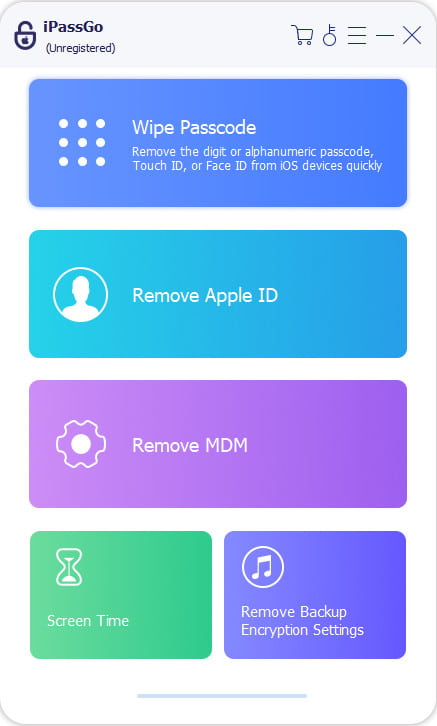
Launch imPass iPassGo on your computer, then choose the Unlock iOS Screen mode from the interface. Connect your device to the computer with a USB cable.
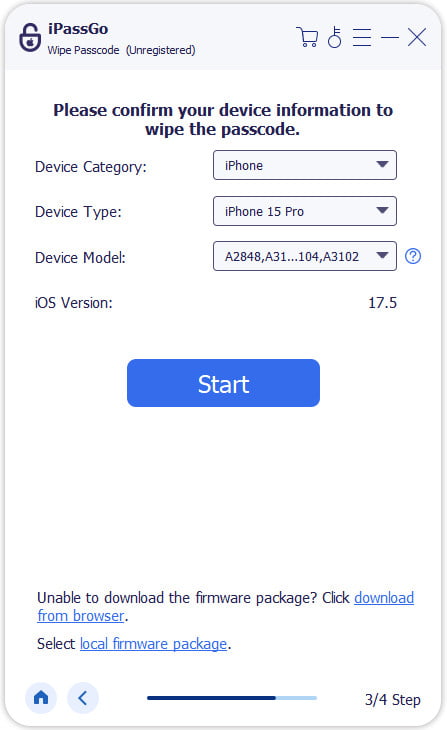
Confirm your device information and click Start Now to begin downloading the firmware package.
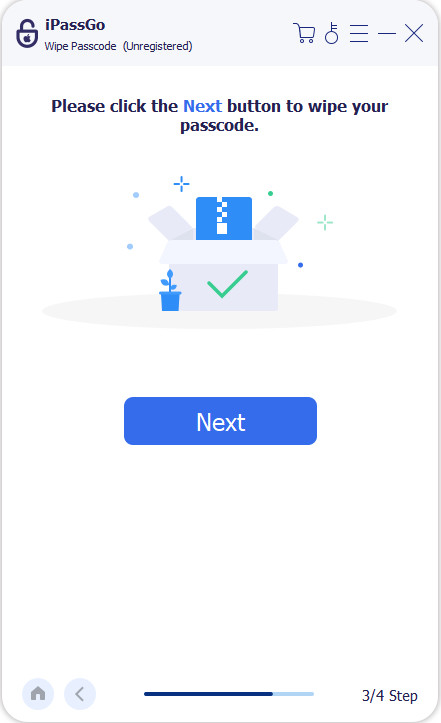
Click the Start Removing button to start the unlocking process. When it is done, the screen passcode will be removed from your device.
FAQs.
-
Is it EaseUS MobiUnlock safe?
Yes, the software is safe to use and it won’t download your data during the process.
-
What happens to your iPhone data after using EaseUS MobiUnlock?
After unlocking your iPhone using EaseUS MobiUnlock, all your data will be erased. So, you’d better back up your device before the process. You can consider it factory resetting your iPhone without Apple ID password.
-
How long does it take to unlock an iPhone using EaseUS MobiUnlock?
The time varies depending on your device model and firmware version. It usually takes a few minutes to complete the job.
Conclusion
This guide has reviewed one of the best iPhone unlocking software, EaseUS MobiUnlock. It enables you to unlock your iOS device when it is locked, disabled, cracked, or broken. You need an EaseUS MobiUnlock license key to enjoy the full features. Due to the low compatibility, we also recommended an alternative solution, imyPass iPassGo. It is not only easy to use but also compatible with a wide array of iPhones and iPad models.
Samuel specializes in password security and digital privacy. He used to work as a cybersecurity consultant for small businesses to protect digital assets. With certifications in Cybersecurity and Ethical Hacking, he turns complex security topics into easy-to-follow advice. He also enjoys sharing password tips to help users protect their accounts more confidently.
Hot Solutions
-
Unlock iOS
-
iOS Tips
-
Unlock Android
-
Password Tips


