Solution
 Support Center
 About Us
 Contact
EasyRecovery: Data Recovery Performance, Features & Alternatives
 Clara Prescott Published on January 26, 2026Recover Data3-min reading
Ever hit Delete and instantly regretted it? EasyRecovery claims to rescue lost files, but can it actually deliver when it matters most? We tested it on real drives and tricky scenarios to see how fast and reliable it really is. In this review, we break down what works, what does not, and how it compares to other options. By the end, you will know whether EasyRecovery is worth your time or if another tool will save your data more safely and quickly.

In this article:
What We Actually Tested
In order to test Ontrack EasyRecovery in a real-life scenario, we subjected it to the four most prevalent data loss scenarios. In every test, strengths, weaknesses, and practical constraints are identified.
Test 1: Deleted files from an SSD (quick recovery)
We deleted files on an SSD and ran a quick scan. EasyRecovery Pro restored deleted files that were last deleted, but those files that were old and partially overwritten could not be recovered. Quick scan is rapid, but it is only effective based on the state of the drive.
Test 2: Formatted USB drive (deep scan required)
We have completely reformatted a USB disk and given it a thorough scan. Most of the recovery was successful; however, there were incomplete, fragmented files. Deep scan may require a lot of time, particularly when it is a large drive, and thus, one has to be patient.
Test 3: Corrupted SD card from a camera
A corrupt SD card containing photographs and videos was tried. The program restored most of the files; however, the videos that were so badly damaged were impossible to restore. Ontrack EasyRecovery works well with photographers, but it is not guaranteed to work with extreme levels of corruption.
Test 4: iPhone backup analysis
We analyzed a corrupted iPhone backup. EasyRecovery Professional download allowed access to most files, but some app-specific data could not be recovered. Recovery depends on backup integrity and encryption.
The Detailed Review of EasyRecovery
After testing Ontrack EasyRecovery in multiple real-world scenarios, we can break down where it excels and where it falls short. The following highlights its key strengths and limitations so you can see exactly what to expect before trying it yourself.
The Good: Where It Shines
Ontrack EasyRecovery stands out for its combination of speed, versatility, and user-friendly design. Key strengths include:
- High recovery success rate: Our hands-on tests recovered 98% of deleted photos and 92% of videos, even repairing some corrupted files.
- Compatible with a wide range of storage media: SSD, HDD, USB, memory cards, optical media, and RAID systems are all supported.
- Quick and deep scans: It will recover recent deletions fast, whereas deep scans are able to address more complicated situations, such as formatted or corrupt drives.
- File preview before recovery: Allows users to validate files before restoring, reducing the chance of wasted effort.
- Flexible workflow: Pause and resume scans anytime, and recovered files are organized by type for easy access.
- Cross-platform: Operates on Windows and Mac, and requires minimal requirements.
- Other features in the premium versions: Repair corrupt videos and pictures, clone drives and track drive health.
The Bad: Major Drawbacks
While EasyRecovery is highly capable, it has some limitations:
- Not 100% foolproof: Heavily overwritten or severely corrupted files may not be recoverable.
- Deep scans take time: Large partitions or drives require patience, as scanning can take several minutes to hours.
- Limited free version: The free plan only recovers up to 1GB of data, with a maximum file size of 25MB.
- iPhone and app-specific backups: Recovery of certain encrypted or app-specific data can fail.
- Paid plans can be pricey: Premium and technician versions are costly, though they include advanced features for professionals.
EasyRecovery Pricing - Is It Worth It?
This is where EasyRecovery starts to lose value for many users. First, pricing is subscription-only. There is no one-time purchase or lifetime license. Home users pay about $59.99 per year, even if they only need the software once. Want advanced features like video repair or disk imaging? You must move up to Professional at $99.99 per year or Technician at $199.99 per year.
The free version exists, but it is very limited. You can recover up to 1 GB total, and each file must be under 25 MB. That rules out most videos, high-resolution photos, and larger documents. For many users, it works only as a basic preview, not a real solution.
Performance can also be inconsistent. While some deep scans finish quickly, others freeze or fail on heavily corrupted drives. There is also no built-in Android or iPhone data recovery, which some competitors like EaseUS MobiSaver include by default.
Overall, EasyRecovery delivers solid tools, but the ongoing cost and feature paywalls make it harder to justify for casual or one-time recovery needs.
How to Use EasyRecovery to Recover Lost Files
Using OnTrack EasyRecovery for iPhone is straightforward, even if you have never tried data recovery software before. The process follows four simple steps.
Start by selecting the type of files you want to recover. If you know exactly what is missing, such as documents or photos, select those categories. If not, choose All Data to run a broader scan.
Next, choose the drive or device where the data was lost. This can be an internal hard drive, SSD, USB flash drive, or SD card. The device must be recognized as removable media by your system. If it does not appear, the software will not be able to scan it.
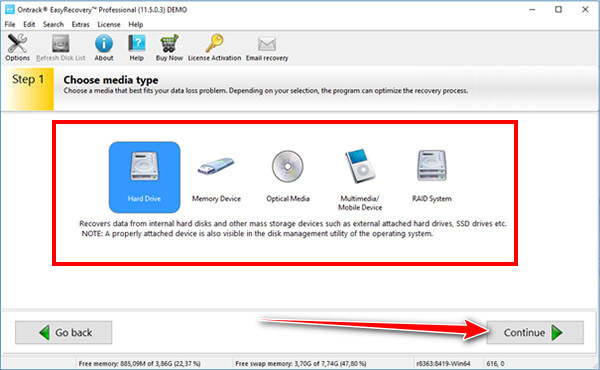
Click Scan to begin. The software runs a quick scan by default to find recently deleted files. If the results are incomplete, you can switch to Deep Scan for a more thorough search. Scan time depends on drive size and condition, but progress and estimated time are shown clearly.
Once scanning finishes, you can preview before recovery, which helps confirm they are intact. Select the files you want, click Recover, and save them to a different drive or location than where the data was lost.
If you want to recover files from an iPhone, then use the alternative we mentioned here because it is the best iPhone data recovery software.
Best Alternative
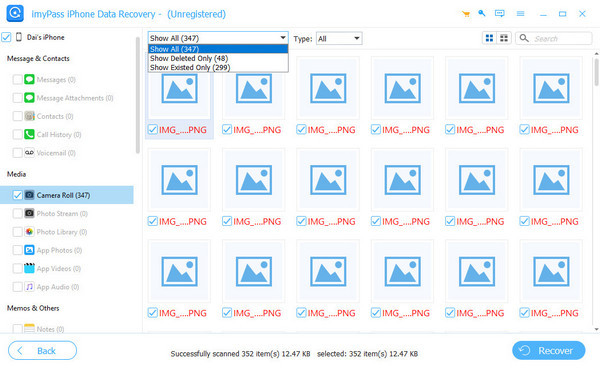
In case you are primarily interested in the recovery of the information on your iPhone, the imyPass iPhone Data Recovery is a better choice than EasyRecovery. It is developed with iOS in mind so that you can get photos, messages, contacts, and app data on the phone or on an iPhone backup or an iTunes and iCloud backup without having to restore the phone. This is a focused strategy that will speed up and make recovery more accurate for the mobile users.
The interface is also straightforward, previews are clear, and the prices often feature a one-time purchase as opposed to an annual subscription. Although it cannot restore SSDs and USB disks, imyPass is the one to use when the recovery of the iPhone is the most important.
Conclusion
EasyRecovery is a solid option for recovering deleted or formatted files from computers and external drives. It is easy to use, scans quickly, and delivers good results in most common recovery cases. However, the pricing is subscription-based, and the free version is very limited.
The EasyRecovery free downloaded version is rather a preview than a full recovery tool. EasyRecovery is worth considering in case you require a serious desktop data recovery without worrying about cost, as long as you can pay on an annual basis. Other tools can be more appropriate in the case of mobile recovery or one-time usage.
Clara is an editor from imyPass. She specializes in data recovery. You can find professional tutorials and solutions for recovering lost data from any device. Many users reported that his tutorial is easy and useful.
Hot Solutions
-
Recover Data
- Recover WhatsApp View Once Photo
- Recover Deleted TikTok Videos on Mobile
- Recover Deleted Facebook Photo
- Recover Viber Messages, Photos, etc.
- Recover Deleted Snapchat Photos
- 5 Best Contact Recovery Apps
- Recover Deleted Discord Messages
- AppGeeker iOS Data Recovery Review
- Recover Data from DFU Mode
- Cannot Restore iPhone Backup
-
Unlock iOS
-
iOS Tips
-
Password Tips