



 Solution
 Support Center
 About Us
 Contact
How to Change GPS Location on Android Phone and Tablet
 Penny Warren Published on January 08, 2026GPS Location3-min reading
Today, we are almost always with our smartphones every minute, holding them in our hands, putting them in our pockets, and more. However, such behavior may expose us to danger. In fact, lots of apps and websites track our geolocation in real time through the GPS feature on our handsets. The good news is that you can change location on Android devices. Our article identifies the proven methods and demonstrates the workflows.

In this article:
Part 1: When You Should Change Location on Android
By default, Android only allows you to hide your geolocation, but not change it. There are a few factors why you need to change the location on your Android phone or tablet. The main reasons include:
1. Protect your privacy. Changing Android phone location can hide your geolocation when accessing websites or social media.
2. Access content exclusive to specific regions. Most streaming services provide specific content for different regions. If you want to view series that are unavailable in your country, you have to change your GPS location on Android.
3. Get advantages in games. Location-based games, like Pokémon GO, require changing the GPS to access new areas.
4. Use location-based apps. Dating apps, for example, provide matches according to your location. If you want to make friends from other regions, you have to change your Android location.
5. Bypass censorship. In some countries, governments block access to certain websites or social media. Changing location provides a way around these restrictions.
Part 2: How to Change Location on Android by VPN
You can use VPNs to change your location on Android quickly. A right VPN can encrypt your data, reroute your traffic, and mask your IP address. However, you must understand that a standard VPN only changes your IP address. Some apps, like Google Maps and weather services, rely on GPS for precise location data. In other words, VPNs are not working for apps that specifically use GPS. Moreover, most VPNs are not free to use.
Advantages
1. Easy to use.
2. Change the Android location by modifying the IP address.
3. Work for almost all websites.
Disadvantages
1. Not work for apps using GPS.
2. Not free.
3. Cannot change an accurate address.
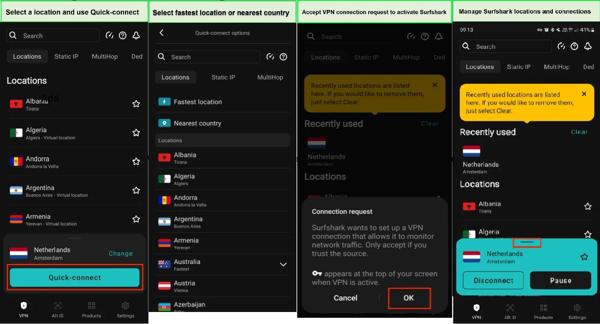
Purchase a VPN subscription online, such as Surfshark.
Download the VPN app from the Google Play Store. If you install it from the official website, you must turn on Install Unknown Apps or Unknown Sources on your device.
Open the VPN app from your app tray.
Go to the Settings menu.
Find and toggle on Override GPS Location.
Choose Let’s Go from the context menu.
Next, select Open Settings, or manually switch to your Android Settings app.
Go to About Phone, and tap your build number seven times to activate Developer options.
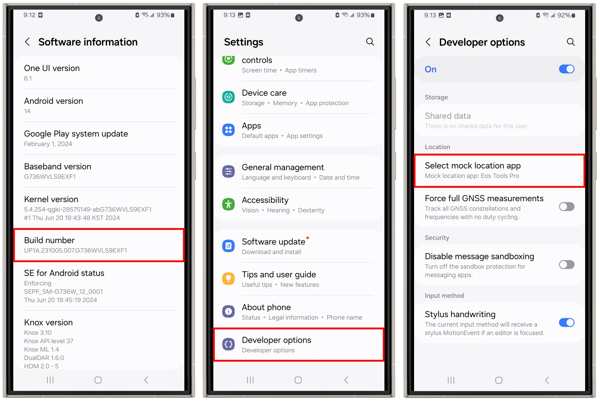
Back to the Settings app, and choose Developer options.
Pick Select mock location app, and select your VPN app.
Switch to your VPN app, select a country, and tap Connect.
Part 3: How to Change Location on Android with a Mock Location App
Another way to change GPS location on Android is to use an app to spoof Android location, such as Fake GPS Location-GPS Joystick, Fake GPS, and more. You can find these apps in the Google Play Store. They work for most apps and websites, but they also may bring risks to your device.
Advantages
1. Change Android GPS location quickly.
2. Make virtual routes.
3. Include custom options.
4. Free to download.
Disadvantages
1. Your account may be banned.
2. Advanced features require an upgrade.
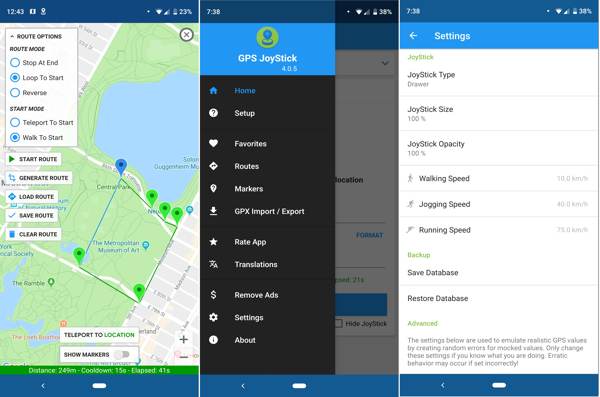
Install a GPS location changer app from your Google Play Store.
Run the Settings app, choose Developer options, and tap Select mock location app.
Choose your GPS location changer app.
Open the location changer app, and select an option to get started.
Tap Set Location, and hit Click here to open the map option.
Tap Start to change Android location. If you want to change options, tap Go to Settings on the Draw Permission Required dialogue.
Part 4: The Easiest Way to Change Location on Android
Compared to VPNs and spoofing apps, iLocaGo is the better option to change location on Android phones. It won’t install anything on your Android device, so mobile games and apps cannot detect it while changing location. Moreover, the intuitive interface makes it easy to use, especially for ordinary people.

4,000,000+ Downloads
Change GPS location on Android devices with one click.
Connect Android devices with a cable or wirelessly.
Offer multiple modes for different purposes.
Compatible with a wide range of Android brands and models.
Connect to your phone
Launch the best location-changing software for Android after installing it on your computer. Connect your phone to your computer with a USB cable. Or click Android Wireless Connection and follow the onscreen instructions to link the two machines wirelessly.

Choose a mode
Once your phone is detected, choose Modify Location to make a virtual location on your Android phone. The other three modes are used to make virtual routes.

Change Android location
Input an accurate address into the field. If you don’t have an address, click an appropriate position on the map. Finally, click the Modify button to confirm changing the Android location. Now, you can access the desired content on your phone.

Note: When you want to stop changing location, disconnect your phone and close the software.
Conclusion
Now, you should understand how to change location on Android in various situations. A VPN service can change the IP address and location on your Android phone when accessing websites. A dedicated spoofing app allows you to modify the GPS location on your phone or tablet. If they are unavailable on your device, iLocaGo is the best option to modify your Android phone location. More importantly, most apps cannot detect it.
Penny is a senior editor from imyPass. She has focused on discovering perfect GPS location solutions in all scenarios, and also has experience in fixing computers.
Hot Solutions
-
GPS Location
- Best Pokemon Go Locations with Coordinates
- Turn Your Location Off on Life360
- How to Change Location on iPhone
- Review of iSpoofer Pokemon Go
- Set Virtual Locations on iPhone and Android
- TikTok Track Your Location
- Monster Hunter Now Joystick
- Review of IP Location Finder
- Change Mobile Legends Location
- Change Location on Tiktok
-
Unlock iOS
-
iOS Tips
-
Unlock Android


