



 Solution
 Support Center
 About Us
 Contact
Spotify Change Country: Access Regional Contents on Your Account
 Penny Warren Published on March 06, 2026GPS Location3-min reading
Countless digital audio streaming services are available nowadays, but Spotify is the leading one in different countries. This service is free with ads or through the paid premium subscriptions, which do not include advertisements. However, there are some limitations to Spotify. Some countries cannot access. It is due to regulatory hurdles, restricted internet access, heavy sanctions, and more.
The mentioned issue is the top reason why others want to learn how to change country in Spotify. This way, users can access regional content on their accounts. In this post, the three easy ways of the procedure are included. See their full details as you scroll below.
In this article:

Part 1. Why You Need to Change Spotify Country
Besides regulatory hurdles, restricted internet access, and heavy sanctions, there are more reasons why people want to change location on Spotify. Most of the reasons are about traveling from different countries. For instance, you travel with the free account of Spotify. You can also use it for 14 days before it is blocked. It needs a country update to resume its service.
Also, Spotify has a family plan compliance. If one of the members changes the country of the account, the other members must change their location to the same one. There might also be a payment mismatch. Moving to a different country requirements payment details. It automatically changes your account location.
Part 2. How Spotify Knows Your Location
You can do a lot of operations on your Spotify. Change your Spotify password, profile, and other information. But one of the operations most people wonder about is how Spotify knows or tracks your real-time location, with or without updating it.
Spotify uses the IP address of your mobile phone to pinpoint your general location within a city or country. Also, it uses some of the wireless connection from your phone. It includes Wi-Fi network, cellular data, GPS, etc.
Part 3. Official Ways to Change Country in Spotify
Spotify has its official ways of changing the country on your account. However, they are only available for the countries that support Spotify. If not, you cannot use the methods below.
1. For Free Users
Spotify offers a limited time to offer its free version without ads. Ads will only appear after the free plan. On the other hand, it does not limit you to changing the country from the account. The steps will show you how.
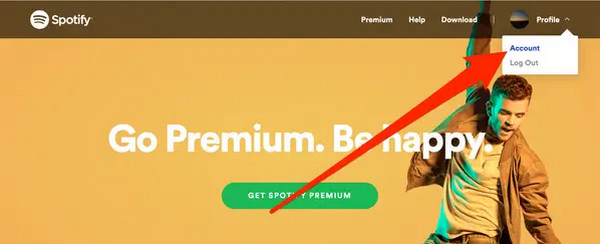
Go the the website of Spotify. After that, sign in to the account you prefer to change the country. Then, go to the Account section and tap the Edit Profile button on the screen.
Swipe down on the screen to see the Country or Region menu. Select your preferred country and tap the Save Profile button.
2. For Premium Users
Premium users can also change the country on their Spotify account. They almost have the same procedure, but some different buttons need to be operated. The steps below will guide you.
Visit the Spotify main website and sign in to an account. Select the Account button and click the Edit Profile button.
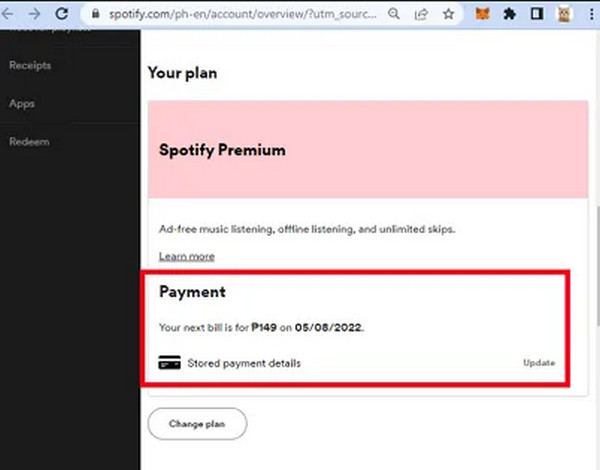
Go to the Your Plan section and click the Update button. Enter a new payment method and follow the on-screen instructions to complete the process.
Part 4. Can I Change Spotify Country Without Being There
Spotify requires you to physically be present where you want to set up its location through GPS. Did you know that you can change the location of your Spotify without being there? imyPass iLocaGo can help! This tool can change the country or location of your Spotify on Android or iPhone. It is available on Mac and Windows. It is 100% safe. The network speed is not affected before, during, and after the location changing.
Moreover, the tool supports the latest Android 17 and iOS 27,, including the earlier versions. Besides Spotify, you can also change your location on Tinder, Life360, Snapchat, Hinge, WhatsApp, Facebook, etc. Use the steps below as your guide on how to use this tool to change the location of your Spotify account.
Open your browser on your computer. After that, search the official website of imyPass iLocaGo. Then, download the tool. Set it up afterward and install it from the small window. Finally, open the tool on your computer to start the process.
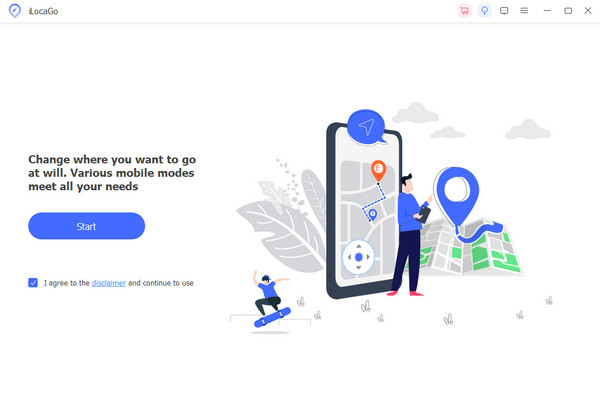
The tool will show you a little discussion about the procedure of the tool. Then, please click the Start button at the bottom left of the screen. A new screen will be presented on the screen of the tool.
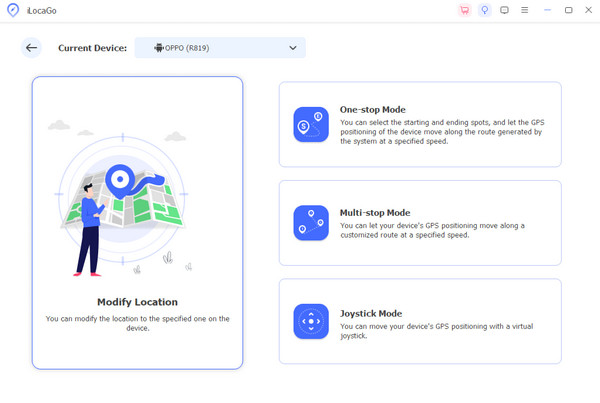
The four tools will appear on the screen. Please select the Modify Location button on the left. Please plug your Android phone or iPhone into the screen. Later, go to the small window at the top left. Enter your preferred location and click the Modify button to change it.
Part 5. Spotify Can't Change Country & Fixes
There are times when Spotify can't change the country. If that happens, you need to update your payment method, which was discussed in the previous section for the premium users. Alternatively, you can wait for the premium account to expire. Other users prefer using a VPN while using Spotify. You may need to reinstall your VPN app or tool to avoid conflict with your actual location. You can also update your Spotify app because there might be an issue with the version that you have for the features.
FAQs.
-
1. What is the cheapest Spotify country?
India, Nigeria, and Pakistan have the cheapest subscription for Spotify. You can purchase a plan for a cost of around $1.00 to $1.50. Next to them are Egypt, Argentina, and Egypt.
-
2. Can I change Spotify country without payment?
Yes. Changing the Spotify country or region does not require a payment. You can achieve this procedure using the official ways of Spotify to change your account country.
-
3. Should I change Spotify country or create a new account?
It is better to change your Spotify country than create an account if you want to keep your playlists and saved music. However, it requires a payment method for the new country. You can create a new account if you want a free account first.
Conclusion
In conclusion, Spotify changes country using the three quick methods in this article. Also, it helps you to fix issues on Spotify when you cannot change its location. It includes the official ways and the third-party tool that can change your location on an iPhone or Android phone in a few clicks. imyPass iLocaGo is that tool! Download the tool to have full access to its features!
Penny focuses on GPS troubleshooting and Windows optimization. She formerly worked as a technical support engineer, helping clients solve location-based and system issues efficiently. Backed by IT support experience, she provides practical solutions that really work. In her free time, she likes hiking and geocaching, testing GPS tech in the real world.
Hot Solutions
-
GPS Location
-
Unlock iOS
-
iOS Tips
-
Unlock Android


