



 Solution
 Support Center
 About Us
 Contact
Everything You Should Know about the Fake GPS Go App
 Penny Warren Published on February 04, 2026GPS Location3-min reading
The GPS is an essential technology on mobile devices. It lets us know where we are and where we are going on the Earth. However, location data is not hidden, and any app or website can track and use it. The downside is that your route and location may be exposed to someone else. Fortunately, GPS spoofer apps, such as Fake GPS Go, can hide your real location with fake GPS data. This article reviews the app.

In this article:
Part 1: Fake GPS GO App Review
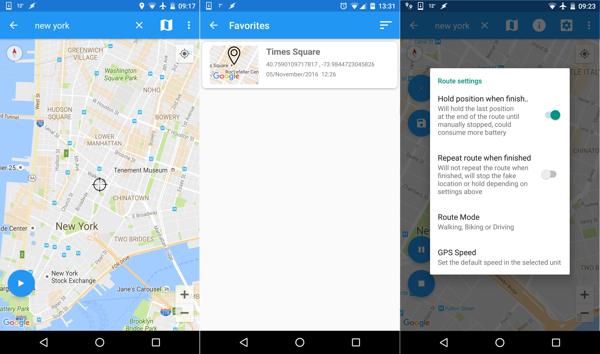
As its name indicates, Fake GPS Go Location Spoofer is an app to fake GPS and spoof location on Android devices. It helps you hide your real location when accessing apps, mobile games, websites, and more. More importantly, this app is free to change the GPS location.
Main Features of Fake GPS Go Location Spoofer
- 1.Change GPS location on Android with one tap.
- 2.Establish the Fake GPS locations effortlessly.
- 3.Available to websites, apps, and mobile games.
- 4.Enhance online privacy and security.
- 5.Favorite GPS locations for using later.
- 6.Work on Android 4.4 and above.
- 7.Make virtual locations and routes with stops.
- 8.Integrate a Joystick mode.
Fake GPS Go Location Spoofer Review
Pros
- It is one of the best Fake GPS apps for Pokémon Go and other location-based apps.
- Fake GPS Go supports a wide range of Android devices.
- You can export your virtual locations and routes in GPX files.
- You can add virtual routes to the favorite list and use them quickly later.
- It won't ask you to root your device.
Cons
- It is unavailable on iPhones.
- Your account may be banned if the app or game detects Fake GPS Go.
- If you want to unlock all features and remove ads, you have to pay $3.28.
Is the Fake GPS Go Location Spoofer app legit?
Yes. According to our test, Fake GPS Go Location Spoofer is safe and legal to use. However, it doesn't integrate technology to prevent apps from detecting fake locations. Once Pokémon Go detects it, your account might be banned.
Part 2: How to Use Fake GPS Go
While Fake GPS Go doesn't equip advanced features, it can fake your GPS location on your Android device without extra hardware. However, you need to set up the app, and we share the steps below:
Install Fake GPS Go from the Google Play Store.
Run the Settings app on your phone.
Go to System, About Phone, and tap the Build Number seven times.
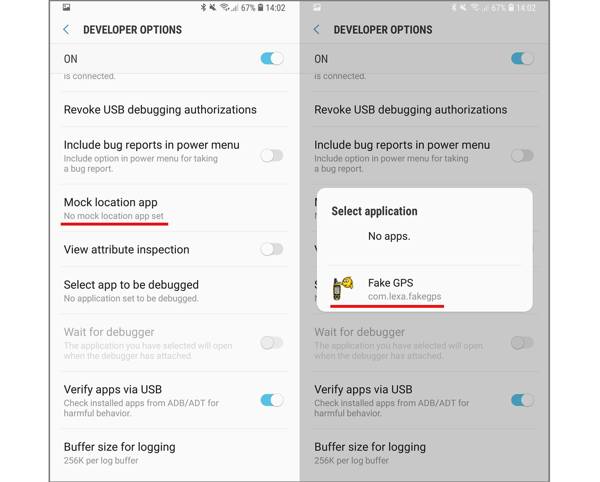
Back to the Settings screen and head to Developer options.
Choose Mock location app, and pick Fake GPS Go.
Next, run the best Fake GPS for Pokémon Go from your app tray.
Move the map and tap the desired location.
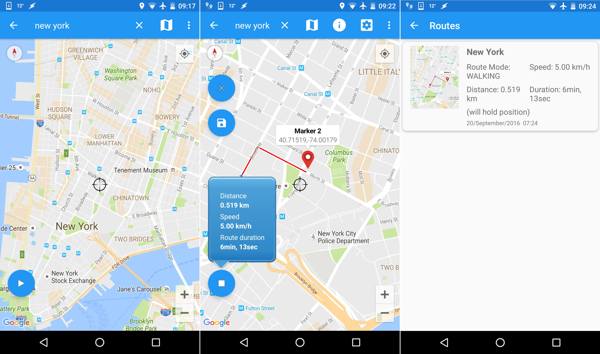
Tap the Play button to begin faking your GPS.
Part 3: Best Alternative to Fake GPS Go
If Fake GPS Go Location Spoofer is detected, you'd better use an alternative solution. From this point, we recommend iLocaGo. It comes with a wide range of features for faking locations and routes on your Android phone or iPhone easily. Moreover, it integrates a user-friendly interface.

4,000,000+ Downloads
Make fake locations on mobile devices quickly.
Create virtual routes with multiple modes.
Offer custom options to adjust speed, traffic, and more.
Support accurate addresses and any position.
Compatible with iOS 27 or Android 17 and lower.
How to Fake GPS Location on Your Phone
Connect to your phone
Start the alternative to Fake GPS Go Location Spoofer after you install it on your PC. There is another version for Mac. Connect your iPhone or Android phone to your computer with a USB cable. If prompted, tap Trust on your screen to trust this PC.

Choose a mode
Once your device is detected, you will be presented with the mode window. Here you can get four modes:
Modify Location is used to fake the GPS location.
One-stop Mode is used to create a route with the starting and ending points.
Multi-stop Mode is used to create a route with multiple stops.
Joystick Mode is used to create a route with your mouse or keyboard.
Click the Modify Location mode to continue.

Fake GPS location
Type in an address into the field or click a position on the map. Finally, click on the Modify button to confirm the change.

Conclusion
This article reviewed one of the best spoofer apps for Pokémon GO, Fake GPS Go Location Spoofer. You can read our review and decide if it is available for your app or device. If the spoofer app is not working for you, we also recommend an alternative, iLocaGo. It is able to fake GPS location on either an iPhone or an Android.
Penny focuses on GPS troubleshooting and Windows optimization. She formerly worked as a technical support engineer, helping clients solve location-based and system issues efficiently. Backed by IT support experience, she provides practical solutions that really work. In her free time, she likes hiking and geocaching, testing GPS tech in the real world.
Hot Solutions
-
GPS Location
-
Unlock iOS
-
iOS Tips
-
Unlock Android


