



 Solution
 Support Center
 About Us
 Contact
Change Your GPS Location: How to Enable Mock Location Xiaomi
 Penny Warren Published on June 18, 2026GPS Location4-min reading
Lots of Xiaomi owners hope to mask their GPS location for daily practical needs. Maybe you play Pokémon Go and wish to catch region-exclusive monsters without traveling, or you want to hide your real location on social apps for privacy, or you want to find new matches on a dating app.
Mock location is a built-in Android feature, yet it's hidden in the developer options on Xiaomi MIUI and Hyper OS. This guide explains what mock location Xiaomi is, and shows you simple ways to spoof your GPS on Xiaomi.

In this article:
Part 1. What is Mock Location Xiaomi
Mock location Xiaomi is a feature that allows developers to simulate a different GPS location for testing and geo-tagging purposes. In other words, it tricks location-based apps and services into thinking you're somewhere you're not.
Although this feature is primarily intended for developers to test location-based apps without physically moving, it has practical uses for regular users as well:
- App Testing: Developers can test maps, delivery apps, or location-based features in different regions.
- Privacy Protection: Users can hide their real location to protect online privacy.
- Games: You can explore virtual locations in location-based games.
- Geo-Restricted Content Access: Users can unlock content that's unavailable in their region, such as movies or shows on streaming platforms.
Part 2. Is Mock Location Illegal
Is it illegal to mock location on Xiaomi? The short answer is: mock location itself is not illegal, but misuse can lead to violations of app policies or laws.
If you use mock location Xiaomi for personal use, such as spoofing Pokémon Go location, it is generally legal. However, using it to break laws, commit fraud, or bypass regulations is illegal and can have serious consequences.
Some apps or services don't allow users to use location changers. If they detect that you're using a fake location, your account may be blocked.
Part 3. How to Allow Mock Location on Xiaomi
Before you can use a location changer app on your Xiaomi device, you need to enable the mock location Xiaomi in Developer Options. Here's a simple step-by-step guide:
Download a location changer app on your Xiaomi
Go to Settings, and then click My device > All specs.
Find MIUI version and tap it 7 to 10 times repeatedly until you see a message saying "You are now a developer."
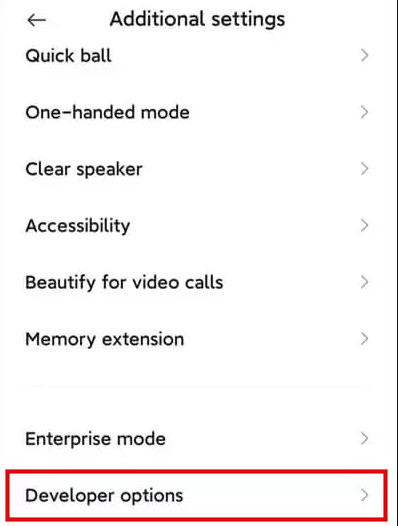
Go back to Settings, scroll down, and tap Additional settings > Developer options.
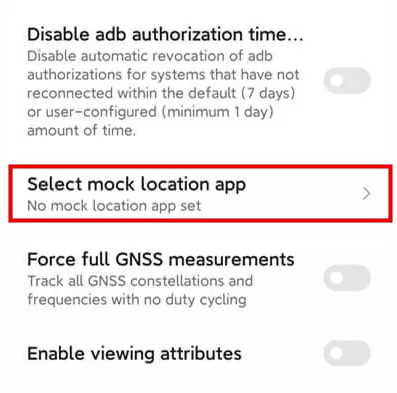
Tap Select mock location app and select the mock location app for Xiaomi you downloaded.
Part 4. How to Mock Location on Xiaomi with imyPass iLocaGo
If you're unsure which location changer app to use for mocking location on Xiaomi, imyPass iLocaGo is a perfect choice. This versatile and powerful tool allows you to simulate movements and change your location freely on apps like Tinder, Snapchat, and more. It is compatible with a wide range of Android and iPhone models and brands.

4,000,000+ Downloads
Mock your location for both Android and iPhone.
Spoof GPS location on various location-based apps and services.
Customize your speed and route as you like with the joystick.
Support the latest Android 17 and iOS 27 versions.
Steps to change your location on Xiaomi:
Connect your Xiaomi to the computer using a USB cable or wireless connection. Tap Trust on your phone when prompted

Launch the software and choose the Modify Location option from the interface.

A map will appear on your screen. You can drag, zoom in, and zoom out to find the desired site. Alternatively, type the place name in the search bar to quickly find it.

Click Sync to device to apply the new location to your device instantly.
Part 5. FAQS About Mocking Location Xiaomi
FAQs.
-
Do I need to root my Xiaomi phone to use mock location?
No, rooting is not required. Xiaomi devices support mock location through Developer Options, so you can safely change your GPS location without modifying your system.
-
What should I do if mock location Xiaomi is not working?
If mock location isn't working: (1) Make sure Developer Options are enabled, and you've selected a location changer app. (2) Turn on High Accuracy Mode in Location settings. (3) Check that the app has permission to access location. (4) Clear the app cache or restart your phone if needed. (5) Some apps may detect mock locations and restrict access; try using realistic movement to avoid detection.
-
Will using mock location drain my battery faster?
Yes. Mock location can use more battery than normal. This can be severe if you simulate movement or use the location changer for a long time. To save battery, only enable mock location when needed, and turn it off when you're done.
-
Can multiple apps use mock location at the same time?
No, Android allows only one app to act as the mock location provider at a time. If you want to switch apps, you need to select the new app in Developer Options.
Conclusion
After reading this guide, you can easily enable mock location on Xiaomi and change your GPS location with imyPass iLocaGo. It is a convenient and simple feature for Xiaomi users. Remember to use GPS spoofing for legitimate purposes. When you're finished, turn off mock location. This helps ensure your daily navigation apps and location-based apps work properly.
Penny focuses on GPS troubleshooting and Windows optimization. She formerly worked as a technical support engineer, helping clients solve location-based and system issues efficiently. Backed by IT support experience, she provides practical solutions that really work. In her free time, she likes hiking and geocaching, testing GPS tech in the real world.
Hot Solutions
-
GPS Location
-
Unlock iOS
-
iOS Tips
-
Unlock Android


