



 Solution
 Support Center
 About Us
 Contact
Samsung Mock Location: How to Enable It Step by Step
 Penny Warren Published on May 19, 2026GPS Location3-min reading
Many Samsung users often need to adjust their phone's location for gaming, streaming, app testing, or privacy reasons. This article introduces the Samsung Mock Location feature and an easier desktop alternative to help you safely change your device location.

In this article:
Part 1. What is the Samsung Mock Location
The Mock Location is a developer permission built into the Android system. For Samsung phones, it is specifically called Samsung Mock Location.
Samsung Mock Location allows third-party software to fake GPS location, thereby displaying the set virtual location.
The working principle of the Samsung virtual location is that the user authorizes the virtual location software in the developer options. Then the software takes over the system's GPS signal to simulate or modify the GPS location.
Part 2. Why Need to Enable Mock Location on Samsung
Game Entertainment
Some games have regional restrictions. With the simulation positioning feature, you can still enjoy these games even in restricted areas. Especially for AR games like Pokémon GO that require real-world positioning, virtual locations can be used to expand gameplay and allow participation in activities across different regions.
Bypassing regional software restrictions
Many applications will impose restrictions on certain content based on the region. By mocking the location, you can unlock these restricted functions.
Development and Testing
When programmers test the App's location-related functions, they can switch between different regions' locations using simulated positions, without actually moving.
Protecting Personal Privacy
When you don't want the software to obtain your actual location, you can use virtual positioning to hide your whereabouts and protect your privacy.
Part 3. How to Allow Mock Location on Samsung
Whether you want to test the app, play games, or hide your location information, you can follow the steps below to enable mock location on Samsung:
Get a reliable location-spoofing app first
Download and install an undetectable mock location app, such as Fake Location, on your Samsung phone.
Enable Developer Mode
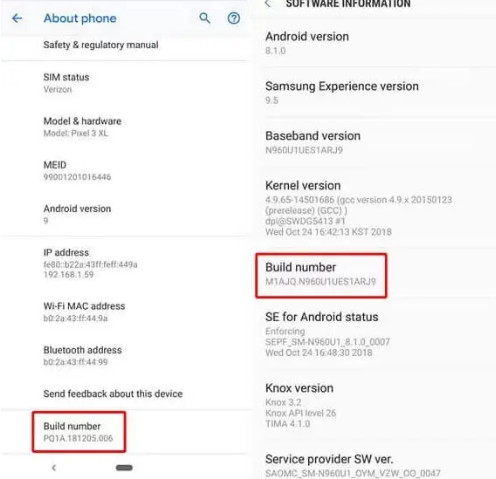
Open your phone's Settings, go to About phone, then tap the Build number seven times continuously to enable Developer Mode.
Turn on mock location on Samsung
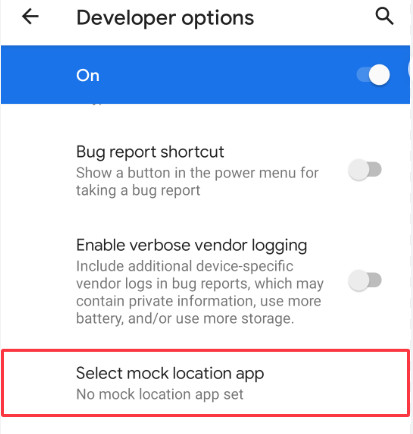
Return to Settings, then tap Developer options. Find the Select mock location app option, and choose the fake‑location app you've just installed to grant permission.
On older Samsung versions, the option may appear as "Allow mock locations" instead of "Select mock location app". They mean the same thing.
Start Mocking Location on Samsung
Open the virtual-position app, and search your target location on the map. Confirm it.
Disable mock location in Samsung
Go to Developer options and click Select mock location app. Choose None or turn off Developer options. Then, your real GPS location will be restored. If not, try to restart your Samsung phone.
Part 4. Alternative When Samsung Mock Location Is Not Working
Although Samsung Mock Location works well for most users, it may not function properly in some cases. For example, it may be detected by applications.
Moreover, it often fails after Samsung system updates. To avoid these issues, you can use simpler and more stable desktop tools, such as imyPass iLocaGo, to change the location information on your Samsung phone.

4,000,000+ Downloads
Change location on Samsung without Developer Mode.
Hard to be detected by apps.
Change the Samsung location to any location with a single click.
Simple operations and flexible location change.
3 modes to make your movements natural.
Download, install, and run the software.
Choose Modify Location.

Set your target location, and then click Modify.

Part 5. Tips When Mocking Location on Samsung
- 1.In some apps or games, location mock may violate the platform's regulations. There is a risk that your account may be suspended or even blocked.
- 2.It is strictly prohibited to mock location on Samsung for any deceptive or illegal activities.
- 3.When using the desktop mock location program, make sure that the mobile phone and the software are always connected. Otherwise, the location will be invalid.
- 4.Some applications with strict detection mechanisms may detect the simulated location.
- 5.This function is only for personal testing and legal entertainment purposes.
Conclusion
This article explains the meaning and working principle of Samsung Mock Location, why people use it, and how to enable mock location on Samsung step by step. With Developer Options, you can easily simulate GPS locations for testing, gaming, or privacy purposes.
If Samsung Mock Location doesn't work on your device, you can also try an alternative desktop program, imyPass iLocaGo, to change location on Samsung. Pick your preferred method and start spoofing your location on Samsung now.
Penny focuses on GPS troubleshooting and Windows optimization. She formerly worked as a technical support engineer, helping clients solve location-based and system issues efficiently. Backed by IT support experience, she provides practical solutions that really work. In her free time, she likes hiking and geocaching, testing GPS tech in the real world.
Hot Solutions
-
GPS Location
-
Unlock iOS
-
iOS Tips
-
Unlock Android


