



 Solution
 Support Center
 About Us
 Contact
2 Android Location Spoofers: Access Region-locked Contents
 Penny Warren Published on December 19, 2025GPS Location3-min reading
The world of social media is huge. It is the top trend from different countries, especially with famous platforms for entertainment. It is indeed entertaining to see content from your countries due to the similarities in culture. However, some individuals want to explore content from different countries around the globe using their Android phones. The problem is that some apps or platforms are restricted in their countries.
Android location spoofing is the best solution. This procedure will change your Android phone's location to help you access the contents that are restricted in your country while accessible to others. Continue browsing this post to see the two ways to spoof your Android location.

In this article:
Part 1. Comparison of 2 Ways to Spoof Android Location
Before anything else, here is a brief introduction to the two best location spoofers on Android. This way, you will have quick information about them, which can help you determine which one you will be using. See the table below.
| Name | Supported Devices | Requirements | Level of Ease | Main Features |
| Super Unlimited Proxy | Android Phone | A mobile phone and a stable Internet connection | Hard | Auto-connected network |
| imyPass iLocaGo | Windows and Mac. It can change location on your iPhone and Android phone. | Computer, USB cable or Internet connection. | Easy | Modify location, one-stop mode, multi-stop mode, and joystick mode. |
Part 2. Spoof Android Location Using a Proxy App
Super Unlimited Proxy is a free location spoofer on Android. It is an app that can change your location from an Android phone in a few taps. However, this application requires special permissions that might acquire sensitive information from your Android phone. Also, this application requires you to watch ads from its free version. These advertisements will prompt each step in the procedure.
The only advantage of this app is that you can connect your Android phone to another network automatically. Please follow the steps of this app below to know how to use it.
Search for Super Unlimited Proxy from the Google Play Store. After that, tap the Install option and wait for it to be downloaded. Tap the Open button to access it and tap the Accept & Continue button to agree to its Terms & Privacy.
The tool will require you to enable the permissions it asks for on your Android phone. Please tap the Allow button at the center of the window. Please allow all of them because not allowing one permission will lead to the app not functioning.
Tap the Location button at the top of the main interface. Then, please choose your preferred country or region. Then, tap the Connect button that is placed at the center of the app. Then, the app will try to connect to the network.
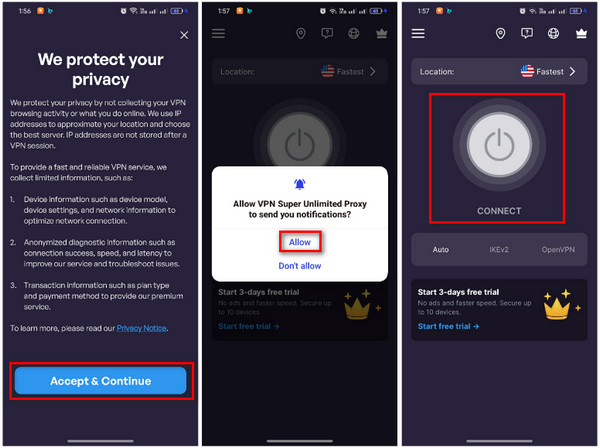
Please wait for the app to connect your Android phone to the network. The button will turn green when the connecting process is completed.
Part 3. Spoof Android Location Using an Android Location Spoofer
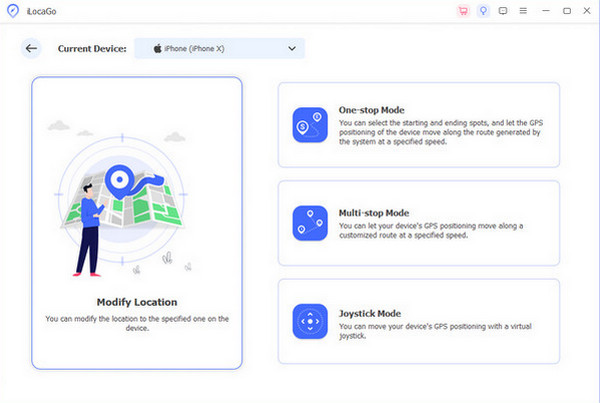
On the other hand, how to location spoof on Android using a computer? imyPass iLocaGo is the best third-party tool that can help. You may download it on your Windows and Mac computers. It allows you to change your Android phone location in four ways. You can use its Modify Location, One-stop Mode, Multi-Stop Mode, and Joystick Mode. These are the main functions of the tool.
Additionally, the tool is 100% safe, and it will never affect the speed of your network on your Android phone. It supports Android 17 and iOS 27. This third-party tool can be used for famous apps, including Tinder, Life360, Hinge, Snapchat, WhatsApp, Facebook, etc. It is also the best Android spoof location for Pokémon GO. Use the steps below for the tool.
Please get the latest version of imyPass iLocaGo on your Mac or Windows. After that, set up the downloaded file to install it from the small window that will be prompted on your screen. The software will be automatically launched on your computer afterward.
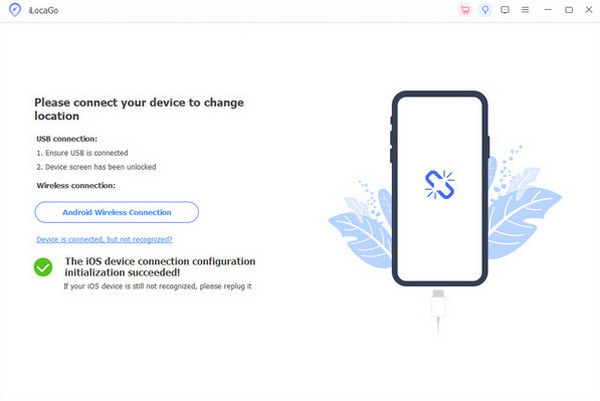
Please plug the Android phone into the computer where the tool is installed using a USB cable. Then, tap the USB Mode from the Android phone Notification Center section. After that, go to Settings and choose About Device. Later, tap Version and tap Version Number seven times to enable Developer Mode.
Select the Modify Location button on the left side of the screen. This interface includes the other features of the tool. You will be prompted to a new screen afterward.
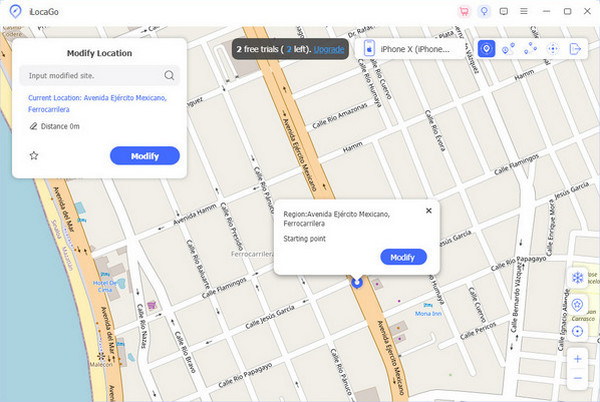
Go to the Modify Location section at the top left. Then, choose your preferred location for your Android phone. Then, click the Modify button to change your Android phone location. The map will be moved to the place entered afterward.
Part 4. Reasons & Risks of Spoofing Location
The two methods for location spoofing on Android can indeed guide you on how to change location on Android to access content that is not available in your country. However, there are precautions you need to know about this procedure. There are risks that you might encounter by spoofing the location on your Android phone. The reasons why people do it are also included.
1. Privacy Protection
Spoofing the location from your Android phone will prevent your location from being tracked by apps used on the device. It is very helpful if you do not want certain apps to track your real-time location.
2. Change Google Play Country
Changing the Android phone location guides you on how to change the Google Play country to access different apps available in other countries. This way, you can download mobile games, social media apps, and more, which are restricted in your region.
3. Emergency Services Cannot Be Used
Every country or region has its emergency services. When an Android location spoofing app or tool is used, you cannot access these services. If you call them, there might be wrong information about the situation, which will be a disaster.
4. Security Risks from Third-party Apps or Tools
Some apps or tools require special permissions from your Android phone. In this case, the apps or tools will acquire sensitive data from your Android phone, which will be risky for you and your device. There might be a harmful component that will be installed on the mentioned device.
5. Incorrect App Functions
There are Android apps that rely on your location, including delivery apps for food and supplies. If so, you cannot use them because your Android phone cannot use its current location for the delivery. Also, maps and navigation applications will be useless due to a fake location.
Conclusion
This article is all about how to spoof location on Android. The two easy ways for the procedure are here for your convenience. imyPass iLocaGo is one of them, which is the best tool to modify your location on an Android phone in an instant. You may download the tool to explore more of its functions.
Penny focuses on GPS troubleshooting and Windows optimization. She formerly worked as a technical support engineer, helping clients solve location-based and system issues efficiently. Backed by IT support experience, she provides practical solutions that really work. In her free time, she likes hiking and geocaching, testing GPS tech in the real world.
Hot Solutions
-
GPS Location
-
Unlock iOS
-
iOS Tips
-
Unlock Android


