



 Solution
 Support Center
 About Us
 Contact
Fixfirmware FRP Bypass Samsung: Risks, Tutorial & Alternative
 Gideon Byron Published on October 17, 2025Unlock Android3-min reading
Since Android 5.1, Google has added Factory Reset Protection (FRP) to make devices more secure. FRP requires you to verify your Google account after a reset, which stops anyone from using your phone without permission.
If you get locked out because of FRP, Fixfirmware FRP Bypass APK can help you unlock your Android without needing your Google account details. You are in luck because in this write-up, you will learn if it is safe to use, how to use it to bypass FRP, and we will also show a safer alternative for you, just in case.
Without further delay and discussion, please keep reading and pay close attention to every detail about this. All of this information is essential so you can make a smart decision about whether to continue using it.

In this article:
Part 1: What is Fixfirmware APK
Fixfirmware APK is an app for Android phones. Its main use is bypassing FRP without a computer. FRP, also called Factory Reset Protection, appears when you forget your Google password or when you get a used phone that still has the lock. With this APK, you can skip the FRP lock right from your phone. You do not need extra tools or a computer. It also has some features for changing settings and fixing small issues on Android.
Part 2: Is Fixfirmware Safe
Let us be real. FixFirmware FRP APK is not fully safe. It is not on the Google Play Store, which means Google has not checked it for security. When apps are outside the store, they can hide malware or bugs that may harm your phone.
Also, installing APKs from unknown places can void your phone's warranty and put your personal data at risk. To lower the chance of problems, you should only download APKs from trusted sources and always scan them with an anti-virus before you install them.
So, while Fixfirmware APK can help, it is a risky option. You need to be careful and understand the dangers before using it.
Part 3: How to Use Fixfirmware APK to Bypass FRP
If your phone is stuck at the Google account screen after a reset, Fixfirmware FRP Bypass Tool can help you get back in. The process is a bit long, but if you follow each step carefully, you can unlock FRP without a computer. Here is how:
Turn on your Android phone and continue through the setup until you see the Google account verification screen. Do not insert a SIM card. Connect your phone to Wi-Fi and set the location to India. Tap the textbox to open the keyboard, then go to Options > More > About > Privacy Policy. Scroll down, tap Contact Us, and use the email link to open Messages. Type www.youtube.com and send it so the link becomes clickable.
Tap the YouTube link, then open the Profile button and go to Settings. Select Terms of Service, accept them, and type fixfirmware/apk in the search bar. From the results, open the first link and scroll down to download apps, like Disabler Pro, Notification Bar, and Google Account Ad APK. If a warning appears, tap Download Anyway.
Once the files are downloaded, install them from the Downloads folder. Then, go to Notification Bar > Accessibility > Installed Apps and enable the Notification Bar. Open Permission Manager under Privacy and allow file access for Package Disabler Pro. Turn off Wi-Fi, then launch Disabler Pro, agree to the permissions, activate it, and reconnect to Wi-Fi.
Inside Disabler Pro, tap the three dots, select Import from XML, and choose the file that disables Play Services. After that, go to Settings > Accounts and Backup > Manage Accounts, then add your Google account. Tap Bypass FRP and follow the instructions on your screen.
Go to Settings > Apps, open Chrome, and search for Activity Manager. Launch it, then go to Android Setup and cancel it. Next, choose Samsung Setup Wizard, tap Always, and agree to continue. Your phone will do a factory data reset, and when it restarts, the FRP lock should be gone.
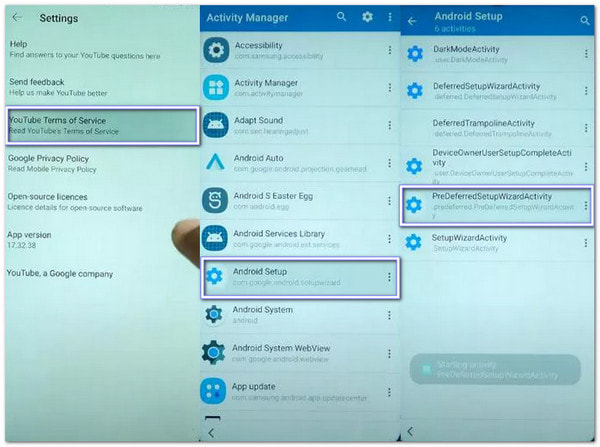
Important Note: While Fixfirmware APK can bypass FRP, the process has many downsides that you should think about first. As you notice, the steps take a lot of time, and they are not easy to follow. You must pay close attention, or you may get lost. Remember that even a small mistake can break the process. If that happens, you will need to start all over again. The installation part can be hard for beginners. It has many steps that are not simple to understand at first. The app does not work for every phone. Some newer Android models are not supported at all.
Because of these problems, Fixfirmware APK might not be the best choice for everyone. If you want something faster, easier, and safer to use, you can try other FRP bypass tools, like the one mentioned below.
Part 4: Safer Alternative to Fixfirmware - AnyPassGo
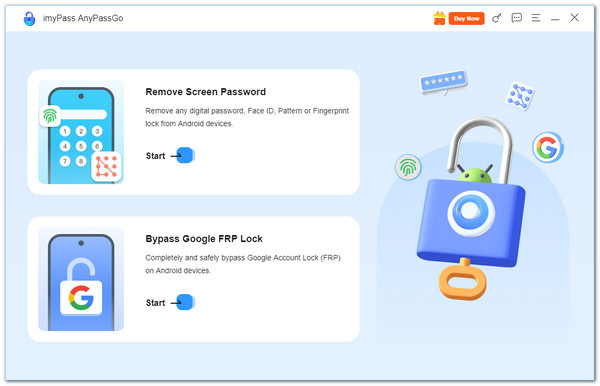
You surely do not want your phone or personal data to be harmed when trying to bypass FRP using Fixfirmware FRP APK. For that reason, you need a safe and easy-to-use tool, and that tool is imyPass AnyPassGo. Unlike Fixfirmware, you can download imyPass AnyPassGo safely from its primary website on your Windows computer. It works with many Android devices, including Samsung, Xiaomi, Vivo, Realme, Huawei, Oppo, OnePlus, Motorola, and more.
The best part is that the FRP bypass process is complete with just a few clicks, unlike Fixfirmware, which requires you to go through a long and confusing process just to finish your task. Moreover, imyPass AnyPassGo guides you step by step from start to finish, making it simple, fast, and safe for both your phone and your personal data. So, go with imyPass AnyPassGo because it is safer and more reliable to use.
Top Features:
• It supports Android versions up to 16, making it compatible with most modern devices.
• It can bypass the FRP lock on Samsung, Xiaomi, Huawei, and other Android devices in a few easy and safe steps.
• It can remove all kinds of Android lock screens, including PIN, Pattern, Password, Fingerprint, and more.
• It can remove the screen lock on older Samsung models, such as the Note 3 and Galaxy S5, without deleting data.
Conclusion
Fixfirmware FRP APK can help unlock FRP without a computer, but it can be tricky and is not always safe. You also need to know some Android techniques to use it properly. If this method feels too hard or does not work for you, imyPass AnyPassGo is a much easier and safer way to unlock your phone.
With imyPass AnyPassGo, unlocking your Android device is fast, simple, and reliable. It guides you step by step, so you do not need technical skills. You can safely bypass FRP and regain full access to your phone without worrying about mistakes or risks. So, get imyPass AnyPassGo installed on your computer so that you can use it anytime!
Gideon is a senior editor from imyPass. He is an expert in unlocking phones and computers, and he has written password tutorials in imyPass for 3 years.
Hot Solutions
-
Unlock Android
-
Unlock iOS
-
Password Tips
-
iOS Tips

