



 Solution
 Support Center
 About Us
 Contact
How to Unlock a SIM-Locked Phone and Switch Carriers Easily
 Gideon Byron Published on July 17, 2026Unlock Android3-min reading
Ever switched networks only to find your phone stuck on the old one? That frustrating moment often comes down to a simple thing: your device is locked. This is where SIM unlock comes in. Whether you are trying to use a different carrier while traveling or hoping to break free from contract limits, unlocking your phone can open the door to more choices and savings. In this guide, we will explore what SIM unlock really means, how it differs from other terms, and how to do it step by step. Let us get you closer to a fully flexible mobile experience.

In this article:
Part 1. What is SIM Unlock?
A SIM unlock is the process of removing the software restriction placed by a carrier that limits your phone to work only with their network. If you bought your phone through a carrier like AT&T, there is a good chance it is locked to their service. That means you cannot use a SIM card from another provider until the device is unlocked.
An ATT SIM unlock gives you the freedom to put a SIM card from a distinct network, whether you are switching carriers, traveling overseas, or using a local SIM to avoid roaming charges. Once unlocked, your phone becomes more flexible and potentially more valuable if you plan to sell or trade it.
Unlocking has no impact on the performance or data on your phone; it just removes the network code. However, unlocking a SIM card on an iPhone or any device should be done in the right manner to prevent trouble. Officially, in numerous instances, phone carriers such as AT&T will offer to unlock your phone as long as you meet certain terms on their part, including your phone being fully paid for or completing your contract. The first point of unlocking the SIM is the comprehension of having complete control of your device and mobile options.
Part 2. SIM Unlock vs SIM Card Unlock: What's the Difference
Although they sound similar, SIM unlock and SIM card unlock refer to two completely different things. A SIM unlock removes the carrier restriction placed on your phone, allowing you to use SIM cards from other networks. In contrast, unlocking a SIM card usually means removing a SIM PIN lock after you enter the wrong PIN or cannot access the card. The first one affects your phone's carrier compatibility, while the second one only affects SIM card security.
| SIM Unlock | SIM Card Unlock | |
| What it means | Remove carrier restrictions | Remove SIM PIN protection |
| Main purpose | Use another carrier’s SIM card | Access a locked SIM card |
| Common situation | Switch networks or travel abroad | Forgot SIM PIN or entered wrong PIN |
If you want to change carriers, use a local SIM while traveling, or avoid roaming charges, you likely need a SIM unlock. However, if you see a SIM locked message after entering the wrong PIN, you need to unlock your SIM card instead.
Part 3. Before You Start Unlocking a SIM-Locked Phone
Check Whether Your Phone is Locked
Before requesting a SIM unlock, confirm whether your phone is actually locked to a carrier. You can insert another SIM card from other carriers to check whether the device connects to the new network, or check the unlock status through Settings.
For iPhone: Go to Settings > General > About and scroll down to Carrier Lock. If it says No SIM restrictions, it is unlocked.
For Android: Go to Settings > Network & Internet or other similar label > Mobile Networks. Tap Choose network or Automatically select network. If you are able to choose several available operators, your phone is unlocked. If you can only select one, it is locked to a carrier.
Find Your IMEI Number
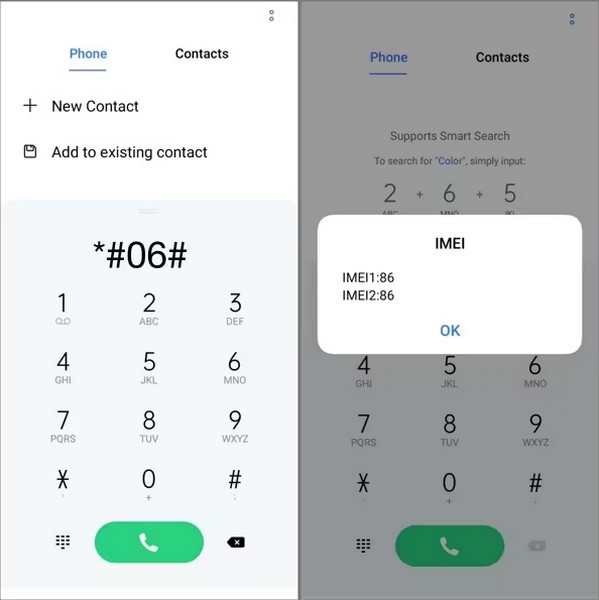
Your IMEI (International Mobile Equipment Identity) is the unique code that identifies your device on mobile networks. This number is essential when requesting a T Mobile SIM unlock or any other official unlock from your carrier. To find it, dial *#06# and your IMEI will appear on-screen. You can also check it in your phone's settings under About Phone. Write it down somewhere secure, as giving an incorrect IMEI can cause delays or even prevent you from unlocking the carrier lock.
Part 4. How to SIM Unlock Your Phone – 3 Methods
If you want your phone to work with any carrier, doing a SIM unlock the right way is important. Using unsafe methods, like random Google Play apps that promise instant unlocking, can be risky; they often fail, may harm your device, and can even hide malware. Instead, stick to trusted and legal unlocking options to protect both your phone and your data.
Request a SIM Unlock from Your Carrier
The safest and most reliable way to unlock a carrier-locked phone is to contact your carrier directly. Most carriers require your device to meet certain eligibility requirements before approving a SIM unlock.
Common requirements include:
- The phone has been fully paid off.
- The device is active and meets the carrier's requirements.
- The phone has not been reported as lost or stolen.
For example, if you need an AT&T SIM unlock or T-Mobile SIM unlock, you can submit an official unlock request through the carrier. Depending on your device, the carrier may provide an unlock code or remotely unlock your phone after approval.
Use an Online SIM Unlock Service
In case your carrier declined to unlock your phone, maybe because you do not fit their terms, you could seek an honest third-party service. This is only to be used as a last resort since most online services are unregulated and unreliable. Always do the research on the provider, verify customer reviews and ensure the viability of the company is tested.
Many customers have used sites for years to unlock their phones with IMEI. Note that you are almost sure to incur a charge, and that this varies among phones, as does the network. Even though this can be an effective solution, it is rather safer to perform an official carrier unlock to start with, avoiding unnecessary costs or risks.
Use a Dedicated SIM Unlock Tool (iPhone)
While contacting your carrier is the official way to remove SIM restrictions, some users may look for a faster solution when their iPhone is locked to a specific network. In such cases, a dedicated iPhone SIM unlock tool like imyPass iPassGo can help remove carrier restrictions and switch to different networks freely.

4,000,000+ Downloads
Unlock SIM-locked iPhone and switch network freely.
Remove various carrier locks, including AT&T, T-Mobile, and more.
Remove screen passcode, Face ID, Touch ID on iPhone and iPad.
Compatible with the latest iOS versions and iPhone models.
Connect your iPhone to the computer, launch the software, and choose Unlock SIM Card from the interface.
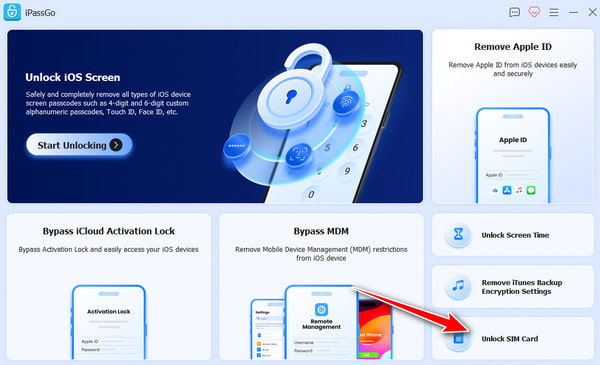
Please review the statement and warnings carefully, then click Start Now to proceed.
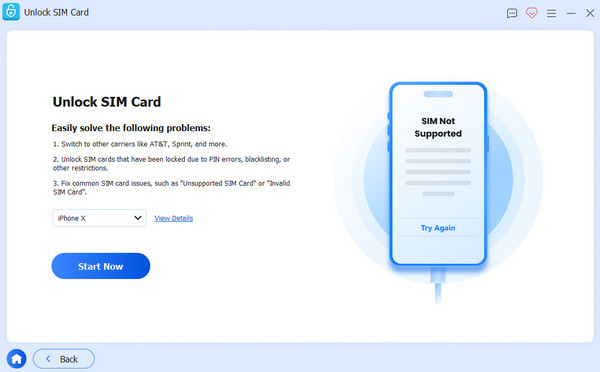
Mack sure your device information is correct, and click Start Bypassing. If your device is not jailbroken, you need to jailbreak it first. Follow the on-screen tutorial to set up your device.
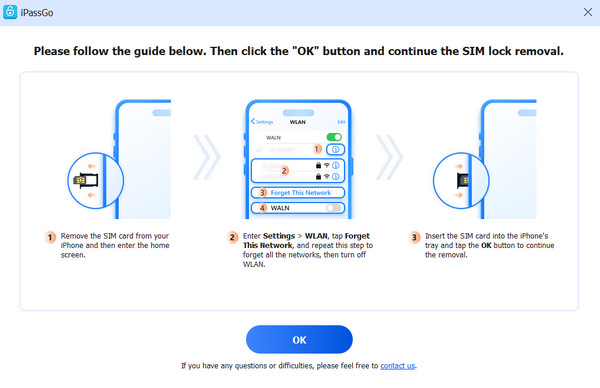
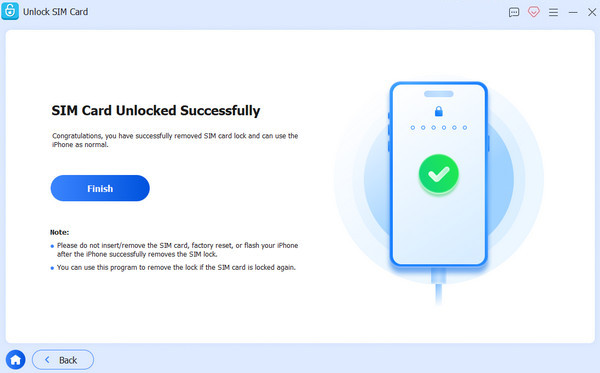
Click the OK button to confirm the removal. Then your SIM lock will be removed in minutes.
Conclusion
By now, you have learned what SIM unlock means, the difference between SIM unlock and SIM card unlock, and the steps to remove carrier restrictions from your phone. Whether you need an AT&T or T Mobile SIM unlock, the safest option is to request an official unlock through your carrier. Alternatively, you can choose a professional SIM unlock tool like imyPass iPassGo for a faster and more convenient unlocking experience.
Gideon writes about unlocking iOS, Android, and Windows devices. He previously worked as a mobile device specialist in a repair center, assisting customers with locked devices and password recovery. In his spare time, he tests new unlock tools, customizes smart devices and makes complex unlock processes simple and safe.
Hot Solutions
-
Unlock Android
-
Unlock iOS
-
Password Tips
-
iOS Tips


