Solution
 Support Center
 About Us
 Contact
How to Unlock Xfinity Mobile Phone for Any Carrier
 Gideon Byron Published on June 18, 2026Unlock Android4-min reading
If you are using an Xfinity Mobile phone, you may need to unlock it when switching to another carrier or using a new SIM card. However, not every Xfinity phone can be unlocked casually, as there are specific requirements you must meet. In this guide, we will explain the unlocking rules and introduce two solutions on how to unlock Xfinity Mobile phone easily.

In this article:
Part 1. Rules of Unlocking Xfinity Mobile Phone
Before you try an Xfinity carrier unlock, you need to know the official rules and requirements. Not every Xfinity phone is eligible for unlocking. Here are the key rules you have to understand:
- Your phone must be activated on Xfinity Mobile for at least 60 days.
- The phone must be fully paid off.
- Your Xfinity Mobile account must have a good standing.
- Your phone cannot be reported lost, stolen, or blocked.
Part 2. How to Unlock Xfinity Mobile Phone
You can perform an Xfinity device unlock using the official method or a trusted third-party service. We'll break down each step in detail to ensure you're fully prepared.
How to Unlock Xfinity Mobile Phone - Official Method
Xfinity Mobile provides an official unlock for eligible devices through their customer support. It's the most secure method without voiding any warranty. Follow these steps:
Contact Xfinity customer service.
Make sure your phone meets all the rules outlined in Part 1, then you can use the Xfinity Mobile app or call 1-888-936-4968 to contact Xfinity Mobile Support.
Find your IMEI number.
You need to prepare your account information like IMEI number to unlock your phone. You can find your IMEI by dialing #06# on your phone or checking in Settings > About > IMEI.
Request an unlock for Xfinity Mobile Phone
Tell the customer service representative that you want to unlock your phone. Then they will guide you providing necessary information and confirm if your phone meets the requirements.
Receive Unlock Confirmation
Xfinity will usually process the unlock remotely. You will receive the unlock code within 1-2 business days.
Complete the Unlocking Process
Turn off your phone and insert a SIM card from a different carrier. Restart your device, enter the free Xfinity Mobile unlock code when prompted, and follow the on-screen instructions. Once completed, your Xfinity Mobile phone is officially unlocked.
How to Unlock Xfinity Mobile Phone with DirectUnlocks
If you prefer a faster or easier method, DirectUnlocks is a reliable third-party service that can unlock Xfinity Mobile phones remotely.
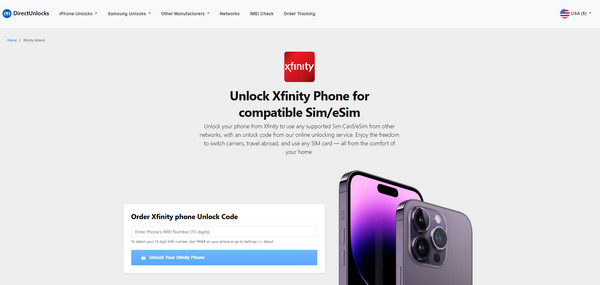
Visit the DirectUnlocks website and go to the Unlock Xfinity iPhone for Compatible Sim/eSim page.
Enter your IMEI number in the provided field. The service will detect your device model automatically, then click Unlock Your Xfinity iPhone to proceed.
You will be redirected to the payment page. Pay the unlocking fee using any of the available payment options.
After payment, wait for the unlock to process. It may take up to 24 hours.
Part 3. Troubleshooting: Issues & Fixes
If you follow the correct steps, but the unlocking still fails. It may be caused by one of these issues:
1. Your device is not eligible
If Xfinity says your device is not eligible for unlocking, check whether your phone meets all the requirements listed in Part 1.
2. Unlock code is not working.
Make sure you entered the code correctly. If the issue continues, contact Xfinity Mobile or request a new code.
3. Phone shows "SIM Not Supported" error.
If your phone still displays "SIM Not Supported" after unlocking, restart your device, check for a system update, reinsert your SIM card or try another carrier's SIM card.
4. Don't receive an unlock code.
Ensure your phone is connected to a stable Wi-Fi network. Check your email or messages for unlock confirmation. If the unlock process takes longer than 48 hours, contact Xfinity Mobile support for assistance.
Part 4. How to Unlock Xfinity Mobile Phone Screen Lock
Now you have learned how to unlock an Xfinity Mobile phone for use with other carriers. However, carrier unlocking is not the only issue users may face. In many cases, the real problem is simply forgetting the screen password, PIN, or pattern and getting locked out of the device. In this situation, imyPass AnyPassGo can remove the screen lock on Android easily.
4,000,000+ Downloads
Remove any screen lock without password on most Android models.
Unlock a disabled, damaged, or stolen Android without passcode.
Bypass Google FRP Lock on Samsung, Xiaomi, Huawei, and more.
Support the latest Android version (Android 5-16).
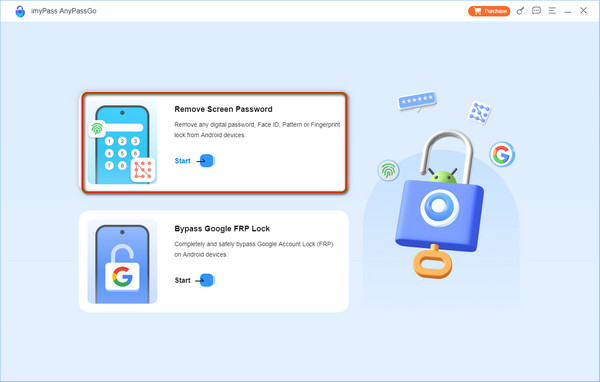
Launch the software on your computer and select the Remove Screen Password from the interface.
On the next screen, select the brand of your device.
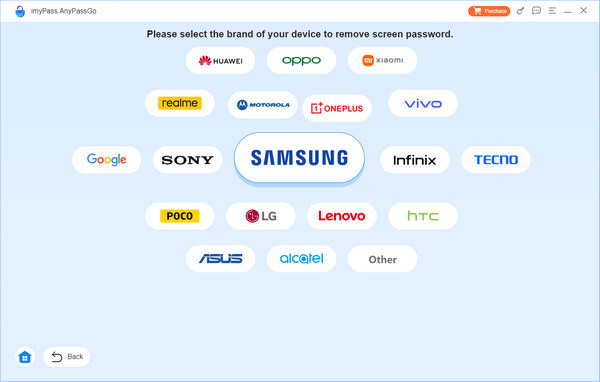
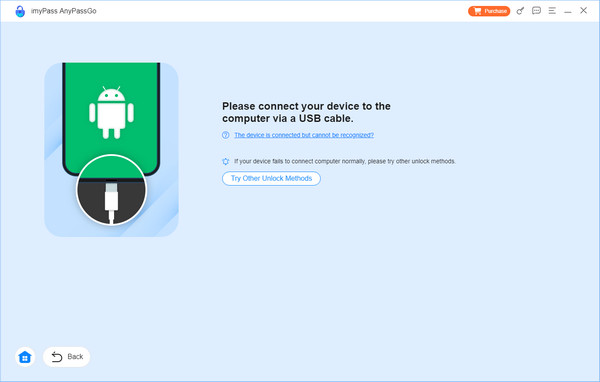
Connect your Android to your computer using a USB cable.
After successfully connected, click the Remove Now button to start removing the screen lock.
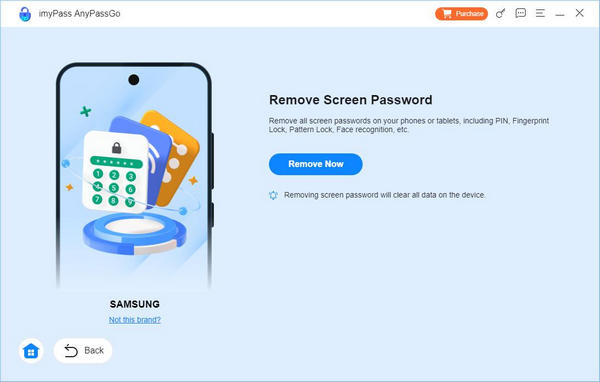
This process will erase all data on your device. Make sure you have a recent backup so you can restore your Android afterward.
Conclusion
To sum up, Xfinity unlock phone is not complicated as long as your device meets the eligibility requirements. If your phone qualifies, the easiest and safest way is to contact Xfinity Mobile Support to complete the official unlocking process. If you run into any issues or prefer a faster solution, you can also try a trusted third-party unlock tool to unlock your Xfinity Mobile phone more conveniently.
Gideon writes about unlocking iOS, Android, and Windows devices. He previously worked as a mobile device specialist in a repair center, assisting customers with locked devices and password recovery. In his spare time, he tests new unlock tools, customizes smart devices and makes complex unlock processes simple and safe.
Hot Solutions
-
Unlock Android
-
Unlock iOS
-
Password Tips
-
iOS Tips