Solution
 Support Center
 About Us
 Contact
3 Ways to Remove or Bypass Activation Lock on Apple Watch
 Samuel Spenser Published on March 06, 2026Unlock iOS3-min reading
Stuck on the Apple Watch Locked to Owner screen? Activation Lock is Apple's robust security layer, but being locked out of your own device is incredibly frustrating. Whether you've forgotten your Apple ID or purchased a second-hand watch with a previous owner's account still linked, you'll need to bypass Activation Lock on Apple Watch.
In this 2026 updated guide, we'll break down the official Apple Support request process and the iCloud remote removal steps that actually work. No shady software, just straightforward, proven methods to reclaim your Apple Watch.

In this article:
Part 1. Can You Bypass Activation Lock on Apple Watch?
Today, no third-party software or service can really "remove" iCloud Activation Lock on Apple Watch. Activation Lock is a server-side security feature. It isn't stored on the watch itself but on Apple's secure servers. This means that even if you "hard reset" the watch, it will immediately ping Apple's servers upon restart and lock itself again.
You can only bypass Activation Lock on Apple Watch (all series) with legitimate and official ways:
- Reset your Apple ID password with linked phone number or email address.
- Request an unlock service via official sources, like a physical or online Apple Support.
- Ask the previous owner to unlink the Apple Watch from iCloud.
Part 2. How to Remove Activation Lock on Apple Watch
Way 1: Ask the Previous Owner for Help
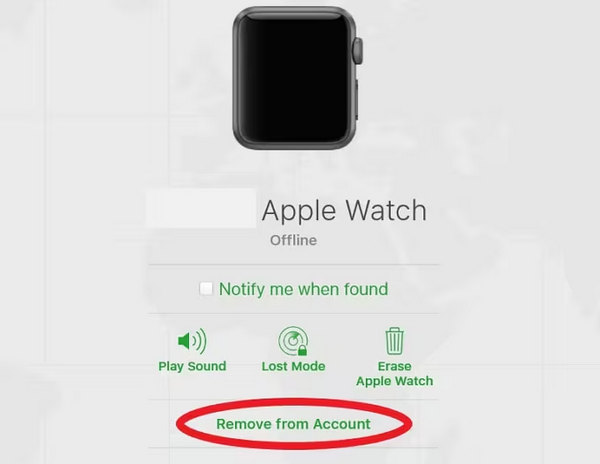
If you bought the Apple Watch second-hand, the seller must remove it from their iCloud. Contact the seller and ask him or her to remove the watch from his or her iCloud. They can do this remotely from anywhere in the world:
What the seller should do:
- 1.Go to www.icloud.com/find and log in.
- 2.Select the Apple Watch from the All Devices list.
- 3.Click Erase Apple Watch (follow the prompts).
- 4.Once erased, click Remove from Account.
What you should do:
- 1.Restart the Apple Watch.
- 2.Check whether the Activation Lock is gone on the watch.
Way 2: Reset Your Apple ID Password
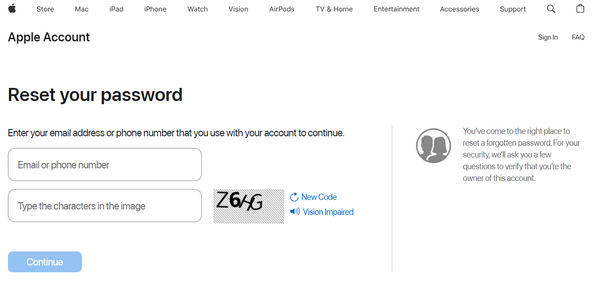
If you still have the linked phone number or email address, you can use them to reset your Apple ID password, and then enter the new password to unlock Activation Lock on your Apple Watch.
Visit iforgot.apple.com/.
Click the Reset Password button.
Follow the on-screen guide to reset your Apple ID password.
Use your new password to log in and unlock the activation lock on Apple Watch.
You May Need to Know: Apple has introduced stricter Stolen Device Protection in 2026 (from support.apple.com/en-us/120340), so you may encounter a Security Delay if you are trying to reset your password from an unfamiliar location.
Way 3: Activation Lock Support Request
If you bought the Apple Watch new but lost access to your account, Apple can unlock it for you. However, you must provide proof of purchase (original receipt/invoice). It must show the device's Serial Number or IMEI. So, if you have a second-hand Apple Watch, ensure that you have the proof of purchase from the previous owner.
Warning: Apple will not unlock devices purchased from eBay or secondary markets without the original receipt from an authorized reseller.
Visit al-support.apple.com/#/. Scroll down to find "Need additional support?".
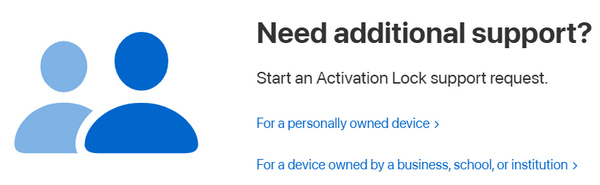
You can see two options:
- For a personally owned device
- For a device owned by a business, school, or institution
Click the one that suits your situation, and then follow the on-screen guide to request Apple to unlock the activation lock on your Apple Watch.
Warning: Avoid Bypass Tools for Apple Watch
Apple Watch has stricter security methods that iPhone or iPad. If you search YouTube or Google, you will find tools claiming to bypass the lock on Apple Watch for a fee. These are almost always scams.
Fake Pre-payments: They often ask for $20–$50 upfront and then stop responding.
Malware Risks: Many unlockers for Windows or Mac are actually Trojans designed to steal your computer's data.
Bypass Mode Trap: Some tools can help you bypass activation lock on Apple Watch, but you cannot pair it with a phone, use the App Store, or make calls.
Part 3. How to Turn Off Activation Lock on Apple Watch
How to turn off the activation lock on the Apple Watch? If you know your Apple ID and password, you can easily do that and regain access to the watch. Most of our Apple Watches are linked to an iPhone, which is why this method can be effective. Learn more here:
Ensure your Apple Watch and iPhone are within proximity and open the Apple Watch app on your iPhone.
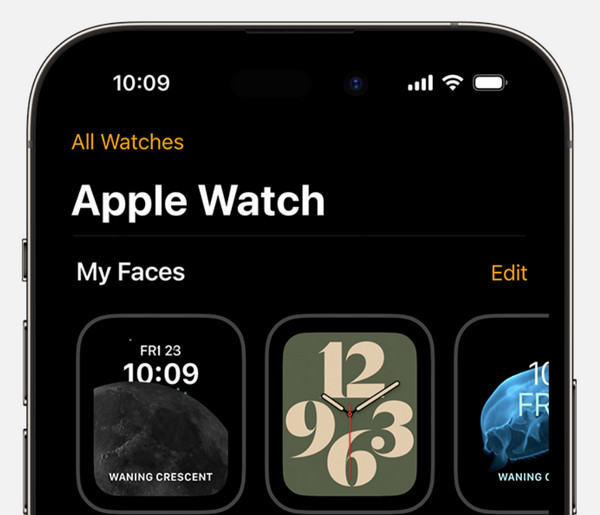
Navigate to the My Watch tab, then tap on All Watches located at the top of the screen.
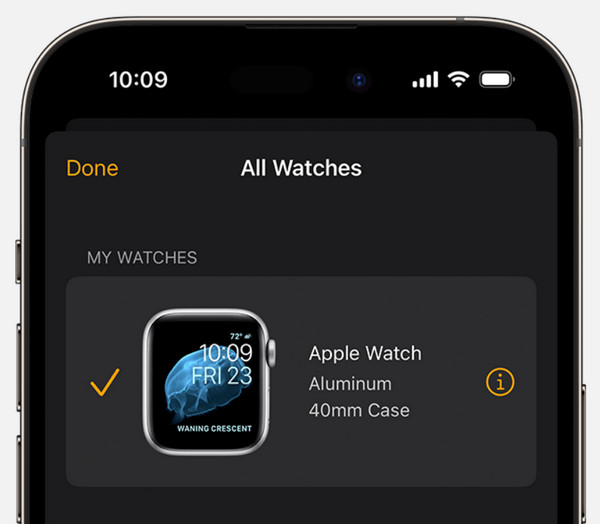
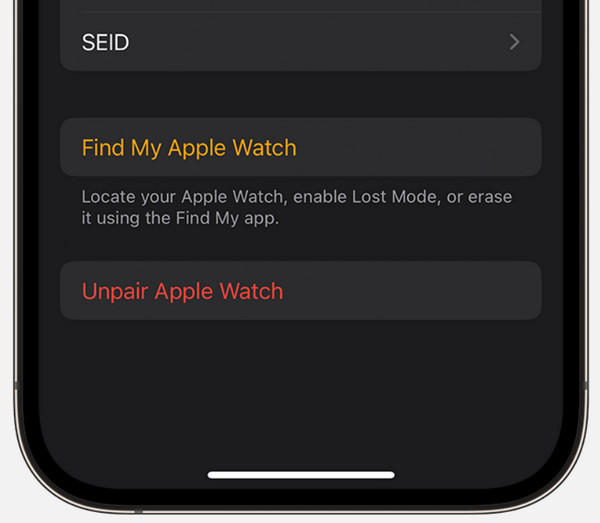
Locate your Apple Watch in the list and tap on the information button next to it and within the Apple Watch app, tap on Unpair Apple Watch.
Part 4. How to Bypass Activation Lock on iPhone and iPad
imyPass iPassBye is known for its effectiveness in removing the activation lock on iPhones and iPads to regain access and lift the restriction. Its effectiveness lies in its overall build and jailbreaking. However, it does not offer a jailbreaking feature which means you will need to jailbreak your device before you proceed to the steps added here.
After jailbreaking the device, click the download button below to have the app on your PC. Then, install the program and do the setup.
Next, open the app and use your USB cable to connect the device to your PC. When there is a prompt, click the Trust This Computer.
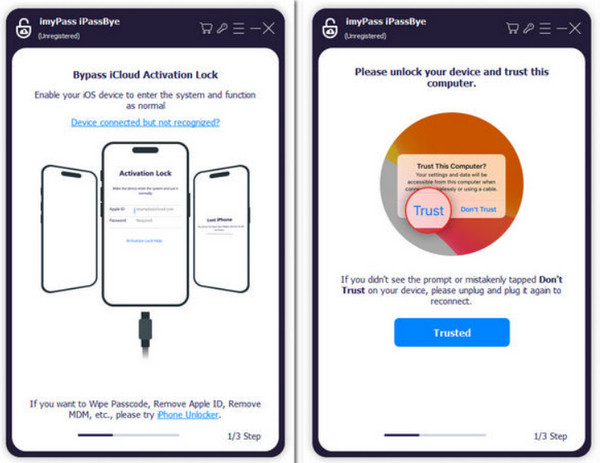
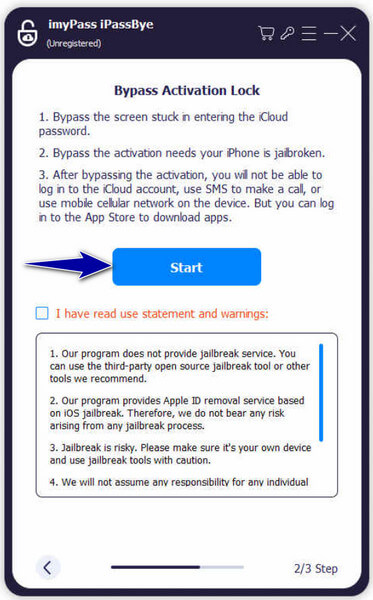
There are three things you need to take note of as it is mentioned and if you agree click the Start button and Next.
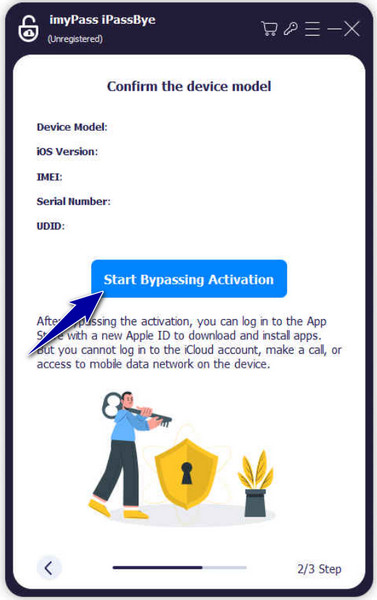
Confirm the information that is generated and click Start Bypassing Activation to confirm the action.
You may want to know:
FAQs.
-
Does the factory reset remove the activation lock?
No, a factory reset alone does not remove the activation lock. Activation Lock is a security feature tied to the Apple ID and requires specific steps to be disabled.
-
How do I pair my locked Apple Watch?
If your Apple Watch is locked, you will need to first remove the Activation Lock associated with it before pairing it with a new iPhone. Follow the recommended methods provided by Apple or use specialized services to bypass the lock.
-
How do I reset an Apple Watch that I bought second-hand?
To reset a second-hand Apple Watch, ensure that the previous owner has removed the Activation Lock. If not, ask them to follow the necessary steps to disable it. Once the Activation Lock is removed, you can perform a factory reset by going to Settings, General, Reset, Erase All Content, and Settings on the Apple Watch.
-
Can I bypass the activation lock without the Apple ID and password?
While services and methods are claiming to bypass the activation lock without the Apple ID and password, it's important to note that these may not always be legitimate or recommended by Apple. Proceed with caution and ensure the legitimacy of the method before using it.
-
Can I bypass the activation lock if the Apple Watch is reported lost or stolen?
Activation Lock serves as a security measure to deter unauthorized use of lost or stolen devices. If an Apple Watch is reported lost or stolen, it may be flagged in Apple's database, making it difficult or impossible to bypass the activation lock without proper documentation and verification of ownership.
Conclusion
This post explains how to bypass Activation Lock on Apple Watch. You can only do that via official and legitimate ways, like resetting your Apple ID password or asking the previous owner to unlink the watch. Apple Watch has stricter security methods than iPhone or iPad, so many so-called bypass tools may not work.
But if you want to bypass iCloud Activation Lock on an iPhone or iPad, you can use some bypass tools like imyPass iPassBye. They can jailbreak your iOS device and then bypass iCloud easily. This will help you regain access to the device.
Samuel specializes in password security and digital privacy. He used to work as a cybersecurity consultant for small businesses to protect digital assets. With certifications in Cybersecurity and Ethical Hacking, he turns complex security topics into easy-to-follow advice. He also enjoys sharing password tips to help users protect their accounts more confidently.
Hot Solutions
-
Unlock iOS
-
iOS Tips
-
Unlock Android
-
Password Tips