



 Solution
 Support Center
 About Us
 Contact
What Is FGL Pro App and How to Use It for Pokemon GO
 Penny Warren Published on February 04, 2026GPS Location3-min reading
There are scenarios when you need to fake a location on your Android phone. For example, you want to play AR games and capture items in another country. Or you wish to watch a series exclusive to a specific region. One simple option is using a spoofer app on your Android device. A free spoofer app, such as FGL Pro, is a good idea for beginners. Our article will review it.

In this article:
Part 1: FGL Pro Review
FGL Pro is one of the free joystick simulator apps, offering a comprehensive array of features. Most joystick apps are not free and include in-app purchases or ads. FGL Pro, on the other hand, is completely free and available at no cost.
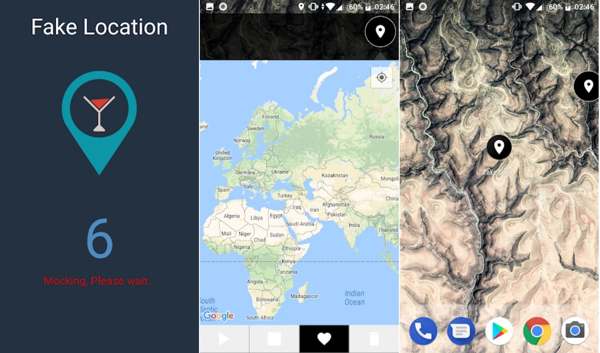
Main Features of FGL Pro Location Spoofer
- 1.Fake and change location on Android devices without a computer.
- 2.View the map in various views.
- 3.Prevent apps from detecting mock location.
- 4.Repeat the last mocked position every 50 seconds.
- 5.Change phone location with coordinates and addresses.
- 6.Favor virtual locations.
- 7.Support different speed modes.
- 8.Duplicate the GPS location.
FGL Pro Review
Pros
- It is available to Android 4 and later.
- It works for a wide range of location-based apps.
- FGL Pro is free to use.
- It doesn’t ask you to root your Android device.
Cons
- You have to install the APK.
- It doesn’t equip advanced features.
- It cannot make virtual routes.
Is FGL Pro Safe to Use?
You cannot download FGL Pro from the Google Play Store currently. It means that you can get the app from a third-party source. That may bring risks to your device. However, according to our test, it won’t install malware or spyware on your phone if you get it from a trustworthy source.
Part 2: How to Use FGL Pro
Since you can download FGL Pro APK, the installation process is a little complication. Moreover, you must set up when using a spoofer app on an Android device. We share the whole process below:
Open the Settings app on your app tray.
Go to Apps & Notifications, and tap Advanced.
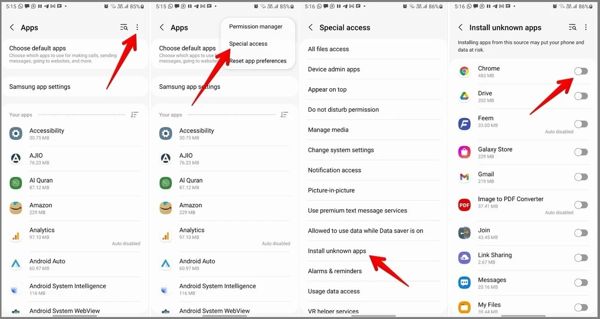
Press the More button with a three-dot icon, and choose Special access.
Tap Install unknown apps, and toggle on Chrome or your browser.
On Android 7 or older, head to Security in Settings, and toggle on Unknown Source.
Search for FGL Pro APK in your browser, and download it.
Next, install it in your memory.
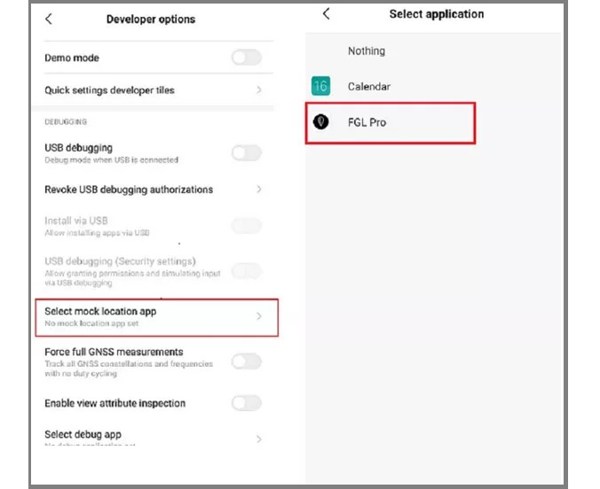
Go to Settings, Developer options, and tap Select mock location app.
Select FGL Pro to set it up.
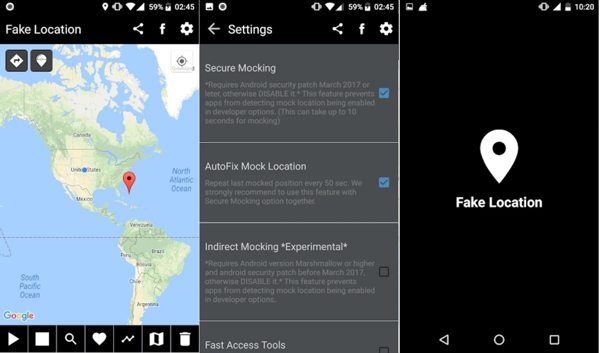
Run the spoofer app from your app drawer.
Tap and pin the desired location on the map, and tap the Start button.
Part 3: An Alternative to FGL Pro
FGL Pro is not the best spoofer app for Android users. For instance, some users reported that FGL Pro failed to detect location or other problems. More importantly, it cannot simulate routes, so FGL Pro is unavailable to Pokémon GO. Therefore, you may need an alternative: iLocaGo.

4,000,000+ Downloads
Fake GPS location on both iOS and Android in one click.
Make virtual routes in multiple modes.
Available on social media, AR games, and more.
Offer a wide range of custom options.
Support iOS 27 and Android 17 or earlier.
How to Use FGL Pro Alternative
Detect your phone
Launch the alternative to FGL Pro after installing it on your PC. There is another version for Mac. Plug your iPhone or Android phone into your PC with a USB cable. The software will recognize your device automatically.

Choose Modify Location
Click the Modify Location mode when you are presented with the mode window. The other three modes, One-stop Mode, Multi-stop Mode, and Joystick Mode, are used to create virtual routes.

Change phone location
Next, enter an accurate address into the field on the pop-up dialog. If you don’t have an address, find and click a position on the map. Finally, click on the Modify button to change your phone location immediately. Now, you can turn on your mobile device and access the app or mobile game.

Note:
Once you want to stop using the FGL Pro alternative, disconnect your device and close the software.
Conclusion
Our article reviewed a free spoofer app, FGL Pro. Following our discuss, you should understand what the app can do, its advantages and disadvantages, as well as how to use it to fake your phone location. If you need FGL Pro on iPhone or the app fails on your device, you can try iLocaGo. It is not only easy to use, but also works for various apps and services.
Penny focuses on GPS troubleshooting and Windows optimization. She formerly worked as a technical support engineer, helping clients solve location-based and system issues efficiently. Backed by IT support experience, she provides practical solutions that really work. In her free time, she likes hiking and geocaching, testing GPS tech in the real world.
Hot Solutions
-
GPS Location
-
Unlock iOS
-
iOS Tips
-
Unlock Android


