



 Solution
 Support Center
 About Us
 Contact
3 Ways to Unlock TCL Phone Screen Lock Without Password
 Gideon Byron Published on February 06, 2026Unlock Android3-min reading
Did you forget the screen passcode on your TCL phone? Screen locks are a vital security feature for TCL users, safeguarding digital privacy and keeping prying eyes at bay. However, forgetting your passcode can become a major roadblock to accessing your own data. Similarly, carrier locks often hinder users who wish to switch to local SIM cards while traveling abroad. To deal with both challenges, this guide provides comprehensive guides to unlock TCL phone screen lock and carrier lock.

In this article:
Part 1. How to Unlock TCL Phone Without Password [Screen Lock]
Method 1: Unlock TCL Phone via Factory Reset
If you can't get past the lock screen, you will likely need to perform a Factory Reset. This will erase all data on the TCL phone (photos, contacts, etc.) unless they are backed up to the cloud.
Turn off your TCL phone.
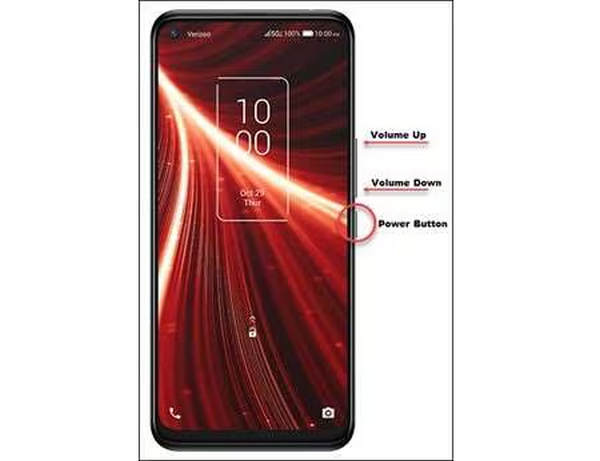
Press and hold the Power button and Volume Up button simultaneously until the TCL logo appears.
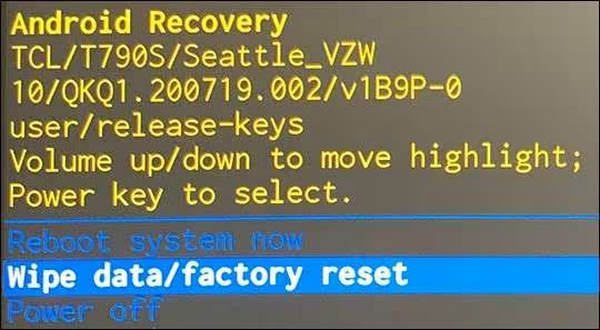
Use the volume buttons to navigate the Recovery Mode menu and select Wipe data/factory reset. Confirm with the Power button.
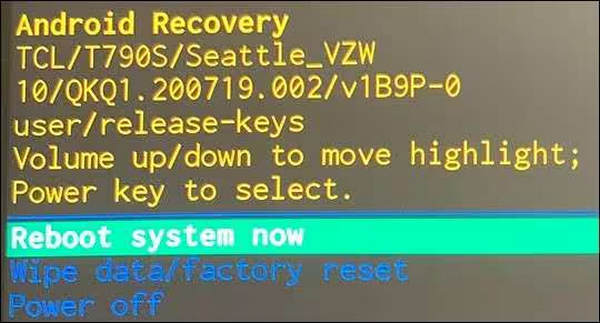
Once finished, select Reboot system now. After reboot, you can unlock your TCL phone without a password.
Note:
After resetting, you will likely need to log in with the original Google Account previously synced to the phone (Factory Reset Protection).
Method 2: Google Find My Device
If you have a Google account logged in and "Find My Device" enabled, you can reset to unlock your TCL phone remotely. Although this method has a fast and easy workflow to unlock your TCL phone, please note that for modern Android versions (Android 5.0 and higher), this method will erase all data on your phone to remove the lock screen.
For this to work, your TCL phone must:
- Be turned ON.
- Be signed in to a Google Account.
- Be connected to Mobile Data or Wi-Fi.
- Have Location and Find My Device enabled (usually on by default).
Access the Service
Use a computer or another smartphone, go to the google.com/android/find webpage.
Select Your TCL Phone
If you have multiple devices, click on the TCL phone icon at the top left of the screen. The system will attempt to locate your device. Even if it can't find the exact location, you can still send the unlock command.
Choose Erase Device
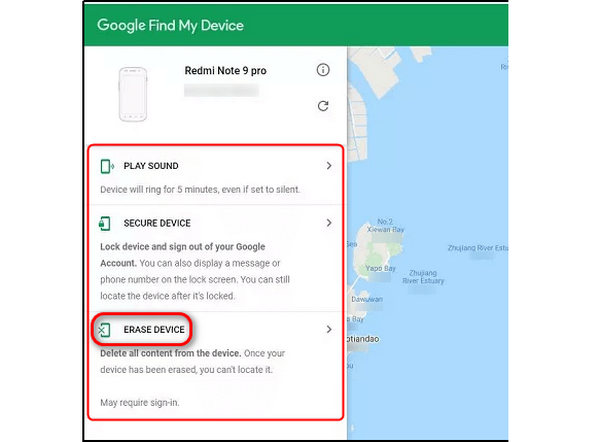
You will see some options like Play Sound, Secure Device, and Erase Device (sometimes called Factory Reset Device). Select Erase Device to unlock your TCL phone without a password remotely.
Note:
In the past, the Secure Device option allowed you to set a new password, but Google updated this for security. Now, Erase is the only way to remove a forgotten lock screen.
Method 3: Unlock TCL Phone via imyPass AnyPassGo
Many third-party programs are available in the market to unlock a TCL phone without a previous password. In this guide, we recommend iMobie DroidKit to wipe all types of screen locks on a TCL phone without a password. imyPass AnyPassGo is an all-in-one Android unlocking program that can not only help you unlock screen locks and FRP locks but also fix system issues and recover Android data.
Let's see how to turn off the lock screen on most Android phones:

4,000,000+ Downloads
Remove screen lock: PIN, pattern, Face ID, Fingerprint, etc.
Support almost all Android devices running Android 5 to 15.
Easy to use and 100% safe.
You can contact support online and get help at any time.
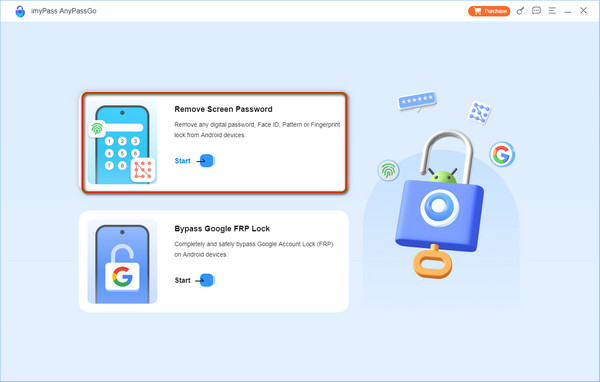
Download and install imyPass AnyPassGo on your Windows PC. After launching it, connect your locked TCL phone to your computer via a USB cable. Click Remove Screen Password from its home interface.
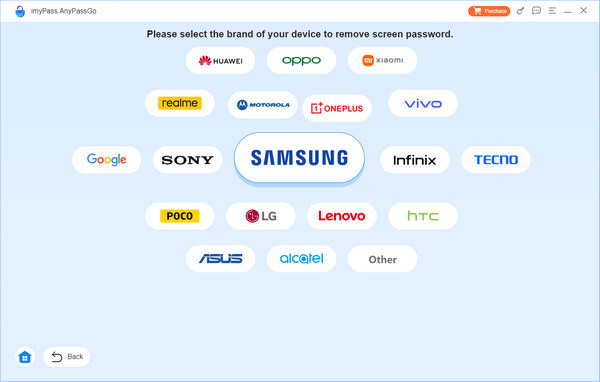
Select your device brand and continue.
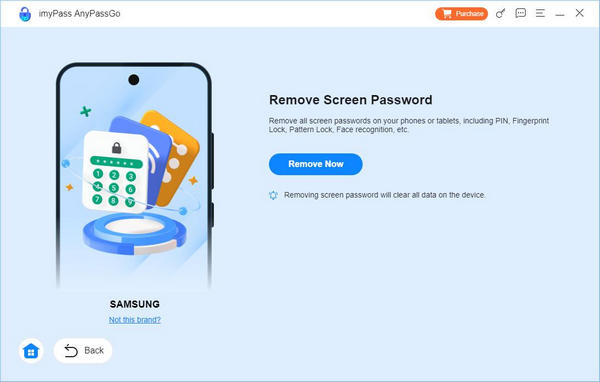
When everything is ready, click Remove Now, and in no time, your TCL phone screen lock will be removed.
Note:
Not all TCL phones are supported. You can download imyPass AnyPassGo and try for free.
You May Also Like:
Part 2. How to Unlock TCL Phone with IMEI [Carrier Lock]
If your TCL phone is carrier-locked, you cannot switch to other carriers whenever you like. In this case, you are unable to take advantage of better deals offered by different carriers. Besides, you might fail to download some special apps for entertainment or work that haven't been verified on the current carrier's approved app store.
To deal with the tough nut, you should apply for a TCL phone unlock code to unlock the carrier lock. If you are the original owner of your TCL phone, you can apply to your TCL phone's carrier for a free TCL phone unlock code. If not, you can turn to paid online services.
Confirm the carrier brand of your SIM card and go to its official website to check its unlock policy. Usually, your TCL phone should be paid off, and your phone number should be active on its network for a certain period.
If your TCL phone is eligible to unlock the carrier lock, you can contact the current carrier and apply for a free TCL phone unlock code.
◆ T-Mobile IMEI Unlock: 800-937-8997
◆ AT&T IMEI Unlock: 800-288-2020
◆ Boost Mobile IMEI Unlock: 1-833-502-6678
◆ Mint Mobile IMEI Unlock: 1-866-646-4638
◆ Verizon IMEI Unlock: 800-922-0204
◆ Xfinity IMEI Unlock: (888) 936-4968
◆ Sprint IMEI Unlock: 888-211-4727
◆ U.S. Cellular IMEI Unblock: 888-944-9400
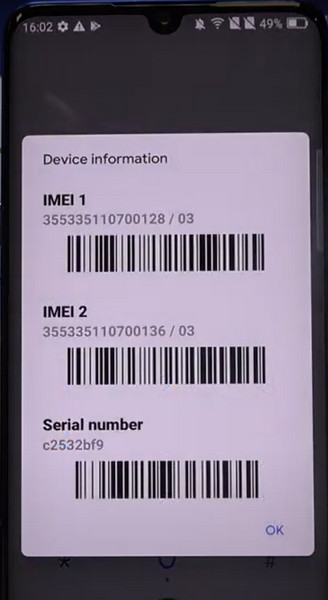
Once connected, you should give them the necessary information, including the IMEI number, phone number, special account, etc. Then, you should wait patiently until they approve your application and send your TCL phone unlock code for free. Now, you can unlock the carrier lock on your TCL phone with the unlock code.
FAQs.
-
How to unlock TCL phone without losing everything?
If the Android version of your TCL phone is Android 4.4 or below, you can use the Forgot Pattern feature to unlock your TCL phone without losing everything. In addition, you can use the Google Find My Device feature to reset a new screen password.
-
Is TCL Flip 2 unlocked better than a locked one?
In terms of carrier freedom, TCL Flip 2 unlocked is superior to a locked one. In terms of price, a locked TCL Flip 2 is cheaper than an unlocked one. They both have their upsides and downsides, you should make an advisable choice between them based on your needs.
-
How to unlock the carrier lock of a second-hand TCL phone?
Since you cannot apply to the carrier for a TCL phone unlock code because you are not the original owner, you can use other online unlock services like CellUnlocks to unlock the carrier lock from a TCL phone. All you need to do is to enter your TCL phone's IMEI number and pay upfront.
Conclusion
By reading this guide, you can learn how to unlock a TCL phone without a password and with the IMEI number. After that, you can access all functions in your TCL phone or switch to another provider without restrictions. imyPass AnyPassGo is the easiest solution to unlock the screen lock on new TCL phones, like the TCL 60 series and 50 series. Moreover, it can help you remove FRP after unlocking the screen, so you can get full access to the phone.
Gideon is a senior editor from imyPass. He is an expert in unlocking phones and computers, and he has written password tutorials in imyPass for 3 years.
Hot Solutions
-
Unlock Android
-
Unlock iOS
-
Password Tips
-
iOS Tips

