



 Solution
 Support Center
 About Us
 Contact
Fly GPS: Change Location on Android Phone and iPhone Easily
 Penny Warren Published on December 26, 2025GPS Location3-min reading
The Android phone and iPhone location is one of the most important features they contain. However, some people need to falsify it for some reasons about their Android phone and iPhone. For example, they are playing Pokémon GO. Some do not have time to go outside to catch Pokémon. They tend to change their iPhone or Android phone location for this issue.
Fly GPS is one of the applications that can change your location on your mobile phone. This article will help you become familiar with the app by showing its full review. Continue browsing in this post to know the full details.

In this article:
Part 1. What Is Fly GPS
From different best location changer reviews, you might have read about Fly GPS. It is one of the most famous apps that can change your location on an Android phone and an iPhone. This application is known for its simple interface and features. Does Fly GPS work for Pokémon GO? Definitely! This mobile game is the most famous supported app by the location changer app.
However, this app contains advertisements from its interface that might be inconvenient for some of you. You can purchase its paid version to remove the advertisements to get its full features.
The good thing about this app is that it allows you to see the history of the location you have set up from your Android phone or iPhone. It also allows you to modify different settings to change the location on your iPhone. It includes Google Maps mobile speed settings, GPS updated speed, updating distance settings, and more.
Part 2. How to Use Fly GPS on Pokémon GO on Android & iPhone
The iPhone and Android Fly GPS for Pokémon GO has a simple procedure. However, this app requires multiple permissions on your iPhone and Android phone. You need to enable Developer Options for advance modifications from the settings of your mobile phone. Beginners will have difficulty with this procedure even though the features are straightforward.
The said procedure is a bit risky if you are a novice. You can possibly set up faulty settings that can affect your iPhone and Android phone negatively. The steps below will help you use Fly GPS on your Pokémon account on its app.
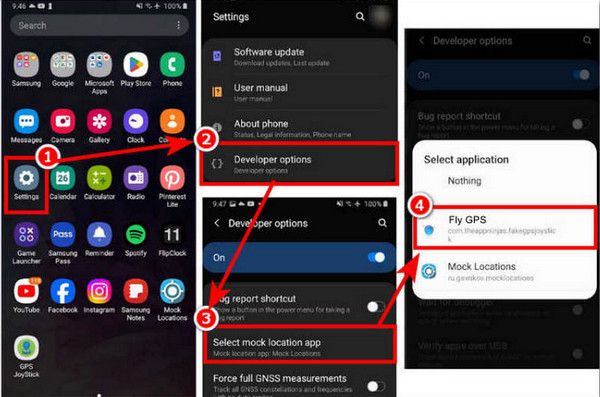
Download Fly GPS on your Android phone or iPhone. After that, tap the Settings app from the screen and tap the Developer Options button from the screen. Tap the Select Mock Location App button from the list. Tap the Fly GPS button from the small window.
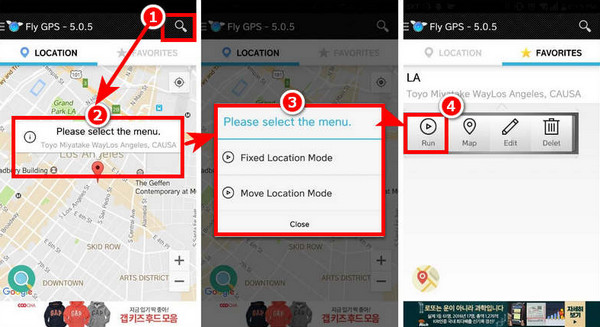
Open the Fly GPS app on your mobile phone. Then, select the Search button at the top right corner. Choose the Fixed Location Mode or Move Location Mode button on your mobile phone.
You can set the features you prefer to use from the Favorite section at the top right. After that, tap the Run button from the toolbar. This way, you can open the Pokémon GO app on an iPhone or Android phone to catch Pokémon around the globe.
Part 3. Does Fly GPS Really Work and Is It Safe?
Fly GPS will indeed change your iPhone and Android phone, wherein it can be used as a GPS joystick. However, there are various risks when using the application on your Android phone and iPhone.
1. Violations of Multiple Applications TOS
Fly GPS is not safe to use on different applications available on your iPhone and Android phone. Pokémon GO, Facebook, and Instagram are some of them. These applications prohibit the changing of your iPhone and Android phone location. The impact of this procedure on the account from the platforms or mobile games is severe. Your account can be banned.
2. Interferes with Real Navigation
The fake GPS signals from the app can interfere with or override your actual location. It can significantly affect your Google Maps, Waze, and other apps that rely on the location from your iPhone and Android phone.
3. Android Phone or iPhone System Instability
The app modifies the GPS behavior and mocks the location features of your mobile phone. This way, the app will drain your iPhone and Android phone battery. In this case, the mobile phones will experience crashing and lagging issues.
4. Tracking and Ads Injection Issues
Fly GPS has crack and APK versions that can be installed on your mobile phones. Some of the versions of this application might contain spyware or adware. If so, your iPhone and Android phone data or information will be at risk. Those GPS changers from third-party sources may contain potential risks.
5. Legal Issues
Spoofing the location from some countries or regions is restricted or illegal. You might face legal actions if Fly GPS is used. It still depends on how you use the app on your iPhone or Android phone.
Part 4. Fly GPS Alternative
There are countless fake Fly GPS on digital stores and online. It is the primary reason why people want an alternative to the app. imyPass iLocaGo can be used. This tool allows you to change your iPhone and Android phone location in four modes. It includes One-stop Mode, Multi-stop Mode, Joystick Mode, and Custom Speed. This tool supports the latest software versions of mobile phones, including Android 17 and iOS 27.
Additionally, this software can change your location from different famous apps on your mobile phone. It includes Facebook, Pokémon GO, Hinge, WhatsApp, Snapchat, and more. It also offers its history and favorite features for convenient procedures. The steps below will show you how to use the tool.
Open the most trusted web browser on your computer. Visit imyPass iLocaGo and download it from the first screen. Set up the file and install it afterward. The software will be installed automatically afterward.
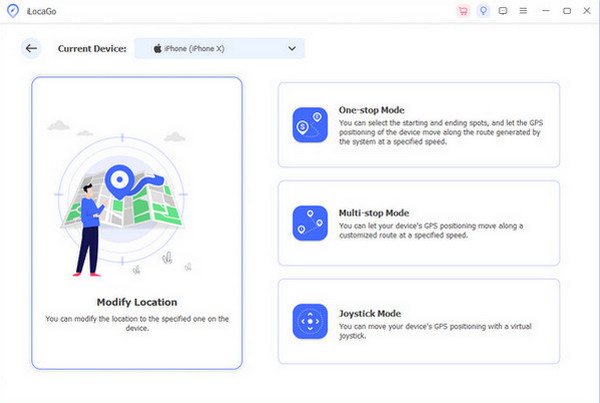
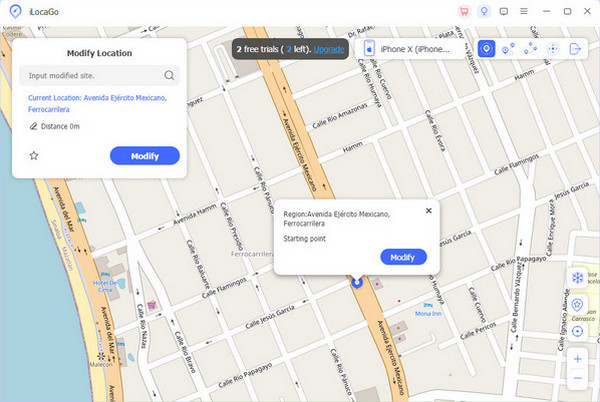
The main functions of the tool will be prompted from the screen. Please select the Modify Location button on the left. Then, you will see the next interface.
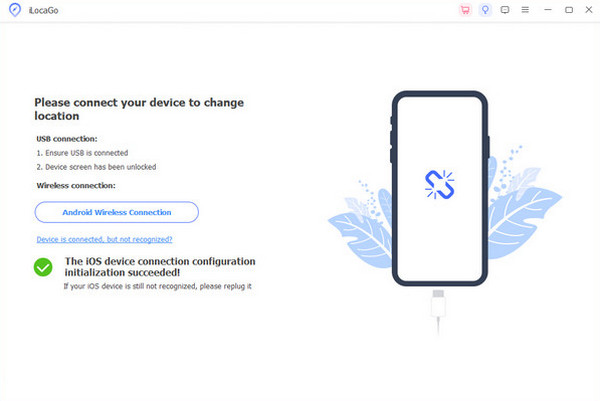
The tool will require you to plug the Android phone or iPhone into the computer. Please grab your USB cable and follow the instructions that are posted on the tool. Then, you must see the iPhone name from the main interface.
You will see a small window at the top left of the screen. Type your preferred location for your iPhone and Android phone afterward. Then, click the Modify button to change it in a few seconds. The Pin button will be replaced afterward, indicating that the process is successful.
Conclusion
In conclusion, the APK Fly GPS is not 100% safe for your iPhone and Android phone, including their features and apps. This article also shows how to use it correctly. It gives you an option for an alternative to the app, which is imyPass iLocaGo. This tool has an accurate change of location on your mobile phone.
Penny focuses on GPS troubleshooting and Windows optimization. She formerly worked as a technical support engineer, helping clients solve location-based and system issues efficiently. Backed by IT support experience, she provides practical solutions that really work. In her free time, she likes hiking and geocaching, testing GPS tech in the real world.
Hot Solutions
-
GPS Location
-
Unlock iOS
-
iOS Tips
-
Unlock Android


