



 Solution
 Support Center
 About Us
 Contact
What Is UltFone iOS Location Changer and Best Alternative
 Penny Warren Published on January 09, 2026GPS Location3-min reading
There are several reasons why you need to change your iPhone location, such as gaining more advantages in AR games, protecting privacy, accessing content exclusive to specific regions, and more. However, Apple doesn't allow users to adjust location on iOS devices due to security regulations. Thankfully, UltFone iOS Location Changer can meet your needs. If you are ready to change your iPhone location using UltFone, read our review first.

In this article:
Part 1: What UltFone iOS Location Changer Is
As its name indicates, UltFone iOS Location Changer is a location changer for iOS users to modify their GPS location and access geo-restricted content and rare in-game items. It offers an easy way to fake your geolocation on your iPhone or iPad at an affordable price.
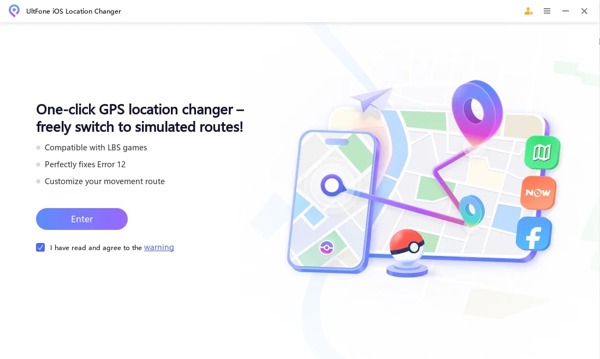
Main Features of UltFone iOS Location Changer
1. Fake location to fool others on social media, dating apps, and more.
2. Support single and multi-spot movements when playing AR games.
3. Adjust custom options, like movement speed.
4. Access a wide range of geo-restricted apps.
5. Support devices running iOS 14 to 18.
6. Offer a mobile app to change location without a PC.
UltFone iOS Location Changer Review
Pros
- UltFone iOS Location Changer integrates a clean interface.
- The prices are affordable.
- It comes with a great customer support team.
- The software provides MHS GPS issue resolution.
- It includes multiple modes for simulating life-like movement.
- It doesn't ask you to jailbreak your iPhone.
Cons
- The current location displayed may be incorrect.
- Users reported high battery drainage.
- The free trial is limited.
Is UltFone iOS Location Changer Safe?
It is safe to install and doesn't contain malware if you download UltFone iOS Location Changer from the official or a trusted source. Plus, it doesn't require you to jailbreak your device.
System Requirements of UltFone iOS Location Changer
For iOS 17 and later, it requires Windows 11/10 or macOS 10.15 and above.
For iOS 16 or below, it requires Windows 11/10/8/7 or macOS 10.13 and above.
The UltFone iOS Location Changer app is available on iOS 14 and later.
Is UltFone iOS Location Changer Free?
You can download UltFone iOS Location Changer for free from the official website, but you have to purchase a license after the free trial. The one-month license costs $14.99, the one-quarter license costs $39.99, and the one-year license costs $79.99.
Part 2: How to Use UltFone iOS Location Changer
While UltFone iOS Location Changer offers a mobile app for changing iOS location, it requires a computer to install it and configure the necessary settings. Then, you can modify the location without a computer.
How to Use UltFone iOS Location Changer with a Computer
Download UltFone iOS Location Changer on your computer, install it, and open the software.
Enter a UltFone iOS Location Changer registration code to activate the software.
Click the Enter button to proceed.
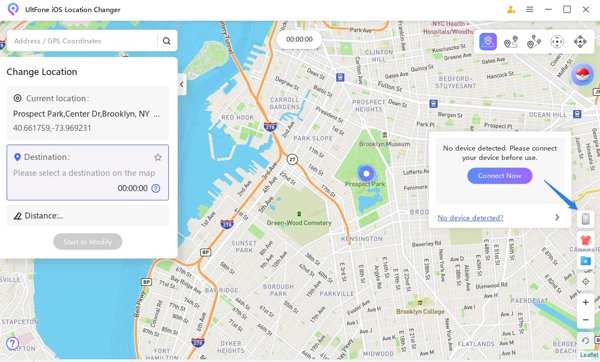
By default, you are presented with the location-change mode. You can switch to other modes at the top right side.
Connect your iPhone to your computer with a USB cable. If prompted, tap Trust to trust this PC.
Next, choose a location on the map with your mouse or input an address in the top search bar.
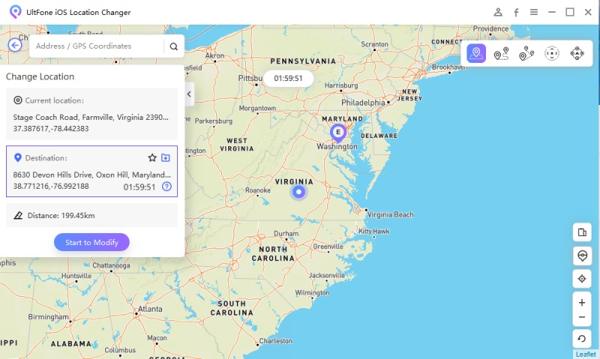
Finally, click on the Start to Modify button. It will change your location so that you can get special features on some apps or stop others from tracking your iPhone location.
How to Use the UltFone iOS Location Changer App
To use the UltFone iOS Location Changer app, install UltFone iOS Assistant on your computer and start it.
Sign in with your Apple account.
Plug your iPhone into your computer with a USB cable.
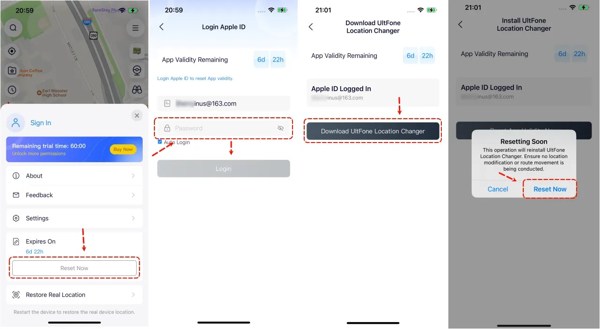
Click Install UltFone iOS Location Changer and follow onscreen prompts to install the app on your device.
After installing, trust this app following the instructions.
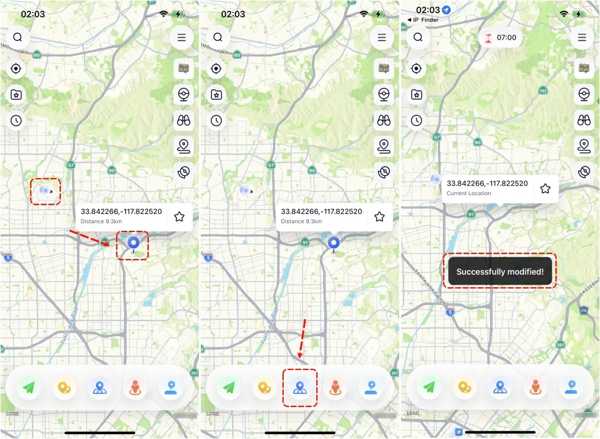
Next, run the app, tap Reset Now, and log in with your Apple ID.
Now, you can select a mode and change your location on the map quickly.
Part 3: The Best Alternative to UltFone iOS Location Changer
If UltFone iOS Location Changer is not working for your iOS device, you may need an alternative software, like iLocaGo. It is easier to use and offers more custom options. Moreover, it is able to fake location on both iPhone, iPad, and Android devices. If you need to change your mobile device location, the software is a good option.

4,000,000+ Downloads
Fake location of mobile devices with one click.
Create virtual locations and routes with multiple modes.
Available to a wide range of apps and mobile games.
Won't install anything on your mobile device.
Support almost all iOS and Android devices.
How to Use the Best UltFone iOS Location Changer Alternative
Connect to your phone
Launch the best alternative to UltFone iOS Location Changer once you install it on your computer. It is compatible with Windows 11/10/8/7 and macOS 10.12 or above. Link your mobile device to your computer with a compatible cable. If you are using an Android device, you can connect it to a Wi-Fi network wirelessly.

Choose a mode
After your device is detected, you will get four modes:
Modify Location: Change your device location to any address.
One-stop Mode: Create a virtual route with starting and end points.
Multi-stop Mode: Create a route with a starting point and multiple stops.
Joystick Mode: Make a route freely using your mouse and keyboard.
Choose a mode based on your need.

Change your phone location
Input an address or click the desired position on the map, or make a route following onscreen prompts. Finally, confirm the change.

Conclusion
This article reviewed UltFone iOS Location Changer, one of the best location spoofing software for iOS users. You should understand what it can do, its advantages and drawbacks, and other information. More importantly, we recommended the best alternative, iLocaGo, if UltFone is not working for your iPhone or iPad. Moreover, the alternative simplifies the workflow of location changing.
Penny focuses on GPS troubleshooting and Windows optimization. She formerly worked as a technical support engineer, helping clients solve location-based and system issues efficiently. Backed by IT support experience, she provides practical solutions that really work. In her free time, she likes hiking and geocaching, testing GPS tech in the real world.
Hot Solutions
-
GPS Location
-
Unlock iOS
-
iOS Tips
-
Unlock Android


