


 Solution
 Support Center
 About Us
 Contact
How to Change Location on Tinder on iOS and Android
 Penny Warren Published on November 04, 2026GPS Location4-min reading
Tinder is a popular online dating platform via website and mobile app launched in 2012. Currently, it is available in 190 countries. To make friends on the platform, users need to create a profile with photos and other information. Since it matches people through geolocation, it is also a geosocial network. This guide shares four proven ways to change Tinder location and demonstrates steps for each way.

In this article:
Part 1: How Does Tinder Location Work
How does Tinder location work? To find matches on Tinder, the platform estimates your location by analyzing the real-time location data on your device. Since it collects your GPS, IP address, and Wi-Fi network information to decide your location, simply using a VPN cannot change your Tinder location.
When does Tinder update your location ? It updates your location automatically when you open and actively use the app. If you have closed the app or run it in the background, Tinder won’t constantly track and update your location.
Part 2: How to Change Location on Tinder with Tinder Passport
Tinder offers a free version and a few paid versions, which include advanced features. Tinder Passport, for example, is a built-in feature that allows you to change location on Tinder with a Plus, Gold, or Platinum subscription.
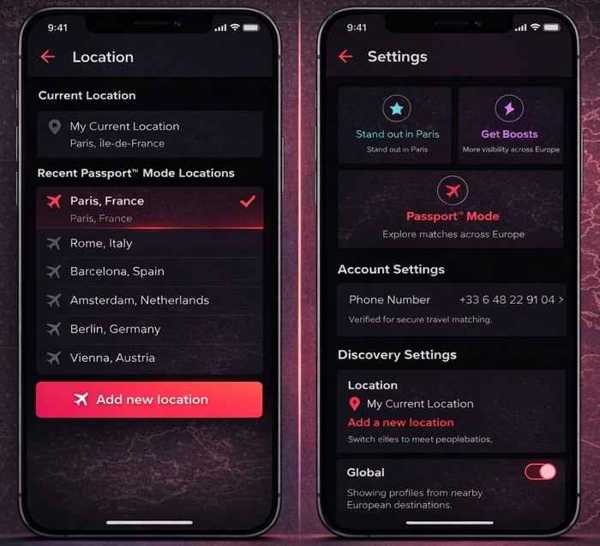
Open the Tinder app on your phone.
Tap on the profile in the top right side.
Tap the Settings button with a gear icon.
Choose the Passport Mode option under Discovery Settings.
Tap the Add new location button.
Search for the desired city in the search bar or drop a pin on the map.
Go back to the main app screen and start exploring in the new location.
Part 3: How to Change Location on Tinder by Facebook
If you sign up for Tinder using Facebook, the dating app will capture your location from Facebook settings. While Tinder tracks your location and updates it automatically, it is worth trying changing your location on Tinder via Facebook.
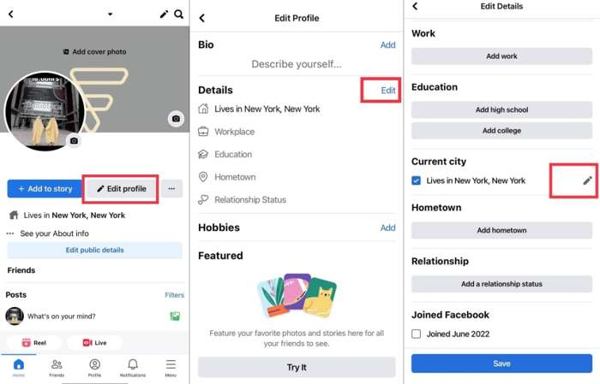
Run the Facebook app.
Log in to your account.
Go to the Profile tab and tap the Edit profile option.
Tap the Edit button next to Details.
Next, tap the Edit button for Current city.
Change the location and tap Save.
Now, open the Tinder app to see if the location is updated.
Part 4: How to Change Location on Tinder on Android
To change your location on Tinder on Android, you can use a GPS spoofer app, such as Fake GPS. After configuration, you can move your GPS to any location. However, the app is only available on Android.
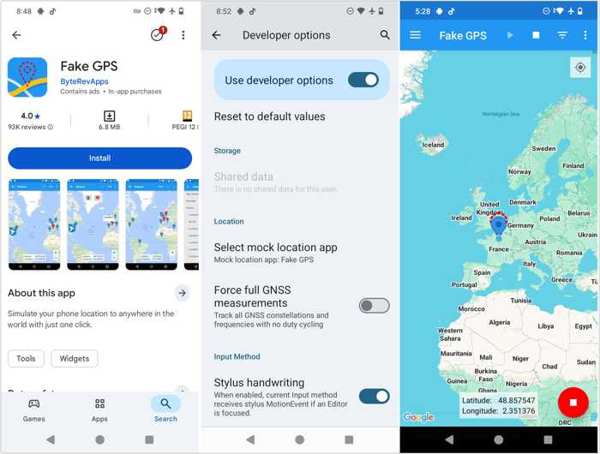
Install the Fake GPS app from the Play Store.
Open the Settings app.
Go to About Phone and tap Build Number seven times.
Back to the Settings app and go to Developer Options.
Locate the Select Mock Location App and select Fake GPS.
Next, run the Fake GPS app from the app tray.
Select the desired location on the map and tap the Start button.
Completely quit the Tinder app and clear the cache.
Then, open it again to detect the new location.
Part 5: How to Change Location on Tinder on iPhone and Android
If the ways above are unavailable, try imyPass iLocaGo. It is a location spoofing software program for both iPhones and Android devices. It works for most location-based apps, including Tinder.
4,000,000+ Downloads
Change location on Tinder with three steps.
Offer multiple modes for changing location and routes.
Provide custom options, such as speed.
Work on a wide range of apps and games.
Compatible with almost all iPhones and Android brands.
How to Change Location on Tinder
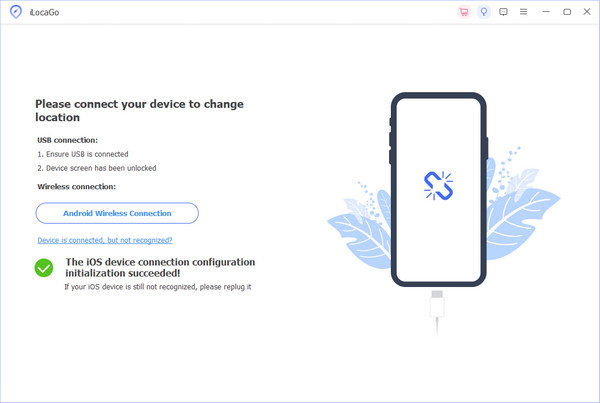
Connect to your device
Start the location changer for Tinder after you install it on your computer. Connect your iPhone or Android phone to the computer with a compatible cable.
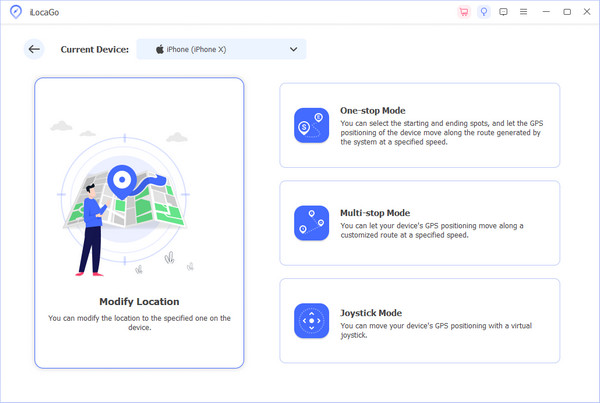
Choose Modify Location
Once your device is detected, choose the Modify Location option. If you need to simulate virtual routes, choose the other three modes: One-stop Mode, Multi-stop Mode, or Joystick Mode.
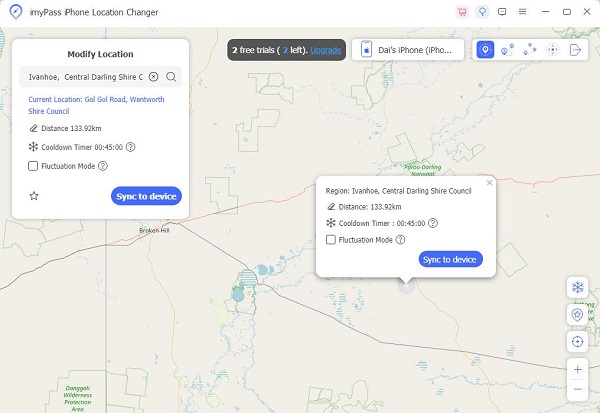
Change location on Tinder
Input an accurate address into the field or click a position on the map. Finally, click on the Modify button. Now, run the Tinder app on your phone, and it should update its location automatically. You can also use this program to change location on Snapchat.
Conclusion
This guide shared multiple ways to change location on Tinder on your iPhone or Android phone. The Tinder Passport feature enables you to set a new city with a subscription account. A GPS spoofer app can change location on Android devices. imyPass iLocaGo is a good option to modify location on Tinder for iOS and Android quickly.
Penny focuses on GPS troubleshooting and Windows optimization. She formerly worked as a technical support engineer, helping clients solve location-based and system issues efficiently. Backed by IT support experience, she provides practical solutions that really work. In her free time, she likes hiking and geocaching, testing GPS tech in the real world.
Hot Solutions
-
GPS Location
-
Unlock iOS
-
iOS Tips
-
Unlock Android


