Solution
 Support Center
 About Us
 Contact
AnyUnlock Review 2026: Can It Really Bypass iCloud Activation Lock?
 Samuel Spenser Published on March 19, 2026Unlock iOS3-min reading
Being locked out of your iPhone due to activation issues can be a frustrating ordeal. However, solutions like iMobie AnyUnlock offer a glimmer of hope. Here, we delve into its effectiveness in bypassing activation locks and simplifying user processes. Exploring its functionality and ease of use and comparing it to alternative methods, we provide insights to empower users seeking to regain access to their devices. Carefully read the factual information in this AnyUnlock review we have created to see if this is for you.

In this article:
What is AnyUnlock?
iMobie AnyUnlock, developed by iMobie Inc., is a comprehensive software solution that offers a wide range of iPhone unlocking tools. Many users highly regard its simplicity and effectiveness in addressing various iPhone unlocking issues.
Compatibility: AnyUnlock is available for both Windows and macOS. It works on most Apple devices, including iPhone, iPad, and iPod touch and supported systems typically from iOS 12 to iOS 17.
With its user-friendly interface and one-click functionality, AnyUnlock iCloud Activation Unlocker streamlines the unlocking process, eliminating the need for additional inputs and complex guides. This makes it a preferred choice for users looking to unlock their iPhones quickly and efficiently. Whether unlocking screen passcodes, Apple ID locks, or Screen Time passcodes, AnyUnlock provides a hassle-free solution to meet the diverse conditions of iPhone users.
Key Features of AnyUnlock
Remove Different Types of iPhone Locks
AnyUnlock can unlock screen passcodes, Apple ID, Screen Time passcodes, and MDM restrictions, helping users regain access when they forget passwords or encounter management locks.
Bypass iCloud Activation Lock
The software provides a secure way to bypass the iCloud Activation Lock, allowing users to access an iPhone/iPad that is locked by a previous Apple ID.
Recover and Manage iOS Passwords
AnyUnlock also includes password tools that allow users to find, view, and export saved iOS passwords, as well as recover forgotten iTunes backup passwords.
Remove Backup Encryption and Check Device Information
Users can remove encryption from iTunes backups and generate a device verification report for in-depth information about their phone.
Pros and Cons of AnyUnlock
Pros
- All-in-one solution with a wide range of unlocking tools for convenience.
- User-friendly interface with built-in guides and automation for firmware selection.
- Removes Apple ID without a password, granting access to all services and apps.
- Easily handles iPhone unlocking scenarios like Screen Passcode, MDM, and iCloud Activation Lock.
Cons
- The free version comes with significant restrictions behind paywalls.
- Some tools may only work perfectly on some iPhone models, requiring multiple attempts for success.
Is AnyUnlock Free, Safe & Legit?
iMobie AnyUnlock isn't completely free. While it offers some free features, some limits may lead you to consider upgrading to its premium Full Toolkit version. This premium option provides access to all advanced features through a yearly subscription, typically priced at $59.99. It allows unlocking various locks on up to 5 devices from 1 PC, offering more options for a fee.
Is AnyUnlock safe and legit? Yes, AnyUnlock is considered a legitimate software solution. There have been no reports of security issues or malware associated with AnyUnlock. iMobie is a well-established developer known for creating trustworthy software products. Throughout its history, no widespread complaints about security vulnerabilities or malware exist in any of its software offerings. This track record contributes to the confidence in AnyUnlock's legitimacy and functionality.
User Feedback & Limitations
Before deciding whether to use AnyUnlock, it is helpful to know what users say about the software. The feedback below is gathered from tech forums, review sites, and user communities.
Positive User Feedback
- The clear instructions make it easier for non‑technical users to follow.
- It can remove screen passcodes, Apple ID locks, and Screen Time restrictions without installing multiple tools.
- The success rate is generally moderate to high, especially when dealing with older iPhone models.
Common User Complaints
- The trial version has many limitations.
- Even after a successful bypass, some device functions may remain restricted.
- The unlocking process sometimes requires a long time.
- Some users report compatibility issues with the latest iOS versions.
How to Use AnyUnlock to Bypass iCloud Activation Lock
Does AnyUnlock work? Yes, it works perfectly fine. To prove that it works for unlocking iCloud activation, here is a quick tutorial on using the app:
Note:
After bypassing the iCloud Activation Lock, the device may still have several restrictions:
For example, cellular features such as phone calls, SMS, and mobile data may not work. In many cases, you also cannot sign in to a new iCloud account. If the device is reset or updated to a newer iOS version, the Activation Lock may appear again.
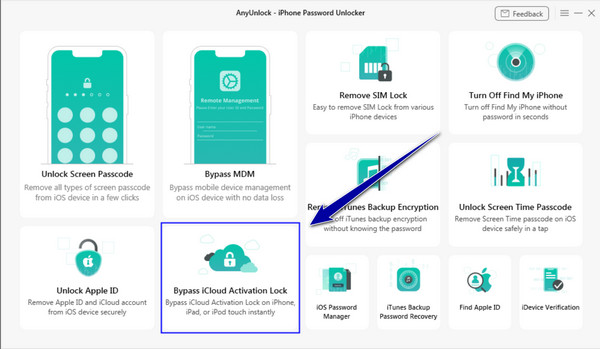
Download the AnyUnlock on your computer, launch it, and select Bypass iCloud Activation Lock mode from the options.
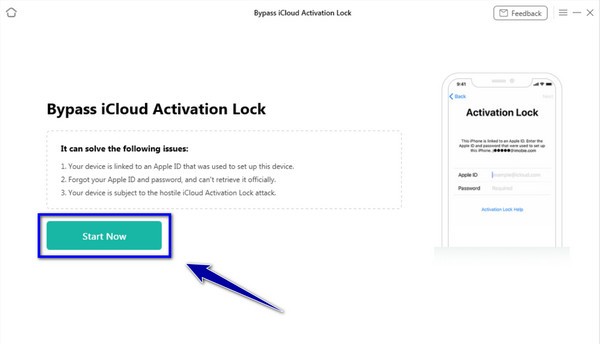
Kindly connect the iOS device you want to unlock on your computer with a USB cable, then click Start Now to proceed.
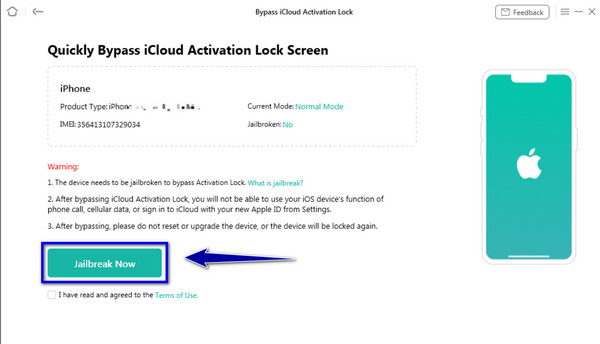
The app requires you to jailbreak the iOS, click Jailbreak Now, and then click Next.
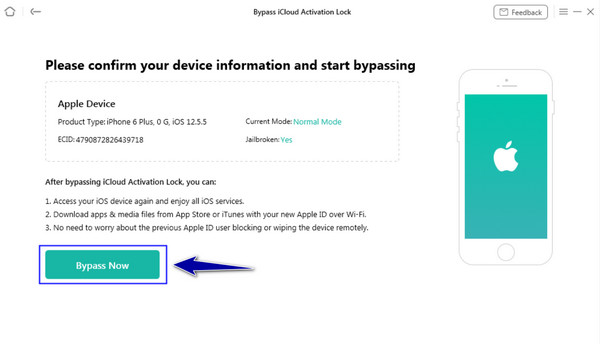
Now that the device is jailbroken, click Bypass Now, and the processing will begin. After that, click Done as the process of bypassing is successful.
Best AnyUnlock Alternative to Bypass Activition Lock
Some users find that while AnyUnlock offers many features, it can still be complicated or limited in certain situations. So, is there a better or easier alternative to AnyUnlock?
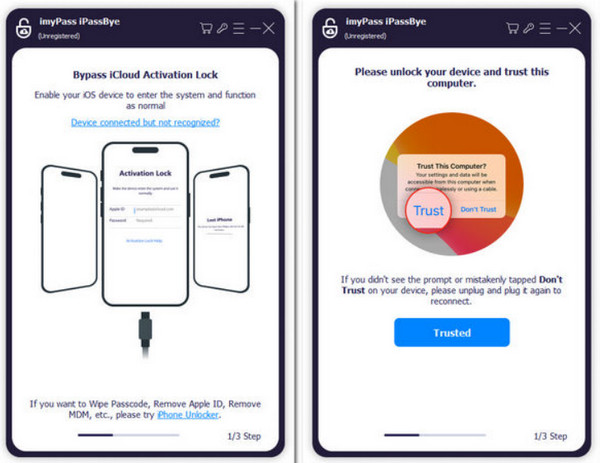
imyPass iPassBye is the best AnyUnlock free alternative you can install on your PC. The app works similarly to AnyUnlock but in a more straightforward way that even not tech enthusiasts can master to do so. If you feel that the app we reviewed here is not for you, then try to use this app by following the guide we have added here.
Make sure to install the newest version of the app to get the latest features added to it on your PC. After that, open the app to begin unlocking your iOS device effectively.
To build a connection on iOS to the computer, you must use a USB cable, and a prompt will appear on your iOS screen. Then tap the Trust to secure the connection. Remember that while you are in the process, never disconnect the device from your PC to avoid issues that may occur.
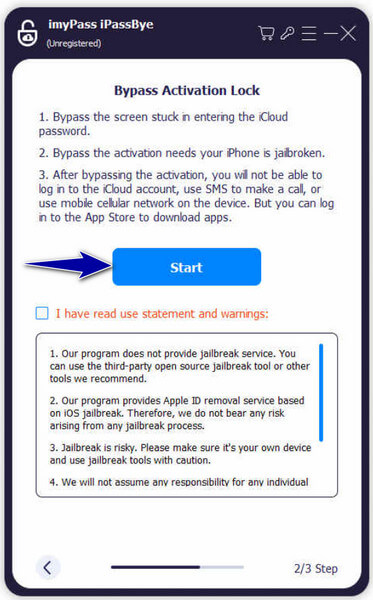
Take a moment to review any warnings the application provides; they contain important information. When you're ready, click Start to kick off the verification process.
Note:
Refer to the iOS Jailbroken Tutorial within the app for instructions since it is necessary to activate the jailbreak, then click Next to proceed.
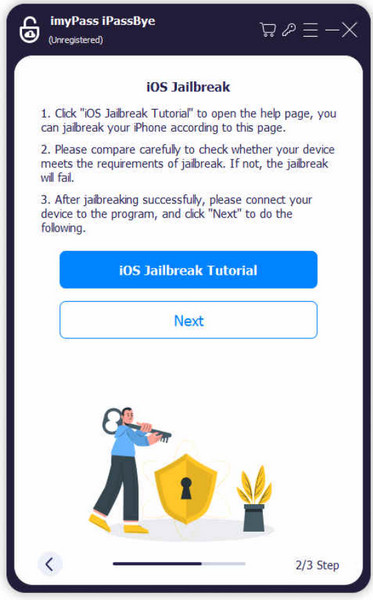
Jailbreaking is the process of removing Apple's system restrictions on an iOS device, allowing third-party tools to access deeper system settings. However, jailbreaking will reduce device security and could affect system stability, so users should follow the instructions carefully before proceeding.
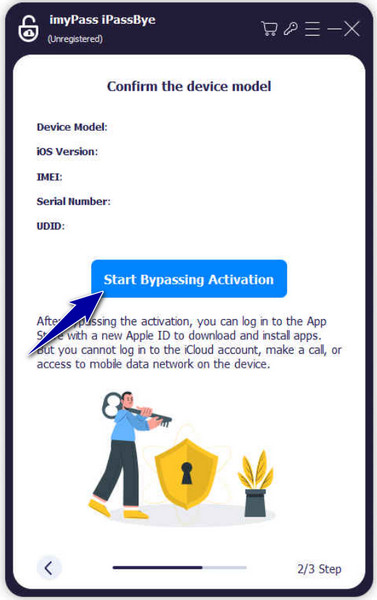
Confirm the device details generated here, then click Start Bypass Activation within the application. Be patient as the bypass process is initiated and completed.
FAQs.
-
Is AnyUnlock a virus?
No, AnyUnlock is not a virus. It's a legitimate software developed by iMobie Inc. to assist users in unlocking various locks and restrictions on iOS devices. AnyUnlock has been thoroughly tested and verified to ensure it does not contain malware or harmful code.
-
Is there a free version of AnyUnlock?
Yes, there is a free version of AnyUnlock available. However, the free version may have limitations or restrictions compared to the premium version. Users can access certain basic features for free, but to unlock the full range of capabilities, they may need to upgrade to the premium version.
-
Is iPhone LockWiper the same as AnyUnlock?
No, iPhone LockWiper and AnyUnlock are software products developed by different companies. iMyFone Technology Co., Ltd. develops iPhone LockWiper, while AnyUnlock is developed by iMobie Inc. Both tools serve similar purposes, offering solutions for unlocking iOS devices, but they have different features, pricing structures, and user interfaces.
-
Is AnyUnlock compatible with all iOS devices?
AnyUnlock is designed to work with many iOS devices, including iPhones, iPads, and iPod touch. However, compatibility may vary depending on the specific model and iOS version. It's recommended to check the official website or documentation for the most up-to-date information on device compatibility.
-
Can AnyUnlock remove iCloud activation locks?
Yes, AnyUnlock can remove iCloud activation locks from iOS devices. This feature allows users to bypass the activation lock screen and gain access to their device, even if they have forgotten their iCloud credentials.
Conclusion
Apps like AnyUnlock and imyPass iPassBye must be added to your arsenal, especially in case you encounter an iCloud locking issue or any other related problems that might need the help of a third party like these.
Samuel specializes in password security and digital privacy. He used to work as a cybersecurity consultant for small businesses to protect digital assets. With certifications in Cybersecurity and Ethical Hacking, he turns complex security topics into easy-to-follow advice. He also enjoys sharing password tips to help users protect their accounts more confidently.
Hot Solutions
-
Unlock iOS
-
iOS Tips
-
Unlock Android
-
Password Tips