Solution
 Support Center
 About Us
 Contact
Does iCloud DNS Bypass Really Remove the Activation Lock
 Penny Warren Published on June 22, 2026Unlock iOS3-min reading
Apple's iCloud activation lock is an important security feature. It is designed/created to prevent unauthorized access to stolen or lost iOS devices. While this protection is good for device owners, it can become a hassle for users who forget their Apple ID credentials or purchase a second-hand device with the lock still enabled.
In such cases, you can try iCloud DNS bypass. It is a popular way to fix the iCloud activation lock stuck on an iPhone or iPad device. But what exactly is an iCloud DNS bypass, and how does it work? If you are interested in this topic or among those users who can't open their devices, this post is for you.

In this article:
Part 1. What is iCloud DNS Bypass
How Does DNS Bypass Work?
DNS (Domain Name System) is a system that translates domain names into IP addresses. When activating an iPhone or iPad, the device contacts Apple servers via DNS. With iCloud DNS Bypass, the DNS settings on the device are changed to use third-party DNS servers instead of Apple's default ones. This may allow the device to load a limited activation screen or access some basic functions during setup.
Compatibility: Work on older iOS versions (iOS 7-10), not for modern iOS models.
Success Rate: The success rate of iCloud DNS bypass is low and inconsistent. On older devices running iOS 7-10, it may provide partial access during setup, but the result is temporary. On newer iOS versions running iOS 11 and later, all unlock attempts failed.
When to Use iCloud DNS Bypass?
This type of feature is only used when the user locks the iPhone or an iCloud activation lock is displayed on the screen. With this free iCloud unlock service, you can effectively bypass the iCloud activation lock to open your screen without any passcode or Apple ID. It is useful if you want to unlock a second-hand iOS device.
Part 2. Does DNS Bypass Really Work & Is It Safe?
Does DNS bypass really remove iCloud lock?
The short answer is no. iCloud DNS Bypass does not remove the iCloud Activation Lock from Apple's servers. This method does not remove the original iCloud account linked to the device. Apple's Activation Lock remains active on its servers. Because of this, iCloud DNS Bypass is only a temporary workaround with very limited functionality, and it does not provide a permanent unlock solution.
Is DNS Bypass Safe?
DNS Bypass is not a fully safe method to unlock an iOS device. After using iCloud DNS Bypass, you may be able to access basic functions on your iPhone. Many key features will not work properly, including iCloud services, App Store, iMessage, and FaceTime. Most importantly, the device will return to the Activation Lock screen after a restart or reset.
Part 3. Pros and Cons of iCloud DNS Bypass
If you want to learn more about this feature, you must take part in this section. We'll give you all of the pros and cons of iCloud DNS Bypass. Therefore, please see the breakdowns below and learn more.
Advantages of iCloud DNS Bypass
No Need for Apple ID Credentials
One of the biggest advantages is that it allows users to unlock the device without a passcode. It's perfect if you've bought a second-hand device with Activation Lock enabled.
Free to Low-Cost Solution
Using a DNS bypass is ideal if you want a free or low-cost solution. It is incomparable with Apple, which requires a costly payment just to open a certain device. Thus, if you want to bypass activation temporarily without incurring any costs, it is better to use a DNS bypass.
Works Without Jailbreaking
One advantage of iCloud DNS bypass is that it doesn't require jailbreaking the device. Jailbreaking is a more complex process that may introduce security risks and affect system stability. Instead, DNS bypass only changes network settings without modifying the iOS system. It remains on the original iOS version during the process.
Drawbacks of iCloud DNS Bypass
iCloud Lock is Not Removed Completely
The bypass can only trick the device into skipping the activation process. However, the iCloud account remains linked. With that, you can only use some basic functions, such as making calls, using some apps, and browsing the internet through Wi-Fi.
No Access to Apple Services
Some of the important features, such as the App Store, iMessage, FaceTime, and Siri, will not function. It is because the device is still tied to the owner's account.
Against Apple's Terms of Service
Apple does not recommend bypassing activation locks. The device may be blocked in the future. Additionally, if this is detected, the device could be blocked, rendering it unusable on cellular networks.
Part 4. How to use iCloud DNS Bypass
How to bypass iCloud activation on DNS? If you want to learn the process, then you can follow the simple steps below.
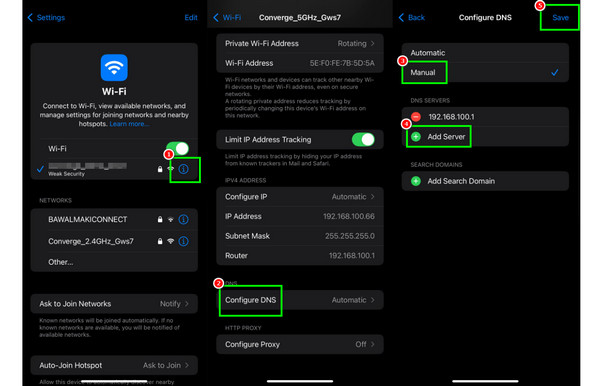
Open your iPhone and proceed to the Settings application. After that, go to the Wi-Fi section and hit the Information option.
After that, scroll down and press the Configure DNS function and choose the Manual option.
Delete or remove the existing DNS server. Then, tick the Add Server button to insert the iCloud bypass DNS server. The server is based on the region:
• Asia: 104.155.220.58
• Australia and Oceania: 35.189.47.23
• Europe: 104.155.28.90
• South America: 35.199.88.219
• USA: 104.154.51.7
Press the Save button in the top-right corner of your screen. Then, you can continue with the device setup, and you will be redirected to the iCloud DNS Bypass.
Part 5. How to Fix iCloud DNS Not Working
Is DNS bypass worth more attempts?
As we explained, the DNS iCloud lock bypass only works on old iOS versions and iPhone/iPad models, and it only bypasses iCloud lock temporarily and gives very limited access. And the method itself has a low success rate. If it doesn't work for you after you have tried many times, or you want to bypass iCloud lock on an iPhone/iPad that runs high iOS versions permanently, we suggest giving up that method and using a reliable iCloud lock remover.
How to bypass iCloud lock efficiently?
An iCloud lock remover is a solution for you if you want to bypass iCloud effectively. It usually has an intuitive interface and allows you to remove iCloud lock permanently for high iOS versions. imyPass iPassBye is a program like this.
You can completely unlock the device with imyPass iPassBye. What makes it special is that you can use it on various iOS versions, from iOS 5 to 17. Therefore, if the DNS iCloud bypass doesn't meet your needs, imyPass iPassBye is worth trying.
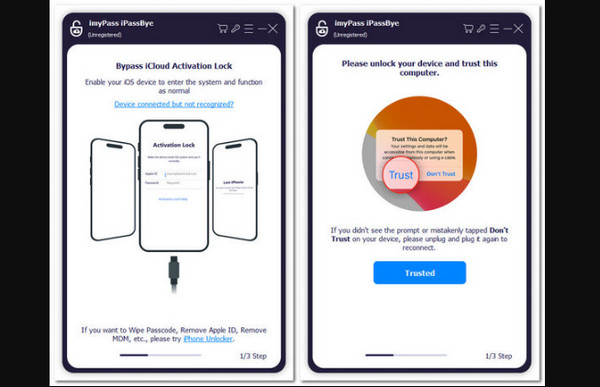
Download imyPass iPassBye software on your Mac or Windows computer. After that, ensure that your iOS and desktop are linked together through a cable.
After connecting your devices, tap the Trust button to proceed to the next process.
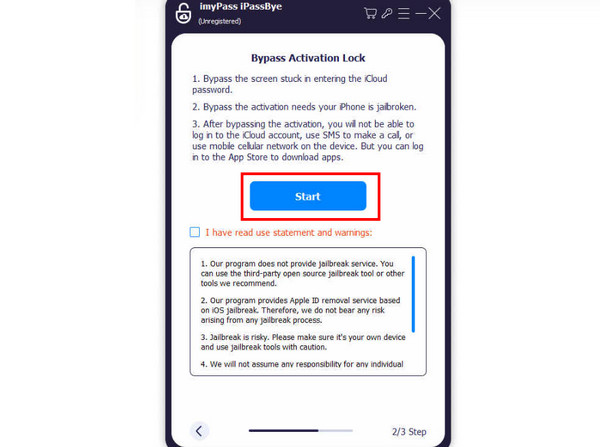
Then, you must read all the information on the screen, especially the warnings. Once done, tap the Start button to confirm bypassing the iCloud Activation Lock.
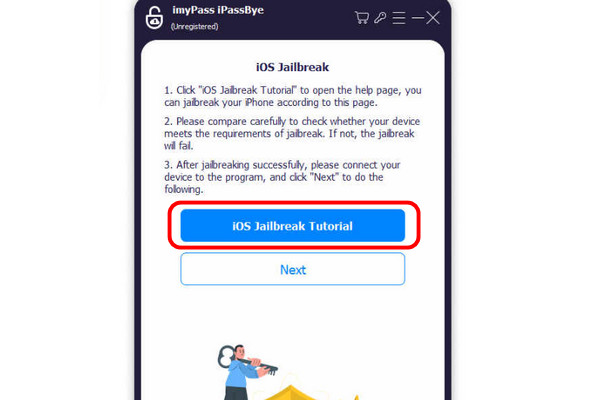
You can now start tapping the iOS Jailbreak Tutorial to learn more about the process. Afterward, tap Next.
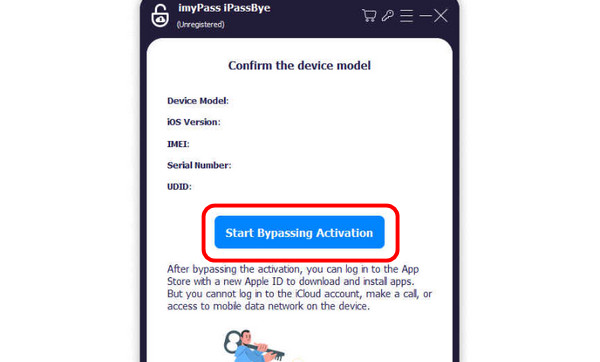
For the final process, press the Start Bypassing Activation option. Wait a moment until you lock the activation. Once done, you can now use the device freely.
Part 6. FAQs About iCloud DNS Bypass
FAQs.
-
Does iCloud DNS Bypass work on all iOS versions?
No, iCloud DNS Bypass does not work on every iOS version. It mainly functions on older devices running iOS 7 to iOS 10. Newer iOS builds include stronger server authentication, so Apple often patches DNS-based vulnerabilities in recent updates.
-
Is iCloud DNS Bypass a permanent iCloud unlock method?
No, it's a temporary workaround. Once the device is rebooted, the bypass is lost. Therefore, if you successfully bypass an iPhone with DNS bypass, keep in mind that you don't reboot or factory reset your device. Otherwise, it will be permanently locked, and even an iPhone unlocker won't work.
-
Are there security risks when using iCloud DNS Bypass?
Technically, any iCloud activation lock removal has risks, including iCloud DNS Bypass. It may cause the device to be permanently locked. However, if you can't remember the Apple ID and password, iCloud locked removal is the only way to get the locked device back.
Conclusion
Now it is clear about DNS bypass. In a word, it is a worth trying method, but don't waste a lot of time if it doesn't work for you. There are easier and safer ways to bypass iCloud activation lock permanently. You can try imyPass iPassBye and see if it works for you. After removing the iCloud lock, you can get most of your iPhone features.
Penny focuses on GPS troubleshooting and Windows optimization. She formerly worked as a technical support engineer, helping clients solve location-based and system issues efficiently. Backed by IT support experience, she provides practical solutions that really work. In her free time, she likes hiking and geocaching, testing GPS tech in the real world.
Hot Solutions
-
Unlock iOS
-
iOS Tips
-
Unlock Android
-
Password Tips