



 Solution
 Support Center
 About Us
 Contact
How to Jailbreak Your iPad to Bypass iCloud Activation Lock
 Samuel Spenser Published on July 17, 2026Unlock iOS3-min reading
Apple adds a few security measures on iPad devices, like screen locks and Activation Lock. After you log in to an Apple Account on your iPad and set up Find My iPad, iCloud Activation Lock is automatically turned on. Even if you factory reset your device, you have to enter the associated Apple Account credentials when you set up the iPad. This guide explains how to jailbreak an iPad with Activation Lock.

In this article:
Part 1. Can You Jailbreak an Activation-Locked iPad
Can you jailbreak an Activation-locked iPad? Yes. However, simply jailbreaking your iPad won’t bypass Activation Lock. Jailbreaking is able to remove Apple software restrictions on iPadOS devices, giving you root access. Then, you can install apps and utilities unavailable in the App Store, such as third-party Activation Lock bypassing tools.
Part 2. Before You Jailbreak Your iPad
Jailbreaking an old iPad can lead to data loss and other serious problems. Before the process, you’d better back up your iPad to a computer. We demonstrate the workflow below to back up your iPad data.
Furthermore, you should understand that jailbreaking an iPad will void your device’s warranty. You cannot update iPadOS through the official channel. Plus, it can introduce instability to your iPad.
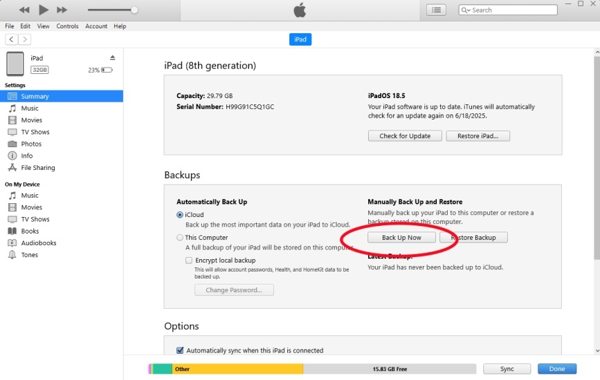
Connect your iPad to a computer with a compatible cable.
Open the latest version of iTunes on PC and macOS Mojave or earlier.
Open Finder on macOS Catalina or later.
Click the Device button in iTunes and go to Summary.
Click your iPad name in Finder and head to General.
Click the Back Up Now button in the Backups heading to begin backing up your device.
When the process finishes, disconnect your iPad.
Part 3. How to Jailbreak an iPad
When jailbreaking an iPad mini/Pro and other models, you need a jailbreak tool. Depending on your iPad model, the available tool is different. We use palera1n to show you the workflow. It works for iPad 7th/6th/5th generation, iPad Pro 12.9-inch 2019/10.5-inch 2017/9.7-inch 2016/12.9-inch 2015.
Connect your iPad to your computer with a USB cable.
Download the latest version of the jailbreak tool from the official web page.
Open the Prompt or Terminal app, enter cd Downloads, and press Enter or Return on your keyboard.
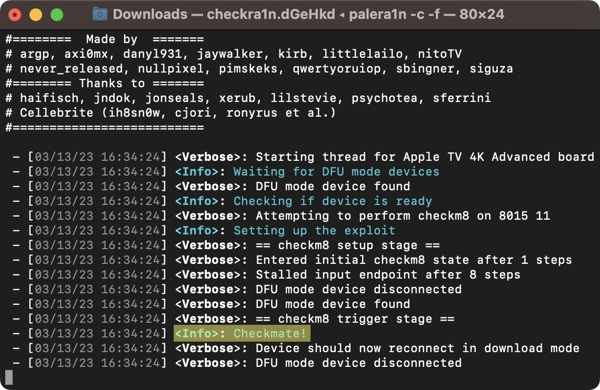
Execute the command: sudo mkdir /usr/local/bin.
When prompted, enter the admin password of your computer.
Next, enter the following command and hit Enter or Return.
sudo mv ./palera1n-macos-universal /usr/local/bin/palera1n
If prompted, input your computer admin password again.
Execute the command: sudo xattr -c /usr/local/bin/palera1n.
Then, type the command: sudo chmod +x /usr/local/bin/palera1n, and hit Enter or Return.
Put your iPad into DFU mode:
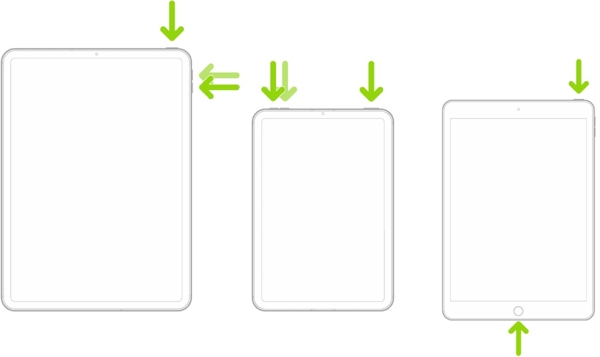
An iPad with Face ID
- Quickly press and release the Volume Up button.
- Do the same thing to the Volume Down button.
- Hold the Top button until the screen goes black.
- Once the screen turns black, hold the Volume Down button and keep holding the Top button.
- 5 seconds later, release the Top button while continuing to hold the Volume Down button until the iPad is detected in DFU mode.
An iPad with a Home button
- Hold the Top + Home button together for 8 seconds.
- Then, release the Top button while keeping hold of the Home button.
- Once your iPad is in DFU mode.
Run the command below, depending on your situation:
palera1n -B -f
palera1n -c -f if your iPad runs iPadOS16 or has more than 16GB of storage available.
When finished, your iPad will restart.
Perform the command: palera1n -f.
Turn on your iPad and open the palera1n app.
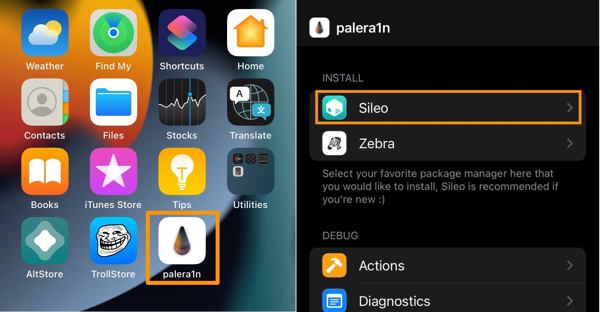
Tap the Sileo button to install the Sileo package manager.
Enter a Terminal password when prompted, and save it.
When the installation finishes, tap Close.
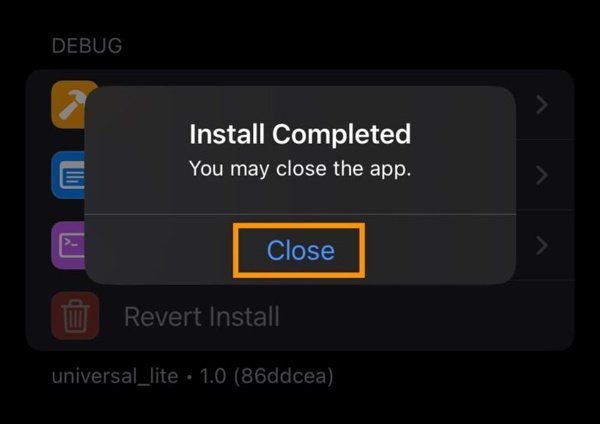
Now, jailbreaking the iPad is complete.
You May Also Like:
Part 4. How to Bypass Activation Lock on Your iPad
As mentioned previously, jailbreaking an iPad cannot bypass Activation Lock. You also need a powerful tool, such as imyPass iPassGo. It enables you to bypass iCloud Lock after jailbreaking your iPad. Compared to other programs, the user-friendly design simplifies the workflow.

4,000,000+ Downloads
Bypass iCloud Activation Lock on an iPad in 3 steps.
Don’t require your iPad passcode or Apple Account password.
Offer the onscreen instructions.
Come with bonus features, like bypassing MDM.
Support the latest editions of iPadOS and iOS.
How to Bypass Activation Lock on Your iPad Without a Password
Connect to your iPad
Download and install the Activation Lock bypassing software on your PC. There is another version for Mac. Launch the software after jailbreaking your iPad. Then, connect your iPad to your PC with a Lightning cable. If prompted, tap Trust on your iPad screen to trust this PC.
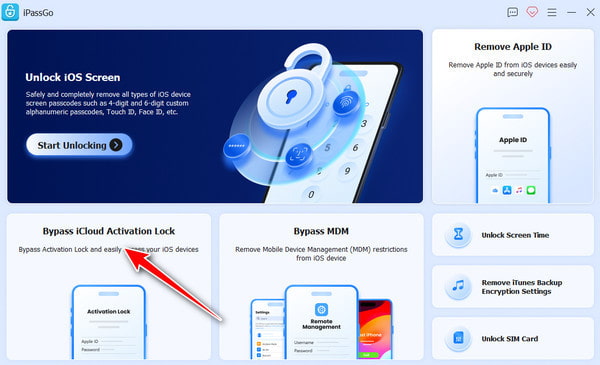
Check iPad jailbreaking
Choose the Bypass iCloud Activation Lock mode from the home interface. After your iPad is recognized, click the Start Now button to proceed. Then, click the Next button. If you haven’t jailbroken your iPad, click Jailbreak Tutorial and follow the instructions to complete the process.
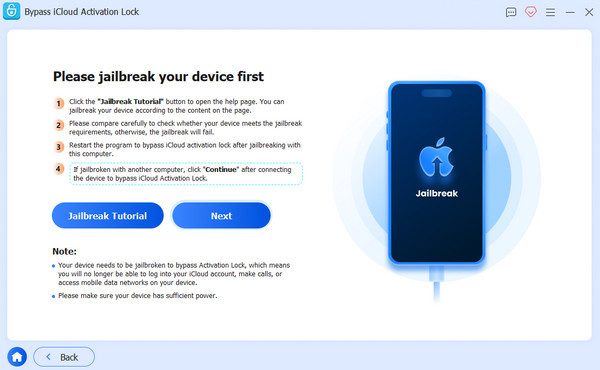
Bypass iCloud Lock
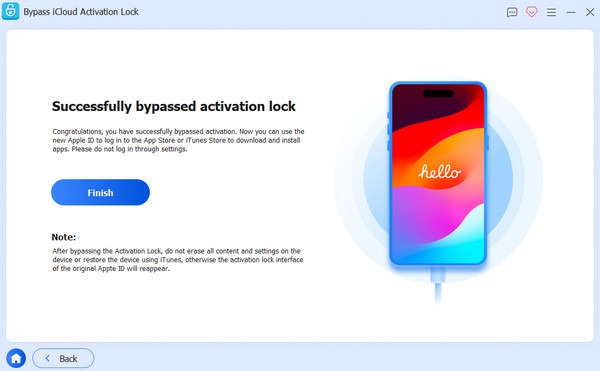
Wait for your device information to load and check it. Next, click on the Start Bypassing Activation button to begin bypassing iCloud Lock on your iPad. When the process is complete, disconnect your iPad and use it without any restrictions.
Conclusion
This guide demonstrated how to jailbreak an iPad to bypass iCloud Activation Lock if you forgot the Apple Account password. To be honest, Apple doesn’t allow users to jailbreak their iPadOS devices due to security concerns. However, it allows you to access the root and gain freedom. You can follow our detailed steps to jailbreak your device for free. When it is done, you can use imyPass iPassGo to get rid of iCloud Activation Lock on your iPad without a password.
Samuel specializes in password security and digital privacy. He used to work as a cybersecurity consultant for small businesses to protect digital assets. With certifications in Cybersecurity and Ethical Hacking, he turns complex security topics into easy-to-follow advice. He also enjoys sharing password tips to help users protect their accounts more confidently.
Hot Solutions
-
Unlock iOS
-
iOS Tips
-
Unlock Android
-
Password Tips


