



 Solution
 Support Center
 About Us
 Contact
How to Unlock Your AT&T iPhone and Phone Efficiently
 Samuel Spenser Published on September 16, 2026Unlock iOS3-min reading
AT&T is a major American multinational telecommunication brand, providing wireless, broadband, and other communication services worldwide. According to our survey, AT&T typically locks iPhones and cell phones purchased directly from AT&T or partners. If you purchased a mobile device that comes with an AT&T SIM card, it is locked to the AT&T network. This comprehensive tutorial shares five ways to unlock AT&T devices and demonstrates the detailed steps.

In this article:
Part 1: Before Unlocking an AT&T Phone
AT&T SIM unlocking means removing the carrier lock and restriction that ties your device exclusively to AT&T's network and services. Once unlocked, you can insert any compatible SIM card into your iPhone or cell phone. The typical scenarios you have to unlock an AT&T phone include:
- 1.Travel overseas and use a local prepaid SIM card.
- 2.Move from AT&T to a cost-effective plan from other carriers.
- 3.Give away your mobile device.
AT&T Unlock Policy for AT&T Wireless
- 1.You must have purchased your iPhone or cell phone from AT&T more than 60 days ago.
- 2.It must be active on your AT&T account.
- 3.You must have paid for your device in full or paid it off through an installment plan.
- 4.Your installment balance must be zero.
- 5.Your iPhone or cell phone hasn't been reported lost, stolen, or involved in fraud.
- 6.Your AT&T account is in good standing.
AT&T Unlock Policy for AT&T Prepaid
- 1.Your device has 12 months of paid AT&T service.
- 2.Your device is active on one AT&T account.
- 3.Your device hasn't been reported as lost, stolen, or involved in fraud.
AT&T Unlock Policy for AT&T Business
- 1.Your iPhone or phone must have been bought over 60 days ago.
- 2.You must pay for your device in full.
- 3.Your device hasn't been reported lost or stolen.
- 4.Your device must be permitted to be unlocked by the controlling company.
- 5.Your device must have a completed contract or term agreement.
- 6.You must be a current AT&T account holder.
Part 2: How to Find out If Your AT&T Device Is Locked
Before unlocking your AT&T device, you must check the carrier status. If your iPhone or cell phone has been unlocked, you can switch to a SIM card from any carrier directly. We share a few ways to learn the network status on your device.
Way 1: Use Another SIM Card
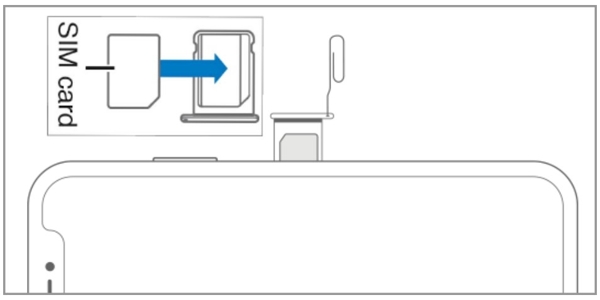
One easy way to learn the AT&T unlock status is to use a SIM card from another carrier. Insert a paper clip or SIM eject tool into the small hole on the SIM tray to pull it out. Take out the SIM card tray and remove the card. Next, place a new SIM card and insert the tray back into your device. Turn on your phone and check the signal. If your phone can detect the SIM card, it means your device is unlocked.
Way 2: Check Your AT&T Account
If your AT&T account is accessible, go to https://www.att.com/acctmgmt/mywireless in a web browser. Log in to your account and select your iPhone or cell phone. If your device is unlocked, it will say Device unlocked in the Device info section.
Way 3: Check Your iPhone Network Status
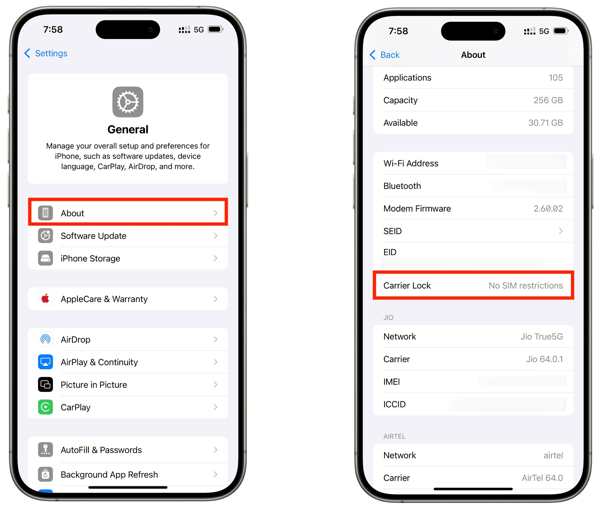
If you want to learn if your iPhone 15 SIM is locked to AT&T, you can check it in the Settings app. Go to Settings, General, and About. Look at the Carrier Lock option. If it shows No SIM restrictions, your iPhone is unlocked.
Way 4: Find out the Status of Your Android Phone
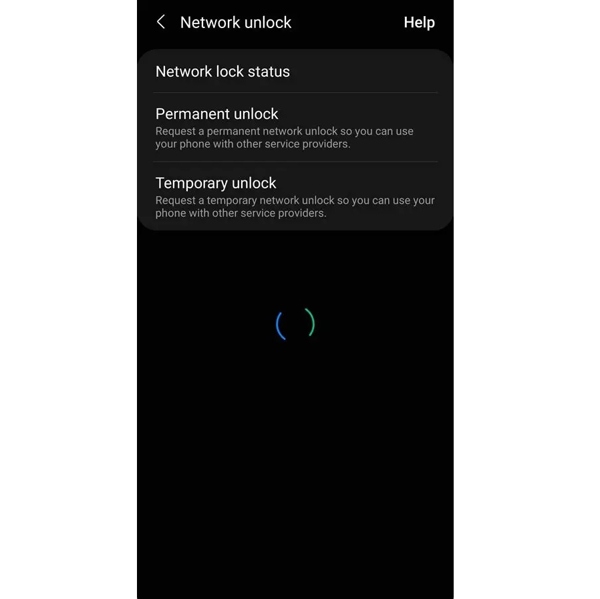
For Android users, the Settings app may show the AT&T unlock status. Open the Settings app, go to Connections, More connection settings, and look for Network lock status. Then, check the status.
Way 5: Check AT&T Lock Online
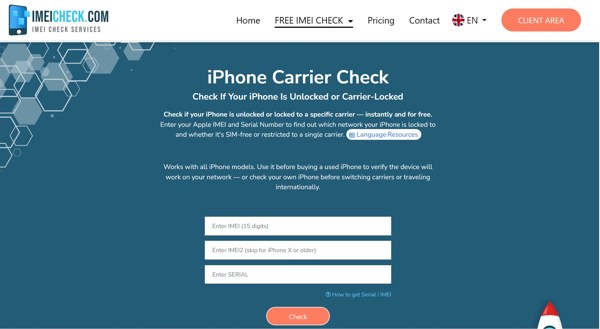
Another way to check AT&T unlock status on your phone is a third-party checker online, such as IEMICheck.com. You can provide the IMEI number of your iPhone or cell phone and check the status directly.
Part 3: How to Unlock AT&T iPhone and Phone
Way 1: How to Unlock AT&T iPhone by Call
If you can meet the device unlocking policy, you can make an AT&T unlock request via customer support. Of course, you must offer the necessary information, like the IMEI number, your phone number, purchase proof, and more.
Find the IMEI number on your phone:
Option 1:
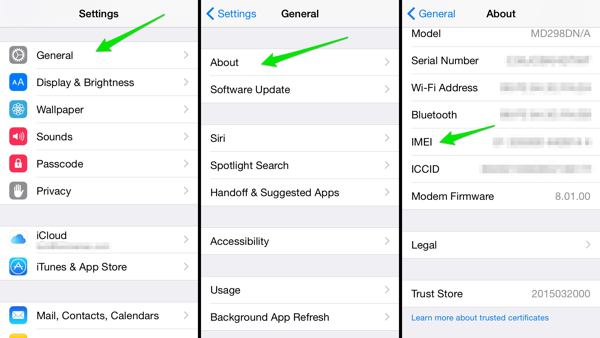
On an iPhone, open the Settings app.
Go to General and About.
Look at the IMEI option and check the IMEI number.
Option 2:
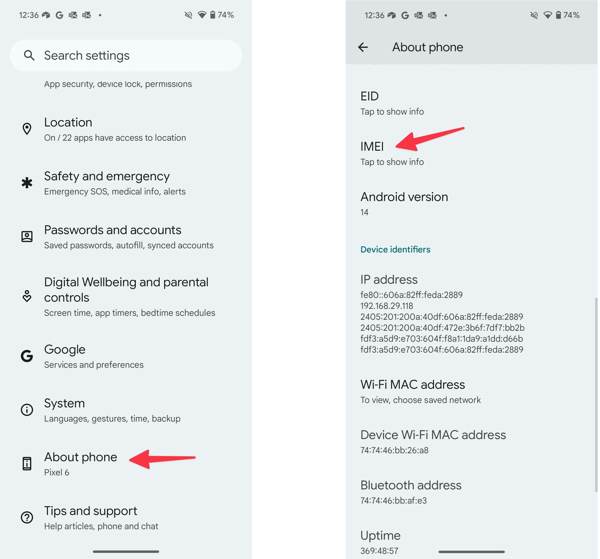
On an Android phone, run the Settings app.
Scroll down and choose the About phone option.
Tap the IMEI option and check the IMEI number.
Option 3:
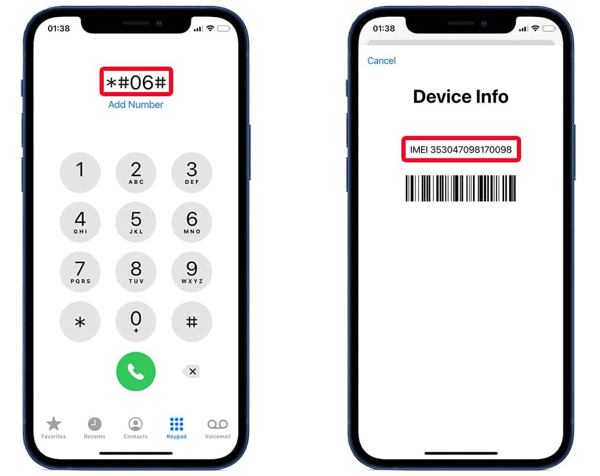
Run the Phone app on your device.
Tap *#06# and press the Call button.
Then, your phone will show the IMEI number.
Call the AT&T customer service number at 1-800-331-0500.
Follow the instructions to submit an AT&T unlock request.
Provide your phone number, IMEI number, and other required information.
Once your device can meet the unlock policy, AT&T will unlock your phone after it is paid off.
Note:
The customer service hours are Monday to Friday from 8:00 a.m. to 8:00 p.m. and Saturday to Sunday from 9:00 a.m. to 7:00 p.m.
Way 2: How to Unlock AT&T SIM on the Web
In fact, AT&T offers an unlock portal online. You can access the web page in a browser and submit an unlock request. Then, you can unlock your SIM lock on your iPhone or cell phone quickly. This way requires a stable internet connection.
If you have an AT&T account that your device is linked to, log in to your AT&T account on the official website. Press the link Unlock device to use on other network under the Get support heading. Then, click the link att.com/deviceunlock.
If you don't have an AT&T account, go to www.att.com/deviceunlock/ directly in a browser.
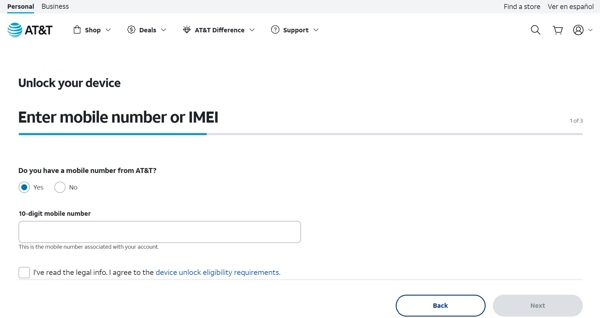
Enter your AT&T phone number, agree to the requirements, and click the Next button.
Type in your IMEI number, complete reCAPTCHA, and click Next.
Fill out the form and input your email address.
Click the Submit button.
Next, go to your email, open the latest AT&T message, and confirm your unlock request within 24 hours.
Factory reset your iPhone or phone:
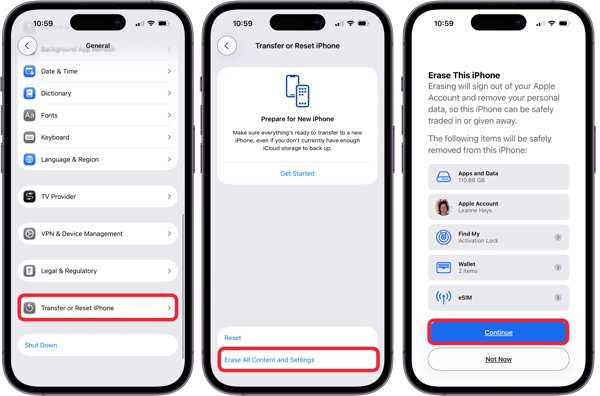
On an iPhone, go to Settings, General, Transfer or Reset iPhone, choose Erase All Content and Settings, and tap Continue. Authenticate with your iPhone passcode to initiate the process.
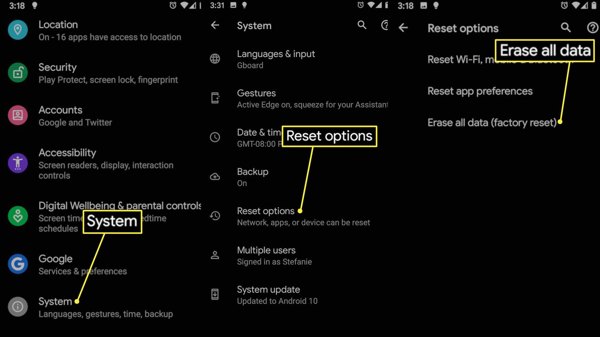
On a cell phone, head to Settings, System, Reset options, and choose Erase all data(factory reset). Follow the onscreen prompts to reset your phone.
Once your device restarts, you can use a SIM card from another compatible carrier.
Way 3: How to Unlock an AT&T Cell Phone in the App
To unlock a prepaid cell phone, the AT&T Device Unlock app is a good option. It allows you to unlock your phone with a single tap if you can meet device unlock eligibility requirements. Here are the steps:
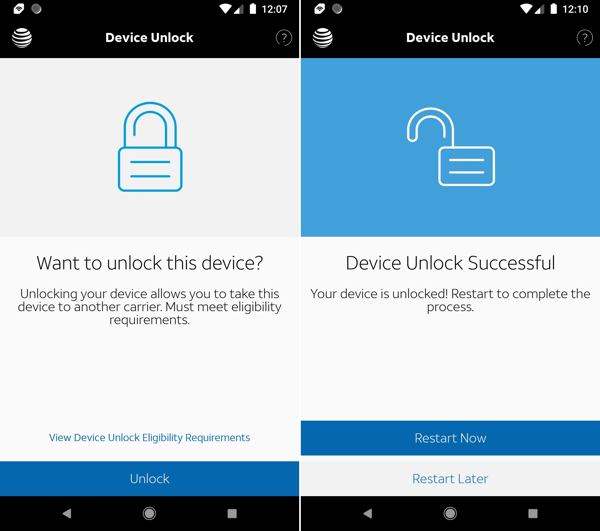
Install the app from the Google Play Store.
Open it when you want to unlock your phone.
Tap the Unlock button.
When it is done, tap the Restart Now button to complete the process.
You May Also Like:
Part 4: How to Unlock AT&T Using a Third-party Unlock Service
Obviously, you have to follow AT&T's unlock policy to get rid of carrier lock from your iPhone or cell phone. If you cannot meet the policy, you have to use a third-party unlock service. The good news is that lots of unlock services are available. However, you'd better look for a reputable one. Moreover, these services are not free, and the prices are not transparent. We use UnlockBase as an example to show you the process.
Visit an online unlock service in a browser.
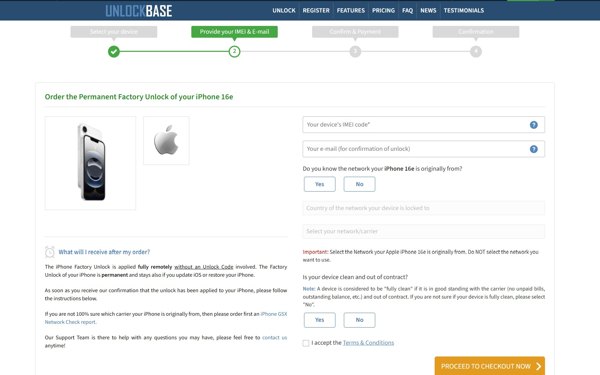
Go to the Unlock menu.
Choose your manufacturer, select your device model, and continue.
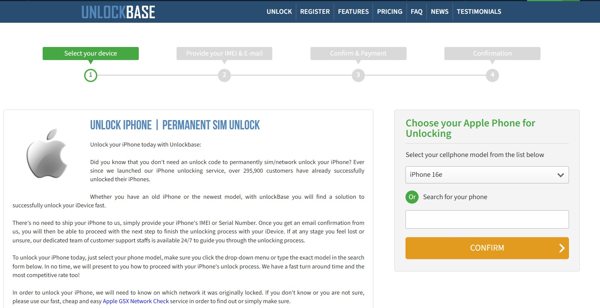
Enter your device IMEI number, leave your email address, and click Proceed to Checkout Now.
Confirm your request and pay for the bill.
Once the service unlocks your device, it will send you an email.
Look at your email and read the message to get the unlock code and more steps.
Follow the instructions to unlock your AT&T phone.
Note:
It may take hours to a few days to unlock your device. Moreover, the success rate is different, depending on your phone brand and model.
Part 5: How to Unlock an AT&T iPhone on Your Own
If you wish to unlock an AT&T iPhone on your own, try imyPass iPassGo. It is a desktop program that allows you to get rid of any restrictions on your iPhone, including the carrier lock. More importantly, it delivers a high success rate. The clear interface makes it easy to use, especially for beginners.

4,000,000+ Downloads
Unlock an iPhone from the AT&T network on your own.
Don't require a password or requirements.
Keep your data on your iPhone during the process.
Offer bonus features, like bypassing MDM.
Support the latest models of iPhone.
How to Unlock Your AT&T iPhone on Your Own
Install iPhone unlocker
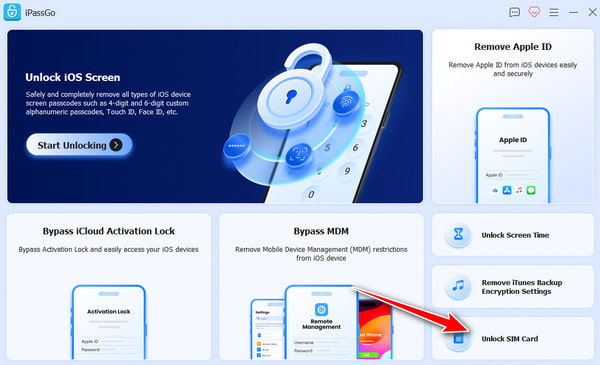
Download and install the iPhone unlocking software on your computer. It is available on Windows 11/10/8/7 and Mac OS X 10.12 or above. When you need to unlock your AT&T locked iPhone, launch the software from your desktop, and choose the Unlock SIM Card mode to move on.
Link to your device
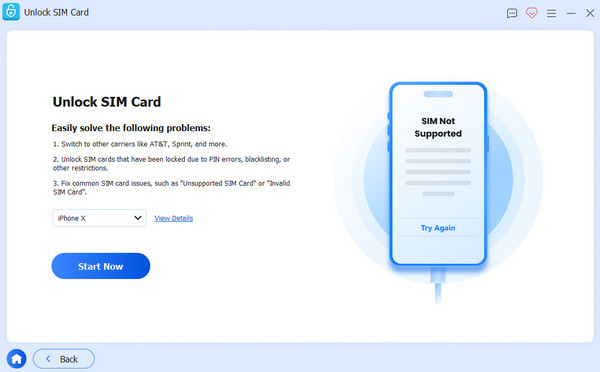
Connect your iPhone to your computer with a Lightning cable. If prompted, tap Trust on your screen to trust this computer. Then, the software will recognize your iPhone immediately. If you are sure to unlock your device, click on the Start Now button to initiate the process.
Unlock AT&T iPhone
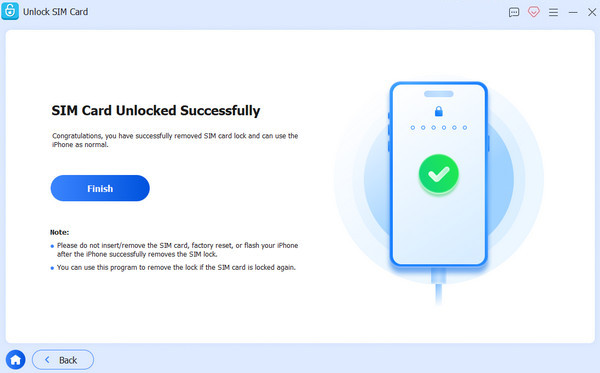
As long as the software loads your device information, check it. If there is no problem, click the Start Bypassing button. Make sure that you have jailbroke your iPhone. If not, follow the instructions to jailbreak it first. Then, set up your iPhone with the onscreen tutorial. When you are done, click the OK button to start unlocking the carrier lock. When the process finishes, disconnect your iPhone and use any compatible SIM card.
Conclusion
This guide discussed everything you should know about unlocking an AT&T device. First of all, we shared the unlocking policy for different plans. Moreover, we listed the ways to check if your device is locked by AT&T. If your iPhone or cell phone is locked by your carrier, pick an appropriate way and follow the detailed steps to unlock your device quickly. imyPass iPassGo is an easy way to get rid of carrier lock from your iPhone if you cannot meet the unlock policy.
Samuel specializes in password security and digital privacy. He used to work as a cybersecurity consultant for small businesses to protect digital assets. With certifications in Cybersecurity and Ethical Hacking, he turns complex security topics into easy-to-follow advice. He also enjoys sharing password tips to help users protect their accounts more confidently.
Hot Solutions
-
Unlock iOS
-
iOS Tips
-
Unlock Android
-
Password Tips


