Solution
 Support Center
 About Us
 Contact
How to Unlock a Blacklisted iPhone or iPad Without Data Loss
 Samuel Spenser Published on April 03, 2026Unlock iOS3-min reading
"I bought a second-hand iPhone, but was told that it is blacklisted, is it possible to unlock it?" Having a blacklisted iPhone restricts your use of the device as it won't be able to connect to any network. As a result, you cannot make or receive phone calls and send or receive text messages. This article tells you how to unlock a blacklisted iPhone or iPad and use the full features on your device.

In this article:
Part 1. What is Blacklisted iPhone
A blacklisted iPhone is a device whose IMEI has been flagged by carriers as lost, stolen, or involved in unpaid contracts, preventing it from accessing cellular networks.
Why an iPhone Gets Blacklisted
- The previous owner reported the device as lost or stolen.
- The iOS device was involved in fraudulent transactions or illegal activities.
- The original owner didn't fully pay for the device or has unpaid bills with the carrier.
What Happens When an iPhone Is Blacklisted
When an iPhone is blacklisted, the device is blocked by carriers from accessing cellular networks. As a result, you cannot make phone calls, send text messages, or use mobile data with a SIM card.
However, a blacklisted iPhone is not completely unusable. You can still:
- Connect to Wi‑Fi networks and browse the internet.
- Download apps from the App Store.
- Use most apps normally, such as FaceTime and iMessage.
In most cases, blacklist restrictions only affect cellular services and do not lock the entire device.
How to Check if Your iPhone is Blacklisted
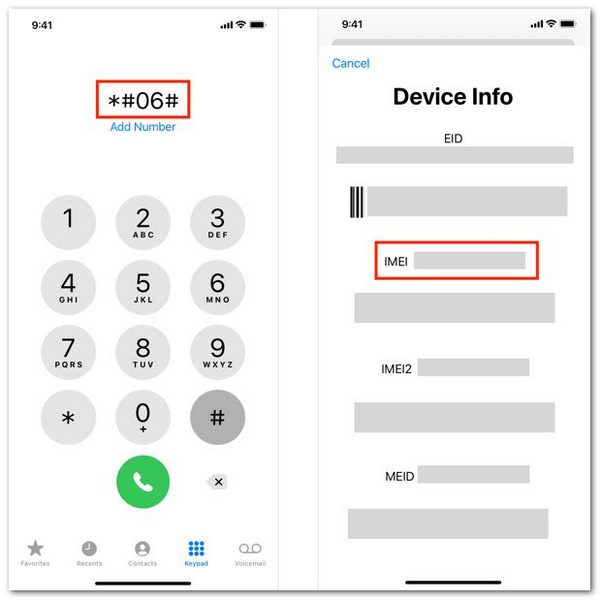
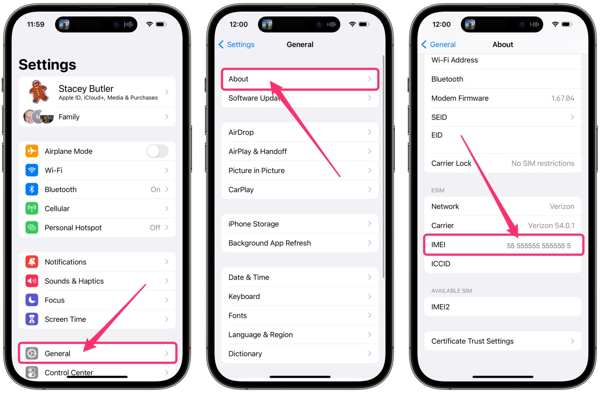
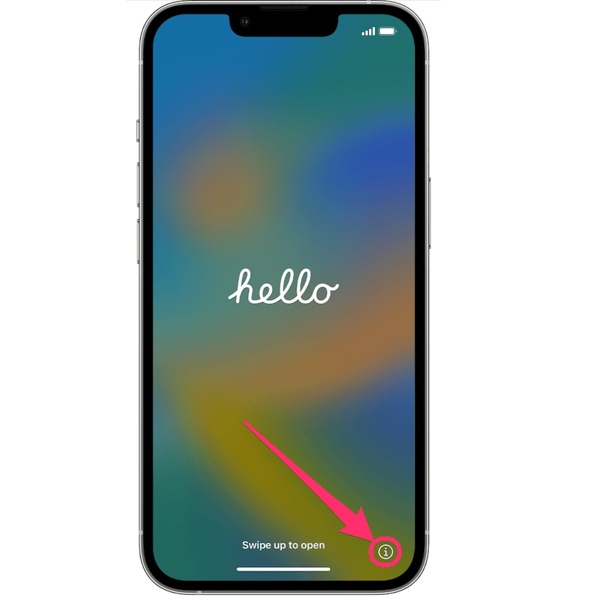
Find the IMEI number on your iPhone, there are three ways to get the job done.
Option 1: Open the Phone app, enter *#06#, and tap the Dial button. Then you will be presented with the information of your iPhone including the IMEI number.
Option 2: Run the Settings app, choose General, tap About, and find the 15-digit IMEI number.
Option 3: On a new iPhone, tap the info button at the bottom right corner to check the basic information including the IMEI number.
Visit an IMEI blacklist checker in your browser, enter the IMEI number in the box, and click the check or relevant button. Then you will find the blacklist status of your iPhone.
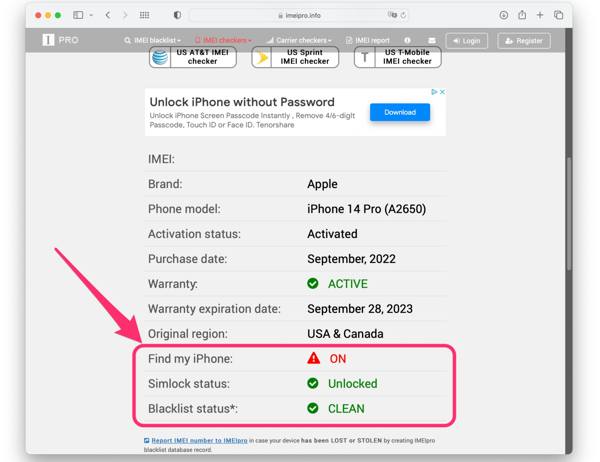
Part 2. How to Un-blacklist an iPhone
Important Note: IMEI blacklist removal does NOT remove iCloud Activation Lock. It only restores cellular functionality.
Way 1: How to Unlock a Blacklisted iPhone for Free
Contact your carrier's customer support.
AT&T: 800-331-0500 (or dial 611 from an AT&T phone)
Verizon: 800-922-0204
T-Mobile: 1-800-937-8997 (or dial 611 from a T-Mobile phone)
Metro by T-Mobile: 888-8-METRO-8 (888-863-8768)
Cricket Wireless: 800-274-2538
Mint Mobile: 800-683-7392
Straight Talk: 877-430-2355
Find out the reason for the blacklisting of your iPhone in the first place.
If it is a mistake, offer your IMEI number, and submit the request for iPhone blacklist removal for free by IMEI.
Way 2: How to Un-blacklist an iPhone with a Third-party Service
Some third-party services claim to remove a blacklisted iPhone or iPad by "cleaning" the IMEI, popular services including UnlockMaker, UnlockBlacklisted, and SafeUnlocks. However, the success rate is not guaranteed, and results depend entirely on the carrier and the reason for the blacklist.
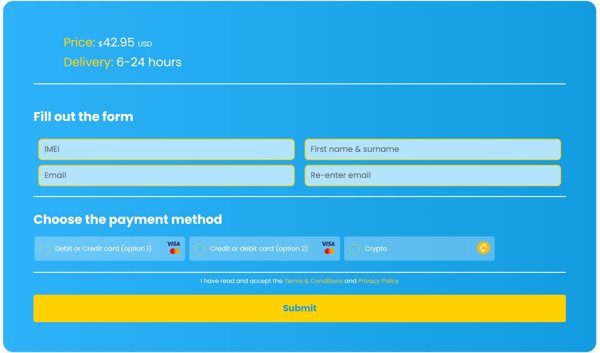
Visit a reputable IMEI blacklist removal service in a browser.
Fill out the form with your iPhone IMEI and your information.
Choose the payment method, check out the bill, and submit a request.
Note:
No third-party service can legally guarantee full blacklist removal. Providing IMEI information to unreliable platforms may expose you to privacy or fraud risks. The safest and most reliable method is still to contact the original carrier.
Part 3: How to Avoid Buying a Blacklisted iPhone
To avoid purchasing a blacklisted device, follow these practical tips before buying:
- Check the IMEI number to confirm the device status.
- Buy from trusted sellers or platforms with refund policies.
- Avoid unusually low prices, which may indicate hidden issues.
- Test the SIM card connection to make sure the device can access cellular networks.
- Ensure the device is signed out of Apple ID and not activation locked.
Bonus: If Your iPhone Is Locked for Other Reasons
If your iPhone still cannot be used normally after checking its blacklist status, the problem may not be related to the carrier network. In many second-hand devices, access issues are often caused by Apple ID lock, Screen Time restriction, or an MDM profile.
In such cases, a professional unlock tool like imyPass iPassGo can help. It features a user-friendly interface that is easy for beginners to navigate. As an all-in-one solution, it can safely remove various types of locks from your iOS devices.

4,000,000+ Downloads
Unlock iPhone, iPad and iPod without password.
Remove the previous owner's Apple ID within minutes.
Bypass Screen Time/MDM restrictions easily.
Support the latest iOS models and versions.
FAQs.
-
How to sell blacklisted iPhones?
If you can verify you are the rightful owner, you can sell a blacklisted iPhone safely and legally. SellLocked, for example, is a platform where you can sell a blacklisted device.
-
What happens if I put my SIM card in a blacklisted iPhone?
When you put a SIM card in a blacklisted iPhone, it may initially connect to the network, but your access to service will likely be restricted. You cannot make or receive calls and text messages.
-
Can thieves use a blacklisted iPhone?
If a blacklisted iPhone has been swapped or replaced at an Apple Store, the security measure has now been bypassed. That enables a thief to sell or use a brand-new iPhone without fear of recrimination.
Conclusion
This guide has talked about how to do iPhone blacklist removal. Firstly, you can check the blacklist status of your iOS device. There are at least two ways to get rid of the blacklist restriction. The easiest option is to submit a request to your carrier. If it is not available, you have to use a third-party unlock service.
Samuel specializes in password security and digital privacy. He used to work as a cybersecurity consultant for small businesses to protect digital assets. With certifications in Cybersecurity and Ethical Hacking, he turns complex security topics into easy-to-follow advice. He also enjoys sharing password tips to help users protect their accounts more confidently.
Hot Solutions
-
Unlock iOS
-
iOS Tips
-
Unlock Android
-
Password Tips