



 Solution
 Support Center
 About Us
 Contact
Full Review of IPlocation Net for A Comprehensive Usage
 Penny Warren Published on February 13, 2026GPS Location3-min reading
Unlock the full potential of IP Geolocation with our 2026 review of IPLocation.net. Whether you're troubleshooting network connections or verifying digital footprints, this tool provides precise data on country, city, and ISP. Beyond tracking, we explore the best solutions to change your IP location and safeguard your online privacy. Dive into our comprehensive guide to master your digital connectivity today!

In this article:
Part 1. Key Features of IPlocation.net
Compatible Platforms: Chrome, Edge, Firefox, Opera, and almost all web browsers
Pricing: IPlocation.net is free to use
The IPLocation.net service offers robust IP geolocation insights by identifying the physical location of internet-connected devices based on their IP addresses. This data is essential for targeted advertising, content localization, cybersecurity, and advanced analytics.
Beyond basic lookups, the IP Geolocation API provides granular details about website visitors, including their country, city, latitude, and longitude. Additionally, it delivers critical metadata such as time zones, ASN (Autonomous System Number), local currency, and real-time security threats, empowering businesses to make data-driven decisions.
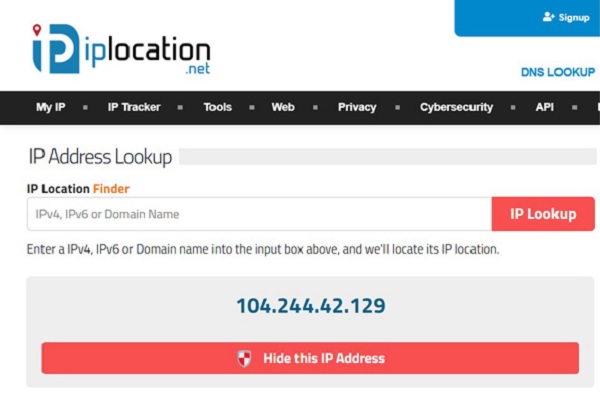
Main Features of IPlocation.net
• Geographical Location Identification: IP Location.net can pinpoint the geographical location of an IP address, providing details like country, region, city, latitude, and longitude of the device.
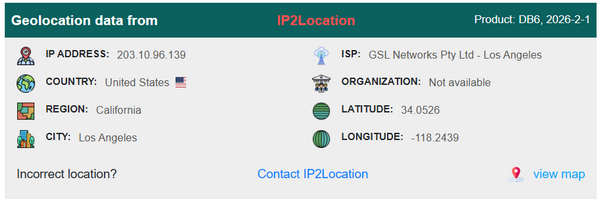
• Device Information: The service may offer additional details about the device, such as the type of device, operating system, and browser used.
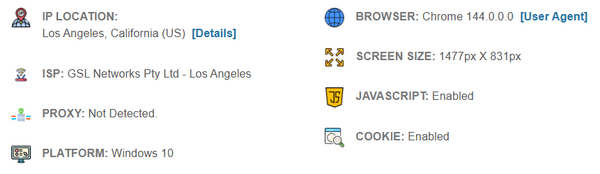
• Network Analysis: Some IP geolocation services provide insights into the network infrastructure, including the internet service provider (ISP) associated with the IP address.
• Security and Fraud Prevention: IP geolocation can enhance security by helping detect and prevent fraudulent activities. It allows businesses to verify the authenticity of users and transactions.
Part 2. Review of IP Location Net Tools
IPLocation.net offers a robust suite of diagnostic tools designed to secure online transactions, prevent spam, and mitigate cyber threats. Below is a detailed breakdown of the most recommended tools to streamline your daily digital tasks.
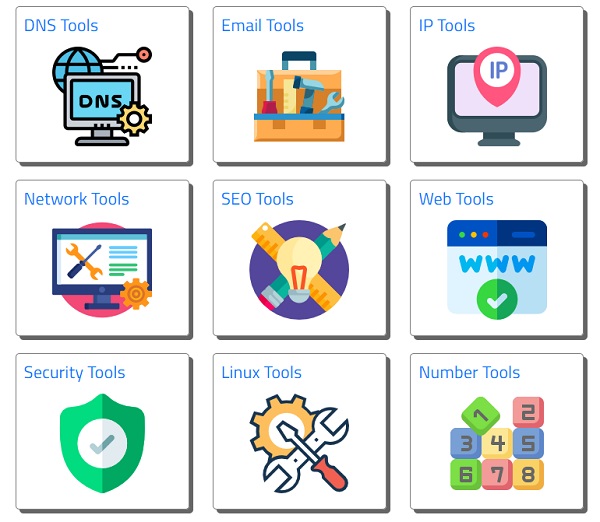
1. DNS Tools: Advanced Record Management
Key Functions: Perform comprehensive lookups for A, AAAA, SOA, CNAME, NS, MX, and TXT records.
Core Benefit: These tools are essential for verifying the proper configuration of SPF, DKIM, and DMARC protocols. Correct implementation ensures high email deliverability and prevents your communications from being flagged as spam by global mail servers.
2. IP Tools: Precision Network Diagnostics
Key Functions: Identify a device's public IP address and pinpoint its precise geographical coordinates.
Core Benefit: Highly versatile for both developers and casual users, these tools assist in diagnosing network connectivity issues, optimizing server setups, and monitoring unauthorized access points.
3. Security Tools: Identity & Privacy Protection
Key Functions: Safeguard your digital footprint by checking if your email address has been compromised in known data breaches.
Core Benefit: The URL Unshortener is a standout feature, allowing you to reveal the true destination of suspicious links before clicking, effectively protecting you from phishing attacks and malicious redirects.
4. Email Tools: Verification & Traceability
Key Functions: Validate email addresses in real-time to confirm deliverability and analyze email headers.
Core Benefit: These tools empower users to trace the origin of an email, identifying the sender's actual IP address. This is critical for verifying the authenticity of business communications and preventing sophisticated spoofing attempts.
Pros and Cons of IPlocation.net
Pros
- Display results from several major providers.
- Offer a comprehensive all-in-one toolkit.
- Free without registration.
- Highly informative for security.
Cons
- Accuracy limitations for specific cities.
- Lag in updates from different providers.
- Doesn't support high-volume check.
Is IPlocation.net Safe?
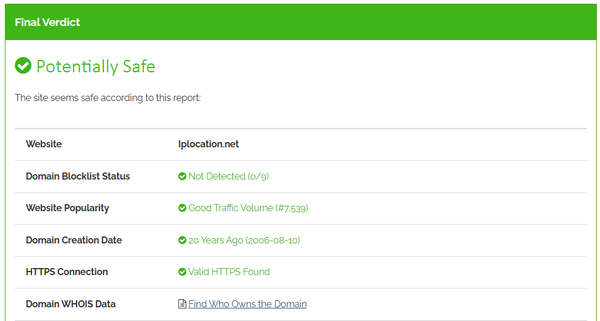
IPLocation.net is generally safe to use for quick lookups, but it should be treated as a public utility rather than a high-security platform. From Scanvoid, IPlocation.net is safe to use. However, this website has many ad pop-ups. You should be careful when using IPlocation.net.
Part 3. Best Tool for You to Change IP Location
If you want to change your IP address location without moving to another location, you can use imyPass iLocaGo. This versatile software is reliable for safeguarding your privacy on social media. Furthermore, the tool enables swift and precise setting of a virtual location for your iPhone, preventing address leakage and ensuring privacy protection. Also, it can effortlessly transport your device to any chosen destination and establish favorite spots for quick position changes. It offers exceptional control, one-stop, multi-stop, and joystick modes, and customizable speed settings from walking to driving. The tool's intuitive interface includes a full map display, simplifying the manipulation of your current and fake locations.

4,000,000+ Downloads
The tool assists in concealing your actual location and ensuring the safe protection of your privacy.
It is compatible with many iOS devices, encompassing the latest iPhone and iPad models.
The application is accessible on both Windows and Mac operating systems.
Related Readings:
FAQs.
-
Can I identify a device with an IP address?
Yes, but only partially. An IP address identifies a network connection, not the specific hardware or the individual person using it.
-
Is IP tracing illegal?
pTracing an IP is legal in most cases, but its legality depends on your intent and method. Here is the brief breakdown:
It is legal if: You are a website owner logging visitors, a business preventing fraud, or an individual using public tools (like IPLocation.net) to find a general city/ISP for personal curiosity or security.
It is illegal if: You use the IP to harass, stalk, or "dox" someone, or if you use it to gain unauthorized access (hacking) to their device or network.ppppp -
How to block IP location?
You can use a VPN or proxy to change your IP location. You can also adjust privacy settings on your device to prevent some apps or services from getting your IP location.
Conclusion
IPlocation is a good website for you to check your IP location and more detailed information about your IP, internet, and device. It's free and safe, but you should be careful of the annoying pop-up ads on the website. If you want to hide your location on your phone, you can use imyPass iLocaGo to easily create virtual locations or routes so that the apps on your phone will detect only the fake locations.
Penny focuses on GPS troubleshooting and Windows optimization. She formerly worked as a technical support engineer, helping clients solve location-based and system issues efficiently. Backed by IT support experience, she provides practical solutions that really work. In her free time, she likes hiking and geocaching, testing GPS tech in the real world.
Hot Solutions
-
GPS Location
-
Unlock iOS
-
iOS Tips
-
Unlock Android


