



 Solution
 Support Center
 About Us
 Contact
Unlock Boost Mobile Cell Phone Carrier Restriction for Free
 Gideon Byron Published on February 06, 2026Unlock Android3-min reading
It is cost-effective to purchase a carrier-locked phone, such as a Boost Mobile contract phone. However, the downside to the low price is a SIM lock, which means that your phone cannot work with other carriers like T-Mobile, AT&T, etc. So, when you want to switch to a cheaper and nicer data plan from another carrier, you'll need to unlock Boost Mobile phone first. Here comes the detailed guide, which will show you the prerequisites and how to unlock a Boost Mobile phone yourself for free.

In this article:
Part 1: When Can You Unlock Boost Mobile Cell Phone
To unlock a Boost Mobile iPhone or Android phone, you must meet specific requirements established by their policy. Generally, the most important factor is the length of time the device has been active on their network.
Here are the specific criteria you must fulfill:
12-Month Active Service: The device must have been active on a Boost Mobile account for at least 12 months.
Account Standing: Your account must be in good standing, meaning all bills are paid and the account is currently active.
Payment Completion: If the phone was purchased through a financing plan, it must be fully paid off.
Not Flagged for Fraud: The device cannot be reported as lost, stolen, or otherwise flagged as involved in fraudulent activity.
Military Personnel: If you are a member of the U.S. military and have received deployment papers, Boost Mobile will typically unlock your device even if you haven't met the 12-month requirement. You will need to provide proof of deployment to their customer service team.
Part 2: How to Unlock a Boost Mobile Phone
Now, let's see how to unlock a Boost Mobile phone yourself for free. Whether you use a Boost Mobile iPhone or Android model, you can find specific guides here.
Make sure your Boost Mobile phone is eligible to be unlocked. Basically, you can unlock your phone at the one-year mark with good standing.
Dial #06# to see the IMEI number of your Boost Mobile phone or go to the Settings app to find it.
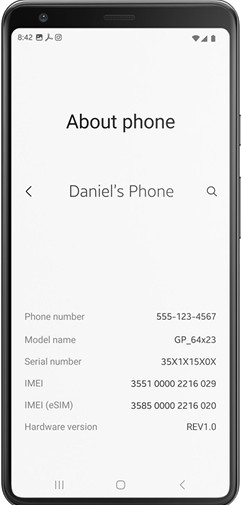
Prepare all the relevant credentials:
Your phone's IMEI number
Phone number or email account linked to the phone
Your account PIN
Then, contact the Boost Mobile customer support line: 1-888-266-7848. Request a Boost Mobile phone unlock.
You may get a response from Boost Mobile within 2 business days.
For iPhone: If you unlock a Boost Mobile iPhone, Boost will contact Apple, and your iPhone gets unlocked remotely.
For Android: If you unlock a Boost Mobile Android phone, Boost may give you an unlock code and instructions to manually unlock your phone.
Power off your phone and replace the Boost Mobile SIM card with a new one. Then, power it on. If you use an Android phone, you may need to enter the Boost Mobile unlock code to unlock your device.
Also Learn:
Part 3: How to Check Whether You Boost Mobile Phone Is Unlocked
Are Boost Mobile phones unlocked or not? This question matters before you perform a Boost Mobile phone unlock. You can practice the following steps to check the status of your Boost Mobile phone lock.
Power off your Boost Mobile phone and eject the Boost Mobile SIM card from your phone. Please use a SIM card removal tool to remove it safely.
Then, insert a workable SIM card from a different carrier into your Boost Mobile phone.
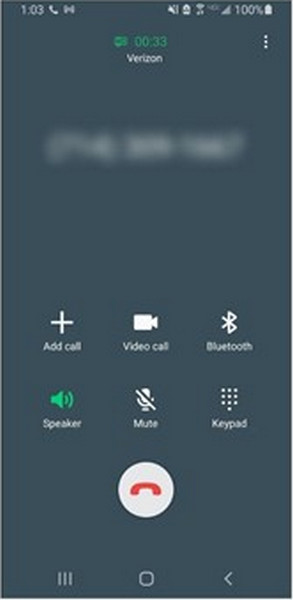
Power on your phone and wait for seconds. If you can see the new carrier's name and have clear signal bars at the top of your phone screen, try calling someone.
If this call goes through, your Boost Mobile phone is SIM unlocked. If the call fails to connect and error messages like 'Emergency Calls Only' or 'Invalid SIM' appear, your phone is still locked to Boost Mobile.
Tips: Why You Fail to Unlock a Boost Mobile Device
Situation 1: You want to switch to a different carrier, but your phone shows Invalid SIM or SIM Not Supported when you insert a new card.
Solution: Verify you have met the 12-month active service requirement and that your account is in good standing. If eligible, contact Boost Mobile Customer Care to request a manual unlock.
Situation 2: Boost Mobile has rejected your request to unlock the phone.
Solution: Ask for the specific reason for the denial. Usually, it is because the device hasn't been active for 365 days or there is an unpaid balance on the device. Resolve the payment or wait until the 12-month threshold is met.
Situation 3: The second-hand phone won't unlock
Solution: Because Boost Mobile unlock requires the account to be in good standing, you may need to contact the original owner to settle any unpaid balances or fulfill the service time requirements.
Part 4: Bonus: How to Unlock Boost Mobile Phone Screen
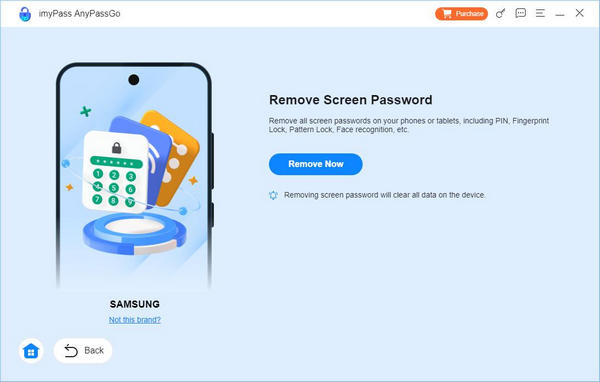
Suppose you are locked out of your Boost Mobile phone due to a forgotten passcode or you cannot find your IMEI number due to a locked screen. In that case, you can use imyPass AnyPassGo to bypass Boost Mobile phone without a pattern, PIN, fingerprints, or face recognition.
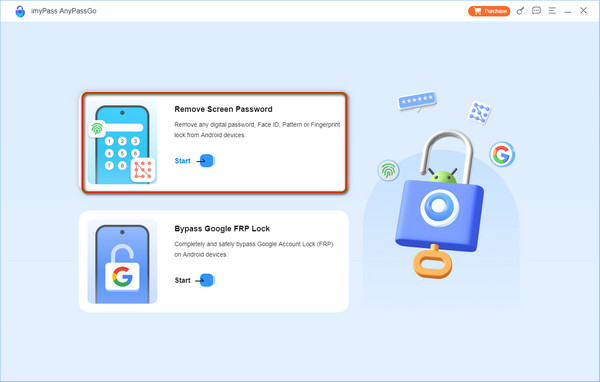
Go to imyPass website to download imyPass AnyPassGo. Launch it and click Remove Screen Password in the home interface. Then, connect your Boost Mobile phone to the computer.
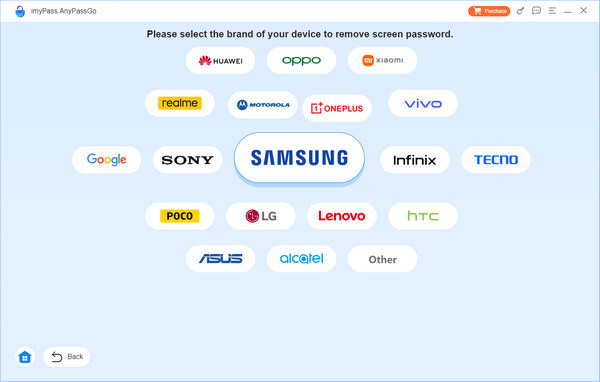
After a successful connection, select your phone brand and move on.
After everything is ready, click Remove Now and the program will wipe the screen passcode for you.
FAQs.
-
Can I download Boost Mobile unlocking software to unlock the SIM lock?
Yes, you can download AnyUnlock to unlock the SIM lock for any carrier on your iPhone. Or, you can download some Boost Mobile unlocking apps for Android on Google Play.
-
Can I unlock a Boost Mobile phone online?
Yes, you can explore some safe online IMEI unlock services to order a Boost Mobile unlock code. For example, you can go to DirectUnlocks to enter your IMEI number and unlock your Boost Mobile phone online.
-
Are unlocked phones compatible with Boost Mobile?
Yes, your unlocked phone is compatible with every carrier without restrictions. So, if you unlock your phone from Boost Mobile lock, you can still use a SIM card from Boost Mobile.
Conclusion
If you want to unlock Boost Mobile cell phone yourself for free, follow the guide in this post to unlock your iPhone or Android and switch to another carrier easily. You should check whether your phone meets the unlock policy first. If you've forgotten the screen passcode of your Android phone, imyPass AnyPassGo can help you easily remove any screen lock on Android phones easily, including the latest Android 17 and many brands like Samsung, LG, OnePlus, Sony, and more.
Gideon writes about unlocking iOS, Android, and Windows devices. He previously worked as a mobile device specialist in a repair center, assisting customers with locked devices and password recovery. In his spare time, he tests new unlock tools, customizes smart devices and makes complex unlock processes simple and safe.
Hot Solutions
-
Unlock Android
-
Unlock iOS
-
Password Tips
-
iOS Tips

