



 Solution
 Support Center
 About Us
 Contact
Can 3uTools Bypass MDM Lock? How It Works and What to Expect
 Samuel Spenser Published on October 23, 2026Unlock iOS3-min reading
You might come across a screen that informs you that you should contact your administrator before you can do anything else. The cause of this lock is Mobile Device Management (MDM), which companies and schools use to control their devices, but it can be annoying for new owners. Fortunately, 3uTools MDM Bypass provides a clear, step-by-step method to bypass these restrictions without requiring any advanced technical knowledge. In this guide, we'll explain how MDM works, walk you through the detailed steps, and cover the limitations you should know before trying a bypass.

In this article:
Part 1: The Truth About 3uTools MDM Removal
What 3uTools Claims to Do?
3uTools claims that its Skip MDM Lock feature can remove or bypass Mobile Device Management (MDM) restrictions with a single click. According to the developers, using 3uTools for MDM bypass on iOS 17 is as simple as connecting your iPhone or iPad to a computer and launching the bypass feature. The process is designed to work without jailbreaking your device or updating its firmware. In addition to MDM-related features, 3uTools also lets you change your device's location using its 3uTools location changer.
Our Real-World Testing Results
Our test results varied depending on the iOS version. Devices running iOS 14 and 15 achieved an 80% success rate with Skip MDM Lock, with the process taking less than five minutes and no user data being lost during successful attempts. However, when we tested 3uTools MDM bypass on an iPhone 13 running iOS 17, the process was interrupted twice, and we had to restore the device. These results suggest that 3uTools performed better on the older iOS devices we tested, while the iOS 17 test was unsuccessful.
Why iOS 17/18 Changes Everything
Apple introduced stricter checks during startup and enhanced security for MDM profiles in iOS 17. Early indications suggest that iOS 18 may introduce further changes. As a result, MDM bypass tools such as 3uTools may face compatibility issues with newer iOS versions and could cause the device to enter recovery mode if the process fails. If 3uTools does not update its bypass methods, bypassing MDM on iOS 17 may become more difficult. Using an incompatible method could also lead to serious device issues.
Part 2: Step-by-Step Bypass Methods with 3uTools
In this section, we will guide you through every click and connection you need, starting from your 3uTools MDM Bypass download to verifying that your device is truly unlocked. Regardless of your familiarity with 3uTools, this walkthrough keeps things clear and easy to follow, using language anyone can understand.
Before you start, make sure you have:
- A Windows PC with the latest version of iTunes installed.
- A reliable USB cable to connect your iPhone or iPad.
- At least 30 minutes to complete the process.
Head over to the official page of 3uTools to download the app. Run the installer and follow the on-screen prompts that need to be completed. Launch it after you are done.
Plug your iPhone device that the MDM locks, click the Toolbox, and choose the Skip MDM Lock to open the module that is designed to bypass MDM profiles without changing the firmware.
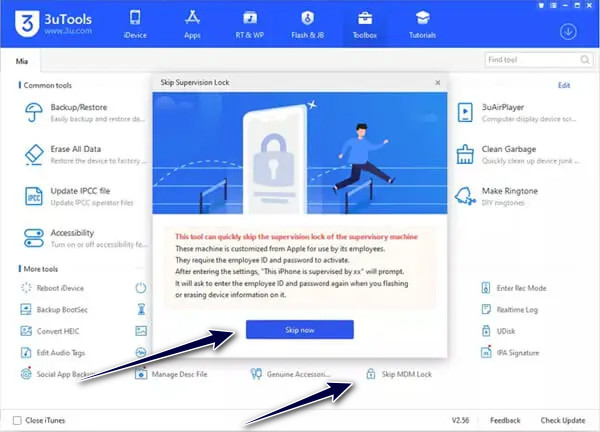
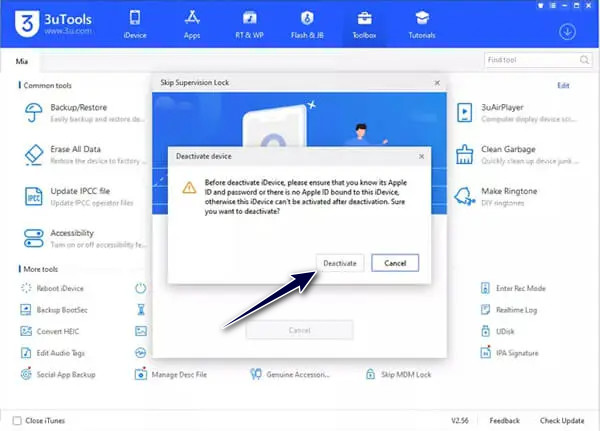
A new interface will appear with the warning, and click Skip Now to proceed. When prompted, click the Deactivate button to remove the profile from the device.
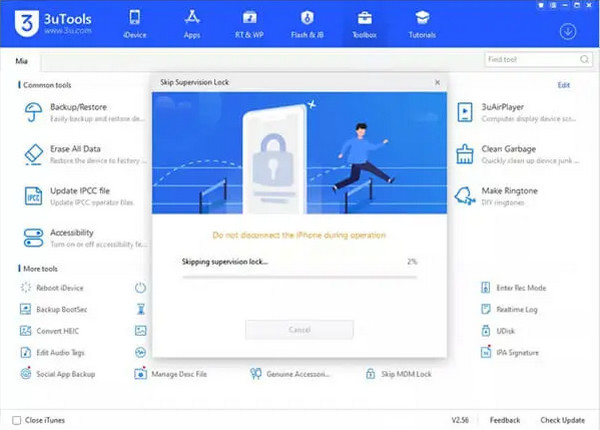
Wait until the progress bar is complete before you plug it out. After the success message that appears, you can now restart it, and once it is done, you will have a home screen with no MDM lock.
Part 3: What Nobody Tells You (Risks & Limitations)
Many users see a third-party MDM bypass tool as a quick fix, but there are several risks to consider.
1. Data Loss
The Skip MDM Lock process may fail or require device recovery. If you need to restore your device via iTunes or Finder, your data may be erased. Without a recent backup, you could lose your contacts, photos, messages, and app data.
2. Warranty and Apple Support
Using 3uTools does not automatically void your Apple warranty. Damage caused by unauthorized modifications may affect your eligibility for repairs or AppleCare service.
3. Security Risks
MDM profiles help enforce security policies on managed devices. Bypassing these protections may leave your device less secure, especially if you install unverified apps or configuration profiles. These may expose personal data and put your device at risk.
4. Compatibility and Recovery Issues
An iOS update may cause a bypass method to stop working. Your device may remain on the Remote Management screen or enter recovery mode. A DFU restore may erase your data, and your device may become unusable if the lock remains.
5. Legal and Ethical Issues
Modifying or bypassing MDM may violate your school or company's policies. Depending on the circumstances and local law, this could lead to disciplinary action or legal consequences. Consider potential consequences before proceeding.
Part 4: Modern Alternative That Actually Works
If you are looking for a simple way to remove MDM from an iOS device, imyPass iPassGo is a solid choice. It works even on the latest iOS 27, offering a smoother experience compared to other tools. Simply install it on your computer, link your device, and follow the steps. A few minutes after the processing is complete, you can enjoy it.

4,000,000+ Downloads
Remove MDM from iPhone or iPad without password.
Offer a simple, step-by-step guide designed for beginners.
Bypass Screen Time passcode, remove screen lock & unlock Apple ID.
Support the latest iOS 27 and iPadOS 27.
Download and install imyPass iPassGo on your computer to start removing Mobile Device Management on your device.
Launch the software on your computer, then choose the Bypass MDM mode from the interface.
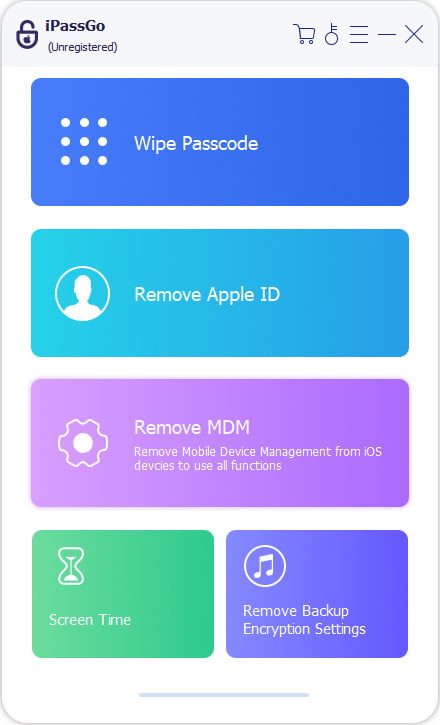
Connect your device to the computer using a USB cable, then click the Start button to proceed.
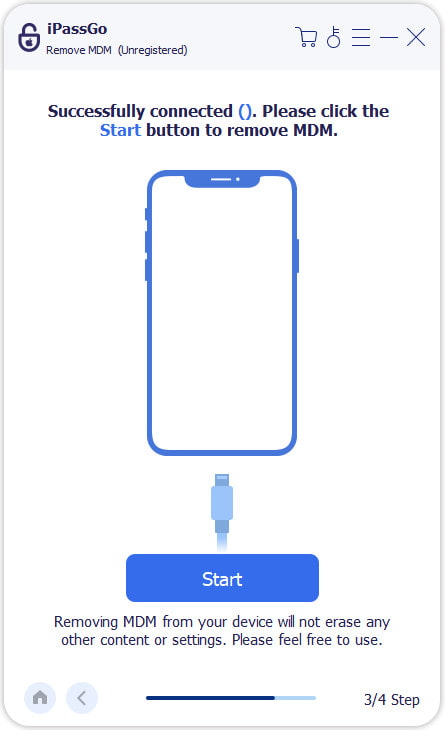
This software will automatically remove MDM from your device. Please ensure your device and computer maintain a stable connection during this process.
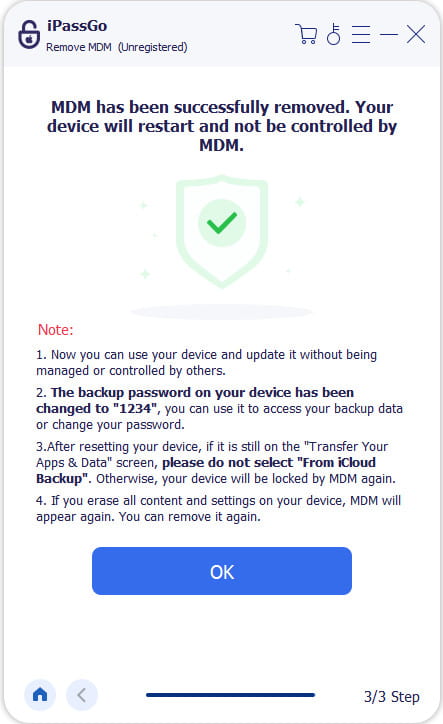
Note:
Keep in mind that only use MDM bypass tool on devices you own or are authorized to manage. Removing an MDM profile without the organization's consent may violate your employer's policies or local law.
FAQs.
-
Is MDM bypass legal?
It depends on your regions and cases. Unauthorized removal may violate policies. Therefore, please always check local laws and consult the device owner before attempting any bypass.
-
How to remove MDM officially?
You should contact the enrolling organization or Apple-authorized support. They may give you the official tools, like Automated Device Enrollment, or remove the MDM for you directly.
-
Does MDM removal erase data?
Most official MDM removal will erase your iPhone/iPad data. If you want to keep your data after MDM removal, you can try imyPass iPassBye. It is legal and authorized.
Conclusion
If you are thinking how to bypass MDM with 3uTools, the steps can be easy based on the facts we highlighted in this part. However, they do come with risks, especially on iOS 17 or newer iOS versions. While it offers a Skip MDM feature, it is not always as reliable as what imyPass has to offer. This app offers a stable and user-friendly option that provides better results without the hassle.
Samuel specializes in password security and digital privacy. He used to work as a cybersecurity consultant for small businesses to protect digital assets. With certifications in Cybersecurity and Ethical Hacking, he turns complex security topics into easy-to-follow advice. He also enjoys sharing password tips to help users protect their accounts more confidently.
Hot Solutions
-
Unlock iOS
-
iOS Tips
-
Unlock Android
-
Password Tips


