



 Solution
 Support Center
 About Us
 Contact
8 Best Cost-Effective iPhone Unlocking Services Review
 Samuel Spenser Published on May 09, 2026Unlock iOS3-min reading
Some people purchased their iOS devices from network providers due to the affordable prices. The downside is that the devices are locked to specific carriers. It means that users cannot switch to another carrier or use another SIM card. Major carriers allow users to unlock their devices once they can meet the unlocking policies. If you cannot meet the policy, you will need an iPhone unlock service. This article reviews the top 8 services.

In this article:
Part 1. Comparison of Best iPhone Unlock Services
How We Test Best iPhone Unlock Services
We collected the most popular iPhone IMEI unlocking services online. We tested them in our lab to identify the top list. Moreover, we collected hundreds of users’ reports on Reddit, Trustpilot, and more. We focus on a few factors, like prices, success rate, supported devices, ease of use, and more.
| URL | Success Rate | |
| DoctorSIM | https://www.doctorsim.com/en-us/ | 85% |
| UnlockRiver | https://unlockriver.com/ | 82% |
| UnlockBase | https://www.unlockbase.com/ | 79% |
| UnlockPlus | https://www.unlockplus.com/ | 78% |
| SIMUnlock | https://sim-unlock.net/ | 75% |
| Simneverlock | https://simneverlock.com/ | 67% |
| CarrierSwitcher | https://carrierswitcher.com/app/ | 65% |
| BigUnlock | https://bigunlock.com/ | 63% |
Part 2. Top 8 iPhone Unlock Services
Top 1: DoctorSIM
DoctorSIM is one of the best places to unlock iPhones from carriers. Users can submit a request, pay the bill, and unlock the SIM card lock on a variety of iPhones. More importantly, there is no extra fee.
Pros
- Unlock iPhones online.
- Support a wide range of devices.
- Offer on-screen instructions.
- Check the blacklist and iCloud Activation status.
Cons
- It is expensive.
- It requires IMEI numbers.
Top 2: UnlockRiver
UnlockRiver is a reputable iPhone IMEI unlock service. It is able to unlock any SIM in any country. According to the service, it promises to refund the cost if it cannot unlock your SIM card on your iPhone.
Pros
- Legal and safe.
- 2.Unlock iPhone with IMEI.
- Take up to 72 hours.
- Unlock iPhone carrier forever.
Cons
- Users must follow unlock policies.
- Customer support is poor.
Top 3: UnlockBase
UnlockBase is one of the best iPhone unlock services online. It allows users to offer basic information and unlock their SIM cards of the iPhones. Moreover, it provides bonus features, unlocking Samsung.
Pros
- Easy to use.
- Unlock iPhone SIM online.
- Support the latest versions of iPhone.
- Cost-effective.
Cons
- The prices are high.
- It lacks live customer support.
Top 4: UnlockPlus
UnlockPlus is another Apple iPhone unlock website. Users can select their device brand and model and begin unlocking their carrier lock on the website. Plus, the onscreen prompts can streamline the process.
Pros
- Unlock an iPhone from any carrier.
- Offer 24/7 customer support.
- Work for GSM carriers.
- Factory reset iPhones.
Cons
- It only supports iPhone 13 and earlier.
- It is only available in English.
Top 5: SIMUnlock
SIMUnlock is one of the cheap iPhone unlock services online. It can unlock almost all iPhone models from network provider lock. More importantly, the prices are affordable and transparent.
Pros
- Unlock iPhone SIM cards.
- Support almost all iPhones.
- Offer bonus features, like an IMEI check.
- Provide affordable prices.
Cons
- The success rate is not high.
- It lacks professional customer support.
Top 6: Simneverlock
Simneverlock is an iPhone unlock site designed for safely changing carriers or SIM cards. It claims to unlock an iPhone for free, but the process must finish after users pay the bill. Of course, the prices are affordable.
Pros
- Professional and well-designed.
- Offer AI customer support.
- Verify your device directly.
- Integrate an intuitive interface.
Cons
- It has refund issues.
- Users must access it on their iPhones.
Top 7: CarrierSwitcher
CarrierSwitcher is an iPhone unlocking website that makes SIM unlocking so easy. It guides beginners to get rid of carrier restrictions with onscreen instructions. Moreover, the concise interface is easy to navigate.
Pros
- Easy to navigate.
- Unlock carrier restrictions on iPhones.
- Unlock Activation Lock.
- Work for a wide array of iPhones.
Cons
- Users must sign up for an account.
- The success rate is low.
Top 8: BigUnlock
BigUnlock is a safe iPhone unlock service online. According to our test, it is reported safe by Avira, Badbitcoin, and more. It works for major carriers, like AT&T, Verizon, and more, online without technical skills.
Pros
- Safe and legal.
- Unlock iPhone SIM quickly.
- Don’t ask for registration.
- Work on the latest models of iPhone.
Cons
- The process of applying for a refund is complex.
- It lacks bonus features.
Part 3. Bonus Tip: How to Unlock iPhone on Your Own
With imyPass iPassGo, you can unlock your iPhone on your own. It allows you to remove the screen locks without a password or jailbreaking your device. Plus, the user-friendly interface makes it easy to use.

4,000,000+ Downloads
Unlock an iPhone with three steps.
Work for digit passcodes, Touch IDs, and Face IDs.
Offer bonus features, like MDM removal from iPhone.
Support the latest editions of iOS and iPadOS.
How to Unlock Your iPhone on Your Own
Connect to your iPhone
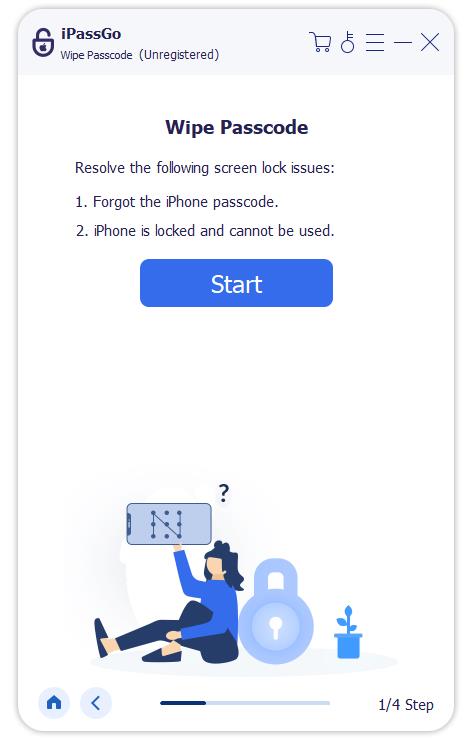
Install the iPhone unlocking software on your computer and launch it. Plug your iPhone into your computer with a Lightning cable. Choose the Wipe Passcode mode to proceed.
Download the firmware
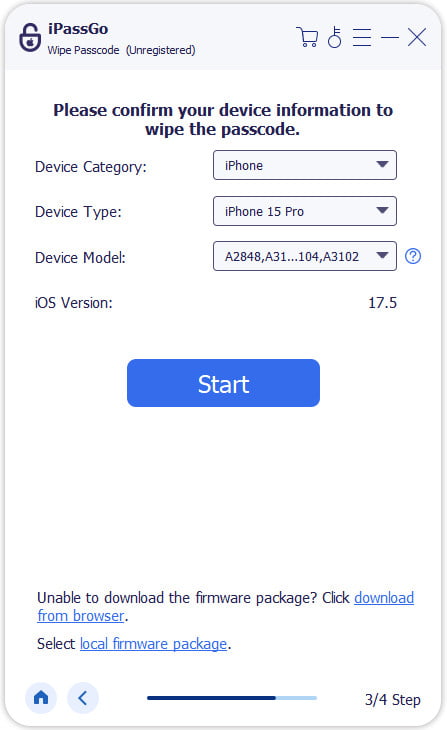
Click the Start button to load your device information. Check them and click Start to begin downloading the firmware.
Unlock your iPhone
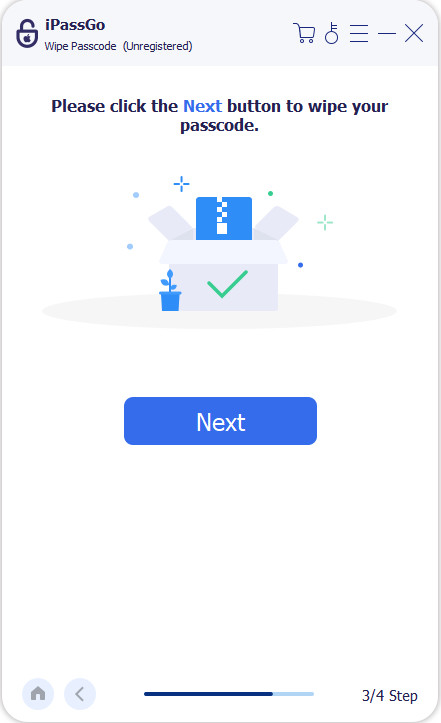
After the firmware is downloaded, click the Unlock button. Read the notification and confirm the process following the prompts. When it is done, your iPhone will restart and can be unlocked directly.
Conclusion
Now, you should learn the top 8 iPhone unlock services. You can read our reviews and pick an appropriate one according to your situation. To protect your device and data, you’d better back up your iPhone before the process. imyPass iPassGo is a powerful way for ordinary people to unlock a locked or disabled iPhone without any restrictions or technical skills.
Samuel specializes in password security and digital privacy. He used to work as a cybersecurity consultant for small businesses to protect digital assets. With certifications in Cybersecurity and Ethical Hacking, he turns complex security topics into easy-to-follow advice. He also enjoys sharing password tips to help users protect their accounts more confidently.
Hot Solutions
-
Unlock iOS
-
iOS Tips
-
Unlock Android
-
Password Tips


