Solution
 Support Center
 About Us
 Contact
A Thorough Review of iRemove Tools - Features & Alternatives
 Samuel Spenser Published on December 17, 2025Unlock iOS3-min reading
iRemove Tools became an emerging program to remove iCloud lock for iPhone, iPad, and even Mac. In this article, we will look at what the app is about, how to use it, and an alternative when it isn't the right fit for your needs. So, if you are stuck with a locked Apple device, read this to know more about its world and how it can help you.

In this article:
Part 1. What Are iRemove Tools?
iRemove Tools is a software providing Apple unlocking solutions on iPhones, iPads, and Macs.
Marketed as a user-friendly solution, it promises to bypass iCloud lock efficiently. This can be helpful if you need to remember your login credentials or have bought a secondhand device still locked to the previous owner's account.
iRemove Tools splits its service into small pieces, and the price difference is significant. For example, the iRemove software for iPad 2 and that for iPhone 16 for iCloud bypass differ several times.
Therefore, please see its main features and the corresponding price:
| Service | Supported Devives | Supported System Versions / Mac Chips | Price | Note |
| Bypass iCloud Lock (iPhone) | From iPhone XR/XS/XS MAX to iPhone 16 Pro Max | From iOS 12 to iOS 26.1 | From $4.99 to $150 | The newer the model is, the higher the price will be. |
| Bypass MDM (iPhone/iPad) | Almost all iPhone and iPad Models | From iOS 7 to iOS 26 | $14.99-$29.99 | |
| Disable Find My Mac | MacBook Pro, MacBook Air, Mac Mini, Mac Pro, iMac Pro | any MacOS Version Up to BridgeOS version 9.4 | $50 | |
| Remove EFI Firmware Password | MacBook Pro, MacBook Air, Mac Mini, iMac, iMac Pro | DATA SAVE up to MacOS 11 Big Sur DATA ERASED any macOS & Bridge OS version | $99.99 | |
| Remove Device Management | MacBook Pro, MacBook Air, Mac Mini, iMac, iMac Pro, Mac Pro | Apple M1, M2, M3, M4 & T2 (Intel) | $29.99 | |
| Remove Mac MDM | MacBook Pro, MacBook Air, Mac Mini, iMac, iMac Pro, Mac Pro | Apple T2 (Intel) | $79.99 |
Are iRemove Tools Safe?
Well, as for our test, it doesn't contain any viruses for your computer. However, as for some services on its website, iRemove Tools does not provide the services. Instead, iActivate provides part of the MDM removing services. So, when you use iActivate, be careful.
Are iRemove Tools Legit?
Yes. iRemove Tools is legal when used to unlock the iCloud activation lock on your own iOS devices. What’s worth mentioning is that, iRemove Tools is not an Apple-authorized tool. Its use may violate Apple’s Terms of Service. In some countries or regions, using it on devices that you do not legally own may involve legal risks.
Part 2. Pros & Cons of iRemove Tools Software
As third-party iOS unlocking software, iRemove Tools show both strengths and limitations. In this section, we will summarize its main pros and cons for your reference.
Pros
- Offers a one-click bypass process for various security features.
- It supports Mac MDM and Apple ID removal.
- All supported devices are clearly listed, and the success rate is high.
Cons
- It doesn't support bypassing the iPad iCloud lock.
- The price for a new iPhone's iCloud bypass is super high.
Part 3. How to Use the iRemove Tools to Bypass iCloud Activation Lock
This software is easy to use, and you will see a very detailed on-screen guide when you operate. Therefore, you can fuse this software and bypass iCloud lock without any tech skills.
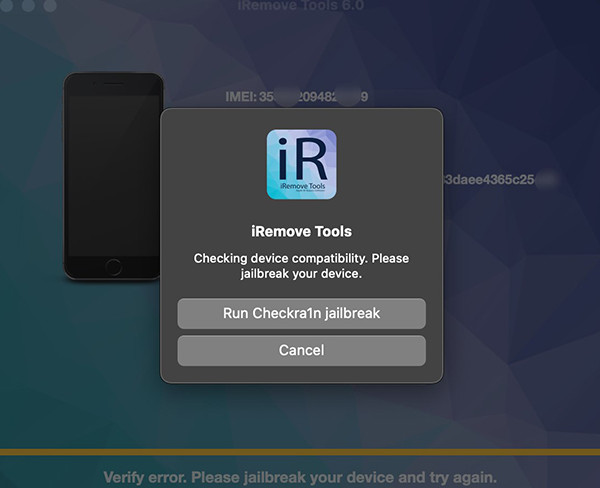
Install the iRemove software and connect your locked device.
Jailbreak your device if needed and check compatibility before paying.
Make a payment to unlock the bypass tool and reconnect your device.
Click Start in the software and wait for the bypass to complete.
Part 4. Affordable iRemove Tools Alternative [Editor’s Choice]
As we mentioned before, iRemove Tools doesn't support bypassing iPad iCloud lock, and the price can be very high for new models (for example, $100 for iPhone 12). Therefore, you can also try imyPass iPassBye, which is more affordable and compatible with iPad. imyPass iPassBye is a reliable companion on the go when your iOS device has been on Activation Lock since it can easily remove the lock being applied. Its performance is incomparable and well-established, so expect your iOS to be unlocked after you process it here. The steps shown here can help you fix the problem today.
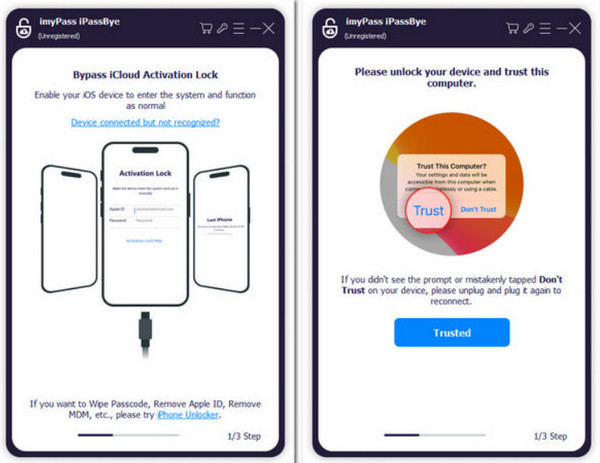
First, download the app on your Windows or Mac devices by clicking the download button below. After that, install the package and launch the program to start using it.
Establish a connection between iOS and computer via USB cable, click Trust to confirm the connection, and proceed to the next step.
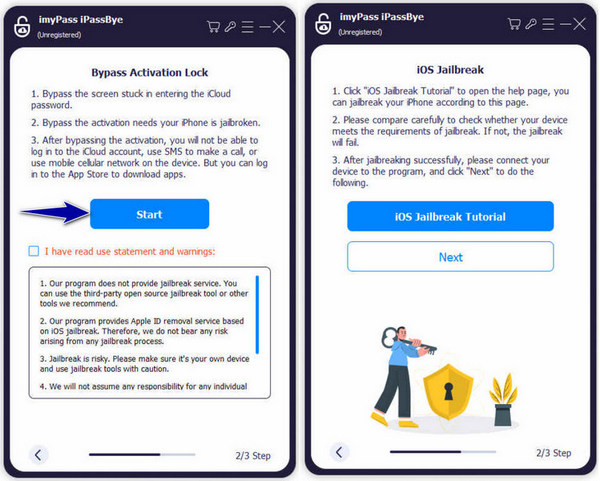
Read the warning and important information here, then click Start to begin the process. Also, your device must be jailbroken before clicking the Next.
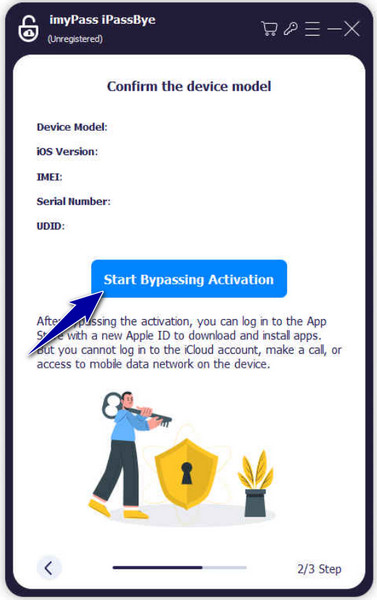
Assess the device information generated, click Start Bypass Activation, and wait for the process to start.
Here is a comparison table of iRemove Tools and imyPass iPassBye focused on iCloud Activation Lock bypass:
| Dimension | iRemove Tools | imyPass iPassBye |
| Feature | Activation Lock / MDM / Apple ID / Mac Support | Devoted in iCloud Activation Lock |
| Device | iPhone 5 – iPhone 16 | IPhone 4 to the Latest iPhone 17 Pro Max |
| Compatibility | iOS 12 – iOS 26 | Optimized for iOS versions up to 17 |
| Success Rate | Higher for Old Devices | Stable Performance |
| Price | $4.99 to $150 Based on Your Device | $43.71 for Lifetime for Any Device(Free Download) |
| User Experience | Multi-function interface designed for advanced users | User-friendly interface optimized for Activation Lock scenarios |
| Support | Offers customer support resources | 7/24 Customer Support |
| Feedback | User feedback varies greatly | 99.6% Positive Review |
FAQs.
-
Does iRemove software offer a jailbreak service?
iRemove offers a built-in jailbreaking feature that can be used to put your device into a jailbroken state.
-
What devices are supported by iRemove Tools?
While iRemove Tools offers various tools for iPhones, iPads, Macs, and potentially Apple Watches, specific supported devices depend on the chosen tool.
-
Is the iRemoval tool trustworthy?
Generally yes. But you should consider the failure situation since the price of bypassing some new models' iCloud lock model is high, and the highest is $125. Contact their support and confirm with them if your device model is supported before purchasing.
Conclusion
Does iRemover Tools work? Based on the review we made, it is working, but its actual effectiveness depends heavily on the device model and iOS version. For users who simply want to unlock the iCloud Activation Lock, choosing a dedicated solution with a simpler workflow may be better. That is why we introduce the imyPass iPassBye.
Samuel is a senior editor from imyPass. He is an expert on password unlocking. He has over five years of experience writing tutorials on phone unlocking.
Hot Solutions
-
Unlock iOS
- Review of the Free iCloud Unlock Services
- Bypass iCloud Activation With IMEI
- Remove Mosyle MDM from iPhone & iPad
- Remove support.apple.com/iphone/passcode
- Review of Checkra1n iCloud Bypass
- Bypass iPhone Lock Screen Passcode
- How to Jailbreak iPhone
- Unlock iPhone Without Computer
- Bypass iPhone Locked to Owner
- Factory Reset iPhone Without Apple ID Password
-
iOS Tips
-
Unlock Android
-
Windows Password