



 Solution
 Support Center
 About Us
 Contact
Guide to Jailbreak iPhone on Windows, Mac, and iPhone
 Samuel Spenser Published on December 26, 2025Unlock iOS3-min reading
Do you know that it's still worth jailbreaking an iPhone? In the past, iOS offered very few apps and features, so many people choose to jailbreak iPhone to unlock more features, like customizing fonts, themes, and more. Today's iPhone has a great number of apps and standard or special features, but you can still engage in iPhone jailbreaking to obtain something magnificent. If you have the demand, you can view this article to learn how to jailbreak iPhone easily.

In this article:
- Part 1: A Brief Introduction to Jailbreak iPhone
- Part 2: How to Jailbreak iPhone via Checkra1n on Mac
- Part 3: How to Jailbreak iPhone on a Windows via iPhone Unlocker
- Part 4: How to Jailbreak iPhone Running iOS 26/27 Beta
- Part 5: How Can You Jailbreak an iPhone Without a Passcode
- Part 6: FAQs of How to Jailbreak iPhone
Part 1: A Brief Introduction to Jailbreak iPhone
In this part, we will introduce the jailbreaking iPhone meaning, and what the pros and cons of jailbreaking. Also, we will discuss whether jailbreaking an iPhone is legal or not.
What Is Jailbreaking on an iPhone?
What dos jailbreaking an iPhone do? Jailbreaking an iPhone is the process of removing Apple's software restrictions on iOS, which means you can gain full control (root access) over your iPhone.
Jailbreaking iPhone is needed because it allows iPhone users to install unauthorized apps (outside the App Store and even without permission), customize the UI and some settings of iOS, remove the iPhone carrier deal, and so on.
Pros & Cons of Jailbreaking iPhone
jailbreaking an iPhone comes with its own advantages and disadvantages. Here, we list a table for you to see.
Pros
- Full customization
- Install paid apps for free
- Unlock extra features (like advanced file browsers)
- Freedom from Apple’s restrictions
Cons
- Security risks
- Prevent Apple from servicing your iPhone
- System instability
- App compatibility issues
Some people may worry that jailbreaking an iPhone will remove the saved passwords. Normally, this won't happen. However, you can't avoid bugs when doing it, so you'd better manage the passwords on your iPhone and back them up in advance.
Is Jailbreaking iPhone Illegal?
Jailbreaking iPhone is legal in most countries. In the United States, the Library of Congress has granted exemptions that make jailbreaking legal for personal use.
However, if you use jailbreaking to pirate apps or bypass digital rights management (DRM), it is still illegal. Also, Apple strongly discourages jailbreaking. This act voids your warranty. If you jailbreak and something goes wrong, Apple can refuse to help.
Part 2: How to Jailbreak iPhone via Checkra1n on Mac
To jailbreak iOS 10 to iOS 14 on Mac, you can use Checkra1n. Checkra1n is one of the most significant jailbreak tools in iPhone history because it is based on a hardware flaw, not a software one.
What's impressive about Checkra1n is that it can use an exploit called checkm8 that exists in the processor. Therefore, some old iOS updates cannot remove jailbreak on iPhone. However, it can only jailbreak iPhone with A7 - A11 chips. So, newer iPhone models are not supported.
Supported Devices: iPhone 5 - iPhone X with A7 - A11 chips.
Supported iOS: iOS 12-16
Pros
- Work on many newer iOS versions.
- Stable and effective.
- Jailbreak iPhone in a deep level.
Cons
- You cannot use passcode after jailbreaking.
- It's semi-tethered so you cannot power off your iPhone.
Visit this link and download Checkra1n at the end of this page:
https://checkra.in/releases/0.12.4-beta
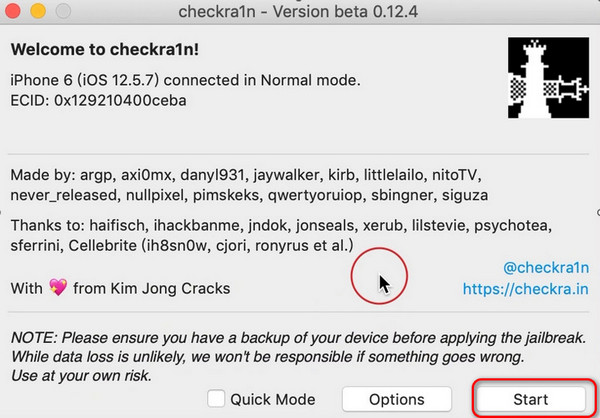
Open Checkra1n on your Mac, connect your iPhone to this Mac computer, and click Start to start jailbreaking.
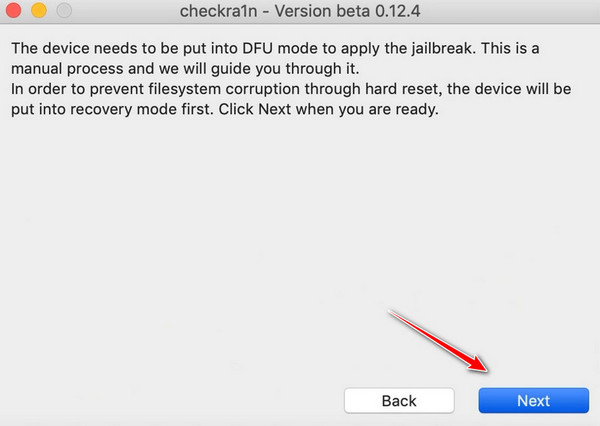
Click Next, and the program will automatically put the device into recovery mode.
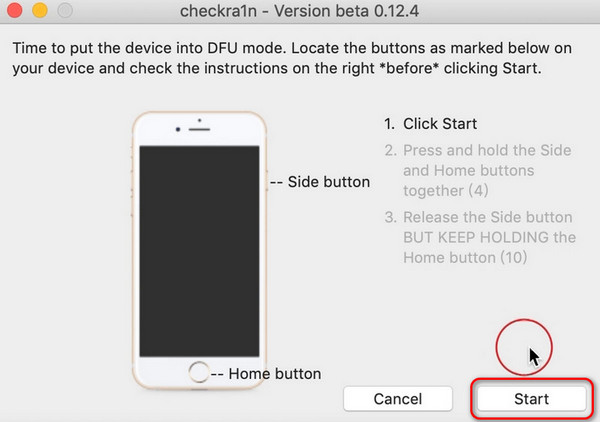
Click Start and follow the instructions on the screen to operate the home and side buttons of the device. Once the operation is correct, the device will enter DFU mode.
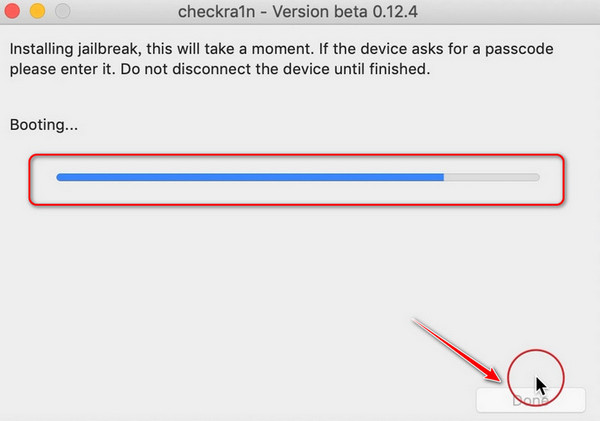
Wait until the progress bar is completed and click Done to successfully jailbreak.
Part 3: How to Jailbreak iPhone on a Windows via iPhone Unlocker
You can also use check1rain on Windows to help you jailbreak iPhone. However, this process is a bit complicated, and you also need a USB to perform. It's recommended to use a spared computer to jailbreak your iPhone with checkra1n.
Requirements: A USB and a computer; enter BIOS on the computer.
Supported Devices: iPhone 5 - iPhone X with A7 - A11 chips.
Supported iOS: iOS 12-16
Pros
- Well jailbreak your iPhone stably.
- Support a wide range of iOS versions and iPhone models.
Cons
- The workflow is complex and a bit professional.
- This method is semi-tethered so that you cannot power off your iPhone.
Reminder: To jailbreak via a Windows computer, you need to use another device to display the tutorial, as the jailbreak process for Windows requires exiting the Windows system and cannot display the tutorial.
1. Create a Jailbreak Environment via a USB Drive
You'd better use an empty USB drive or back up the files on the USB drive. Creating a USB drive may cause damage to the original data.
Download Checkra1n ISO file from this link:
https://github.com/asineth0/checkn1x/releases/download/1.1.7/checkn1x-1.1.7.iso
And install balanaEtcher from this link for creating USB drives: https://etcher.balena.io/
Then, launch balanaEtcher.
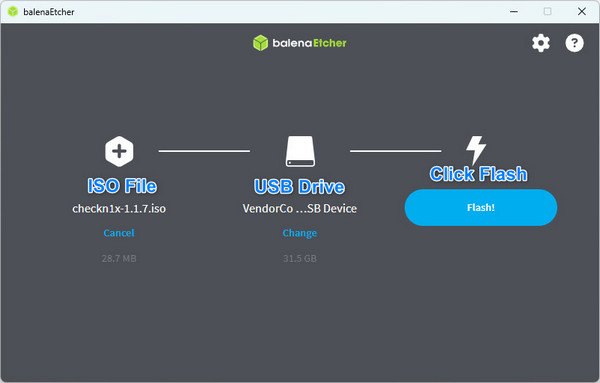
Choose Burn from File, select the downloaded ISO file.
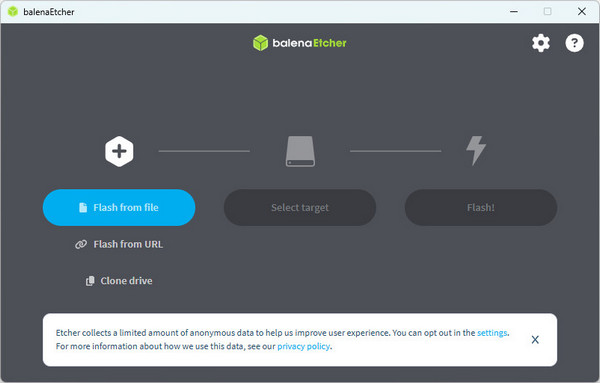
Then, select the target as the USB drive. Click Flash.
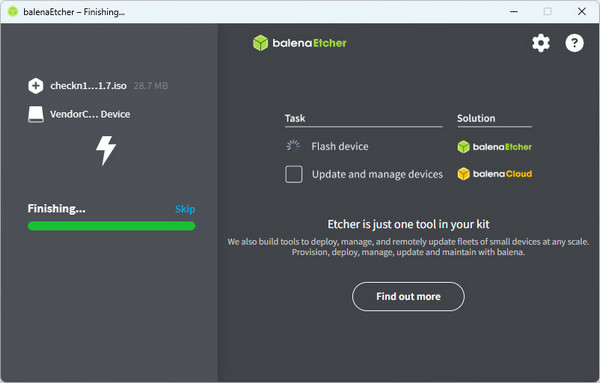
The USB flash drive will be created automatically.
2. Set the Computer to USB Boot Priority.
Insert the USB drive into the computer.
Restart the computer and continuously press the Delete button to enter the BIOS state. (Different brands of computers have different operations when entering the BIOS. You can check the corresponding operations for your computer brand in advance. For example, Thinkpad BIOS enter key: F1; Megatrends BIOS enter key: Delete.
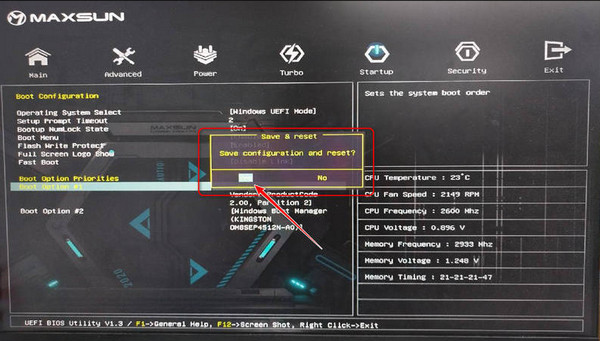
Select Startup > Boot Option Priorities. Then, choose USB drive priority. (You may need to select Advanced Mode before selecting Startup.)
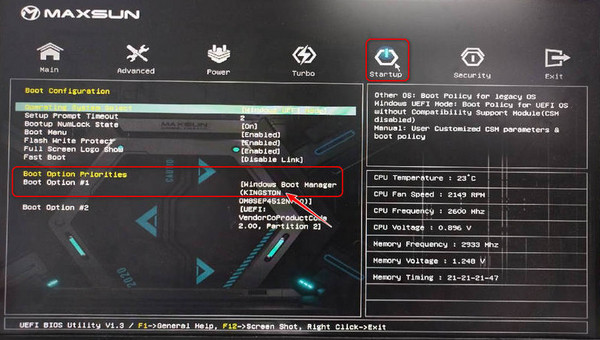
If your computer is not connected to other devices, the default first one is the Windows system, and the second one is the USB drive.
Press F10 to save your settings, and click Yes or Accept.
3. Start Jailbreaking
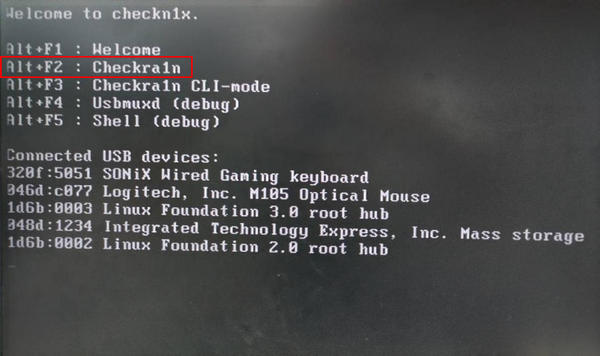
Start your computer, and now it will start from the USB drive. Press Alt+F2 to enter checkra1n you downloaded in Step 1.
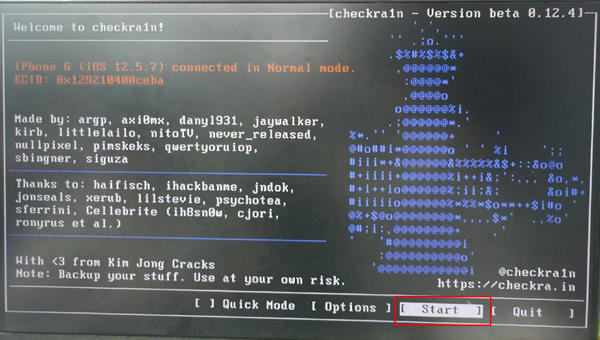
Click Start and Next in sequence, and the device will automatically enter recovery mode.
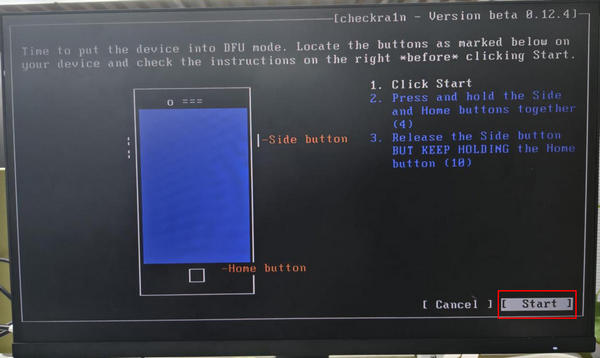
Click Start and follow the on-screen prompts to operate your iOS device and enter DFU mode. Wait for the progress bar to complete, and the jailbreak will be successful. You can continue to bypass the activation locks using imyPass iPassBye.
Note:
After a successful jailbreak, you had better enter the BIOS again and change the startup order back to prioritize starting the Windows system. Otherwise, the next time you insert the USB drive, the USB file will start first by default.
Part 4: How to Jailbreak iPhone Running iOS 26/27 Beta
Can you jailbreak iPhone 16/15/14/13 running iOS 26/27 Beta? No, there are no public tools that can help you jailbreak iOS 26/27 Beta. However, XIXtract can offer a jailbreak-like environment on your iPhone. It uses configuration profiles to offer limited features for your iPhone. like third-party apps, themes, and other tweaks on the UI. Although it cannot help you truly jailbreak iPhone, it really offers many features and is easy to use.
How to Use XIXtract
Open Safari and go to the official website of XIXtract. Tap the Add Source button.
When you see a promotion on your screen, go to Settings, and then Profile Download to install XIXtract.
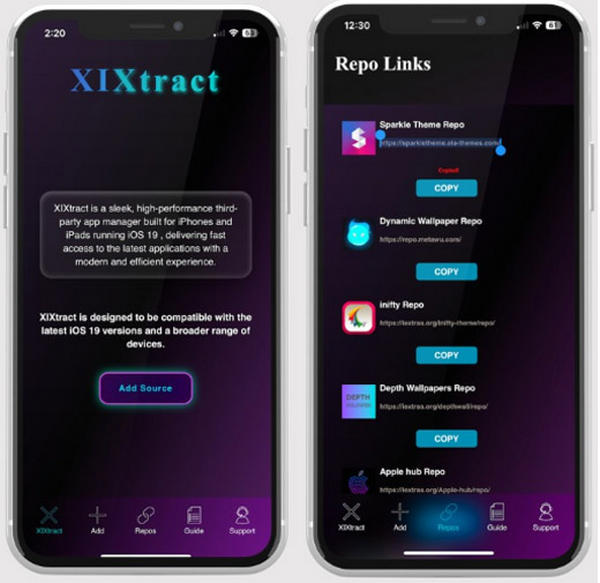
Now, launch XIXtract. You can select Repos tab to select a theme you like. You can copy the URL, and then go to the Source tab, and then paste the URL to add a theme.
You can also add the URL link of Cydia and paste it in Source. Tap the Extract button to install Cydia via customization profile in Settings. Then, you can use the Cydia app on your iPhone.

Note:
XIXtract is just a customization profile that can help you "jailbreak your iPhone". So, you can easily remove all traces of jailbreak iPhone in Settings.
Part 5: How Can You Jailbreak an iPhone Without a Passcode
You may wonder if iPhone jailbreaking removes the screen password. It sounds quite good to jailbreak an iPhone while wiping out the forgotten password. However, the answer is no. Jailbreaking can break some iOS restrictions but can't approach the passcode security, which means there's no link between iPhone jailbreaking and passwords.
However, there's a way out - you can remove the password before jailbreaking an iPhone, and imyPass iPassGo can easily handle it, for it can remove all password restrictions, whether it's screen passwords, Face ID, or Touch ID.

4,000,000+ Downloads
Remove the password quickly if you forget your iPhone's password.
Erase password restrictions while resetting your iPhone in a fresh state.
Offer the firmware package of every iOS version for iPhone unlocking.
You can also remove the Apple ID within seconds before jailbreaking.
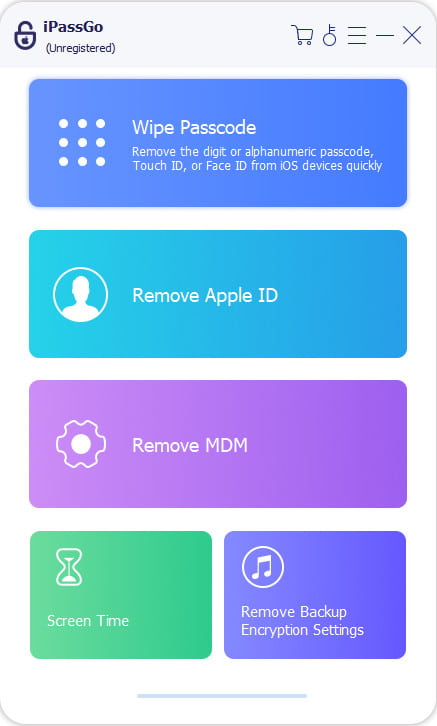
Downlaod iPassGo and launch it. Connect your iPhone to your computer. Click the Wipe Passcode button. Then, click the Start button on the next window.
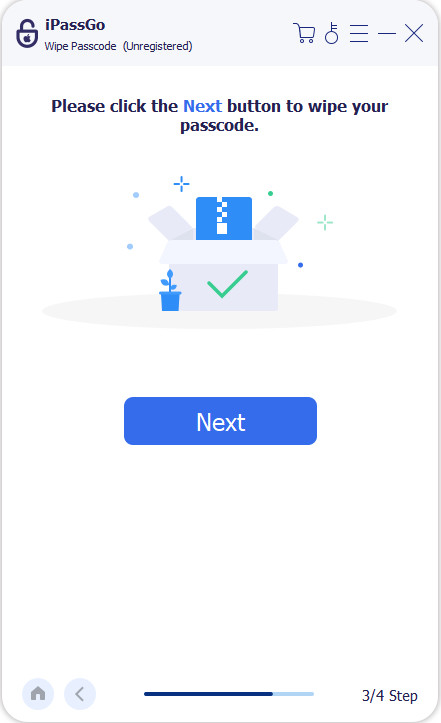
The program recognizes your iPhone; please check it and click the Start button to download the firmware package of the iOS version. When it‘s completed, your iPhone will be unlocked without the password, and you can jailbreak your iPhone without password restrictions.
Tips
Below are the devices and OS that are supported by iPassGo to jailbreak:
OS: arm64 iOS 15.0-16.5
Devices
| iPhone | iPad | iPod Touch |
|---|---|---|
| iPhone 6s iPhone 6s Plus iPhone SE (2016) iPhone 7 iPhone 7 Plus iPhone 8 iPhone 8 Plus iPhone X | iPad mini 4 iPad Air 2 iPad (5/6/7th generation) iPad Pro (9.7″) iPad Pro (10.5″) iPad Pro (12.9″) (1st/2nd generation) | iPod Touch (7th generation) |
FAQs.
-
Is jailbreaking iOS hard?
It's truly complicated to jailbreak an iPhone, but it doesn't require professional skills. You can take some time to learn to do that.
-
Can iOS detect jailbreak?
Yes, iOS can detect a jailbreak, and so can the apps you use. That's why jailbreaking skills always update.
-
Is it still worth jailbreaking an iPhone?
For many users, it can be worthless jailbreaking an iPhone because new models and iOS versions offer many powerful apps and features. Testflight and configuration profile can also allow you to install third-party apps. However, if you want certain features like themes, you can jailbreak your iPhone.
Conclusion
You've learned how to jailbreak iPhone on Windows and Mac. It's meaningful to jailbreak an iPhone because it can offer many features and allow you to install even more third-party apps. However, you should not forget that iPhone jailbreaking means declining any Apple software and hardware support, so you'd better not do that if you have only one iPhone.
If you need to jailbreak a broken iPhone that cannot unlock the screen, you can use imyPass iPassGo. It can use a USB cable and a computer to directly remove screen lock, Face ID, and Touch ID, so that you can perform a jailbreak on your iPhone easily.
Samuel specializes in password security and digital privacy. He used to work as a cybersecurity consultant for small businesses to protect digital assets. With certifications in Cybersecurity and Ethical Hacking, he turns complex security topics into easy-to-follow advice. He also enjoys sharing password tips to help users protect their accounts more confidently.
Hot Solutions
-
Unlock iOS
-
iOS Tips
-
Unlock Android
-
Password Tips


