



 Solution
 Support Center
 About Us
 Contact
What Is Miradore MDM and How Does Miradore MDM Work
 Samuel Spenser Published on September 21, 2026Unlock iOS3-min reading
Digital security is an essential part of IT administration in almost every organization. An appropriate MDM solution can help organizations manage and secure their mobile endpoints, including iPhones, iPad, and Android devices. Miradore MDM, for example, is a reputable MDM solution designed to assist organizations in securing, monitoring, and managing mobile devices across multiple operating systems. This article shares an in-depth review and other necessary information about the MDM solution.

In this article:
Part 1: Unbiased Review of Miradore MDM
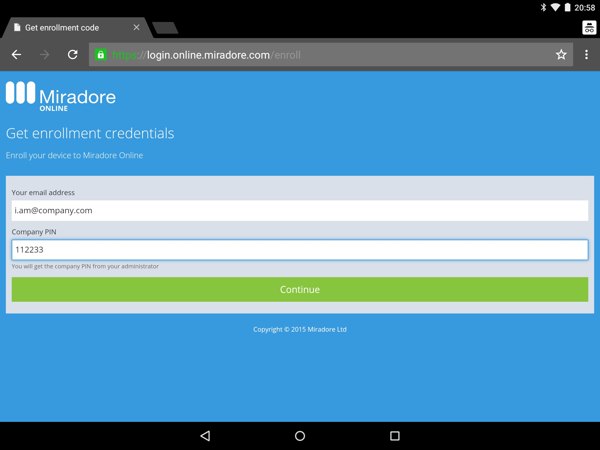
As a standout MDM solution, Miradore MDM provides centralized control over mobile device configuration, app deployment, policy enforcement, and more to ensure device and data security across the organization.
Key Features of Miradore MDM
- Report security and error information, like enrollment log, action log, device inventory data, and more.
- Manage device polling intervals and online status.
- Configure devices remotely.
- Deploy, clone, import, export, and delete a configuration profile.
- Control a mobile device remotely, like enabling a screen lock passcode, tracking location, etc.
- Manage files and apps, like uninstalling apps and deleting files.
- Manage or block a patch.
- Offer remote assistance on mobile devices.
- Remotely lock, wipe, and reboot a device.
- Create, deploy, edit, and remove business policies.
Miradore MDM Review
Pros
- Miradore MDM provides a free version.
- It offers straightforward device enrollment.
- It supports a wide range of device restrictions, particularly for iOS.
- The MDM solution provides a Kiosk mode for Android devices running Android 9 and above.
- It monitors mobile devices and computers in real time.
Cons
- It is unavailable on Linux or ChromeOS management.
- Limited enterprise integrations.
- It lacks some important features, like SIEM, webhooks, etc.
- AI bias in automated policies may require careful human oversight.
Miradore MDM Price
As mentioned previously, Miradore MDM offers a free version for up to 50 enrolled devices with basic features. The premium plan costs $2.75 per device per month for billed monthly or $2.30 per device per month for annual billing. The premium+ plan costs $3.95 per device per month for billed monthly or $3.30 per device per month for annual billing.
You May Also Like:
Part 2: How Miradore MDM Works
To get started, you must sign up for an account on Miradore and subscribe to a plan. Of course, you can try the free version if you use it for the first time. If you want to get the full features, pay for a plan.
Access Miradore on the IT administrator’s computer.
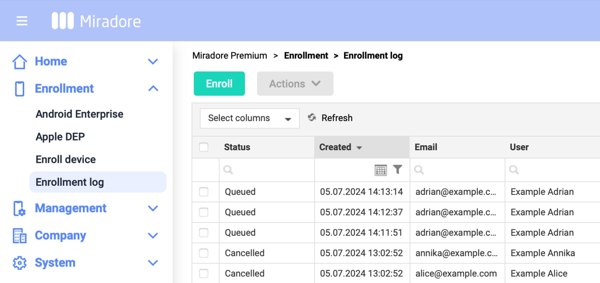
Navigate to Enrollment and Enroll device.
Select the device platform, such as Android or iOS.
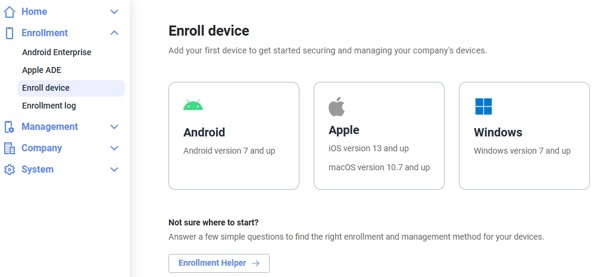
For Windows, follow the onscreen instructions. For other platforms, enter the device user’s email address in the Email field.
Turn to the desired device and visit online.miradore.com/enrollnow.
Enter the username and password.
Hit the Enroll device button.
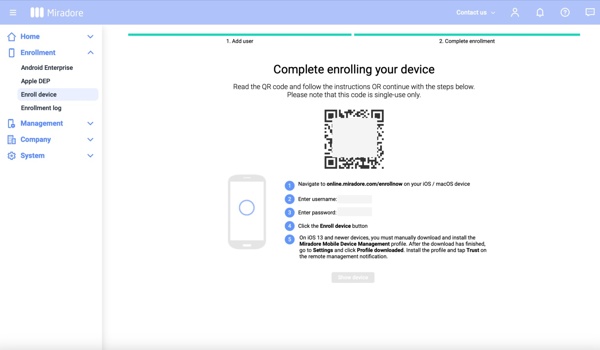
Then, scan the QR code to complete the enrollment.
Now, the IT administrator can manage the device remotely.
Part 3: How to Bypass Miradore MDM on Your iPhone/iPad
Once Miradore MDM enrolls your iPhone or iPad, you will lose full control of your device. Only the administrator can remove the MDM profile. If you don’t have the administrator password, try imyPass iPassGo. It enables you to get rid of MDM from your iOS device without any restrictions.

4,000,000+ Downloads
Remove Miradore MDM from your iPhone or iPad quickly.
Don’t require a password during the process.
Protect your data when bypassing MDM.
Include bonus features, like Apple ID removal.
Support almost all iPhones and iPad devices.
How to Bypass Miradore MDM on Your iPhone
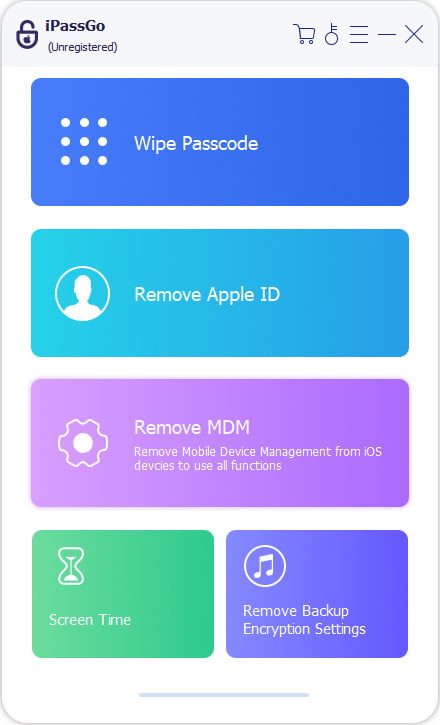
Install the MDM bypassing tool
Launch the MDM bypassing tool once you install it on your computer. It is available on Windows 11/10/8/7 and Mac OS X 10.12 or above. Choose the Bypass MDM mode to continue.
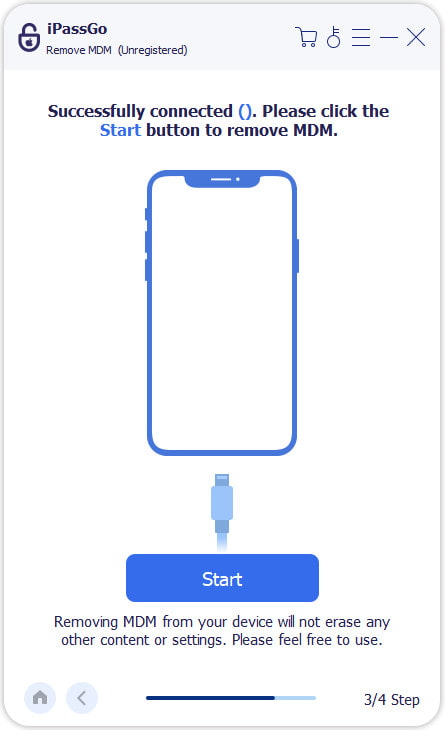
Connect to your device
Plug your iPhone into your computer with a Lightning cable. If prompted, tap Trust on your screen to trust this computer. Then, the software will detect your device immediately.
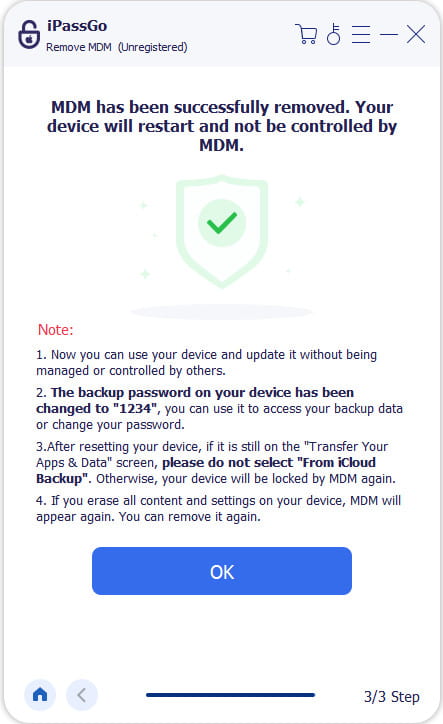
Bypass Miradore MDM
Click the Start button to begin removing Miradore MDM from your device. Keep your iPhone connected during the process. When it is done, your iPhone will restart, and you will get full control of your device.
Important Warnings
Do not bypass Miradore MDM on a device managed by a school, company, government agency, or other organization without authorization. MDM may be used to enforce security policies, protect organizational data, manage applications, and remotely secure lost or stolen devices. If the device was provided or configured by an organization for a specific purpose, do not attempt to bypass its MDM restrictions. Contact the organization or the device administrator instead. You can also check some situations and corresponding solutions:
| Situation | Appropriate action |
| Your own personal device, accidentally enrolled | Officially unenroll it |
| Company device being returned | Ask the IT administrator to unenroll/retire it |
| School-owned iPad | Contact the school administrator |
| Government-issued device | Contact the issuing agency |
| Second-hand device still under organizational management | Ask the seller/previous owner to release it |
| Device you are not authorized to manage | Do not bypass the MDM |
Conclusion
This article reviewed one of the standout cloud-based MDM solutions, Miradore MDM. You should learn what it can do, its benefits and downsides, and the cost. To manage and control mobile devices in your organization in one place, you need to enroll them first. Therefore, we explained how to enroll a mobile device in Miradore. When you are ready to get rid of the MDM control, try imyPass iPassGo for your iPhone or iPad directly.
Samuel specializes in password security and digital privacy. He used to work as a cybersecurity consultant for small businesses to protect digital assets. With certifications in Cybersecurity and Ethical Hacking, he turns complex security topics into easy-to-follow advice. He also enjoys sharing password tips to help users protect their accounts more confidently.
Hot Solutions
-
Unlock iOS
-
iOS Tips
-
Unlock Android
-
Password Tips


