Solution
 Support Center
 About Us
 Contact
How to Show Administrator Password Using CMD on Windows 1110/8/7
 Penny Warren Published on January 04, 2026Windows Password3-min reading
There is an invisible administrator account on the previous Windows computer by default. If you want to make changes on a Windows computer that may affect other users of this computer, you need to provide the associated administrator account and password.
How to show the administrator password using CMD? It is the most concerned question by many users who forget the administrator password.
By entering certain command lines, you can indeed get the administrator account information successfully. However, can you view the administrator password using CDM? Read more for more information!

In this article:
Part 1: Can You View Administrator Password Using CMD
First, we need to make it clear that there is no way to show your administrator password and account with CMD directly. The Admin password is always protected and will not be stored in plain text on Windows systems. Instead, they are encrypted to prevent unauthorized access.
As a result, many methods found online that claim to show administrator passwords using CMD are misleading. Most of them are only guides to help you manage or reset account settings, rather than reveal the original password. If you forget the Admin password, you can only reset it.
Part 2: How to Reset Windows Admin Password Using CDM
From the Windows Start menu, type CMD in the search bar. Run the program as Administrator.
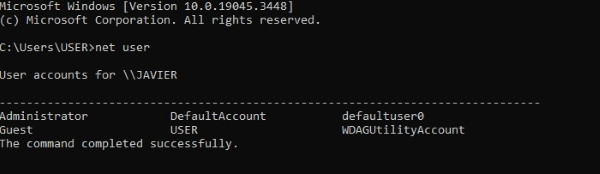
Run the net user command line to show the administrator account.
Type net user (admin username) (new password) command line and press the Enter key. (admin username) is the administrator account’s name. new password is the password you are ready to set.
Part 3: How to Change Administrator Password Using CMD (Guest Account)
If you are a guest account, you should know that you can’t reset the admin password using the steps above because guest accounts are intentionally restricted to prevent system-level changes.
However, that doesn’t mean you cannot change the admin password. This section will provide a detailed guide.
Go to the https://github.com/SecWiki/windows-kernel-exploits/tree/master/CVE-2017-0213 to download the CVE-2017-0213_x64 file and unzip it.
Double-click it to open a command prompt with administrator privileges.
Repeat Step 3 above.
Press the Enter key.
Part 4: An Easier Way to Reset Admin Password
If you want to view and set up a new password for your Windows administrator account, imyPass Windows Password Reset provides an easier and safer way. You can reset Windows administrator and standard user account password without losing data. There is no need to enter complicated commands for Windows administrator password resetting. Just click several on-screen options to reset Windows 10 administrator password with ease.
4,000,000+ Downloads
Find, remove and reset Windows administrator password without command lines.
Crack Windows administrator and login password while preserving local files.
Create a new administrator account without entering the previous password.
Make a bootable CD/DVD/USB drive to unlock your computer and reset your Windows password.
Hack administrator password on Dell, HP, IBM, Sony, Lenovo, Acer, and many other brands of desktops and laptops.
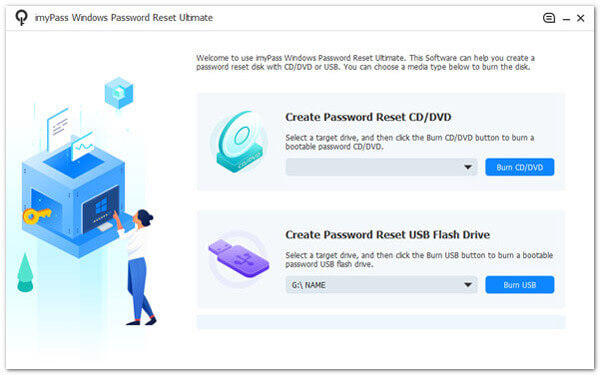
Free download, install, and launch the Windows admin password reset tool on your normal computer. Create a password reset disk with Create Password Reset CD/DVD and Create Password Reset USB Flash Drive options, which is based on your purchase plan.
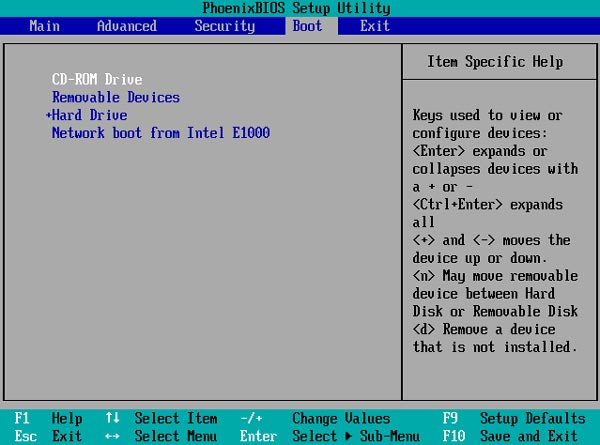
Restart your administrator account locked computer. Meanwhile, press F12 or ESC on the keyboard while rebooting your computer. When you enter into Boot Menu, use the arrow-up and arrow-down keys to select your inserted disc or drive. Press Enter to save changes. Your Windows computer will restart immediately.
Select Windows as your operating system for Windows administrator password reset. Choose which administrator account and password you want to crack.
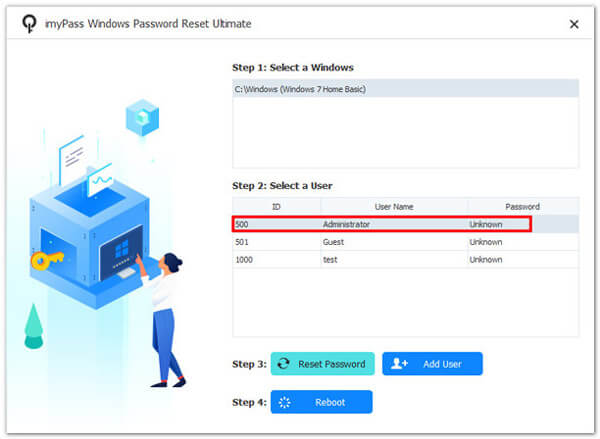
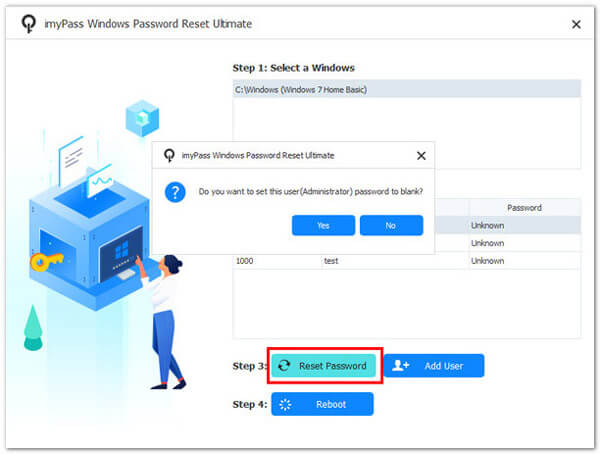
Click Reset Password on the bottom. In the popping-up window, click Yes to confirm. As a result, your current Windows administrator password will be removed. You can make changes within Windows settings directly.
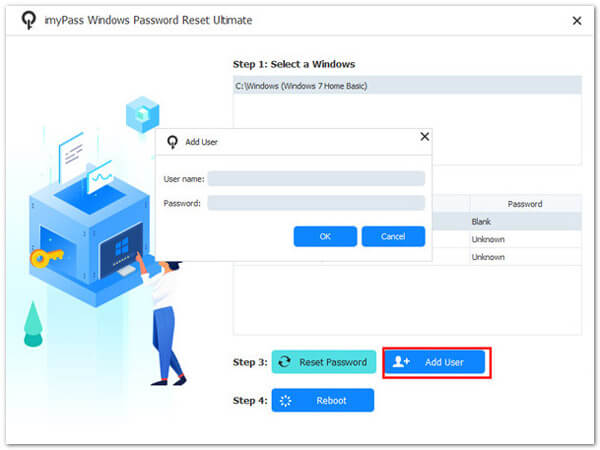
If you want to view Windows 10/8/7 administrator password, you can click Add User to create a new administrator account on Windows. Enter a new administrator username and passcode. At last, click OK followed by Reboot to get into a locked computer with a new admin account.
FAQs.
-
What is the default Windows administrator password?
There is no such a default Windows default admin password. You can enable the built-in administrator account on Windows and password manually. Later, you can access all Windows admin permissions.
-
Can you bypass the Windows 10 administrator password?
Yes. If you remember your administrator password, you can bypass Windows 10 admin password successfully. Press Windows and R keys to open the Run dialog. Type netplwiz and press Enter on your keyboard. In the User Account section, go to the Users tab. Choose your Windows 10 administrator account. Uncheck before User must enter a user name and password to use this computer. Click Apply to confirm. Then enter the correct administrator password for your local administrator account. Click OK to save changes and exit the window.
-
Can you change the admin password from the guest account?
Yes. You can download and unzip the CVE-2017-0213_x64 file from Github. Run the program by double-clicking. Type the net user USERNAME password. Press Enter on the keyboard. Now you can replace AUSERNME and PASSWORD.
Conclusion
That’s all to show administrator password with or without CMD. You can view and crack Windows 10/8/7 local administrator password by using imyPass Windows Password Reset. The Windows admin password hack tool is friendly to beginners.
Penny is a senior editor from imyPass. She has focused on discovering perfect GPS location solutions in all scenarios, and also has experience in fixing computers.
Hot Solutions
-
Windows Password
-
Windows Tips
-
Fix Windows
-
Password Tips