



 Solution
 Support Center
 About Us
 Contact
How to Unlock iPhone from Carrier Restrictions 2026: Full Guide
 Samuel Spenser Published on July 09, 2026Unlock iOS3-min reading
Many users find that their iPhone bought through a carrier is locked to a specific network, which limits the ability to switch to other carriers freely. This restriction can be frustrating in situations such as traveling abroad, changing to a better SIM plan, or reselling the device. As a result, more users are searching for how to unlock iPhone from carrier restrictions, aiming to remove network limitations and use their device with any compatible carrier worldwide.

In this article:
Part 1. What Does it Mean by Carrier Locked iPhone
A carrier-locked iPhone refers to a device that can only be used with a particular mobile network provider. This means you cannot switch your SIM card to other carriers unless it is unlocked.
In most cases, iPhones become carrier-locked when they are purchased through a carrier contract or installment plan. The carrier applies a network restriction to ensure the device is used with their services until the contract terms are fulfilled.
While a carrier-locked iPhone still functions normally for calls, messages, and apps, the restriction limits network flexibility. For example, users may not be able to switch to a cheaper SIM plan, use a local carrier while traveling abroad, or sell the device easily in the second-hand market. This is why many users start looking for ways to unlock an iPhone from carrier.
Part 2. How to Tell if Your iPhone is Locked by Carrier?
Now that you know what a carrier unlock iPhone is, the next step is to figure out whether your device is actually locked. Only when the device status is confirmed can the appropriate unlocking method be selected without wasting time or misusing the technique. Here are some common and accurate ways to judge:
Replace the SIM card
Remove the SIM card you are currently using.
Insert the SIM card of another carrier. It is recommended that you use a different brand card from your existing one.
Restart the phone and check the screen to see if the message SIM card is invalid or cannot be activated appears.
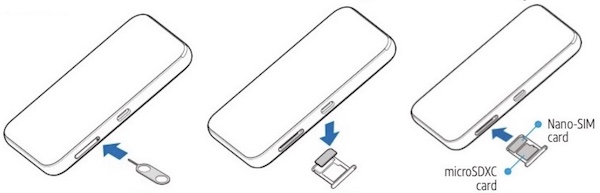
If you get one of these alerts, your device is likely tied to a carrier and cannot use another network, so you need to consider how to unlock the iPhone without carrier restrictions.
Check Carrier Lock Status Through Settings
Open your iPhone and go to Settings.
Click General > About.
Swipe down to see the Carrier Lock.
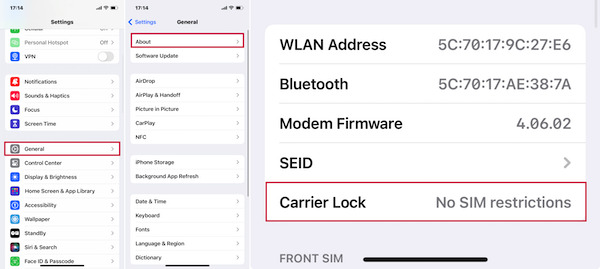
If No SIM restrictions or unlocked is displayed, your phone is a free model; If there is a lock prompt, you need to unlock it immediately.
Check Carrier Lock Status via IMEI
Open your browser and search for IMEI unlocking service-related services (please choose official or reputable websites first).
Enter your mobile phone's IMEI number (you can get it by entering *#06# on the dial-up screen).
Check whether the generated report shows a Network Lock or SIM Lock status.
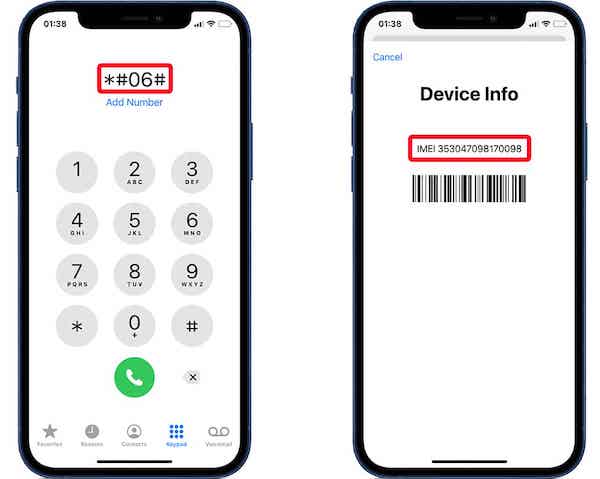
This method is especially suitable for use when buying used devices to avoid limited use due to locking problems. Such tools are also mentioned in many technical forums, such as the carrier unlock iPhone on XDA, for users who totally forgot iPhone password.
Part 3. How to Unlock iPhone from Carrier - 3 Methods
Eligibility Requirements for iPhone Carrier Unlock
Before using any online SIM unlock service, make sure your iPhone meets the basic eligibility requirements.
- 1.Your iPhone must be fully paid off without remaining unpaid balances.
- 2.Your iPhone should not be tied to an active carrier contract.
- 3.The carrier account must be in good standing.
- 4.Your iPhone must not be reported as lost or stolen.
In fact, online unlocking tools also provide a simple and efficient solution. These tools offer faster and more convenient unlocking than traditional unlocking methods by contacting carriers. Below, we look at two standard online unlocking services that operate in different steps and are, therefore, suitable for different needs.
Method 1: Official SIM Unlock
The Official SIM Unlock is a very popular online unlock tool available for multiple iPhone models and carriers. It is straightforward to operate, but it requires more detailed information than other platforms to ensure the accuracy and success rate of unlocking.
Visit the Official SIM Unlock website and select your iPhone model and carrier. If you are not sure of your device's carrier, you can first check the tool provided by it.
Enter the device's IMEI number, submit an unlocking application, and pay the fee. Official SIM Unlock offers different unlocking packages, which you can choose according to your needs.
After completing the payment, you will usually receive an unlocking confirmation email within 1-3 days. While waiting for the unlock to complete, make sure your device remains connected to the Internet.
Once the unlock is complete, you will receive an email with instructions on how to activate your iPhone via Wi-Fi or iTunes. If your iPhone is unable to activate, other factors may be involved.
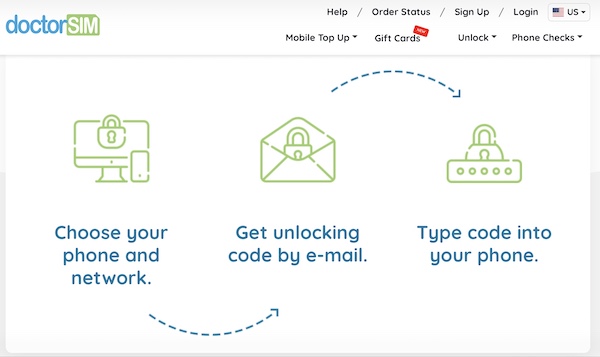
Method 2: DoctorSIM
DoctorSIM offers a slightly different method of SIM unlocking than the official method. The uniqueness of the unlocking process is that the processing starts immediately after the payment is made instead of waiting for a long processing period.
Go to the DoctorSIM website and select the iPhone model and carrier you want to unlock. DoctorSIM provides global support.
Enter the IMEI number of the device and make payment immediately to submit an unlocking request. Unlike other platforms, it supports multiple payment methods, such as credit cards and PayPal, and your unlock request will be processed immediately after payment.
Once the unlock is complete, usually within 24-48 hours, DoctorSIM will send you a confirmation email. You don't have to wait any longer. Once you receive the unlock confirmation, your device will be unlocked.
After receiving the confirmation email, follow the instructions to unlock the device, insert the SIM card of another carrier, and use the device normally.
Method 3: Contact the Carrier to Unlock iPhone
If you don't want to use an online unlocking tool, contacting your carrier directly is another standard and reliable method. Not only is it legal to unlock your iPhone through a carrier, but it's often risk-free, especially if you meet the conditions to do so.
You can process your application by calling a customer service hotline, applying online, or going directly to your carrier's store. Ensure that accurate information is provided to speed up processing.
Carrier processing time is usually 1-3 working days, which may vary from carrier to carrier. Once the processing is complete, you will receive an unlocking confirmation.
Once the unlocking is complete, insert the new SIM card into your iPhone, and the device should activate automatically.
Unlocking an iPhone through a carrier is a stable and legal method that takes a long time to process but ensures success and security.
Part 4. Easiest Way to Unlock Carrier locked iPhone – Quickest
If you can't wait for carrier to unlock iPhone, or if the online tools don't work for your device, there's a fast and safe solution may help you. imyPass iPassGo is a dedicated iOS unlock tool for various lockout scenarios. Requiring no technical background, no tedious operation, no complicated set up, it lets your iPhone free of network restrictions in a few simple steps.

4,000,000+ Downloads
Remove carrier SIM lock and switch network freely.
Fix SIM Not Valid or network restriction errors in easy 3 steps.
Unlock iPhone from any carrier, including AT&T, T-Mobile, and more.
Compatible with the latest iOS versions and iPhone models.
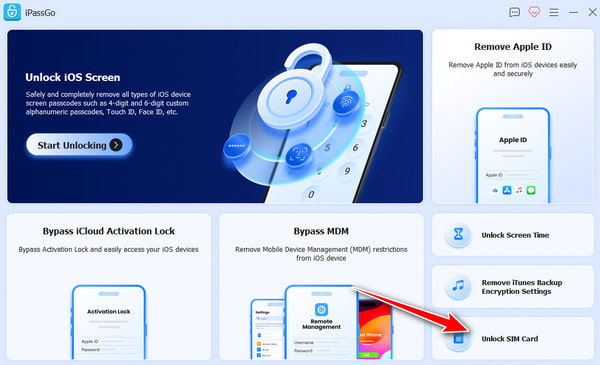
Connect your iPhone to the computer, launch the software, and choose Unlock SIM Card from the interface.
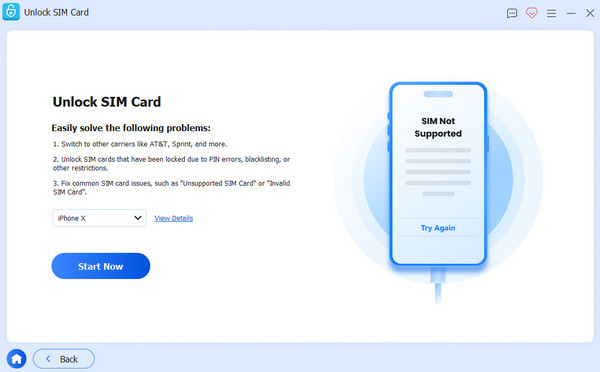
Please review the statement and warnings carefully, then click Start Now to proceed.
Mack sure your device information is correct, and click Start Bypassing. If your device is not jailbroken, you need to jailbreak it first. Follow the on-screen tutorial to set up your device.
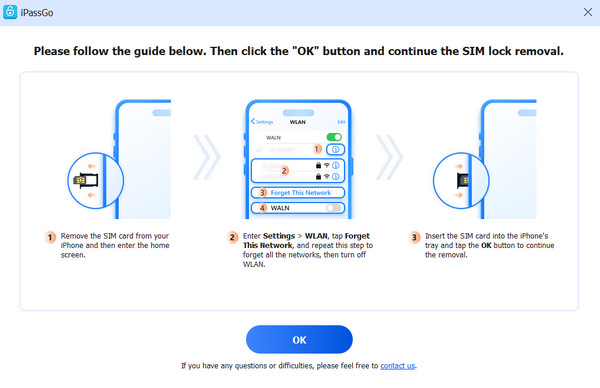
Click the OK button to confirm the removal. Then your SIM lock will be removed in minutes.
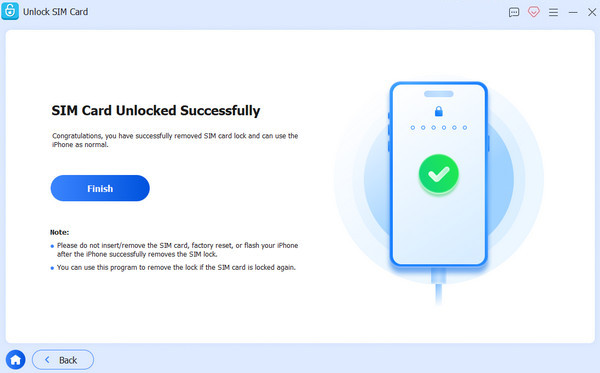
Conclusion
Carrier locked iPhone is a common but vexing problem for many iPhone users. When faced with different unlocking methods, choosing the most appropriate method can save you time and effort. If you want a quick and hassle-free solution, imyPass iPassGo is an excellent option. It makes it easy to unlock your iPhone with simple steps without waiting for carrier approval, allowing you to quickly regain full control of your device.
Samuel specializes in password security and digital privacy. He used to work as a cybersecurity consultant for small businesses to protect digital assets. With certifications in Cybersecurity and Ethical Hacking, he turns complex security topics into easy-to-follow advice. He also enjoys sharing password tips to help users protect their accounts more confidently.
Hot Solutions
-
Unlock iOS
-
iOS Tips
-
Unlock Android
-
Password Tips


