Solution
 Support Center
 About Us
 Contact
iPad Locked to Owner? 4 Solutions to Unlock Your iPad Easily
 Samuel Spenser Published on March 26, 2026Unlock iOS3-min reading
After purchasing an iPad, have you ever encountered an iPad locked to the owner? It's a frustrating scenario, but fortunately, there are ways to overcome it. In this guide, we'll explore common methods to unlock your iPad when it's tied to its previous owner. Also, we will share a complete tutorial on each that helps you utilize each method effectively.

In this article:
Part 1. iPad Locked to Owner - One Click to Solve It with No Passcode
Activation Lock is a security feature introduced by Apple as part of the Find My service. It helps protect your device by preventing anyone from using or resetting it without the original Apple ID credentials. However, it can become a problem if you forget your Apple ID password or purchase a second-hand device that's still linked to the previous owner. In these situations, you may need to bypass Activation Lock to unlock your device.
imyPass iPassBye is the ultimate one-click solution to delete the activation lock on your iPad without needing a passcode. This powerful tool simplifies the process, allowing you to swiftly regain control of your device without hassle.
Success Rate: High
Best for: Users who have no access to the original Apple ID or cannot reach the previous owner.
Risks: The process usually erases existing data and may require jailbreaking the device.
Key Features:
- Remove Activation Lock when your device is stuck on the Locked to Owner screen.
- Bypass Lost Mode if you recovered your iPhone but cannot unlock it.
- Unlock the device when you forgot the iCloud password or phone number.
- Access a second‑hand iOS device that's locked to the previous owner's account.
First, ensure that you have the most recent version of imyPass iPassBye installed on your computer. Launch the application to initiate the unlocking process.
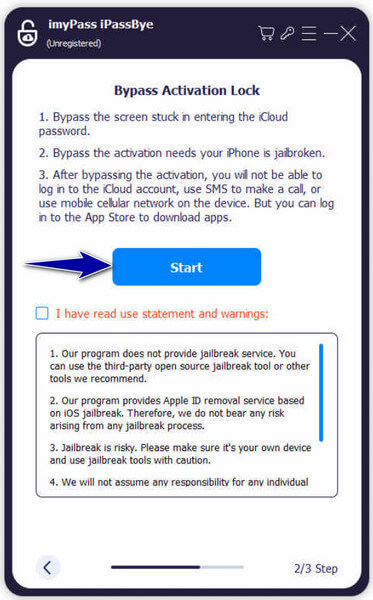
Take a moment to review any warnings provided by the application, as they contain crucial information. Once ready, click on the Start button to begin the verification process.
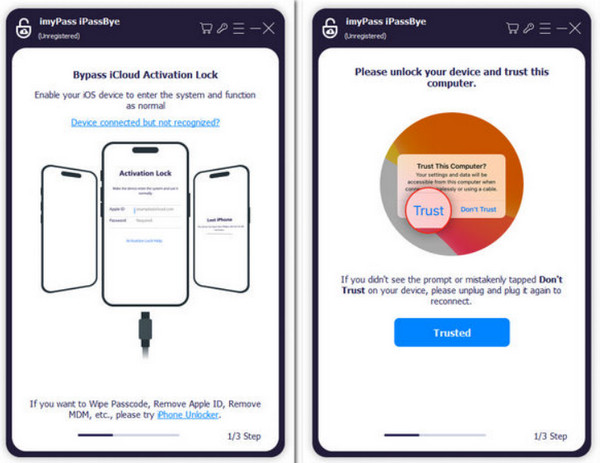
Note:
Prior to proceeding, ensure that your iOS device is jailbroken. imyPass iPassBye does not offer jailbreaking services. Refer to the iOS Jailbreak Tutorial provided within the app to learn how to jailbreak your device, then click Next to proceed.
After confirming the device information, click on Start Bypass Activation within the application. Please be patient as the bypass process is initiated and completed.
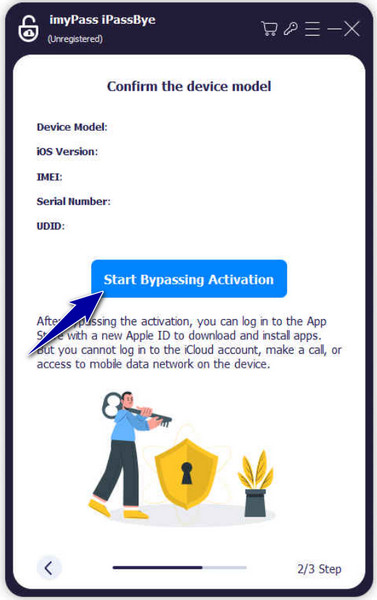
Please note that this method only works when you can't get into the iPhone. If you can unlock the iPhone but and delete the iCloud account or Apple ID, this method won't work.
Note:
imyPass iPassBye needs to jailbreak the device during the bypass process. This may affect system stability, temporarily disable some Apple services, and change the device's security environment.
Part 2. iPad Locked to Owner Bypass Methods [3 Manual Solutions]
When faced with an iPad locked to its previous owner, finding a solution can be challenging. However, there are manual bypass methods available to regain access to your device. In this section, we'll explore three manual solutions: using iCloud, DNS bypass, and contacting the previous owner directly. Each method offers a different approach, so let's dive into the steps for each one to unlock your iPad and resolve the activation lock issue.
1. Remove iPad Locked to Owner via iCloud
Success Rate: High
Best for: Users who knows the previous owner Apple ID and password.
Risks: The device will be erased during the removal process.
The first method for iPad locked to the owner by removing the activation lock from your iPad involves using iCloud. However, please note that this method requires you to have the Apple ID and password of the previous owner. Here are the steps to follow:
Go to the website iCloud.com on a computer or another device. Sign in with the Apple ID and password of the previous owner.

Once logged in, click on Find iPhone. From the list of devices, select the iPad that needs to be unlocked. Choose the option Erase iPad to remotely wipe the device.
Confirm the action by clicking on Erase. After the iPad has been erased, select the option to “Remove from Account” to dissociate it from the previous owner's iCloud account.
2. Bypass iPad Locked to Owner Screen Using DNS
Success Rate: Very low
Best for: Users who only need temporary access to limited features or want to test whether the device is still usable.
Risks: This method does not unlock the device permanently and many features remain unavailable.
Below is a step-by-step guide to bypass the iCloud activation lock via DNS, This free iCloud unlock service can help you regain access to some features on your iPhone. However, it's important to understand that the DNS bypass is not a complete unlock solution and only works in very restricted scenarios. The success rate is relatively low and only provides access to a small number of basic functions.
Navigate to Settings, General, then select Language and Region to choose your language and country/region. Access the Wi-Fi settings page. If prompted to connect to Wi-Fi, locate the i symbol next to the Wi-Fi tab. Select Forget this Network to disconnect from the Wi-Fi network.
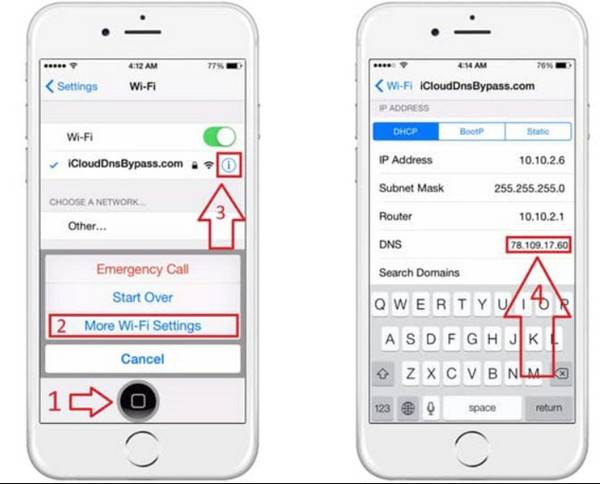
Tap the i symbol and input a DNS server IP address to bypass the iCloud activation lock. Choose from the list below based on your location:
◆ USA: 104.154.51.7
◆ South America: 35.199.88.219
◆ Europe: 104.155.28.90
◆ Asia: 104.155.220.58
◆ Australia and Oceania: 35.189.47.23
◆ Other continents: 78.100.17.60
Return to the previous screen by tapping the Back option on the left side, enable Wi-Fi, select the appropriate network from the list, and enter your passcode.
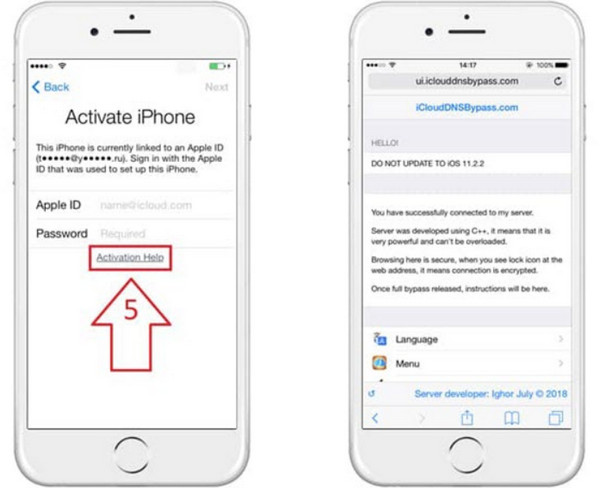
Proceed to the next page and then tap Back to access the iCloud bypass screen. You can now set up your apps and utilize your device as desired.
3. Ask the Previous Owner to Erase the iPad
Success Rate: High
Best for: Second-hand device owner who can reach the previous owner.
Risks: All the existing data will be removed after the reset.
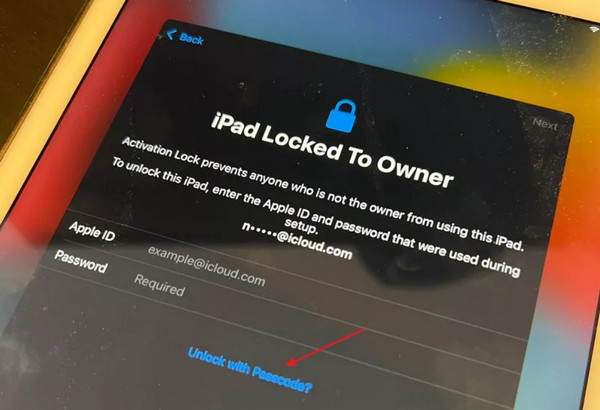
Unlocking your iPad, which is locked to its owner, is straightforward if you have the passcode. Follow these steps to bypass and change iPad owner here:
Access your locked iPad and choose the Unlock with Passcode option. Next, select Use Device Passcode.
Enter the passcode previously used on your iPad.
After entering the correct passcode, your device will be unlocked.
You may want to know:
FAQs.
-
Is it possible to remove the activation lock without the previous owner?
Yes, you can bypass Activation Lock without the previous owner using a professional tool. imyPass iPassBye can remove Activation Lock when your device is stuck on the Locked to Owner screen, or unlock your iPhone if you forgot the password or phone number.
-
How to remove the previous owner's Apple ID without a password for free?
Unfortunately, there is no free method to remove the previous owner's Apple ID without their password. You'll need to contact the previous owner for assistance in removing the Apple ID from the device.
-
What is iPad locked to the owner?
When an iPad is locked to the owner, it means that the device is tied to the previous owner's Apple ID. This prevents unauthorized access and ensures the security of the owner's data. To use the iPad, you'll need the previous owner's Apple ID and password or assistance in removing their account from the device.
-
Is there a way to bypass the activation lock on an iPad?
Bypassing the activation lock on an iPad without the previous owner's cooperation is not recommended and may violate Apple's terms of service. It's best to work with the previous owner to resolve the issue legally and securely.
-
Can I purchase a used iPad without worrying about the activation lock?
Before purchasing a used iPad, it's essential to ensure that the device is not locked to the previous owner's Apple ID. You can check the activation lock status by asking the seller to provide the device's serial number or IMEI, which you can then verify on Apple's website.
Conclusion
How to bypass the activation lock on an iPad without the previous owner? Encountering an iPad locked to its previous owner can be frustrating, but with the methods outlined in this guide, you can regain control of your device. From one-click solutions like imyPass iPassBye to manual methods involving iCloud, DNS bypass, and contacting the previous owner, there are options available to suit different situations. Remember to proceed with caution and ensure legal and secure practices when attempting to bypass activation locks.
Samuel specializes in password security and digital privacy. He used to work as a cybersecurity consultant for small businesses to protect digital assets. With certifications in Cybersecurity and Ethical Hacking, he turns complex security topics into easy-to-follow advice. He also enjoys sharing password tips to help users protect their accounts more confidently.
Hot Solutions
-
Unlock iOS
-
iOS Tips
-
Unlock Android
-
Password Tips