



 Solution
 Support Center
 About Us
 Contact
iToolab UnlockGo Review: Can It Remove Screen Locks Successfully
 Samuel Spenser Published on March 26, 2026Unlock iOS3-min reading
Sometimes you may find yourself locked out of your device due to a forgotten screen passcode or an Apple ID issue. In such monents, iToolab UnlockGo is a reliable solution offering wide device compatibility, lock removal features, and user-friendly interface. In this article, we will provide a detailed review of iToolab UnlockGo, explores its key features, and introduces a powerful alternative.

In this article:
Part 1. What's Special About iToolab UnlockGo
iToolab UnlockGo is known for its extensive device compatibility, efficient FRP bypass, and multiple lock screen deleting functions for major brands. It offers an all-embracing program for users confronting issues about lock screens, therefore becoming a very useful instrument in the way of restoring their devices immediately and effectively.
- Compatibility: iToolab UnlockGo can remove screen locks and bypass FRP on all major brands like Samsung and Apple, making it a versatile solution for different unlocking needs.
- Ease of Use: The program features a clean and user-friendly interface that can be easily navigated.
- Safety: UnlockGo offers reliable unlocking performance where your phone will unlock successfully without losing any data, except in some Samsung models.
- Pricing & Guarantee: It provides flexible pricing plans and includes a 30-day money-back guarantee to ensure customer satisfaction.
Part 2. Detailed Review of iToolab UnlockGo
Pros
- Works with multiple operating systems, including Android and iOS.
- Supports popular brands like Samsung, Xiaomi, Huawei, Asus, and Sony.
- Removes MDM and various screen locks such as fingerprint, Face Lock, PIN, and pattern.
- Features a simple interface that users can follow easily.
- Offers a 30-day money-back guarantee.
Cons
- Some users report slow loading times, especially during screen lock removal.
- The lifetime plan supports only five devices, and single-use options are limited.
Key Features:
- FRP Bypass Tool: Bypass Factory Reset Protection on supported Samsung models.
- Lock Screen Removal: Removes various lock screen types. Some newer Samsung versions can be unlocked without data loss.
- Wide Brand and OS Support: Compatible with almost all brands and operating systems.
- User-Friendly Interface: Provides a simple interface with step-by-step instructions.
- Customer Support: Users can contact customer support via email for assistance.
UnlockGo offers several pricing options for different usage needs.
Pricing:
- One-month plan: $29.95
- One-year plan: $39.95
- Lifetime plan: $49.95
- One-year Business plan: $399.95
Note:
All plans come with regular updates and customer support. The lifetime plan is limited to five devices only.
How to Use:
To begin, download and install the iToolab UnlockGo software on your computer.
Then, choose Unlock Screen Passcode, Remove MDM or any feature depending on your situation.
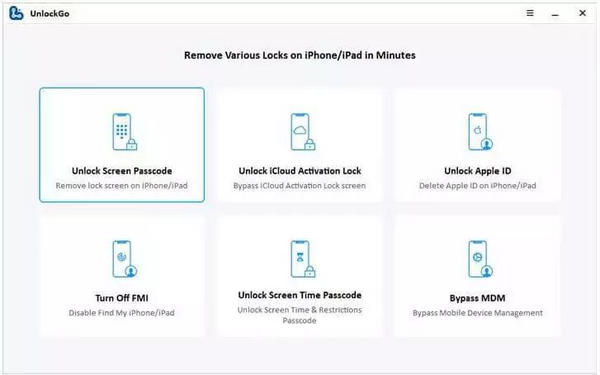
Next, your device should be connected to the computer via a USB cable.
Follow the on-screen instructions to complete the process, which may involve setting up a new PIN or entering recovery mode.
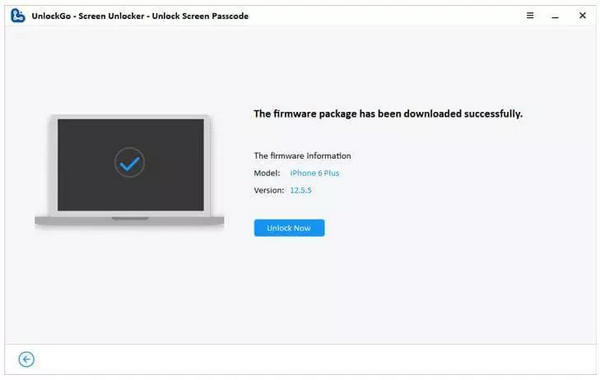
Finally, wait for the process to finish, and you'll click the Unlock Now button to confirm that the lock screen is successfully removed.
Note:
Removing the lock screen passcode will erase data on the device. It is strongly recommended to back up your data before proceeding!
Part 3. The Best iToolab UnlockGo Alternative
imyPass iPassGo emerges as the superior alternative to iToolab UnlockGo, surpassing its capabilities in unlocking iOS devices with versatile features, robust compatibility, and a user-friendly approach. With a focus on security, ease of use, and reliable customer support, imyPass iPassGo sets a new standard in iOS unlocking solutions, offering users unparalleled flexibility and peace of mind.

4,000,000+ Downloads
Unlock iPhone Passcode feature can unlock a variety of iPhone screen passcodes.
Removing Apple ID and turning off Screen Time restrictions without entering a password.
Remove MDM restrictions on iOS to complete control over iDevices.
Remove iTunes Backup Password can bypass iTunes backup encryption settings such as passwords.
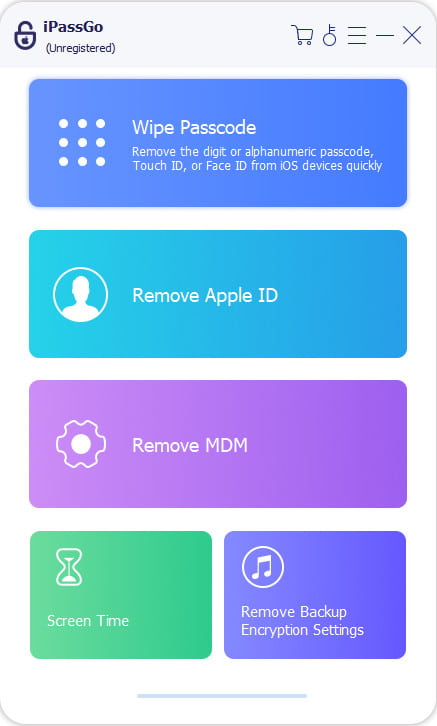
Connect your iOS device to a computer via USB. Launch the software, choose Wipe Passcode mode, and click Start.
Confirm your device information and click Start to download the firmware package.
Click Unlock button, read the notification, and confirm again. The passcode will be removed automatically from your device.
Pros
- Compatible with all iPhones, iPads and iPods, including the latest iOS versions and devices.
- The intuitive interface makes it easy for professionals and novices to use without extensive technical skills.
- It safely removes various passcodes to unlock your iOS device without compromising data security.
- One-click iPhone unlocking software removes Apple ID, bypasses Screen Time etc.
- Has a 30-day refund policy and responsive customer support for assistance.
Cons
- For certain features to work properly, one needs the Find My iPhone set either ON or OFF according to their iOS version or their device's condition.
FAQs.
-
Can iToolab UnlockGo be used with any make of phones and operating systems?
Certainly, iToolab UnlockGo is suitable for use across different phone brands and versions, such as Android OS and iOS. It is designed to cover more popular devices like Samsung, Xiaomi, Huawei, Asus, and Sony, making it the best choice for most people.
-
Does iToolab UnlockGo offer a one-click solution for unlocking screen passcodes?
IToolab UnlockGo answers this question with a yes because it allows its users to unlock various types of screen passcodes on different phones in just a single click. This tool can take off lock screens, PINs, patterns drawn by users themselves or even passwords created by users at any time.
-
How does iToolab UnlockGo ensure data security during the unlocking process?
iToolab UnlockGo preserves data security while unlocking it using a safe and dependable method. Before taking off the screen passcode, this application guarantees that all necessary measures are taken to prevent losing your data. Therefore, it ensures that user information remains completely confidential throughout the process, giving them peace of mind.
-
How do I get a refund for the iToolab UnlockGo product?
iToolab UnlockGo provides a 30-day money-back guarantee to ensure user satisfaction. Clients who are unsatisfied with the software or its functioning can return it within thirty days from the purchase date, thus giving them confidence in the software.
-
What are some of the requirements that must be met to use certain features?
To ensure that certain features of iToolab UnlockGo work well, users should confirm whether Find My iPhone is ON or OFF based on their device's iOS version. This aspect is essential for some functionalities of this program to operate at their best.
Conclusion
IToolab UnlockGo for Windows and iPhone, among others, is dependable for those grappling with device lock screen challenges. With extensive device support, efficient lock removal capabilities and a user-friendly interface, it is a versatile tool for different smartphone brands and operating systems. However, some drawbacks, like slow loading time and lifetime plan limitations on devices, make their effectiveness in unlocking screens very good but could be better.
Samuel specializes in password security and digital privacy. He used to work as a cybersecurity consultant for small businesses to protect digital assets. With certifications in Cybersecurity and Ethical Hacking, he turns complex security topics into easy-to-follow advice. He also enjoys sharing password tips to help users protect their accounts more confidently.
Hot Solutions
-
Unlock iOS
-
iOS Tips
-
Unlock Android
-
Password Tips


