Solution
 Support Center
 About Us
 Contact
Lost Vista Password: How to Reset It to Access Account Again
 Penny Warren Published on November 27, 2025Windows Password3-min reading
Windows Vista is known for having advantages in its security features, especially the administrator rights and system protection. There have been lots of improvements in this matter for the past few years. It always prompts for permission from the credentials of the administrator before major system changes.
However, how can you make changes if the Windows Vista password is forgotten? It is really stressful if you think of it. The good thing is that you can perform a Windows Vista password recovery. Four of the best ways for Windows Vista password recovery can be found by browsing this post.

In this article:
Part 1. Is It Possible to Reset Windows Vista Password Without Disk?
If Windows Vista can't remember the password, can you reset it without a disk? This question is one of the primary queries people have these days. One of the reasons is that disks are not commonly used nowadays because people prefer to use a USB flash drive due to the convenience it gives. The good thing is that you can reset a Windows Vista password without a disk. You may use a DVD or USB flash drive instead. You may use one of the mentioned devices to create a Windows Vista reset password. You may use a third-party tool for that, like imyPass Windows Password Reset Ultimate/Platinum.
You can also recover Windows Vista password without a CD using the built-in ways that Windows offers. You may use the Command Prompt when Windows Vista is locked out.
Part 2. 4 Ways to Reset Windows Vista Password When Forgot
Countless ways to reset the Windows Vista password exist. But the four most convenient and easiest Windows password hacks are filtered and listed in this section of the article. Their list can be discovered as you scroll below.
Method 1. Remove Windows Vista Password via imyPass Windows Password Reset
imyPass Windows Password Reset is a third-party tool that can create a Windows password reset disk to reset the password from Windows Vista when locked out. The best thing about this tool is that you can use a DVD or USB flash drive if you do not want to use a CD. This software is universal due to the supported Windows versions it supports. You can use it on your Windows 11, Windows 7, Windows 8, Windows 10, etc.
This third-party tool has a high success rate in creating a Windows password reset disk. This way, you do not need to worry when you are locked out of your Windows Vista account. The steps below are your best guide on how to use this tool.
Use your best web browser to visit the webpage of imyPass Windows Password Reset. Then, set up and launch it on your Windows Vista.
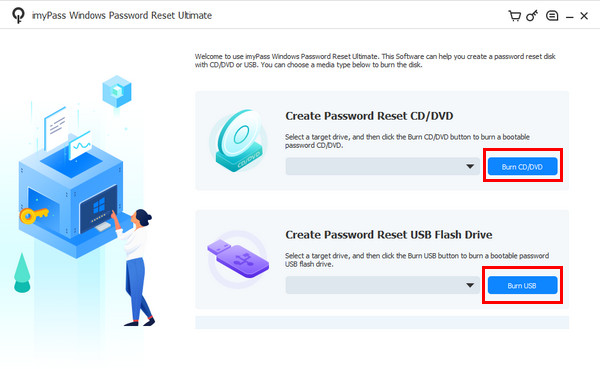
Select the Burn CD/DVD or Burn USB button, depending on your preferred password reset disk, to create one. Then, restart your PC and press F12 or ESC to boot it. Select your burned disk afterward to proceed.
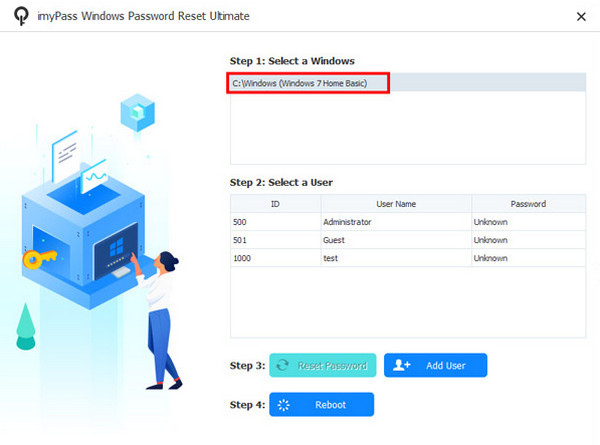
The list of operating systems available on your PC will appear. Select the one where your account is present and choose the account on the next screen.
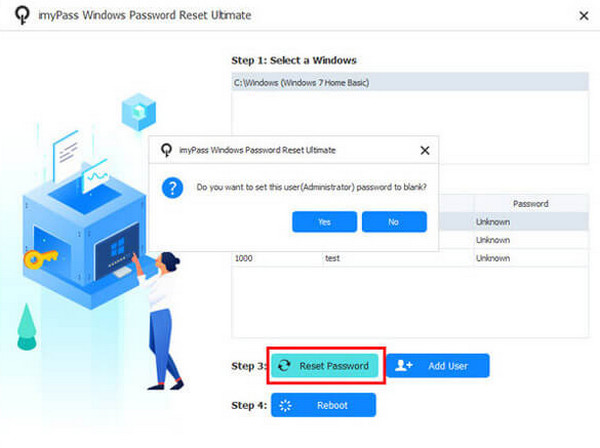
Please click the Reset Password button at the bottom. A small dialog box will appear, and click the Yes button. Finally, select the Reboot button to complete the process.
Method 2. Buy a Reset Disk and Bypass the Windows Vista Password
You might want to know: How do I bypass the password on Windows Vista if I do not know how to create a reset disk? You can buy one online, like on Amazon. However, the success rate of this reset disk does not guarantee that you to reset the password from Windows Vista. Also, they are expensive compared to normal disks. We still recommend that you create a reset disk manually to ensure the effectiveness of your Windows Vista.
Method 3. Use the Command Prompt to Reset Windows Vista Password
Command Prompt has a Safe Mode feature that can be used when Windows Vista is locked out due to a forgotten user account password. This feature can be used to reset the password of the mentioned device. How to get around passwords on Windows Vista? The steps for the Command Prompt are posted below.
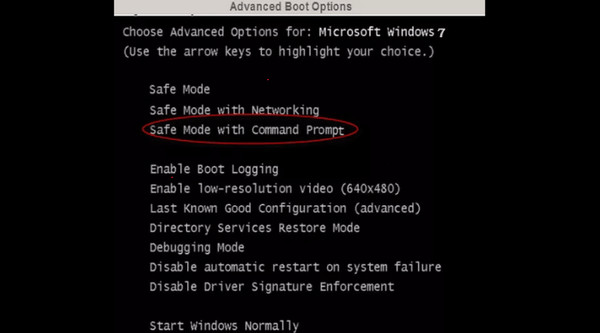
Reboot the PC and press F8 for 10 seconds. Then, select Safe Mode with Command Prompt.
Log in to the administrator account. Then, type net user [username] [new password] and replace the information. Then, press the Enter key to apply the changes. Restart the PC afterward and log in with the new password.
Method 4. Get Admin Privilege and Reset the Windows Vista Password
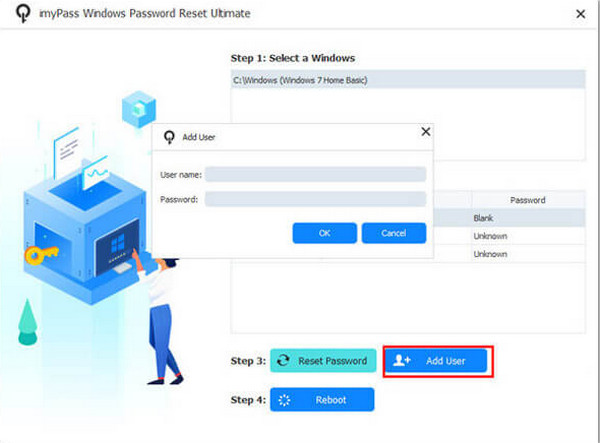
You may also reset the password in Windows Vista without a CD by getting the admin privilege by creating a new one. You might wonder if it is possible when you are locked out. The good thing is that we have imyPass Windows Password Reset! This process is quite simple due to the interface and features of the tool. The steps below will guide you through this procedure.
Ensure that you have created the Windows password reset disk, which you can follow from the previous section. Now, select the Windows version where you want to create a new admin account.
Choose the Add User option at the bottom. Then, input your username and set a password for the account. Finally, click the OK button.
Part 3. Tips to Avoid Windows Vista Password Forgot
Some of you might have been experiencing a frequent loss of the Vista password. It might be due to multiple passwords you handle, rare logins, or more. You might ask: How can I not forget my Vista password? Well, there are multiple preparations and principles you can make.
1. Make Passwords Memorable
Some individuals use a random password for their Windows Vista. It is recommended to use passwords that are connected to you, like birthdays, special dates, and more. Do not forget to make them strong.
2. List Down Account Credentials
Listing down the account credentials or information is also suggested. You may use an app from your mobile phone to take notes of them. On the other hand, it is not recommended to list down the account credentials in your notebooks or sticky notes.
3. Have Recovery Methods
Some of you cannot help but accidentally forget the Windows Vista password. You may use Windows password recovery methods. Create a Windows Vista password reset disk, secondary administrator account, or more.
Conclusion
All in all, you can reset or recover Windows Vista password easily with the help of this post. It has listed the four proven methods that can reset your Windows Vista password. imyPass Windows Password Reset can be used to reset and get a Windows Vista privilege by creating a new admin account. Download the tool and explore its features.
Penny is a senior editor from imyPass. She has focused on discovering perfect GPS location solutions in all scenarios, and also has experience in fixing computers.
Hot Solutions
-
Windows Password
-
Windows Tips
-
Fix Windows
-
Password Tips