Solution
 Support Center
 About Us
 Contact
Windows Password Reset Tools: Review to Help Pick the Best
 Penny Warren Published on December 05, 2025Windows Password3-min reading
Have you ever turned on your computer and realized you cannot remember your password, no matter how hard you try? That is when a Windows password recovery tool becomes essential because it gives you a way back into your system without stress.
Do not look anywhere! In this article, you will discover various tools you can choose from. So, what are you waiting for? Scroll down and learn how to choose the best Windows password recovery tool.

In this article:
Part 1: Top 5 Windows Password Recovery Tools Free Download
There are Windows password recovery tools that are free to download that can help you open your computer again when you forget your password. So, please get to know them now below, so you can pick the one that helps you right away.
Top 1: imyPass Windows Password Reset
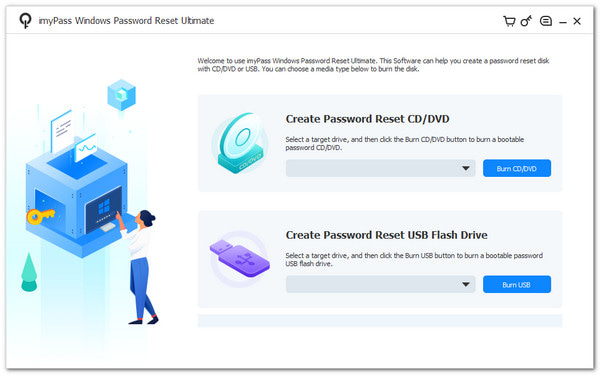
A locked Windows computer can stop your work and slow down your day. Because of that, you need a program that can save you fast, and a Windows password recovery tool becomes necessary. imyPass Windows Password Reset stands at the top because it keeps steps simple.
You can reset your password with a CD or USB without any hard setup. Most importantly, it is easy to use, keeps your files safe, and works with a 100% success rate. With it, you can reset passwords in seconds and make a new account right away.
Platform: Windows 11/10/8.1/8/7/Vista/XP
Pricing: 1 Month License: $39.96 / Lifetime Access: $79.96
Selling Points: It can remove admin and user passwords on all major Windows versions without deleting any files. It can also make a new admin account when you cannot open your old one. In addition, it lets you make a CD, DVD, or USB boot drive in just a few minutes.
Top 2: PassCue Windows Password Recovery
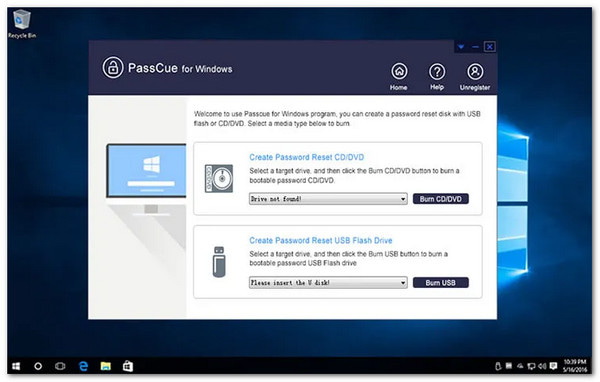
PassCue Windows Password Recovery software can reset user accounts, admin accounts, and even Microsoft accounts without reinstalling the system. It also supports UEFI and Legacy BIOS, so old and new computers both work fine. Moreover, you can make a USB, DVD, or CD reset disk. It even creates new local users when needed, which helps people get back into their computers fast.
Platform: Windows 10/8.1/7/8/Vista/XP
Pricing: Personal License: $35.95 / Business License: $95.95
Selling Points: It can read your system by itself, so the boot process is easy. It keeps all your files safe while you reset your password. It also gives quick customer support when you need help.
Top 3: Passware Kit
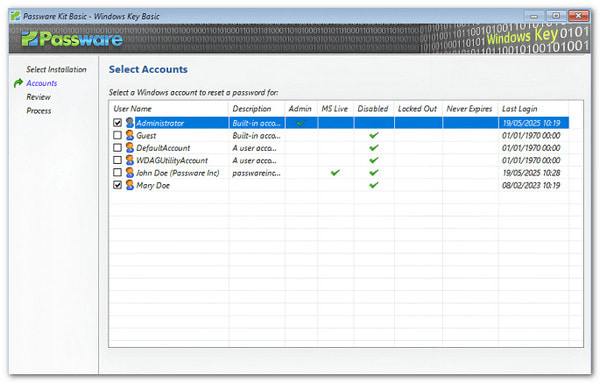
Some tools focus only on resetting local accounts, but Passware Kit goes straight for fast password removal. This Windows 10 password recovery software wipes Windows account passwords within minutes and works during the boot process.
It also resets secure boot options, startup keys, and supports Windows 11, 10, 8, Vista, XP, and more. Many people use it for old computers, work computers from past employees, or family devices they need to open again.
Platform: Windows 10/11/8/7/Vista/XP
Pricing: Basic $39 / Business $295
Selling Points: It has a USB creator tool that guides you step by step. It can handle strong and complex passwords with no trouble, which helps a lot when you forget your Windows 10 password.
Top 4: PCUnlocker
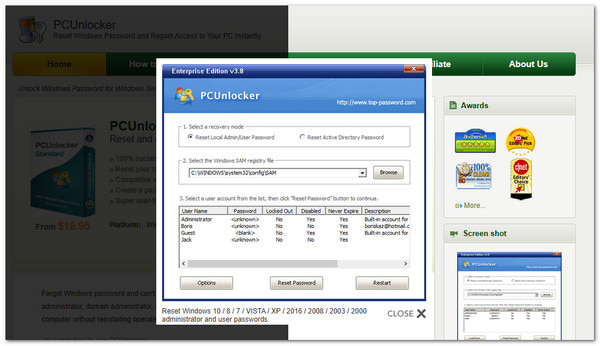
PCUnlocker stands out because it handles almost every type of Windows password issue. It works well as a Windows 8 password reset software because it resets Microsoft accounts, local accounts, and even domain accounts.
Many users like it because the interface is simple and easy to follow. It works with Windows 11. It boots from a CD, DVD, or USB and does not cause data loss.
Platform: Windows 11-XP
Pricing: Standard $19.95 / Professional $29.95 / Enterprise $49.95
Selling Points: It can turn a normal user into an admin with one step. It can open accounts without wiping old passwords. It also supports many disk types, like RAID and VHD files.
Top 5: Trinity Rescue Kit
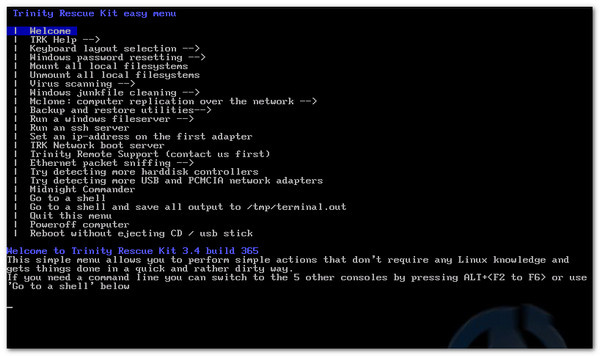
Trinity Rescue Kit feels different because it is a free Linux-based rescue system that helps fix Windows problems. It works well as a Windows 7 password reset software because it can reset passwords with simple text menus.
It can also clean files, scan for viruses, clone systems, and recover lost data. It can boot from CD, USB, or even over a network. It makes it handy for old and new computers. It also supports NTFS write, Samba sharing, SSH, and many tools for deep repair work.
Platform: Windows XP/7/8/10
Pricing: Free
Selling Points: It has tools that check for rootkits and bad files. It updates virus scanners so they stay ready. It also has backup tools that help you save important files.
Part 2: How to Choose the Best Free Windows Password Recovery Tool
Picking the best Windows Password Recovery Tool matters because each works in its own way. It is easier to pick the best one when you know what you need. Below are the things to check or consider:
1. Know your needs.
Think about what problem you want to fix. Some users only need a basic reset because they forgot a simple login. Others deal with Windows administrator password reset software or blocked systems.
2. Check the features.
Look at what the program can do for you. Some tools only reset passwords. Others can remove passwords or create new accounts. So, pick the program that gives the features you will actually use. It helps you avoid tools that look good but do not solve your problem.
3. Look for a safe tool.
Your files matter. Pick a tool that protects your data and keeps your system safe. A good recovery tool should not delete anything. It should only fix the password problem without touching your personal files.
4. See if your Windows version is supported.
A tool must match your computer. Check if it works as a password recovery tool for Windows 7, 8, 8.1, 11, 10, Vista, or XP. When a program supports your version, the process becomes safe and smooth. You will not deal with errors or failed boots.
5. Choose a simple tool.
A tool with clear steps is easier to follow. A clean screen helps you see what to click. Simple tools guide you from start to finish without stress. It makes the whole process smoother and faster.
6. Check for real support.
Support matters when you get stuck. A good tool gives guides, FAQs, or a support team. It helps you finish the job without guessing. It also makes the tool feel more reliable and friendly to use.
Conclusion
It is a good thing that there are Windows password reset software tools you can download for free. We have shared the leading five tools you can choose from, and each one gives you a simple way to fix a locked Windows system.
But if you are still unsure which one to pick, we recommend imyPass Windows Password Reset because it works well in many situations. It helps when you lose or forget your Windows password, forget your admin password, or need to create a new account without admin access.
Penny focuses on GPS troubleshooting and Windows optimization. She formerly worked as a technical support engineer, helping clients solve location-based and system issues efficiently. Backed by IT support experience, she provides practical solutions that really work. In her free time, she likes hiking and geocaching, testing GPS tech in the real world.
Hot Solutions
-
Windows Password
-
Windows Tips
-
Fix Windows
-
Password Tips