Solution
 Support Center
 About Us
 Contact
Snapchat Login Unlock – Fast and Effective Methods
 Gideon Byron Published on January 28, 2026Password Tips3-min reading
"My Snapchat account is locked, and I cannot access my account, how do I unlock my Snapchat account?"
If your Snapchat account becomes locked, you won't be able to log in, send snaps, view stories, or interact with other users. Account locks can happen for several reasons, such as suspicious login activity or violations of Snapchat's community guidelines.
To help you regain access, this guide explains the common reasons why Snapchat accounts get locked and provides Snapchat unlock methods for both temporary and permanent Snapchat locks.

In this article:
Part 1. Why Is Your Snapchat Account Locked?
Why Is Your Snapchat Account Temporarily Locked?
A temporary lock usually means Snapchat detected unusual activities, like:
1. Too many actions in a short time: Adding lots of friends, sending many snaps, or joining many groups too fast.
2. Using third-party apps or plugins: Apps like tweaked Snapchat versions, bots, or automation tools.
3. Logging in from multiple devices or IP addresses: Especially with proxies or VPNs.
4. Suspicious login attempts: Repeated failed logins or sudden location changes.
5. Being reported by other users: If there are many users reported you, your Snapchat account may be locked temporarily.
Why Is Your Snapchat Account Permanently Locked?
A permanent lock means Snapchat believes an account seriously or repeatedly violated its rules. Common reasons include:
- 1.Repeated temporary locks without changing behavior.
- 2.Using unauthorized third-party apps after warnings
- 3.Sending spam, scams, or phishing messages.
- 4.Doing Abusive, harassing, or hateful behavior or sharing prohibited content.
- 5.Compromised accounts used for malicious activity
Part 2. How to Unlock Snapchat Account Temporarily Locked
How do you unlock a Snapchat account that is temporarily locked? A temporary lock usually lasts 24 to 48 hours. It is often triggered by unusual behavior (adding too many friends quickly) or using unauthorized third-party plugins. So, when you wait for Snapchat to unlock your account, you can also uninstall unauthorized apps or plugins. Check the detailed guide below to unlock Snapchat account free.
Uninstall Unauthorized apps
Delete any tweaked versions of Snapchat (like Snapchat++, Phantom, or Wicked). If you try to unlock account on Snapchat while these are still on your phone, you might trigger a permanent ban.

Wait the required time
Do not try to log in repeatedly. If the message says Temporary, wait at least 24 hours before attempting the official Snapchat unlock tool.
Use the Official Snapchat Unlock Tool
Open a web browser on your computer or phone and visit the Snapchat unlock page: accounts.snapchat.com/accounts/unlock
Log in with your username and password, and then click the yellow Unlock button to unlock snapchat account.
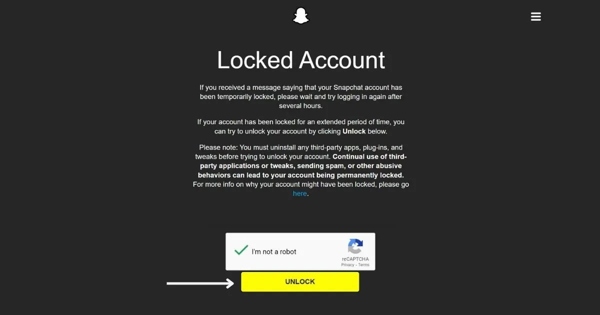
Verify your Snapchat account
Once your Snapchat account is unlocked, immediately verify your email and phone number to check their status.
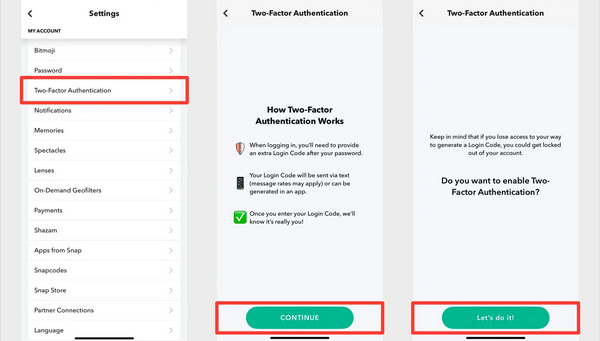
When your Snapchat account is locked, the Two-Factor Authentication (2FA) is also removed, so remember to enable Two-Factor Authentication (2FA) to prevent future security flags.
Part 3. How to Unlock a Permanently Locked Snapchat Account
You may wonder how to unlock a Snapchat account that is permanently locked. This is a very challenging situation, and it means your account is now in a critical state. If your screen says, "Your account has been permanently locked", the standard Snapchat unlock tool will not work. Your only option is the Official Appeal Process.
Go to the Appeal screen on Snapchat
Open the Snapchat app and attempt to log in. When the "Permanently Locked" notification pops up, look for a button that says "Appeal Decision".
Note:
If this button does not appear, your account is ineligible for appeal (usually due to severe violations like illegal activity).
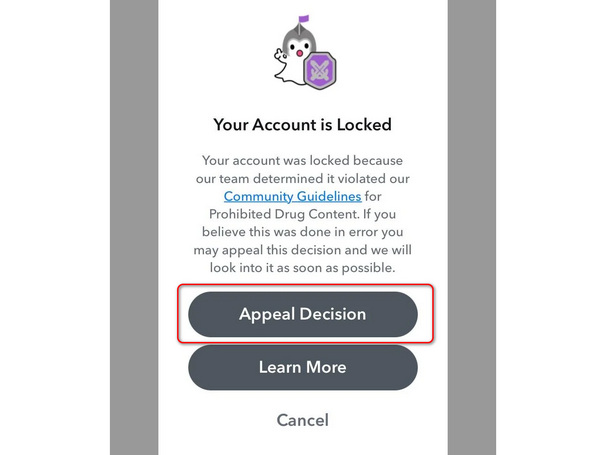
Submit your case
Tap the Appeal Decision button and provide a clear, polite explanation. You should explain that you were unaware of the wrongdoing, like:
"I believe my account was compromised", or "I was unaware that a specific plugin violated terms and I have now deleted it".
Wait for the 30 days
Snapchat will take up to 30 days to review your appeal and determine whether your Snapchat account is unlocked.
You will receive an email or an in-app notification once the review is complete. You only get one appeal; if denied, the account is gone forever.
Part 4. How to Prevent Future Snapchat Locks
When you've finished unlocking Snapchat, you should do some verifications and settings to protect your Snapchat account from future locks.
1. Verify your account: Ensure your profile info, associated email and phone number, and other information are all correct.
2. Enable Two-Factor Authentication: Two-Factor Authentication (2FA) is very necessary for protecting all accounts. It can reduce the risk of hacking. In addition, when you log in to your Snapchat account from different devices, 2FA can lower the chance of your account being locked.
3. Stay official: Download and use the Snapchat app from official sources like App Store, Google Play, and more.
Avoid Snapchat Unlock Scams
Maybe you've seen comments on social media like "Contact [Name] on Instagram, they unlocked my account!", but they are scammers. No one can manually enter Snapchat's database to unlock a Snapchat account except official Snap Inc. employees through the formal appeal process.
More Reading:
Part 5. How to Check and Save Snapchat Login Password
According to our research, most users who encounter the issue that Snapchat accounts are locked are due to multiple incorrect password entries. It cannot be denied that a strong and complicated password is difficult to be hacked. However, the owner may forget it too. To avoid Snapchat being locked again, you’d better save your password effectively. From this point, we recommend imyPass iPhone Password Manager.
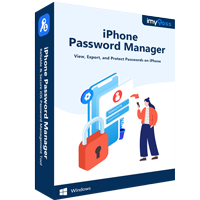
4,000,000+ Downloads
Back up your Snapchat password on your iPhone quickly.
View and manage accounts and passwords easily.
Support a wide range of accounts and passwords.
Compatible with the latest versions of iOS, iPhones, and iPad.
Here is the process to manage and back up your password to avoid locked Snapchat on your iPhone:
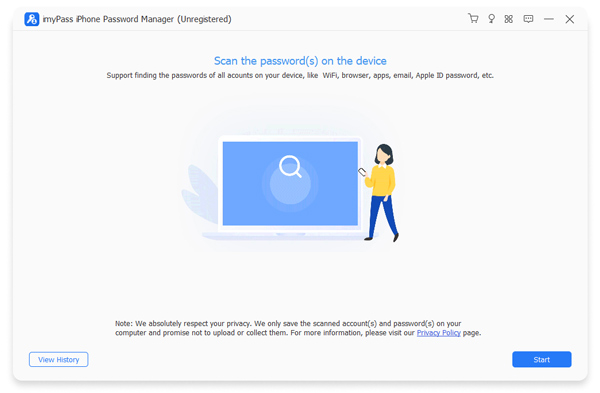
Connect to your iPhone
Run the best iPhone password manager once you install it on your computer. Then connect your iPhone to your computer with a Lightning cable. As long as your device is recognized, click the Start button to begin scanning passwords on your iPhone.
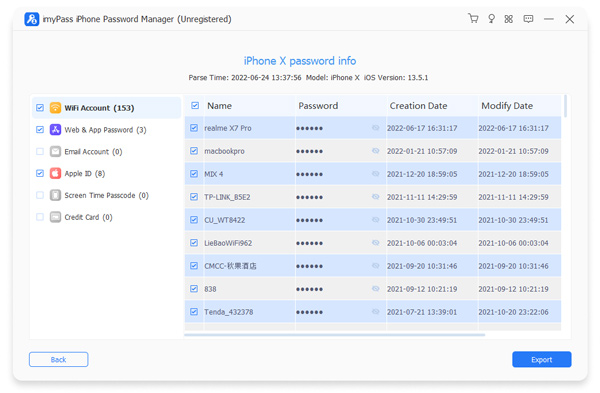
View the Snapchat password
When password scanning finishes, you will be taken to the preview window. Select the desired password types. To view your Snapchat password, select Web & App password. By default, the passwords are encrypted. Click the eye button next to the Snapchat password, and you will see the details.
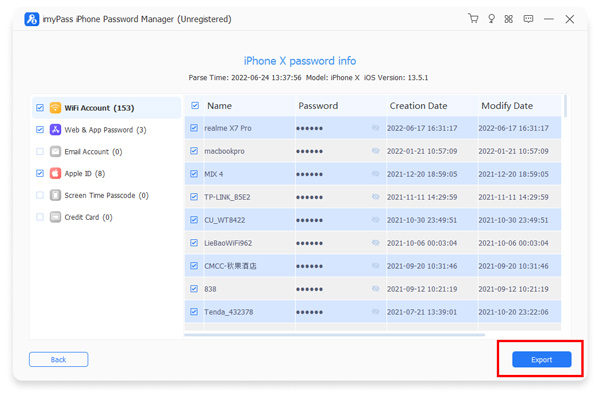
Back up your Snapchat password
To prevent Snapchat from being locked again, select your password, and click the Export button at the bottom right corner. Then select a proper file format, leave a filename, set a destination folder, and save the backup.
FAQs.
-
Is a Snapchat SS06 ban permanent?
Yes. A Snapchat SS06 ban is generally permanent. It is a device-level ban, meaning Snapchat has blocked your phone from accessing the service due to serious or repeated violations. Snapchat does not usually lift SS06 bans, and reinstalling the app or resetting the device won't help. In most cases, the only way to use Snapchat again is with a different, unbanned device.
-
How do you get rid of device ban on Snapchat?
You generally can't remove a Snapchat device ban (SS06) once it's applied. Snapchat treats it as permanent or indefinite. The only legitimate options are submitting an appeal or using another device.
-
How to bypass Snapchat error ss07?
SS07 usually means Snapchat detected suspicious activities. It's also a temporary lock. You just need to log out and wait 24–48 hours, disable VPN or proxy, remove third-party Snapchat apps or plugins, and then log in to your Snapchat account in the official Snapchat app to see if your Snapchat account is unlocked.
Conclusion
Snapchat login unlock is not difficult. The key is to use the account normally and strictly follow Snapchat's rules and Terms of Use. If your Snapchat account is permanently locked, you should submit an honest and well-reasoned appeal to request account recovery.
After unlocking Snapchat account, you should enable Two-Factor Authentication immediately to protect your account. Tools like imyPass iPhone Password Manager can also help you safely store and manage your passwords, reducing the risk of hacking or Snapchat account locks caused by forgotten login passwords.
Gideon is a senior editor from imyPass. He is an expert in unlocking phones and computers, and he has written password tutorials in imyPass for 3 years.
Hot Solutions
-
Password Tips
- 5 Best Password Finders for Instagram
- 10 Best Wireless Network Password Viewers
- Change Email Passwords on iPhone
- Reset or Change a Forgotten Twitter Password
- How to Restore or Reset Instagram Password
- Solutions When Forgot TikTok Password
- Recover or Change Discord Forgotten Password
- How to Reset Keychain Passwords
- Review of Microsoft Edge Password Manager
- 5 Best iPhone Password Manager Recommendations
-
Windows Password
-
Unlock iOS
-
Unlock Android