Solution
 Support Center
 About Us
 Contact
EaseUS Partition Master's Features, Perks & More Revealed
 Penny Warren Published on December 05, 2025Windows Password3-min reading
A program that can organize your disk space, resize or merge partitions, clone drives, recover lost data, and even create bootable media to reset Windows passwords is useful for any computer user. Did you know that is exactly what EaseUS Partition Master is? Are you familiar with its name?
Whether your answer is yes or no, you can freely read our in-depth review of EaseUS Partition Master. You will discover essential details, from what it is, its main features, advantages, disadvantages, where to get a license code, and whether it is safe to use. So, without further ado, please keep reading!

In this article:
4,000,000+ Downloads
Create reset media via USB, CD, or DVD.
Reset or remove Windows password in seconds.
Create a new Windows account without signing in.
High success rate with no risk to your files or data.
Supports Dell, HP, Lenovo, Acer, ASUS, Sony, Samsung, and more.
Part 1: What Is EaseUS Partition Master
EaseUS Partition Master is a software that helps you manage the storage space on your computer. It works on Windows and Mac operating systems, and it lets you create new partitions, resize old ones, or join them together.
The program also has tools for cloning disks when you upgrade to a new drive. It can help with backup, system migration, and even fixing lost partitions. You can also make bootable media and create a Windows password reset disk to reset your password safely.
Moreover, EaseUS Partition Master comes in a free version for basic tasks and a professional version for more advanced work.
Part 2: Main Features of EaseUS Partition Master
Let us move on to the main features! Good thing, EaseUS Partition Master free and professional versions include many features that help you control, fix, and improve your disks. The main tools cover partition management, disk cloning, disk conversion, and repair functions. It also has options for making bootable media and resetting Windows passwords.
1. Partition Management
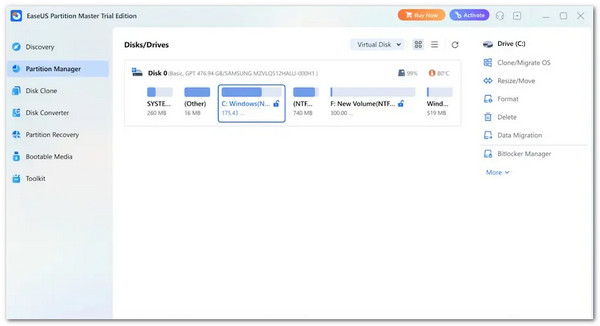
The feature lets you create new partitions when you need extra space. You can delete partitions that you do not want. You can format a partition, so it becomes clean and ready to use again.
If you want to turn two partitions into one, it can merge them for you. You can resize a partition to make it bigger or smaller. You can also move a partition to a different place on the disk without losing files.
If you want more privacy, you can hide a partition and unhide it when needed. The program also lets you change drive letters and labels so your disks stay easy to organize.
2. Disk Cloning and System Migration
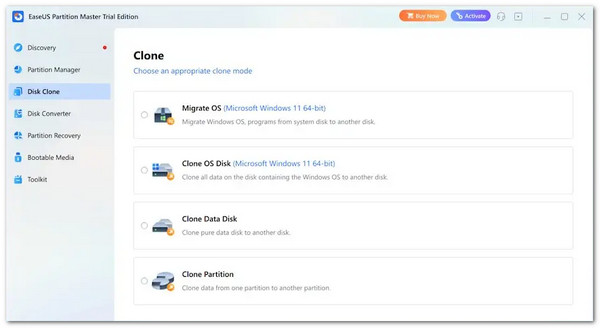
The cloning feature lets you copy a whole disk or one partition. It helps when you move your data to a new drive. You can also move your Windows system to a new SSD without reinstalling anything. It makes upgrades much easier.
3. Disk Conversion Tools
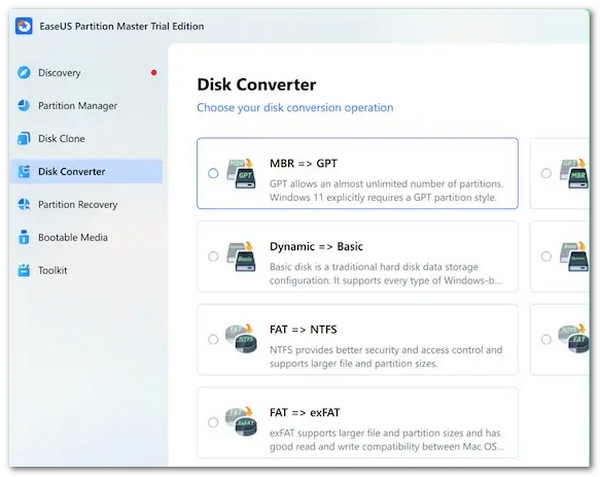
The program can change a disk between MBR and GPT, which is needed for larger drives and newer systems like Windows 11. You can switch partitions from primary to logical. You can change the file system from NTFS to FAT32 without deleting your data. You can also convert dynamic disks into basic disks while keeping your files safe.
4. Optimization and Repair Tools
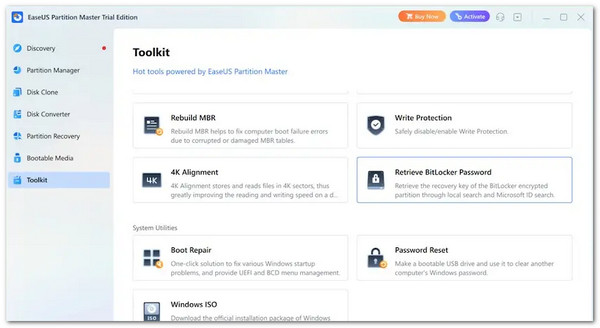
EaseUS Partition Master can scan a disk and fix file system problems. It can wipe a disk so all data is fully erased. It can check the health and speed of your SSD and adjust it for better performance with 4K alignment. If your computer cannot boot, the tool can rebuild the MBR. In addition, it has a recovery feature that helps bring back lost or deleted partitions.
5. Bootable Media Creation
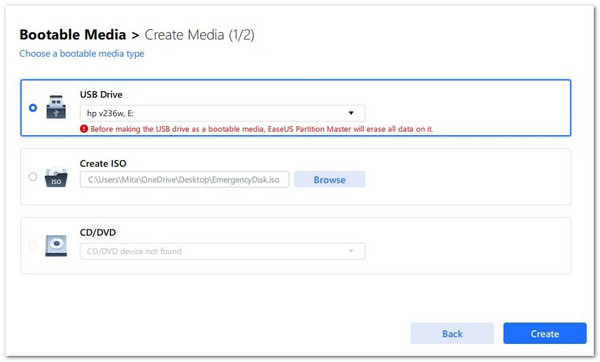
It can also help you reset a Windows password through a bootable USB to regain access if you forget your password. It works for both admin and standard user accounts on Windows 11, 10, and 7. You can make a bootable password reset disk using a USB drive or a DVD.
This disk can start your computer when you cannot log in. You can safely reset or remove your Windows password without reinstalling the operating system or losing any files. This feature is guided and simple, making it easy for beginners to use while keeping your data secure.
Part 3: Pros and Cons of EaseUS Partition Master
Every program has good sides and bad sides, and EaseUS Partition Master is the same. Some parts make your work easier. Some parts may feel slow or limited at times. In this section, you will see the perks that help you manage your disks better.
You will also see the disadvantages that might affect your experience. It helps you understand what to expect before you use the program. It also helps you decide if the program fits the way you work.
Pros
- Regular Updates: EaseUS Partition Master gets updated often, so it stays compatible with the latest Windows versions. You do not have to worry about running outdated tools that might not work.
- Supports Large Disks: It works with disks up to 8 TB, which is perfect for users with large storage needs or multiple drives.
- Advanced and Safe Tools: Features like MBR repair, lost partition recovery, and file system checks are included. These are safe to use even for important system drives.
- Wide Range of Operations: You can resize, merge, copy, convert, wipe, and repair partitions. It makes it an all-in-one tool for disk management.
- Action Preview: The program shows a full preview of all changes before applying them. It gives users control and confidence that nothing will go wrong. It gives users control and confidence that nothing will go wrong.
- MBR/GPT Conversion Without Data Loss: You can switch disks between MBR and GPT safely. It is useful when upgrading to new systems like Windows 11 without losing files.
Cons
- No Dynamic Volume Management: It cannot manage dynamic disks, which can limit some advanced setups.
- Ads in Free Version: Every time you close the program, an advertisement appears. It can be distracting, especially during frequent use.
- Long Copy/Clone Times: Cloning or copying large drives can take a while, depending on the disk size.
- Free Version Limits: The EaseUS Partition Master free edition is only for personal use, so you cannot use it for business work.
- Difficult to Cancel Tasks: Once a process starts, it can be hard to stop. Users must double-check before running major operations.
- Some Features Locked: There are advanced tools, like merging system partitions and cloning a system disk, that require the paid version to access.
Part 4: Where to Get an EaseUS Partition Master License Code
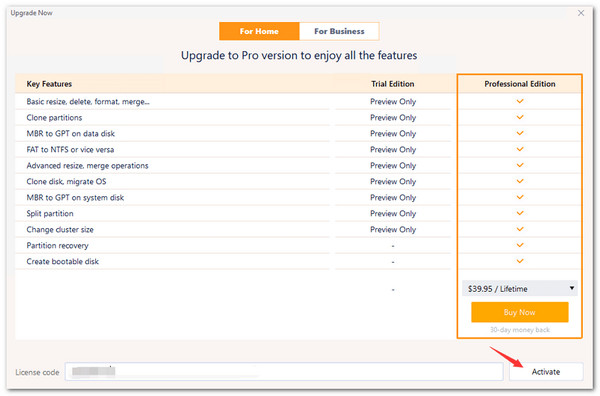
The safest and only proper way to get a real EaseUS Partition Master license code is through the official EaseUS website or from their approved sellers. The official site gives you a valid code right after you pay, and the program comes clean and virus-free. Some trusted sellers can also provide codes, and they are listed on the official EaseUS support pages.
You should avoid sites that claim to offer "free" keys or cracked versions. These sites often share codes that do not work, and the downloads can carry viruses, malware, or harmful files. Using a cracked version also removes your access to updates and customer support. It also breaks the software license rules and can cause legal trouble.
But if you have already purchased the program but lost your code, you can contact EaseUS support with your email and order ID to get it back.
Part 5: Is EaseUS Partition Master Safe
How about safety and security? Do you think that EaseUS Partition Master checks this qualification?
The answer is yes! Please take note that EaseUS Partition Master is totally safe when you download it from the official website or from approved sellers. Trusted sources have checked it, and tests show that the installer does not contain malware.
Many home users and IT workers use it every day for partitioning and disk management, which shows that the program is reliable. The only real danger comes from unofficial download sites, which sometimes claim to offer an EaseUS Partition Master crack. These sites can include harmful files or malware. When you stay with the official source, the program is safe to install and safe to use.
Conclusion
With the in-depth review of EaseUS Partition Master, you have surely learned that it can help you a lot in managing, repairing, and organizing your disks. It also enables you to create bootable media for repairing Windows on your computer.
It really has a lot of perks, right? That is why a licence code for EaseUS Partition Master is necessary. Always remember to get your license key in the official way to unlock all features safely.
If you need to reset or recover a Windows password, imyPass Windows Password Reset works fast, supports many devices, and keeps your data safe.
Penny is a senior editor from imyPass. She has focused on discovering perfect GPS location solutions in all scenarios, and also has experience in fixing computers.
Hot Solutions
-
Windows Password
-
Windows Tips
-
Fix Windows
-
Password Tips