Solution
 Support Center
 About Us
 Contact
Full Guide to Use Checkra1n iCloud Lock Removal Tool
 Samuel Spenser Published on January 28, 2026Unlock iOS3-min reading
If you're looking for ways to jailbreak an iPhone or bypass the iCloud Activation Lock, you've probably come across Checkra1n. It’s one of the most popular and powerful tools in the jailbreak community. But can Checkra1n actually unlock the iCloud Activation Lock? In this guide, we'll break down the truth about iCloud Checkra1n and explain what it can and can't do when it comes to bypassing Activation Lock.

In this article:
Part 1: What Is Checkra1n?
Checkra1n is a well-known semi-tethered jailbreak tool for iPhones and iPads. It works by taking advantage of a hardware vulnerability in Apple's boot ROM, called checkm8, which allows custom code to run during the device's startup process.
Since checkm8 is a hardware-level flaw, Apple cannot fix it through iOS updates, making Checkra1n a long-term jailbreak solution for supported devices. However, because it is semi-tethered, users must reconnect the device to a computer and re-enable the jailbreak after each reboot.
Can Checkra1n Bypass iCloud Activation Lock?
Checkra1n itself cannot directly bypass iCloud lock, but its jailbreak feature is needed for iCloud activation lock bypass. This post will show you how to jailbreak iOS devices and how to perform Checkra1n iCloud unlock.
Checkra1n iCloud Bypass Supported Models
Although Checkra1n jailbreak and iCloud bypass cannot be patched by iOS updates, they cannot work on newer iOS and iPadOS devices, as newer models have avoided the checkm8 exploit at the hardware level. Checkra1n iCloud Bypass and Jailbreak works on devices with processors ranging from the A5 to the A11 Bionic. This translates to:
iPhone: iPhone 5s through iPhone X.
iPad: iPad Mini 2/3, iPad Air, and iPad Pro models from that era.
Other: Apple TV (4K and 4th Gen) and even the T2 security chip in certain Macs.
Part 2: How to Bypass iCloud Activation Lock with Checkra1n
Checkra1n is a desktop-based tool, so bypassing the iCloud Activation Lock requires using it on a Mac or Linux computer. If you use Windows, you can still burn Chcekra1n into a USB drive. In addition, jailbreaking your iPhone is a necessary step before attempting any iCloud Activation Lock bypass. Below, we'll walk you through how to complete both processes step by step.
How to Jailbreak iPhone or iPad with Checkra1n
Go to the Checkra1n official webpage and select a release that suits your macOS or Linux.
To use Checkra1n on Windows, you'll need to download Checkra1n first and burn it to a USB drive:
- 1.Download a 64-bit or 32-bit Checkra1n ISO from github.com/foxlet/bootra1n webpage.
- 2.Download, install, and launch Rufus from rufus.ie/en/.
- 3.Follow the guides on the Rufus website to create a bootable USB drive with the Checkra1n ISO file.
You can follow the on-screen guide to jailbreak an iPhone or iPad on Mac or Linux with Checkra1n because the two operating systems can run Checkra1n as a program with an interface. Follow the on-screen prompts to jailbreak your iOS device.
From this step, let's focus on how to use Checkra1n on Windows:
Insert the USB drive into your computer. Restart your Windows PC, and repeatedly press F12 or ESC (based on your PC brand) to enter the BIOS panel.
Select an option like Boot Manager or Boot Sequence, and then set the USB hard drive as the first option.
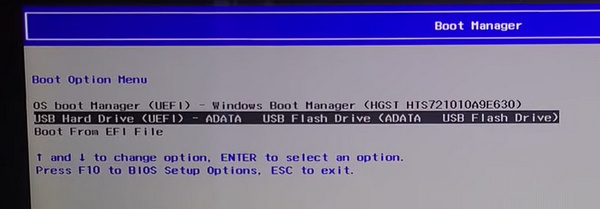
Wait for Checkra1n to boot. Then, you should log in as anon and press the Enter key to enter the password voidlinux. Press the Enter key to confirm.
Then, $ will prompt. Enter sudo checkra1n and press the Enter key.
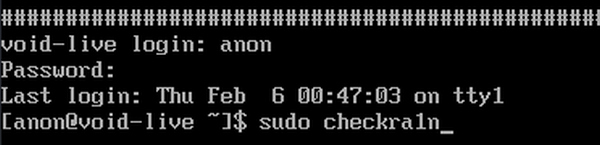
Now, you'll enter the Checkra1n interface. Connect your iOS device to your Windows PC. Select Start on your computer.
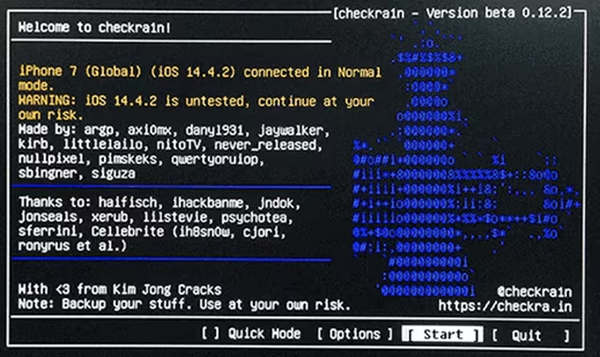
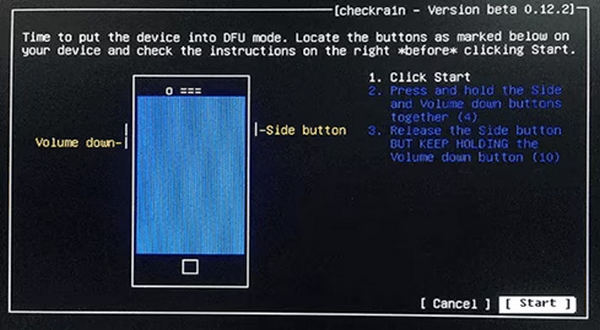
Enter the Recovery Mode on your iPhone following the on-screen prompts.
Wait for Checkra1n to jailbreak your iPhone or iPad. After jailbreaking with Checkra1n, you can bypass iCloud activation.
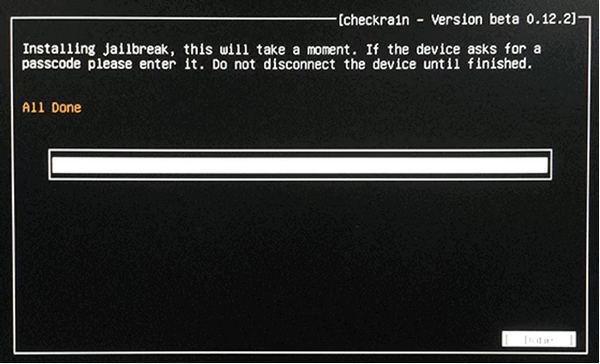
How to Bypass iCloud Activation Lock with Checkra1n
While Checkra1n alone cannot unlock iCloud Activation Lock, whether used as a program or from a USB drive, you can pair it with a dedicated iCloud Activation Lock removal tool, such as imyPass iPassBye. This GUI-based software is designed to help you bypass iCloud Activation Lock on supported iPhone and iPad models with a simple, guided process. According to the developer, it supports a wide range of devices and iPad models and is intended to work alongside a jailbreak like Checkra1n.
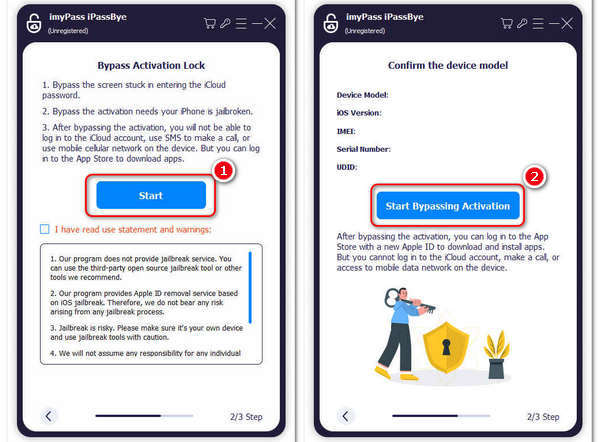
Download, install, and launch imypass iPassBye on your Windows or Mac computer.
Connect your iPhone to your computer. Click the Start button on the program.
Since you've jailbroken your iPhone, just click the Start Bypassing Activation button. That's how easy you can bypass iCloud Activation Lock with Chekra1n and imyPass iPassBye.
Now, let's compare Checkra1n and imyPass to better explain how Checkra1n fits into the iCloud Activation Lock bypass process.
| Checkra1n | imyPass iPassBye | |
| Features | Jailbreak iOS devices by exploiting checkm8 in hardware level. | Bypass iCloud Activation Lock. |
| OS Compatibility | macOS and Linux (Create a bootable USB on Windows) | Windows and macOS |
| Supported iOS Devices | iPhone 5s to iPhone X | iPhone 4 to iPhone 17 series |
You may want to know:
Bonus: Easily Remove Screen Lock When You Forget Passcode
Perhaps you've forgotten the screen passcode on an old iPhone. How can you access this device? imyPass iPassGo can help you easily remove any screen lock (including screen passcode, Face ID, and Touch ID) on iOS devices. You will regain access to your phone without restrictions. It works highly compatible with the latest iOS 26 and iPhone 17 series.

4,000,000+ Downloads
Connect your iOS device to a computer to remove screen locks.
Easily remove screen passcode, Face ID, and Touch ID.
Help you access your iPhone and iPad with a forgotten passcode.
Work on all iPhone/iPad models and iOS/iPadOS versions.
FAQs.
-
What iOS does Checkra1n support?
Checkra1n supports iOS 12.0 to iOS 14.8.1. Although Checkra1n exploits checkm8, a hardware-level trick to jailbreak iOS devices, newer iOS introduces many security updates to make Checkra1n unable to work.
-
Is Checkra1n legit?
Yes, Checkra1n is considered a legitimate jailbreaking tool developed by a team led by Luca Todesco. However, it's essential to use it responsibly and be aware of the potential risks associated with jailbreaking, such as voiding warranties or compromising device security.
-
What will happen after bypassing the iCloud activation lock?
Bypassing the iCloud activation lock allows you to access the device, but it doesn't remove the iCloud account associated with it. You may be able to use some functions of the device, but you won't be able to sign in with a different iCloud account or access iCloud services.
Conclusion
While Checkra1n is a powerful tool for jailbreaking an iPhone, it cannot directly bypass iCloud Activation Lock. Instead, it serves as a critical first step by granting the necessary system access. To complete the Checkra1n iCloud unlock process, you need a specialized secondary tool like imyPass iPassBye. By first jailbreaking your iOS device with Checkra1n, and then you can use iPassBye to easily remove the iCloud lock in just a few clicks.
Samuel is a senior editor from imyPass. He is an expert on password unlocking. He has over five years of experience writing tutorials on phone unlocking.
Hot Solutions
-
Unlock iOS
- Review of the Free iCloud Unlock Services
- Bypass iCloud Activation With IMEI
- Remove Mosyle MDM from iPhone & iPad
- Remove support.apple.com/iphone/passcode
- Review of Checkra1n iCloud Bypass
- Bypass iPhone Lock Screen Passcode
- How to Jailbreak iPhone
- Unlock iPhone Without Computer
- Bypass iPhone Locked to Owner
- Factory Reset iPhone Without Apple ID Password
-
iOS Tips
-
Unlock Android
-
Windows Password