



 Solution
 Support Center
 About Us
 Contact
How to Fix Apple ID Verification Pop-Up Repeatedly
 Penny Warren Published on December 04, 2025Unlock iOS3-min reading
If you use an iPhone, iPad, or Mac, you've probably encountered an Apple ID verification pop-up at some point. Normally, it appears when you sign in, download apps, or change device settings. But in some cases, users report that the Apple account verification pop-up appears constantly, sometimes every few minutes.
If your Apple account verification keeps popping up, this guide will help you understand why it happens and what you can do to stop it.

In this article:
Part 1: Why Does Apple ID Verification Keep Popping Up?
Many iPhone and iPad users ask the same question: Why does Apple ID verification keep popping up? There are several possible reasons:
1. Incorrect or outdated Apple ID password.
2. iCloud syncing issues.
3. Multiple devices using the same Apple ID.
4. Pending App Store downloads.
5. Wrong Apple ID on the your iPhone or iPad.
6. Software bugs and glitches.
You can check whether your iPhone or iPad has such issues. By understanding them, you can easily fix the Apple account verification pop-up problem with the guides below.
Part 2: How to Stop Apple Account Verification Pop-Up
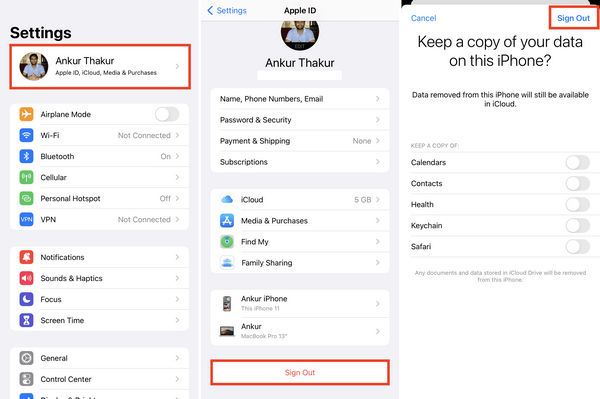
1. Sign Out and Sign Back In
Go to the Settings app, and then select your profile.
Slide down to tap the Sign Out button. Enter your Apple ID password to sign out of the ID.
Then, tap the Sign In button to sign back in to your Apple ID. Wait for a while to see if you can fix the Apple account verification pop-up.
2. Check for an Incorrect Apple ID
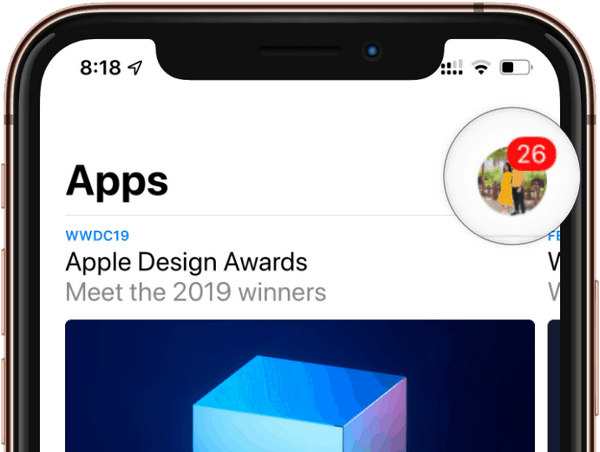
If your current Apple ID is not associated with a certain app on your iPhone and iPad, you may see the Apple account verification pop-up when you want to update the app.
Go to the App Store and tap the Account profile on the top right side. Check if it is the account that you used to download a certain app. If not, you can sign in to the right Apple ID or directly remove the app if you don't want to see Apple ID verification pop-up.
3. Reset Network Settings
The network settings on your iPhone or iPad may have glitches, causing Apple ID verification to keep popping up. You can factory reset network settings to try to fix this problem.
Open Settings. Go to General. Scroll down and tap Transfer or Reset iPhone.
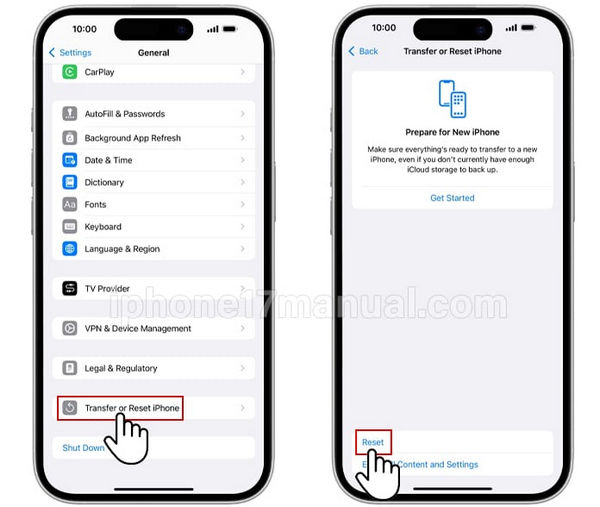
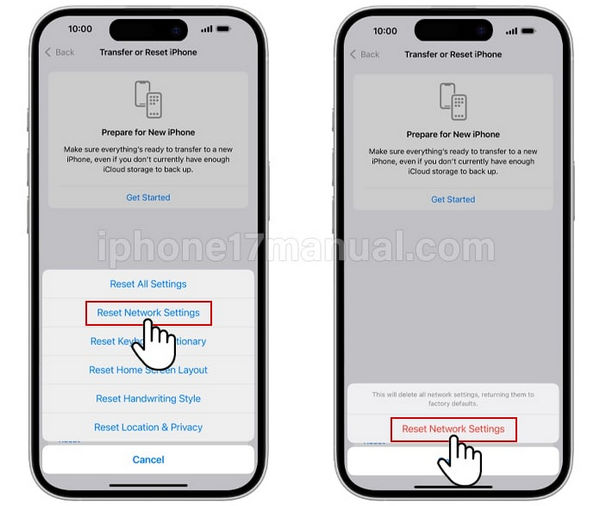
Tap Reset. Choose Reset Network Settings. Enter your passcode to confirm.
After that, your iPhone will restart. You can see if it can fix the Apple ID verification pop-up.
4. Update iOS
Updating iOS to a newer version can help you fix the abnormal Apple ID verification pop-up. If your iOS version is a bit old and your iPhone has glitches and lags, you can try this way to repair your iPhone. It requires a stable internet connection and may take long to finish installation.
Plug your iPhone into power and connect it to an internet connection (better stable and fast).
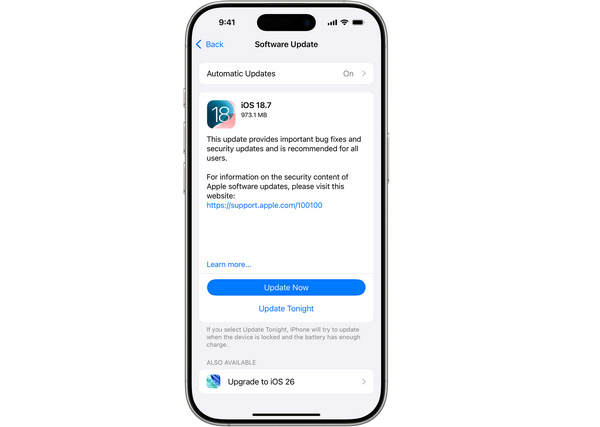
Open the Settings app. Tap General. Then, select Software Update.
If there's a new iOS version, you can tap the Update Now or Update Tonightbutton to update iOS. After installation, reboot your iPhone to see if you can fix the Apple ID verification pop-up problem.
Part 3: What If Apple ID Verification Still Pops Up?
If the methods above can't help, you can use the methods below to fix the Apple account verification that keeps popping up.
1. Check Wi-Fi Connection
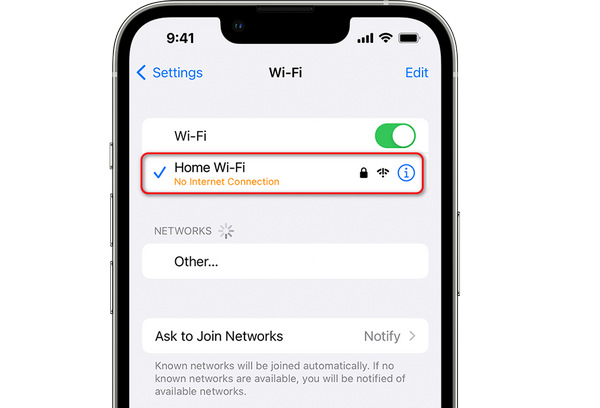
Open the Settings app, and then tap Wi-Fi. Then, tap your current Wi-Fi connection. Here, you can check the signal bars and whether there's No Internet Connection prompt.
2. Check Screen Time Restrictions
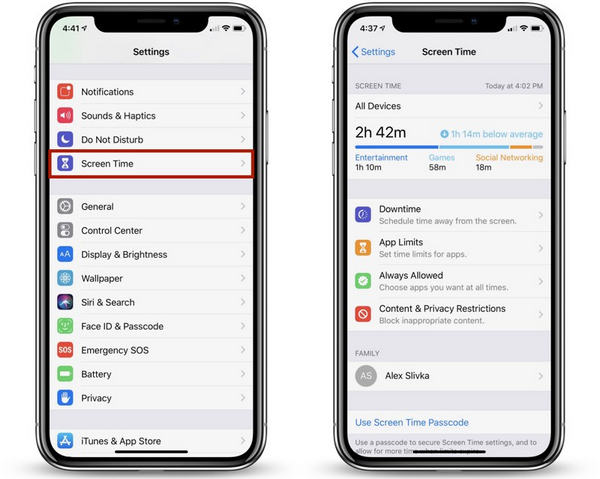
Open the Settings app. Scroll down to tap Screen Time.
Here you can see if Screen Time blocks account changes, iTunes & App Store purchases, installing or deleting apps, or using certain apps (FaceTime, Messages, iCloud functions).
You can turn off Screen Time, for your iPhone or iPad may repeatedly ask for the Apple ID verification because it cannot complete a background verification.
3. Check Apple System Status
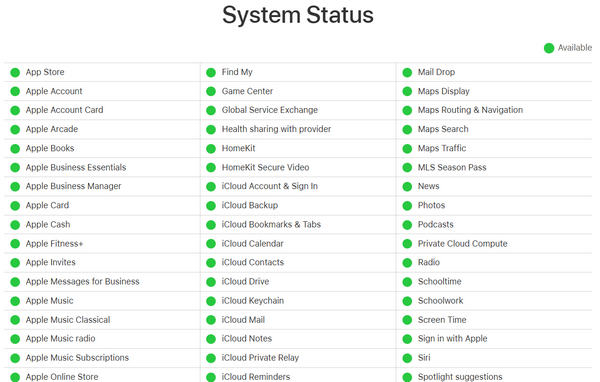
If Apple system status is abnormal, you may encounter Apple ID verification keeps popping up. Follow the guide below to check it.
Go to the official webpage of Apple System Status. If the Apple system status is abnormal, the Apple account verification pop-up is inevitable. You can wait for the status to turn normal.
4. Contact Apple Support
If you can ensure that all the conditions above are normal, but Apple ID verification still keeps popping up, you need to contact Apple Support. You can go to the official Apple Support webpage – support.apple.com, or directly call an Apple Authorized Service Provider near you for help.
Part 4: Ultimate Solution to Fix Apple Account Pop-Up
If you can't fix the Apple account verification pop-up, imyPass iPassGo is your last solution. It can easily remove Apple ID on your iOS devices, so that you cannot see Apple account verification pop-up. If your iOS device has Screen Time restrictions, imyPass iPassGo can one-click remove Screen Time without any effort. Then, you can use your iPhone without the annoying Apple ID verification pop-up.

4,000,000+ Downloads
Connect your iOS device to your computer to remove Apple ID verifications.
Remove Screen Time restrictions to fix the abnormal Apple ID verification pop-up.
Help you unlock screen lock on iPhone, iPad, and iPod easily.
Remove iTunes backup password and MDM on your iOS devices.
Conclusion
This article offers the 9 best ways to remove the Apple ID verification pop-up. You can use your iPhone or iPad without any exhausting verification pop-ups. It's not easy to check and fix abnormal system settings or conditions. However, you can use imyPass iPassGo to quickly fix the Apple account verification keeps popping up for any reason.
Penny is a senior editor from imyPass. She has focused on discovering perfect GPS location solutions in all scenarios, and also has experience in fixing computers.
Hot Solutions
-
Unlock iOS
- Review of the Free iCloud Unlock Services
- Bypass iCloud Activation With IMEI
- Remove Mosyle MDM from iPhone & iPad
- Remove support.apple.com/iphone/passcode
- Review of Checkra1n iCloud Bypass
- Bypass iPhone Lock Screen Passcode
- How to Jailbreak iPhone
- Unlock iPhone Without Computer
- Bypass iPhone Locked to Owner
- Factory Reset iPhone Without Apple ID Password
-
iOS Tips
-
Unlock Android
-
Windows Password


