



 Solution
 Support Center
 About Us
 Contact
How to Fix Apple ID Sign in Requested Keep Popping up
 Penny Warren Published on November 07, 2025Unlock iOS3-min reading
"My iPhone was locked to AT&T, but I want to use other carriers. How can I unlock a SIM-locked iPhone?" Even if you purchase your iPhone in full, you may still be restricted to a specific network provider. As a result, you cannot switch to other carriers or use a new SIM card. The good news is that you can get rid of the restriction following our proven methods and concrete guide.

In this article:
Part 1: How to Check iPhone SIM Lock
Before unlocking your SIM card, you first need to check your iPhone's SIM lock status. While there are third-party SIM-lock checkers, you can check the status on your device without extra tools.
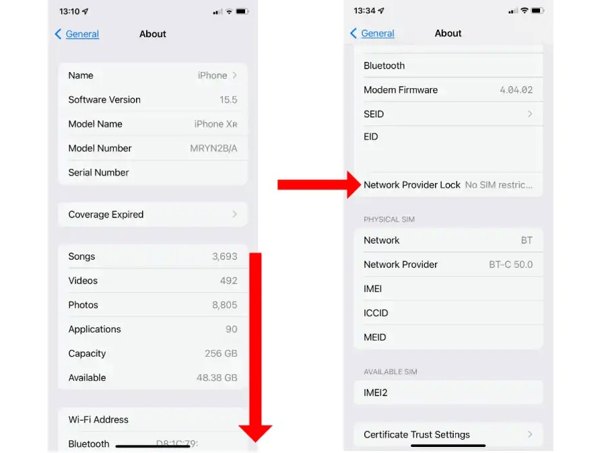
To check your iPhone SIM lock, run your Settings app.
Go to General and choose About.
Scroll down and find the Carrier Lock or Network Provider Lock.
If you see SIM locked, it means your iPhone is locked to your carrier.
Part 2: How to Ask Carrier to Unlock SIM Card on iPhone
The easy way to unlock an iPhone SIM lock is to make a request to your carrier. However, you must follow the device unlocking policies or requirements. Once you meet these policies, you can make a request directly.
General Device Unlocking Policies
1.You have paid for your iPhone in full. If you bought it on an instalment plan, make all payments.
2.You must have your service active for a specific period. T-Mobile users have their iPhones active for at least 40 days. For AT&T and Verizon users, the period is 60 days.
3.Recently, you haven't reported your iPhone as lost or stolen.
4.Your iPhone must be sold by your carrier or be an authorized device.
5.The carrier account associated with your iPhone must be in good standing.
6.If your carrier has unique requirements, you can find them on its website or contact customer support.
Once you meet the iPhone SIM unlocking policies and requirements, you have three methods to get rid of the restriction.
Option 1: How to Unlock SIM Locked iPhone by Phone Call
When you want to unlock a SIM-locked iPhone, you can call the customer support of your carrier. The phone calls of the main carriers include:
Verizon: 800-922-0204
AT&T: 800-331-0500
T-Mobile: 877-453-1304
U.S. Cellular: 888-944-9400
Mint Mobile: 800-683-7392
Mint Mobile: 800-683-7392
Then, make a request and provide the necessary information and proof. Once your carrier receives your request, it will unlock your SIM directly, and you can get an unlocked GSM phone.
Option 2: How to Unlock SIM Lock on iPhone Online
Major network providers offer a web interface to unlock the SIM lock on an iPhone, such as AT&T, Verizon, T-Mobile, etc. You can make a request on the website directly if it is inconvenient to call your customer support. We use AT&T as an example to show you the workflow.
Visit your carrier's website in a browser and sign in with your account.
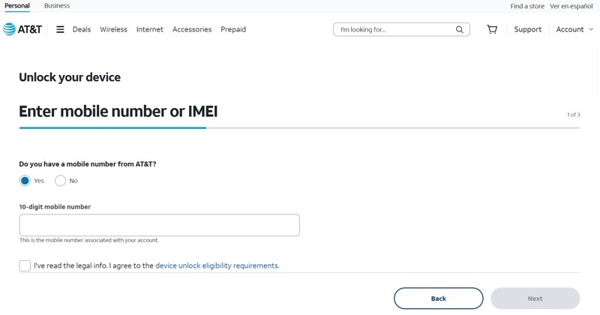
Redirect to the unlock-device web page and input your phone number.
Turn to your iPhone.
Run the Phone app, type *#06#, and tap the Call button.
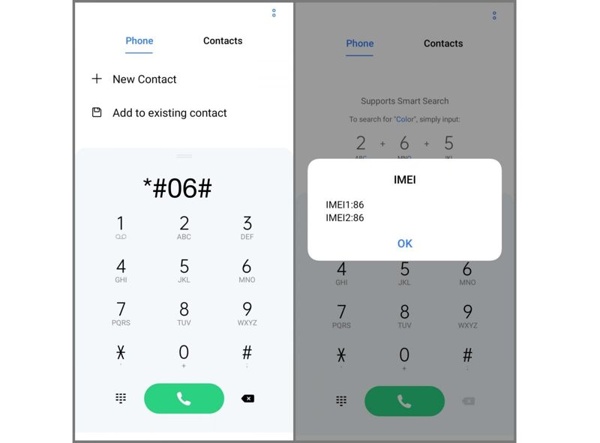
Input your IMEI number and submit your request.
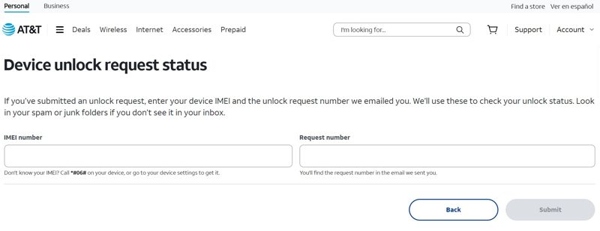
Once your carrier receives your request, your SIM card will be unlocked.
Option 3: How to Unlock iPhone SIM in an App
Some carriers released the mobile apps to unlock iPhone SIM cards, like Cricket, AT&T, and more. It enables you to get rid of the network lock on your iPhone without a computer or other hardware.
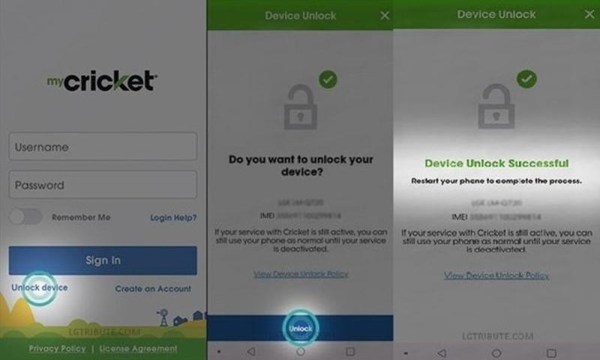
Open your carrier's app on your iPhone.
Log in to your account.
Tap the Unlock button.
Offer the information, like your phone number and IMEI number.
Once it is successful, you can switch your SIM card.
Part 3: How to Unlock SIM Card on iPhone Online
If you cannot meet your carrier's unlocking policies or requirements, you have to use a third-party unlock service. In fact, there is a wide range of unlocking services online. You'd better look for a reputable service to protect your device. We use Unlock Base as an example to show you how it works.
Go to the online SIM unlocking service in a browser.
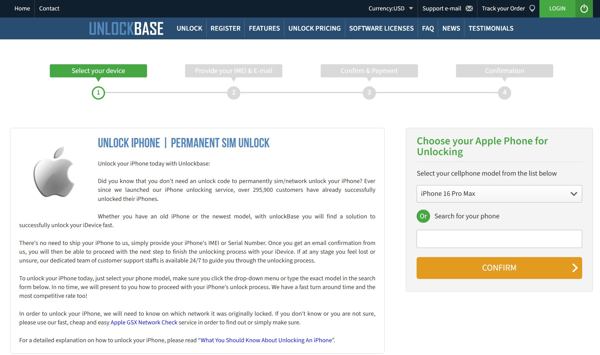
Click the Unlock menu, and choose your device brand. Here we click Apple.
Next, select your iPhone model from the drop-down list.
Input your IMEI number. You can find it on your iPhone.
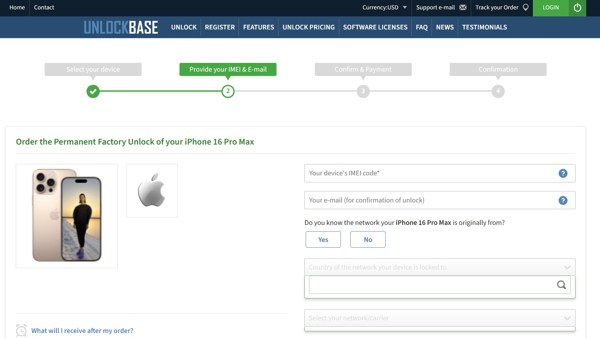
Enter your email address and select other information.
Continue and check out your bill. The price is different, depending on your iPhone model.
When the service unlocks your iPhone SIM card successfully, you will receive the confirmation email with the rest steps.
Take out the SIM card from your iPhone and insert a new one.
When prompted, input the unlocking code you received from the service.
Bonus Tip: Best iPhone Unlocker
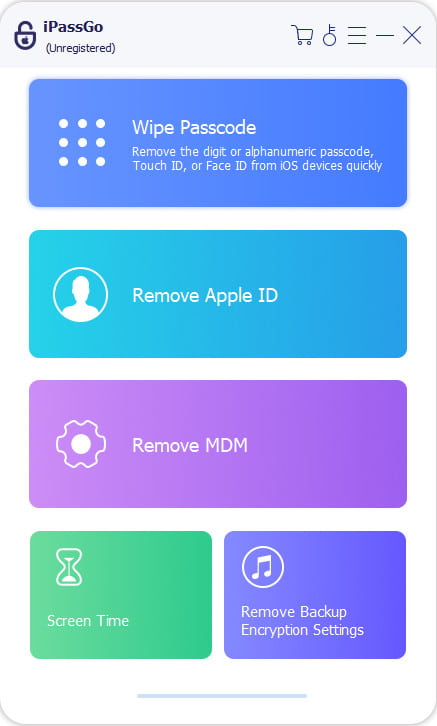
In addition to SIM lock, your iPhone may be locked by your passcode or Apple ID credentials if you forgot them. To regain access to your device and use various features on your device, you need a powerful unlocking tool, such as imyPass iPassGo. It is able to wipe a variety of locks on your iPhone without technical skills.

4,000,000+ Downloads
Remove iPhone screen locks with one click.
Available to digit-passcodes, Face IDs, and Touch IDs.
Offer bonus features, like Screen Time bypass.
Support the latest versions of iOS and iPadOS.
Conclusion
This guide explained how to unlock the SIM card on your iPhone. First, you should check if your iPhone is locked by SIM lock. If you can meet your carrier's unlocking policies and requirements, you can ask it to unlock your SIM card. If not, you will need to ask a third-party unlocking service to set your device free. Plus, we also recommended an excellent iPhone screen unlocking tool, imyPass iPassGo.
Penny is a senior editor from imyPass. She has focused on discovering perfect GPS location solutions in all scenarios, and also has experience in fixing computers.
Hot Solutions
-
Unlock iOS
- Review of the Free iCloud Unlock Services
- Bypass iCloud Activation With IMEI
- Remove Mosyle MDM from iPhone & iPad
- Remove support.apple.com/iphone/passcode
- Review of Checkra1n iCloud Bypass
- Bypass iPhone Lock Screen Passcode
- How to Jailbreak iPhone
- Unlock iPhone Without Computer
- Bypass iPhone Locked to Owner
- Factory Reset iPhone Without Apple ID Password
-
iOS Tips
-
Unlock Android
-
Windows Password


